



Everyone in the chat has lived this one. You are mid-build, you are in flow, and Claude just stops. Out of usage.
Come back later. It does not matter if you are on Pro or Max, everyone has hit that wall.
So on episode 16 of One Shot Show, I opened the actual workflow that stopped me from running out of Claude every afternoon. Not a bigger plan. A cleaner session.
Wyndo from The AI Maker sat across from me to ask the questions you would ask, and to bring the other side of the stack: he lives on Claude Cowork and Chat, no slash commands, so we covered both surfaces.

Here is the whole thing in one sentence. I was not running out of Claude because I was doing one giant thing. I was running out because every turn carried too much old context into the next thing.
Fix the context, not the plan. And the fixes are free.
👋 Julley, I’m Dheeraj, an AI systems builder.
I build production-grade AI systems at work by day and ship my own products by night, 9 and counting, including SubflowAI and the Content OS Agents Toolkit. This newsletter is the bridge between those two worlds. Every system, every build, documented step by step.
Join 1,800+ builders getting the exact AI setups, prompts, and workflows that actually work in your business.
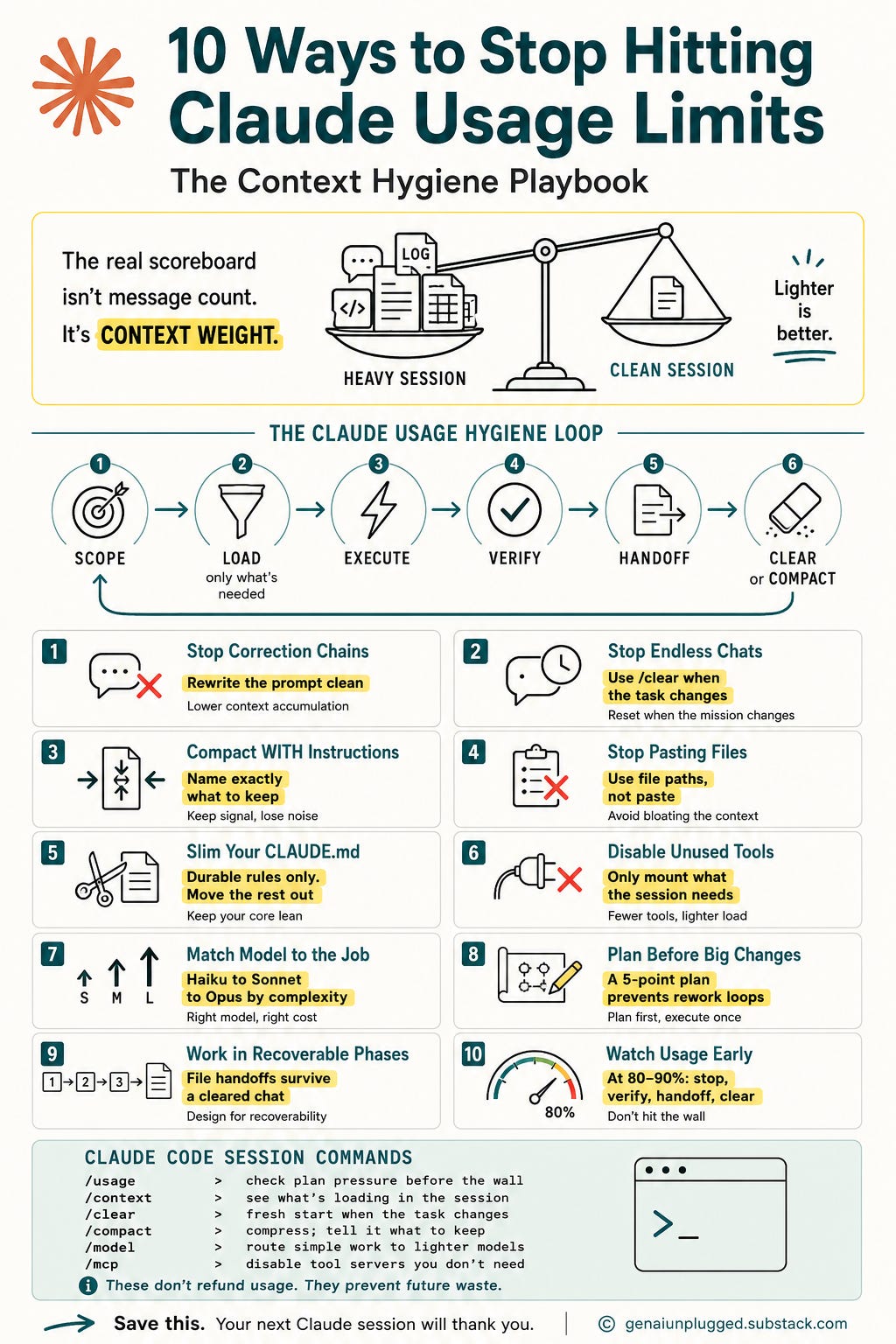
Message count is the wrong scoreboard
Most people count messages. "I only sent 20 messages, why am I out?" That is the wrong scoreboard.
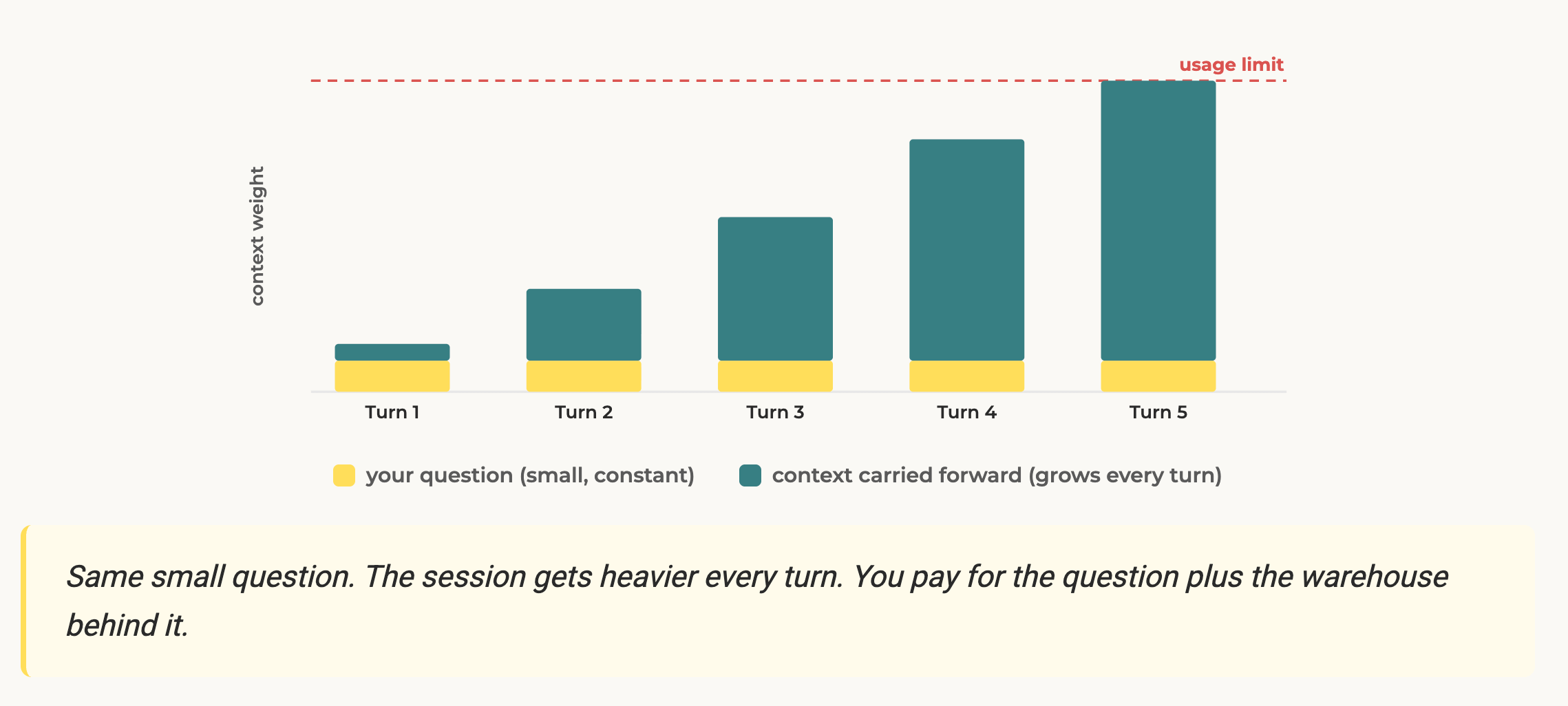
The real scoreboard is context weight. Every single turn, Claude has to carry forward whatever is already in the session: the old conversation, every file it has read, your memory files, your tool schemas, plus the new prompt. So a sloppy long session burns faster than a short clean one.
Picture a backpack. Every message is not a fresh start. It is you, still wearing the backpack from this morning.
The pasted log is in there. The three files you opened are in there. The correction chain from earlier is in there.
The big memory file is in there.
So when you ask one more small thing, Claude is not lifting a feather. It is lifting the whole backpack again to answer. Context weight is how heavy the backpack is.
When Wyndo pushed me to make that concrete, the answer stayed the same: the fix for almost everything here is to take stuff out of the backpack.
There is caching in place for a lot of this, but if you read the Reddit threads you will notice the pattern: sometimes the cache hits, sometimes it misses. You cannot assume it covers you. The compounding weight is the real problem, and it is the one you control.
The May 6 correction
Timing matters here, so let me get specific.
On May 6, 2026, Anthropic announced higher limits for Claude Code. They doubled the Claude Code five-hour limits for Pro, Max, Team, and seat-based Enterprise plans. Same announcement, they removed the peak-hours limit reduction for Claude Code Pro and Max.
So if you read advice that says "just work off-peak" as the main fix for Claude Code Pro or Max, treat it as stale. It may still matter in some products or capacity events, but it is not the strategy to build around.
Wyndo asked the question half the chat was thinking: if the limits just got doubled, why are we even having this conversation? Did the problem not just go away?
It did not. Double the room is still a room. If your workflow leaks, you just get to leak for twice as long before you hit the wall.
More usage does not fix a messy session, it delays the moment you feel the mess. Extra usage is a seatbelt. It is great when a real deadline hits, but you do not drive worse because you are wearing one.
The habits are what keep you off the wall.
The two Claude commands that do the heavy lifting
Two commands carry most of the value: /clear and /compact.
/clear is a clean break.
Use it when the work unit is done. Not when you are bored. Not every five minutes.
Research finished and you are about to write, one bug fixed and the next is unrelated, draft done and the audit starts. You clear, and you are telling Claude the last thing is over.
If you are in the Claude desktop app instead, the move is the same: start a new chat for the next unit of work. Inside a Project, start a new chat within that Project. Do not keep dragging old, unrelated context into the next task.
The one honest thing people get wrong: /clear does not refund the usage you already spent. It is not a reset button. It just stops you from carrying dead weight into the next turn.
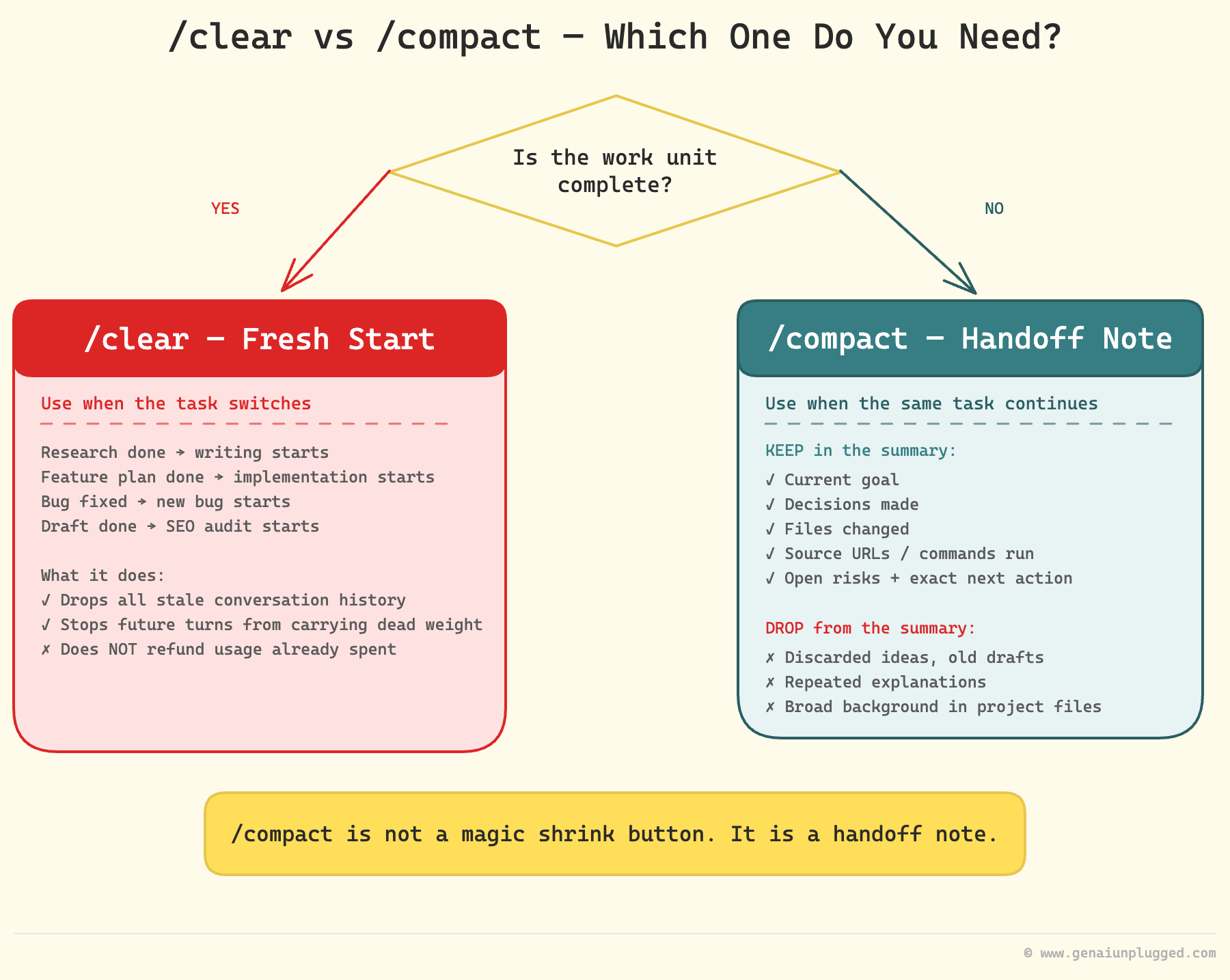
/compact is for when you need continuity, not a clean break.
You are deep in a task, you do not want to lose the thread, but the session is bloated.
My rule of thumb: once I am around 60 to 70 percent of the context window, I run /compact before it auto-compacts on me.
The mistake everyone makes is hitting /compact with nothing else. Then Claude shrinks the conversation by guessing, and it throws away the file paths while keeping some debate you do not care about.
I have watched it drop the guidelines I set at the very start of a session, right when I needed them for the review at the end.
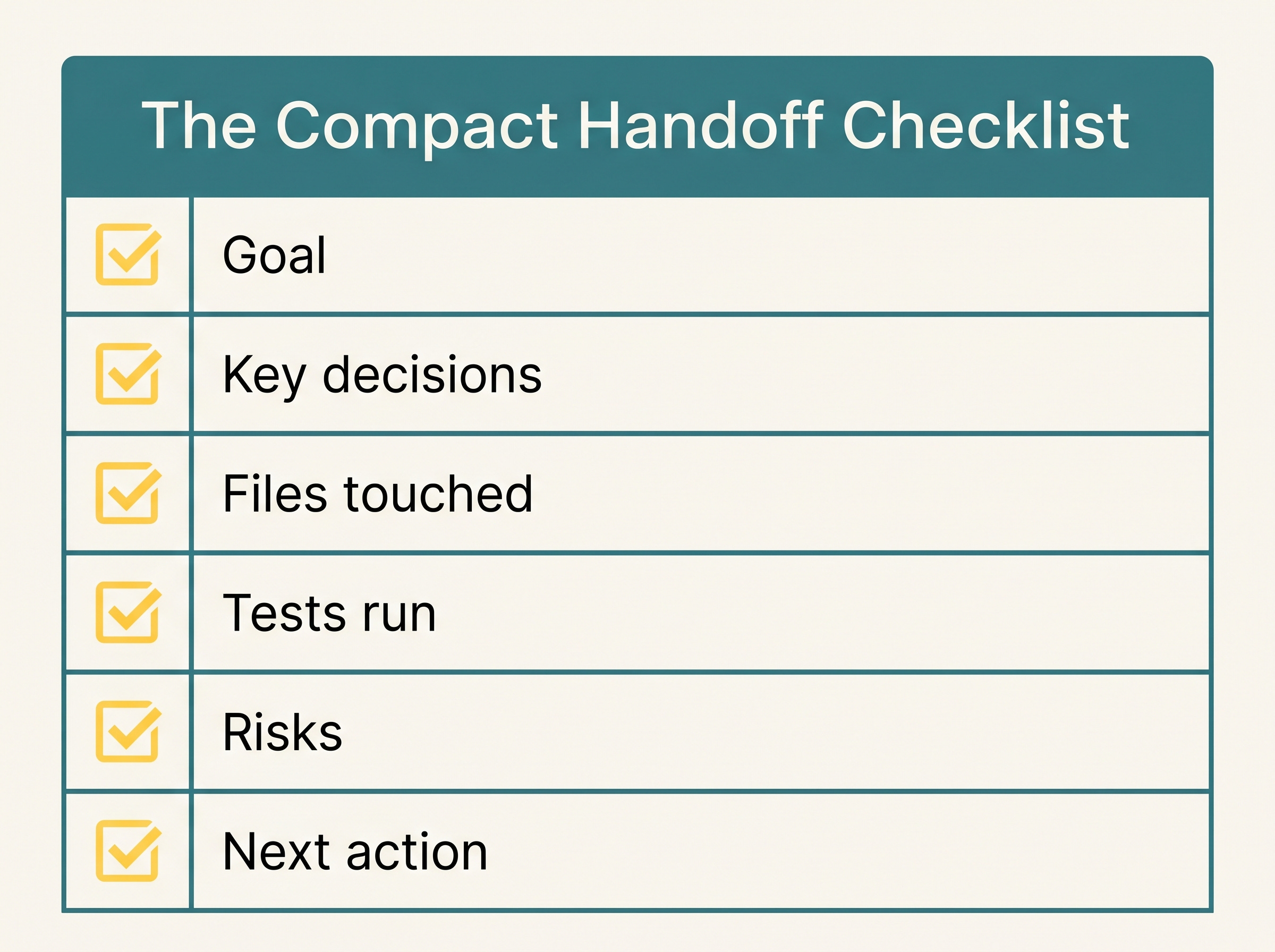
So I always compact with instructions. Keep the goal, the decisions, the files and paths, the sources, the commands I ran, the next action. Drop the discarded ideas, the old drafts, the verbose logs.
This matters even more on a smaller 200K window with Sonnet, because there you have less room to repeat yourself.
The reframe: /compact is not a magic shrink button. It is a handoff note. Write it like you are handing the work to someone who is taking over.
Here is the simple rule for choosing between them. Ask one question: does the next task need what just happened? If no, clear.
If yes, compact. And the real trick is to make clearing safe in the first place.
If every phase of work ends with a saved file (a brief, a draft, a plan, an audit report), then clearing never loses anything, because the important stuff is on disk, not trapped in the chat.
The context diet of your Claude session
Four habits, one idea: control what you load.
Clean briefs, not correction chains.
The old habit was expensive. "Write this." "No, more practical." "Also include Claude Code." "Actually use my brand voice." "Wait, I meant solopreneurs." Each correction is another layer Claude carries.
Now I rewrite the request once, clean: audience, goal, tone, what to include, what to avoid, output format. It looks longer. It weighs less, because it removes the whole correction chain.
Point at files, do not paste the warehouse.
A 4,000-line log pasted into chat feels fast. It is dead weight on every turn after. Put bulky material in files and point Claude at the exact spot: file paths, function names, line ranges, search terms.
"Use the 30 lines around this error, not the whole log."
In Wyndo's words: "Whenever I already know the things I want to do, I just mention the files and work on those files only. Claude does not need to guess everything to find the right folders, and that guessing can cost you a lot of tokens."
Naming the file or folder stops Claude from searching the whole repo to find what you already know the location of.
Keep CLAUDE.md lean.
A big memory file feels like good setup, but it loads on every single turn. I used to run 300 to 500 lines. I am at 150 to 200 now, and the work got better, not worse.
The extra lines were noise.
The test for what to cut: does this rule apply to almost every task, or only one rare workflow? "Always read a file before editing it" is durable, it stays.
A 200-line prompt for one stage of one pipeline is a recipe, and a recipe belongs in a file Claude opens only when it runs that stage. You are not deleting it, you are moving it one room over so it stops riding along on every unrelated task.
Durable rules live in memory. Recipes live in files.
Disable tools you are not using.
Every connector and MCP server you mount adds weight. If I do not need web search this session, I do not mount it.
This one had a live moment. Wyndo noticed my MCP token usage was basically zero and asked if I had turned my servers off. I had.
I start most sessions by disabling MCP servers I will not use. In Cowork, you do the same from the plus sign in the connectors tab: turn off everything the conversation does not need.
And here is the upgrade we both landed on. Notion as an MCP server is a token killer. So is loading your whole Google Workspace through MCP.
The cheaper move is to use the CLI instead, then wrap that CLI in a skill. As Wyndo put it: "A skill is just so cheap.
You can save a lot of tokens by moving everything from MCP to CLI, then wrapping the CLI into a skill." That is the pattern I now reach for whenever a CLI exists for the tool.
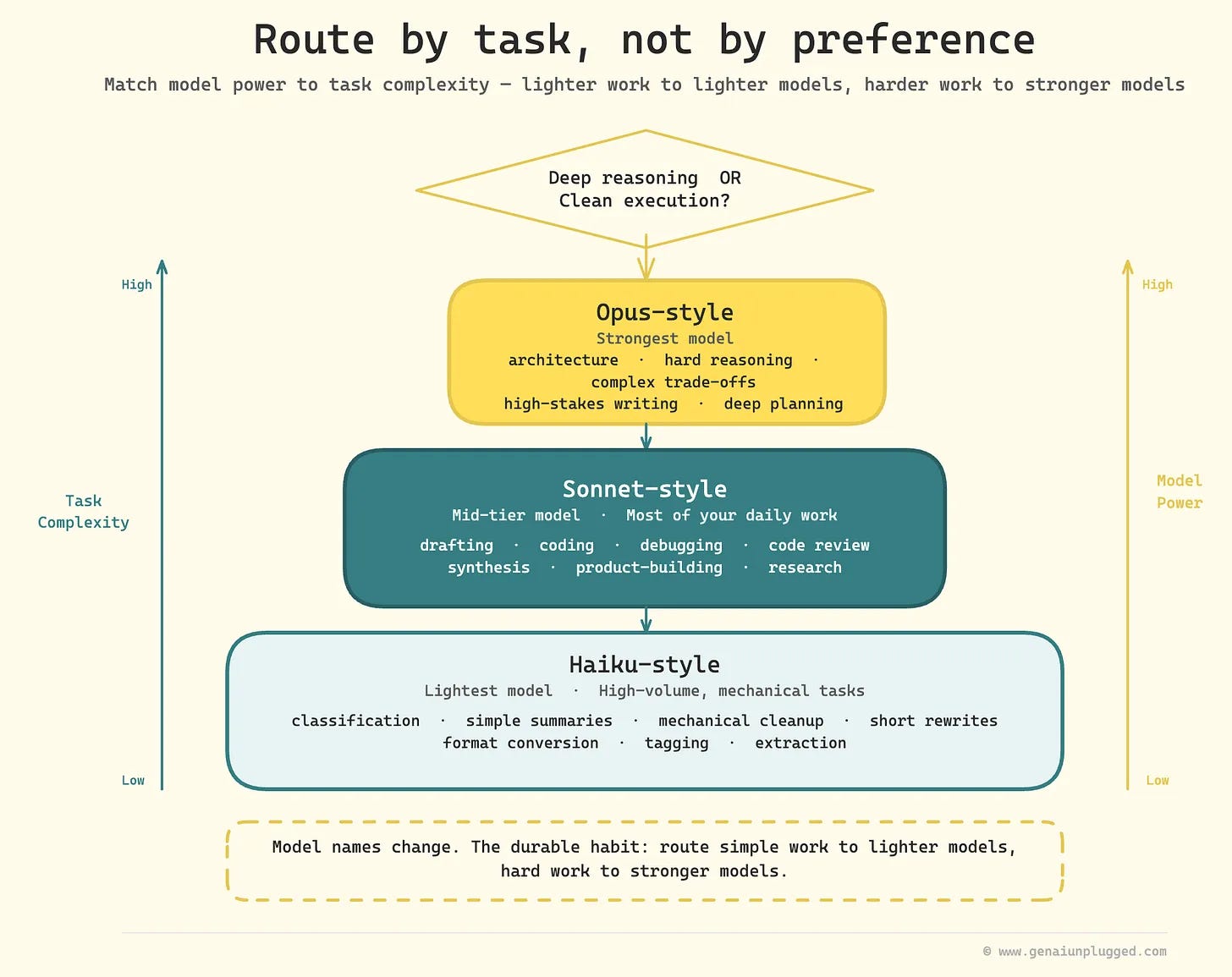
Route by task, not by preference
I used to reach for the strongest model every time because I wanted the best answer. But most work does not need deep reasoning. It needs clean execution.
So I route.
Light models handle quick classification, simple summaries, mechanical cleanup, short rewrites, format conversion. If I am committing to a git repository or doing a mechanical task, a Haiku-style model is fine, and I will wire it into a skill or an agent with that model set explicitly.
Mid models do most of the daily work: drafting, coding, debugging, review. Strong models are for architecture, hard reasoning, complex trade-offs, high-stakes writing.
The model names will change. The habit will not: route simple work down, hard work up.
One note if you are on Pro rather than Max: plan everything with the strongest model, then use /model to drop to a mid model for execution.
Plan before big changes.
The expensive part of a session is almost never the thinking. It is the rework. Bad execution, then a fix, then another diff, then more tests.
Before a big edit I ask for five things only: which files to inspect, what you propose to change, the risks, how we verify, and one blocking question if you have one. Plan mode pays for itself the first time it stops a bad edit.
A plan set in place with your feedback turns into one clean execution instead of twenty fragmented corrections.
Watch the gauges before the wall.
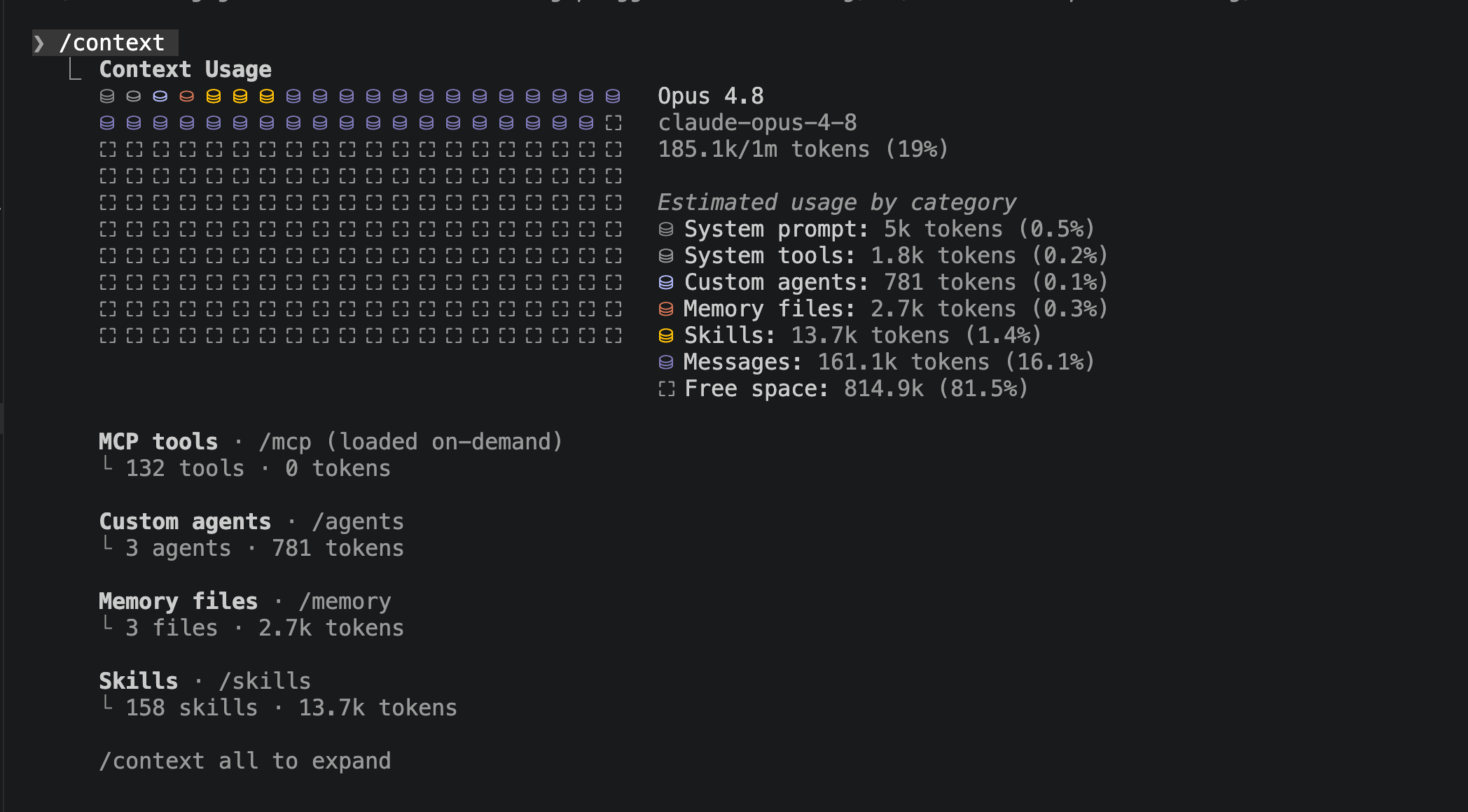
/usage shows plan pressure. /context shows what is making the session heavy. My rule: around 80 to 90 percent of the useful window, I stop starting new work, verify what is done, and leave a clean pickup point.
Do not wait for Claude to stop. By then it is too late to land cleanly.
This is not theory. When I ran /usage on a recent session, it told me 70 percent of my usage was coming from sub-agent-heavy sessions, and a big share was running at 150K-plus context, with a suggestion to compact mid-task. It even ranked the biggest culprits.
The one that shocked me: an automated WordPress travel blog I run on autopilot was eating close to 29 percent of my daily usage. That blog has 17 years and roughly 600 articles behind it, so the context was enormous.
The real bug was smaller and dumber: the writer agent still had the strongest model set from when I first built the template, and I forgot to change it. It quietly ran on the expensive model for weeks. Without /usage and /context, I would never have found it.
These commands bring the leaks into the light so you can fix them.
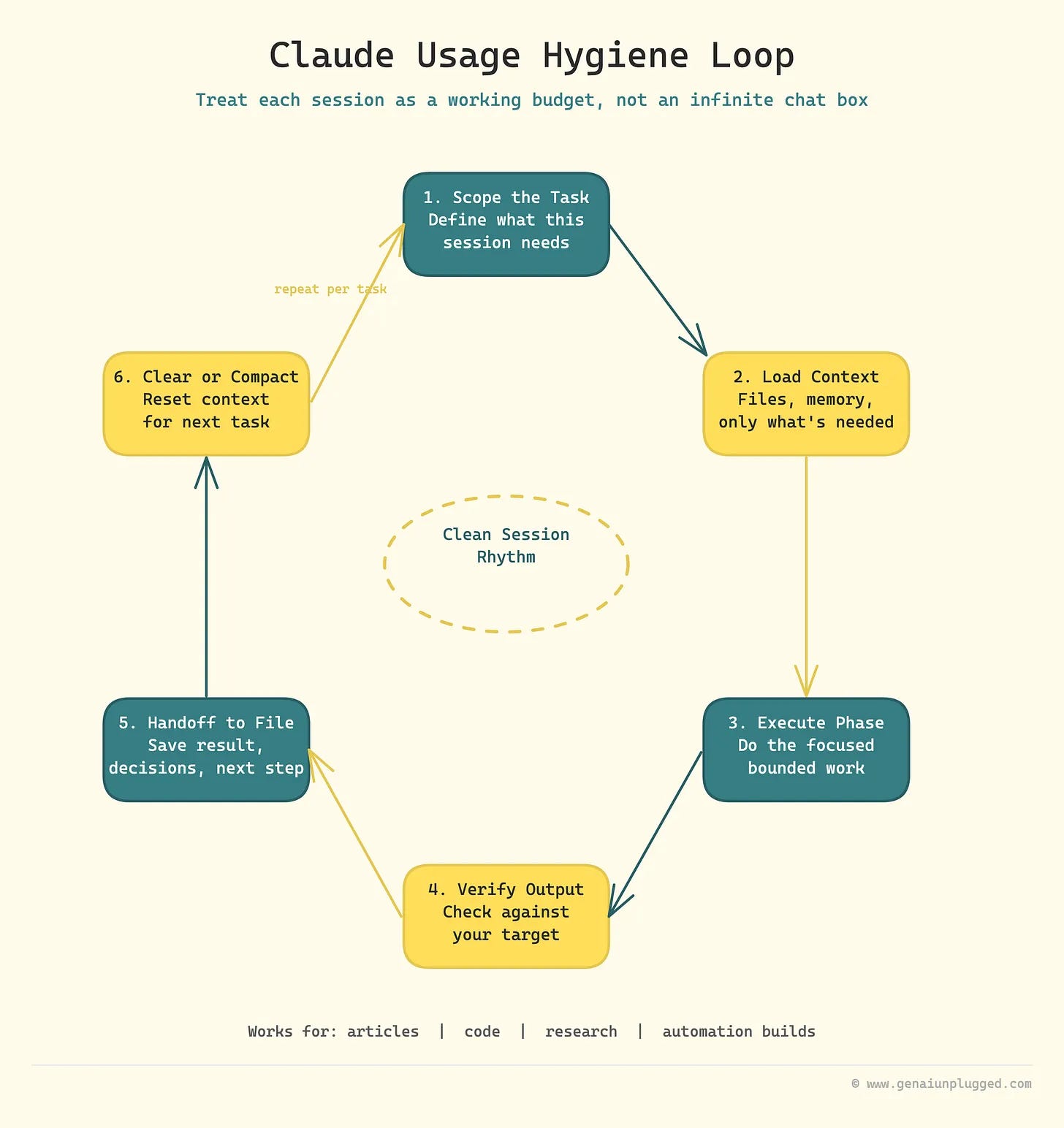
The Usage Hygiene Loop
All of it rolls up into one loop:
Scope the task.
Load only what you need.
Execute one bounded phase.
Verify against a target.
Hand off to a file.
Clear or compact.
Six steps. That is the operating system, and it works for articles, code, research, and automation builds. Notice the loop never says "buy more usage." Because more usage is not step one.
A lighter session is.
The handoff step is what makes the rest safe.
In a recent build I keep a log file that gets written after each phase: decisions and changed files land in the log, and the compact command just says "refer to the log file to start the next task."
The loop keeps going, and nothing important lives only in the chat.
No slash commands? Same loop
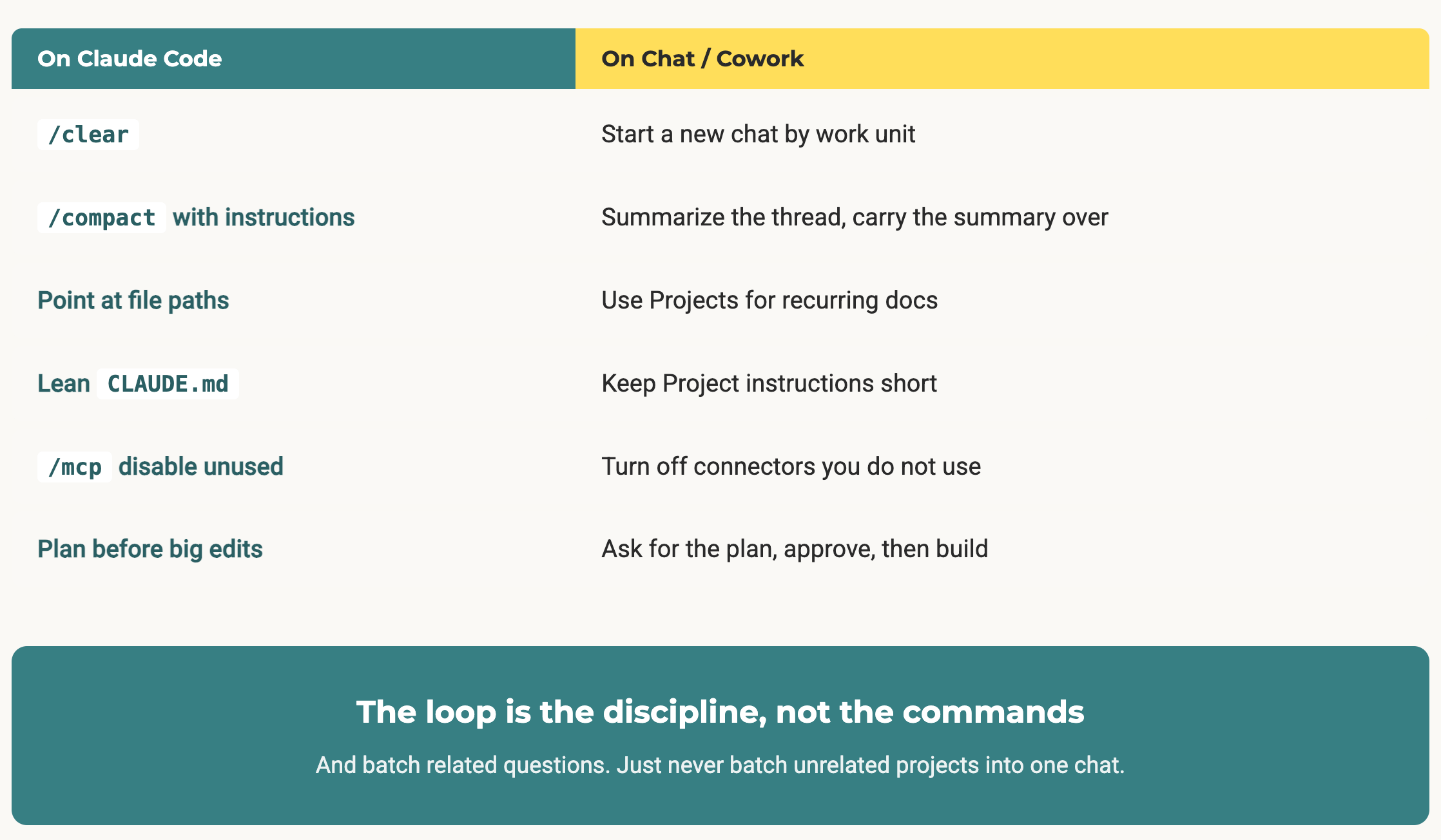
Everything above uses slash commands. But the loop is not about the commands, it is about the discipline. Wyndo lives on Claude Cowork and Chat, so here is the translation for everyone without /clear and /compact:
/clearbecomes: start a new chat by work unit. Same move, you are telling the model the last thing is over./compactbecomes: ask for a tight summary of what you decided before you switch, then carry that summary into the next chat. A handoff note, no slash command.Pointing at file paths becomes: use Projects for recurring docs instead of re-uploading the same file every time. You stop paying the upload tax.
A lean
CLAUDE.mdbecomes: keep your Project instructions short.Disabling MCP becomes: turn off the connectors you are not using.
Wyndo's own move is worth stealing.
Instead of writing a clean brief every time, he invests in the architecture: a well-structured CLAUDE.md with progressive disclosure and routing files, so when he asks for a newsletter draft, Claude already knows to read the right subject notes and audience files on its own.
You can watch Claude reason about which files it loads, and if it reaches for irrelevant ones, that is your signal to fix the routing.
One extra thing on the Chat side: batching. Group questions that share context, like everything about one document in a single prompt. Do not batch unrelated projects into one chat, because that just rebuilds the heavy session you were trying to avoid.
The compact prompt I actually use
If you take one copy-paste from this, take this. It turns /compact from a guess into a handoff note.
/compact Preserve only:
1. Current goal and success criteria
2. Decisions already made
3. Files changed or read, with paths
4. Source URLs or citations that must survive
5. Commands/tests already run and results
6. Open risks or TODOs
7. Exact next action

Drop:
- discarded ideas
- repeated explanations
- old drafts
- verbose logs
- broad background that is already in project files
The one thing to copy this weekend
Pick your most repeated task, the thing you do every week, and write two reusable files for it: one handoff note and one compact (or summary) prompt.
Not the whole system. One handoff template, one compact prompt.
Because the moment you have those two files, you can clear or start a fresh chat without fear. And that single change is what turns Claude from a bottomless chat box into a working system with a budget.
Message count is the wrong scoreboard. Context weight is the real one. Take stuff out of the backpack.
Frequently Asked Questions
Does /clear reset my Claude usage limit?
No. /clear does not refund usage you already spent or reset the rolling window. It removes stale conversation history so future turns are lighter.
The savings are forward-looking, not a refund.
Does Claude Code count against my Claude.ai usage?
Yes. Claude.ai, Claude Code, and Claude Desktop draw from the same usage pool. Heavy Claude Code sessions show up on the same meter as your chat usage.
When should I use /compact instead of /clear?
Use /compact when the same task must continue and you need the decisions, files, and next actions to survive. Use /clear when the work unit is finished or you are switching to something unrelated. The test: does the next task need what just happened?
Do MCP tools really increase token usage?
They can. Mounted MCP servers and connectors add weight to the session. Keep only the ones you need and disable the rest.
Where a command-line tool exists, using the CLI wrapped in a skill is usually far cheaper than the equivalent MCP server.
Should I just upgrade to Claude Max if I keep hitting limits?
Maybe, but clean the workflow first. A bigger plan gives you more room, it does not fix sloppy context. Double the room is still a room.
If the session leaks, you just leak for twice as long.
What is the single biggest usage leak?
Correction chains and pasted logs. Those two carry the most dead weight from turn to turn. Rewriting a clean brief and pointing at files instead of pasting them removes most of it.
How much does this whole setup cost?
Nothing. The hygiene habits are commands and discipline, not a product. The only thing they cost is a little upfront thought before you start a session.
How can I see how much Claude usage and context I have left?
Use two commands. /usage shows your plan pressure, how much of the rolling window you have spent. /context shows what is making the current session heavy: the files, memory, and tool context loaded right now. Check both before the wall, not after. Around 80 to 90 percent of the useful window, stop starting new work and leave a clean pickup point.
What is the Claude Usage Hygiene Loop?
It is a six-step rhythm for treating each session as a working budget instead of an infinite chat box: scope the task, load only what you need, execute one bounded phase, verify against a target, hand off to a file, then clear or compact. It works for articles, code, research, and automation builds, and it keeps the important context on disk instead of trapped in the chat.
Next - Go deeper on Claude Usage Limits
If you want the long version, the full playbook on GenAI Unplugged has all ten changes, the clear-versus-compact breakdown, the lean memory-file template, and the whole loop: I Stopped Hitting Claude’s Usage Limits, 10 Things I Changed.
Two companion reads if you live more in Claude Chat than Claude Code: the Claude Projects setup guide (the point-at-files fix on the Chat side) and turning the loop into a reusable skill.
Next episode we go from managing usage to building a second brain. See you then.


