

I Stopped Hitting Claude Usage Limits - 10 Workflow Changes That Actually Helps
Hitting Claude usage limits too fast? Use these 10 workflow changes to reduce stale context, wasted tokens, and mid-task limit walls in Claude Code.

I was not running out of Claude because I was doing one giant thing.
I was running out because I was carrying too much old context into the next thing.
One reader said they were out of usage fast and wondered if a repeatable skill could "save some usage bandwidth." Another asked how to run Claude more economically in a serious product-building workflow without losing quality.
That is the practical problem. Claude usage limits are not just a pricing page problem. They are a workflow problem.
I used to treat Claude like an infinite chat box: research here, write there, debug something else, paste a file, add three corrections, switch models, keep going. The output was useful, but the session became heavy.
This is the playbook I use now. It will not make limits disappear. It will make each session cleaner and easier to recover.
👋 Julley, I'm Dheeraj and I'm an AI systems builder.
I build production-grade AI systems at work by day and ship my own products by night (9+). This newsletter is the bridge between those two worlds. Every system, every build, documented step by step.
Join 1,300+ builders getting the exact AI setups, prompts, and production configs that actually work in your business.
Claude usage limits are easier to manage when you stop treating Claude like unlimited memory and start treating it like a working session with a budget: scope the task, load only what matters, execute in phases, hand off the result, then clear or compact.
First, the plain-English version of Claude usage limits
Anthropic separates usage limits from length limits in its help docs. Usage limits control how much you can interact with Claude over time. Length limits control how much information can fit inside one conversation.
They are related, but not identical. Anthropic also says Claude.ai, Claude Code, and Claude Desktop share usage from the same pool. Source: Anthropic's usage and length limits explainer.
Claude Code usage limits add another layer. According to Anthropic's Claude Code models, usage, and limits docs, each turn can include prior conversation, project context, files Claude has read, and the new prompt.
That means a sloppy long session can burn through usage faster than a short clean one. Anthropic's usage limit best practices also point readers toward shorter, more focused conversations.
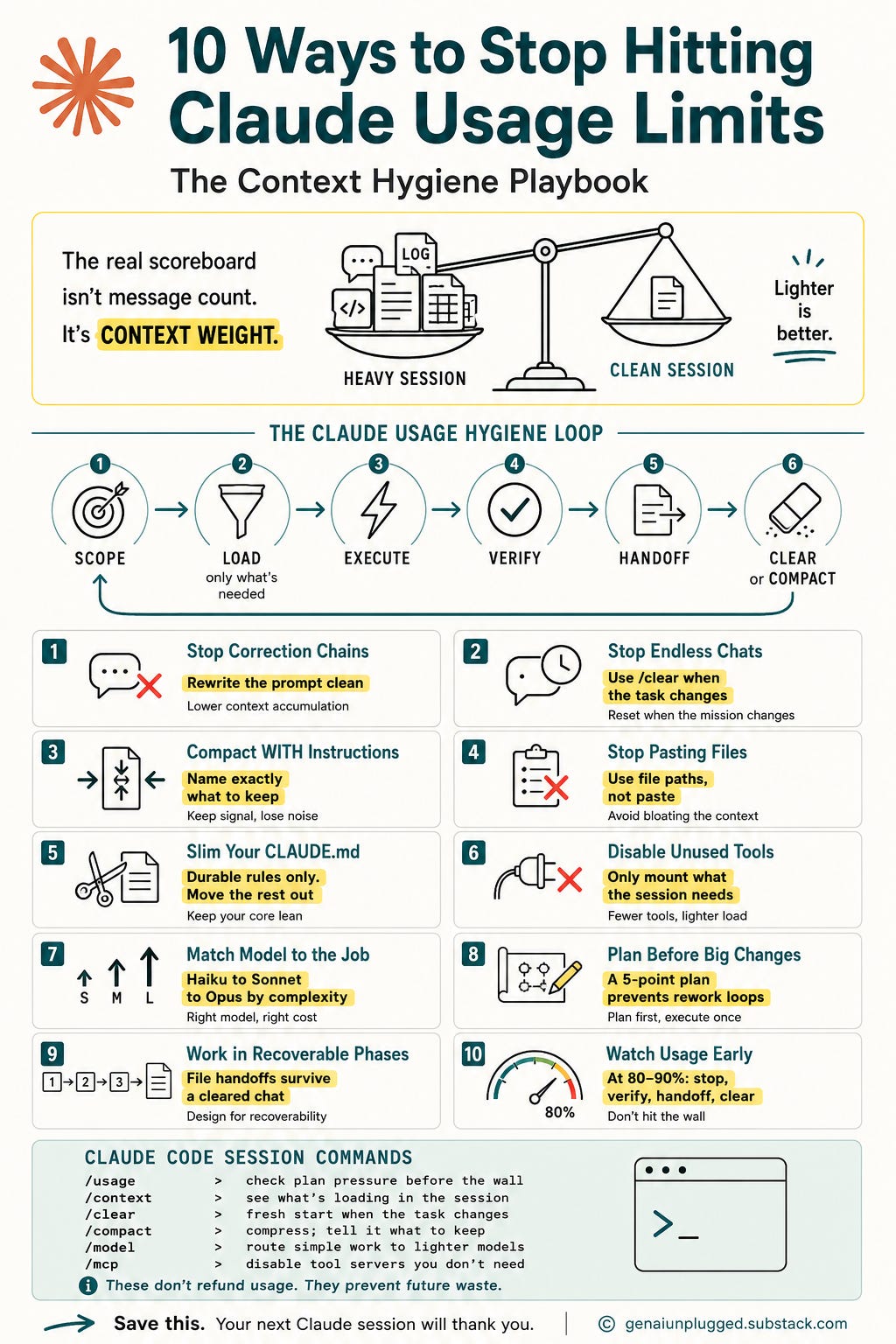
The mental model that helped me: message count is the wrong scoreboard.
The better scoreboard is context weight: the amount of old conversation, file content, memory, and tool context Claude has to carry into the next answer.
If every message drags along old research, pasted logs, irrelevant files, tool schemas, and a bloated CLAUDE.md, you are making Claude carry yesterday's work into today's task.
The May 6, 2026 correction by Anthropic
On May 6, 2026, Anthropic announced higher limits for Claude Code. The company said it doubled Claude Code five-hour limits for Pro, Max, Team, and seat-based Enterprise plans, and removed the peak-hours limit reduction for Claude Code Pro and Max accounts. Source: Anthropic's May 6, 2026 higher-limits announcement.
So if you see advice that says "work off-peak" as the main fix for Claude Code Pro or Max, treat that as conditional. It may still matter in some products, plans, or capacity events, but it is not the core strategy I would build around today.
1. I stopped sending correction chains
My old habit was expensive:
"Write this."
"No, make it more practical."
"Also include Claude Code."
"Actually, use my brand voice."
"Wait, I meant for solopreneurs."
Each correction added another layer to the conversation. Claude had to carry the first bad prompt, the wrong output, the correction, the second wrong output, and the next correction.
Now I rewrite the request cleanly when I can.
Before:
No, that's not what I meant.
Make it less generic, use first person, include /clear and /compact, and don't explain token math so much.
After:
Audience: solopreneurs and small teams using Claude Code or Claude Chat for daily work.
Goal: show how to reduce Claude usage limits pressure through better context hygiene.
Tone: first person, practical, plain English.
Must include: /clear, /compact, lean CLAUDE.md, batching, and prompt compression.
Avoid: generic pricing explanation, hype, and long token math.
Output: 700-word section with clear before/after habits.
That second prompt looks longer, but it is cleaner. It reduces ambiguity and removes the correction chain.
2. I stopped living in one endless chat
This was the biggest behavior change.
I used to keep one conversation alive because it felt productive. Claude seemed to know the project, the files, and the weird edge case from two hours ago.
That feeling was deceptive.
Sometimes continuity helps. But most of the time, an endless chat becomes a storage unit.
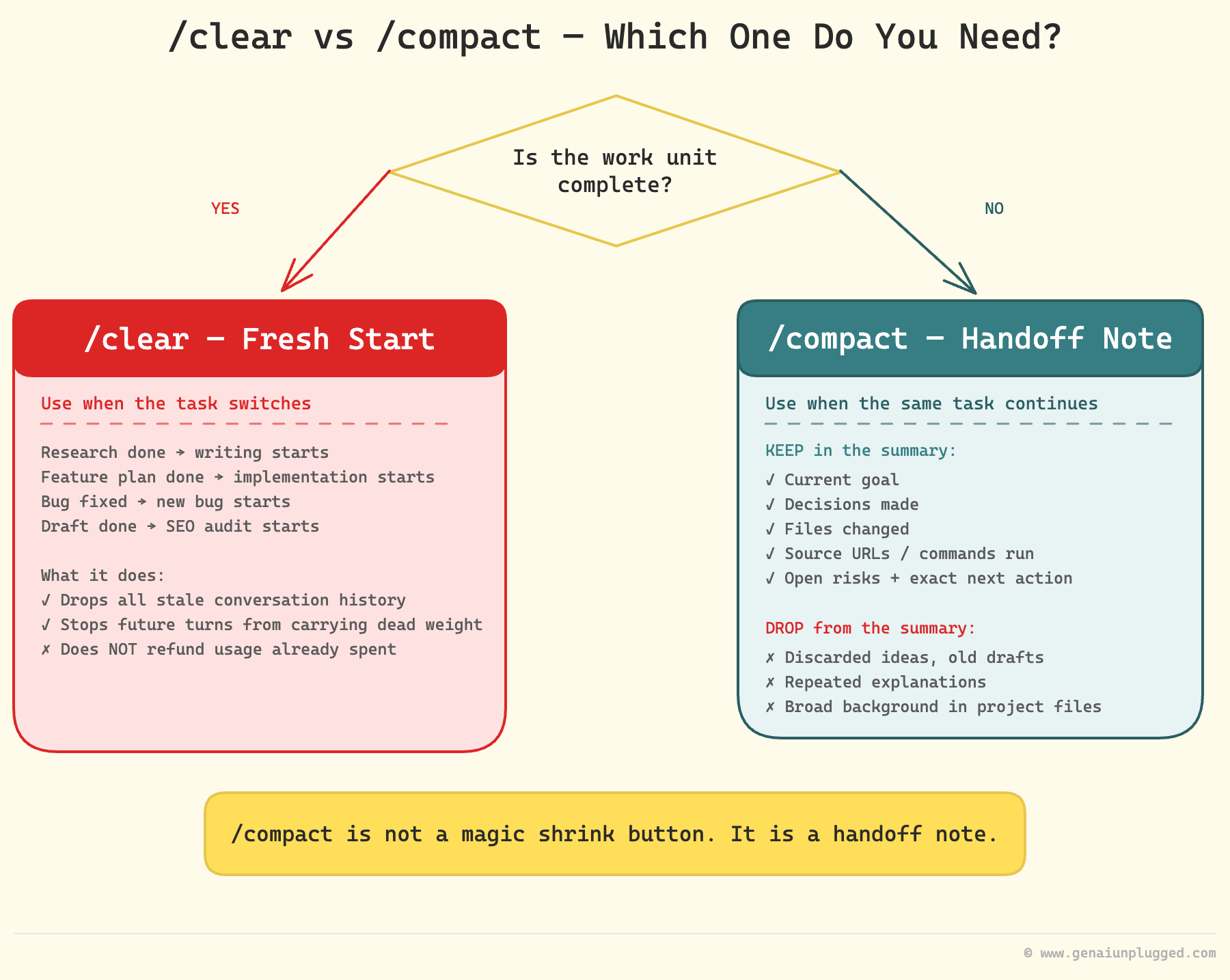
In Claude Code, I use /clear when the task changes. Not when I am bored. Not every five minutes. When the work unit is done.
Examples:
Research is done, writing starts: clear or hand off first.
Feature plan is done, implementation starts: clear if the plan is saved to a file.
Debugging one bug is done, a new bug starts: clear.
Article draft is done, SEO audit starts: clear if the audit can read the file.
Important:
/cleardoes not refund the usage you already spent. It reduces future waste by removing stale conversation history from the next turn.
3. I started compacting with instructions
Clearing is clean. Compacting is for when I need continuity.
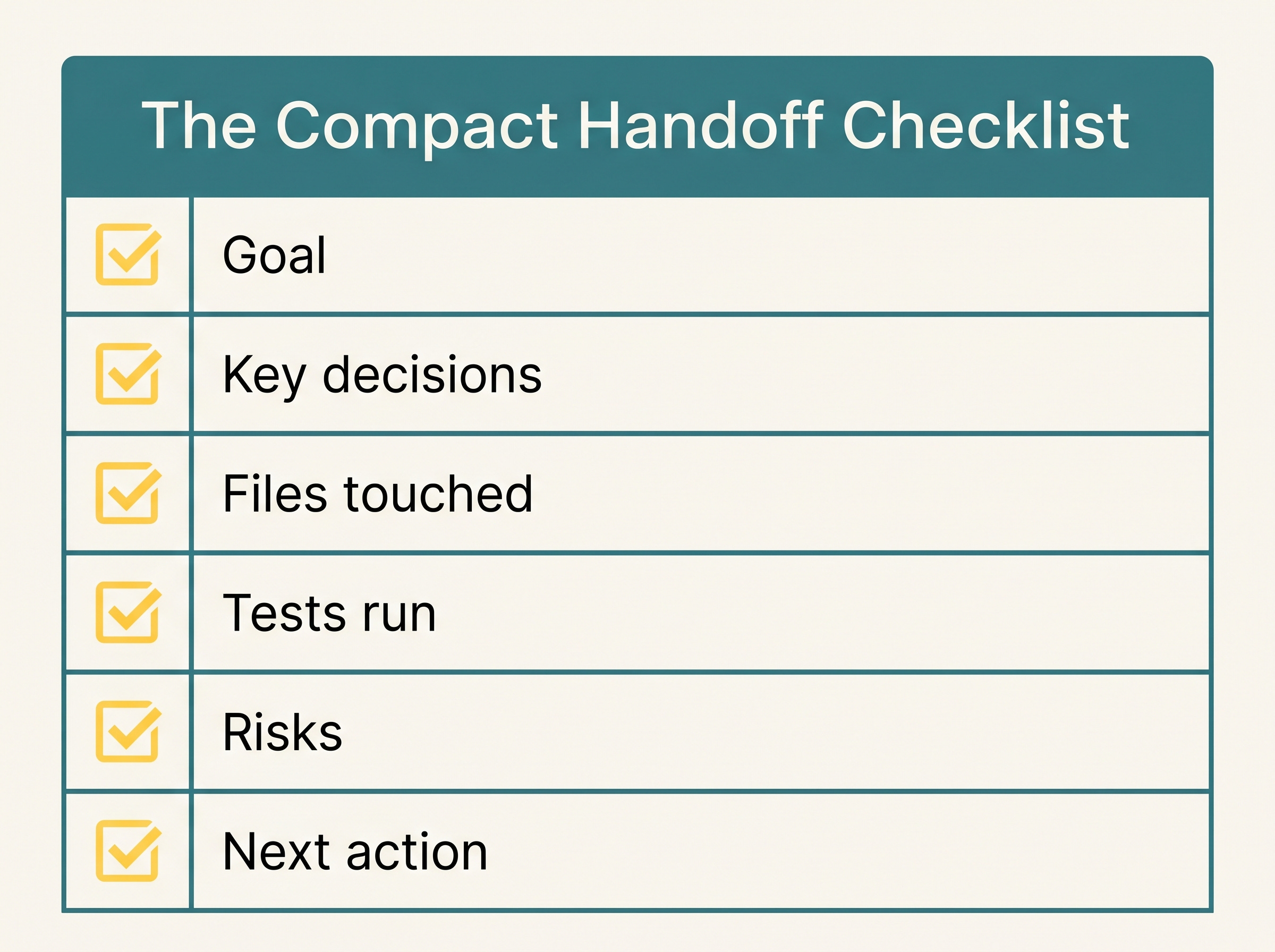
The mistake is running /compact with no instruction. I want Claude to keep decisions, file paths, tests, sources, and next actions, not every debate along the way.
Here is my copy-paste compact prompt:
/compact Preserve only:
1. Current goal and success criteria
2. Decisions already made
3. Files changed or read, with paths
4. Source URLs or citations that must survive
5. Commands/tests already run and results
6. Open risks or TODOs
7. Exact next action

Drop:
- discarded ideas
- repeated explanations
- old drafts
- verbose logs
- broad background that is already in project files
That one habit changed how I recover long sessions. /compact is not a magic shrink button. It is a handoff note. Treat it that way
.
4. I stopped pasting huge files
Pasting a 4,000-line log into chat feels faster than saving it to disk. It is not cheaper.
Now I put bulky material into files and point Claude at the exact place it needs to inspect. In Claude Code, that means file paths, function names, line ranges, or search terms. In Claude Chat, it means using Projects and specific references instead of uploading the same giant document again and again. If you are new to that workflow, my Claude Projects setup guide is the next place to go.
Careful wording matters here: Projects can reduce repeated setup and repeated uploads. I would not claim project content never counts against usage. What matters is what Claude has to load and reason over in the current task.
My current pattern:
"Read
docs/research-brief.mdand summarize only the pricing section.""Inspect
src/stages/stage5_quality_gate.pyfor retry logic.""Search for
generate_with_systemand report files that still use the wrong pattern.""Use the 30 lines around this error, not the whole log."
The goal is not to starve Claude. The goal is enough context without feeding it the whole warehouse.
5. I made my project memory smaller
This one surprised me because it felt like "good setup."
I had big instruction files: brand, pipeline, tools, agents, edge cases, voice, directories, rules. Useful? Yes. Always needed? No.
Anthropic's Claude Code memory docs recommend keeping memory specific, concise, and structured. The same principle applies to CLAUDE.md, AGENTS.md, and any project instruction file.
My rule now: the root memory file should hold durable rules, not every workflow detail.
Keep:
Non-negotiable patterns
Directory map
Naming conventions
Safety rules
How to resume work
Links to deeper instructions
Move out:
Long stage prompts
Rare workflows
Tool-specific tutorials
Examples that only matter once
Historical notes
Here is a lean CLAUDE.md shape I like:
# Project Operating Rules

## Non-negotiables
- Use `get_provider()` plus `generate_with_system()` for LLM calls.
- Read files before editing.
- Do not modify user content without approval.

## Project map
- `src/stages/`: pipeline stages
- `src/prompts/`: prompt templates
- `config/`: shared configuration
- `drafts/`: working drafts

## Workflow
1. Read only relevant files.
2. Plan the change.
3. Edit scoped files.
4. Run focused verification.
5. Write a short handoff if work is incomplete.

## Deeper instructions
- Brand voice: `Brand Knowledge/genai_unplugged_core_brand_voice_guide.md`
This is minimal CLAUDE.md re-injection. The same idea applies when you train Claude on your brand voice: keep durable rules close, and move long examples into files Claude opens only when needed.
Get PluggedIn
The article tells you what to change. PluggedIn gives you the reusable files so you can change it before the next limit wall.

Every limit-hit session without a handoff costs the setup time, the recovery note, and the next hour of useful work.
Get PluggedIn to go from scattered Claude cleanup notes to a reusable Usage Hygiene Checklist, compact prompt, lean CLAUDE.md template, and session handoff system.
6. I disabled tools I was not using
Tools are useful until they become background noise.
In Claude Code, unused Model Context Protocol (MCP) servers, broad tool access, and overstuffed connectors can make the session feel heavier. MCP is the connector layer that lets Claude talk to external tools. Anthropic's Claude Code cost management docs recommend inspecting context, reducing MCP overhead, using the right model, and preferring command-line tools where practical.
My current habit is simple:
If I do not need web search, I do not mount web search.
If I do not need a connector, I disable it.
If a shell command can count words, search files, or run tests, I use the shell command.
If an agent only needs to review, it gets read-only access.
This is not cleverness. It is Claude token usage hygiene.
7. I matched the model to the job
I used to reach for the strongest model because I wanted the best answer.
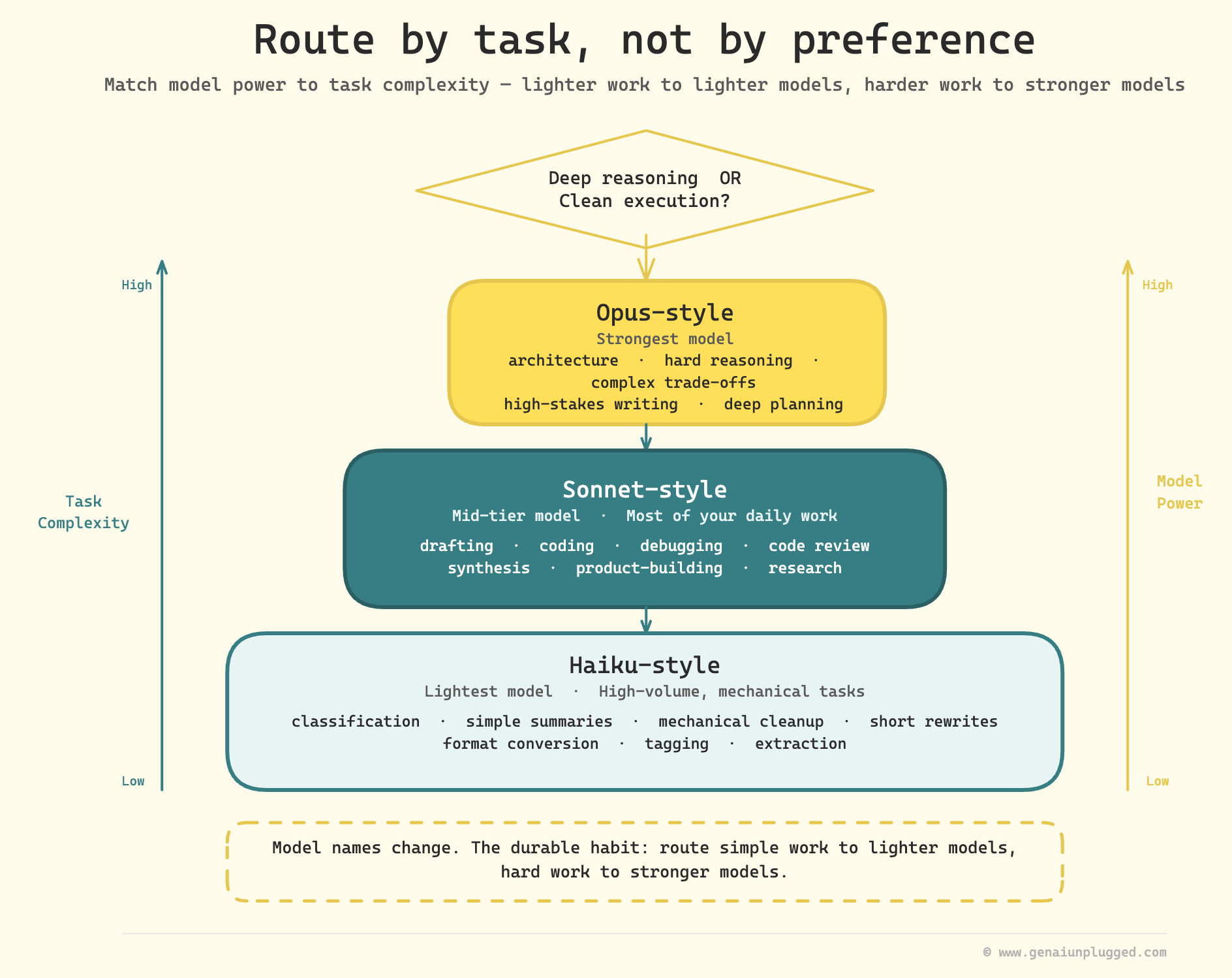
Now I route by task.
Haiku-style work: quick classification, simple summaries, mechanical cleanup, short rewrites.
Sonnet-style work: most drafting, coding, debugging, review, synthesis, and product-building.
Opus-style work: architecture, hard reasoning, complex trade-offs, high-stakes writing, or deep planning.
The exact model names will change over time, so the habit matters more than the label. Model names change; the durable habit is routing simple work to lighter models and hard work to stronger models.
The question is: does this task need deeper reasoning, or clean execution?
8. I planned before big changes
The expensive loop is not "thinking."
The expensive loop is bad execution, rework, more context, another diff, more tests, and another correction.
Plan mode saves usage when it prevents wrong work. Before a big edit, I ask Claude for five things only: files to inspect, proposed edits, risks, verification plan, and one blocking question if needed.
9. I split work into recoverable phases
The best way to use /clear is to make clearing safe.
That means every phase needs a handoff artifact: a research brief, outline, draft, audit report, plan file, test output, or next action.
This is why I like small phase files and explicit handoffs. They let me clear the chat without losing the plot. This is the same operating principle behind my Claude Code research team lesson: each phase needs a bounded job and a readable handoff.
My handoff template is simple: goal, done, files changed, files read, commands run, decisions, risks, next action, and what not to repeat.
If a task cannot survive a cleared chat, the task is depending too much on chat memory.
10. I watched usage before the wall
I used to notice usage only when Claude stopped.
Now I check earlier.
In Claude Code, /usage and /context are part of my session hygiene. /usage shows plan pressure. /context shows what may be weighing the session down. If the context is old, I hand off and clear. If I need continuity, I compact with instructions.
My rule: do not wait until the wall. At around 80 to 90 percent of the useful window, I stop starting new work, verify what is done, and leave a clean pickup point.
That single habit protects momentum.
Claude Code command capsule
Use this as a session hygiene checklist, not as a list of commands to run every time.
/usage: Check plan pressure before you hit the wall./context: Inspect loaded files, memory, and tool context./clear: Start fresh when switching tasks./compact: Compress the current task with explicit instructions./model: Route the task to the right model./mcp: Disable tool servers you do not need.
For Claude Chat or Cowork: start new chats by work unit, summarize before switching, use Projects for recurring docs, keep instructions short, disable unused tools, and batch related questions.
Which operations are worth batching?
Batching helps when the tasks share context.
Good batching: ask related questions about one document, request outline plus risks in one prompt, review similar snippets together, or group small mechanical edits in one scoped request.
Bad batching: mixing unrelated projects, combining tasks that need different models, or asking Claude to inspect a whole repository when you need one function.
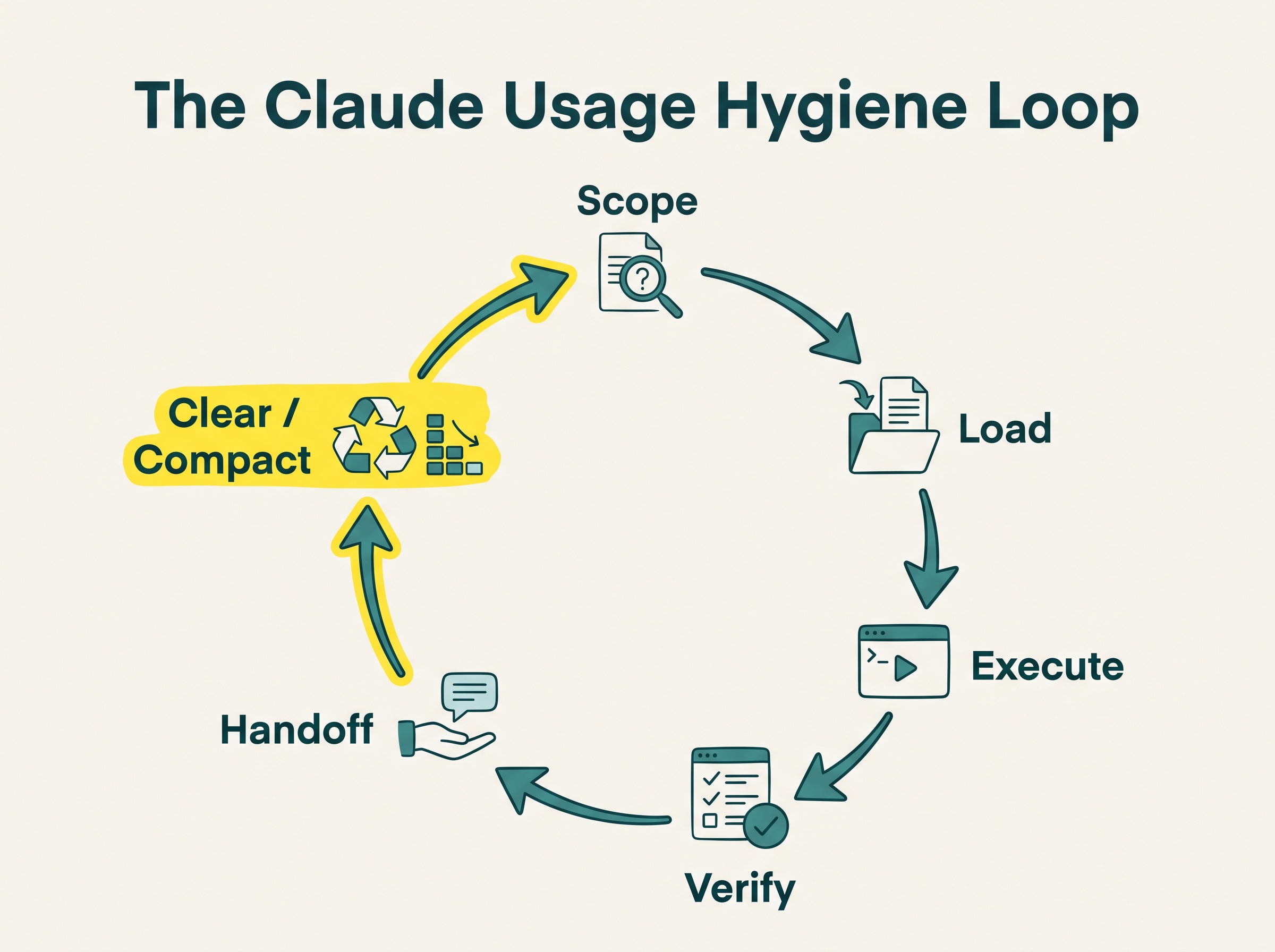
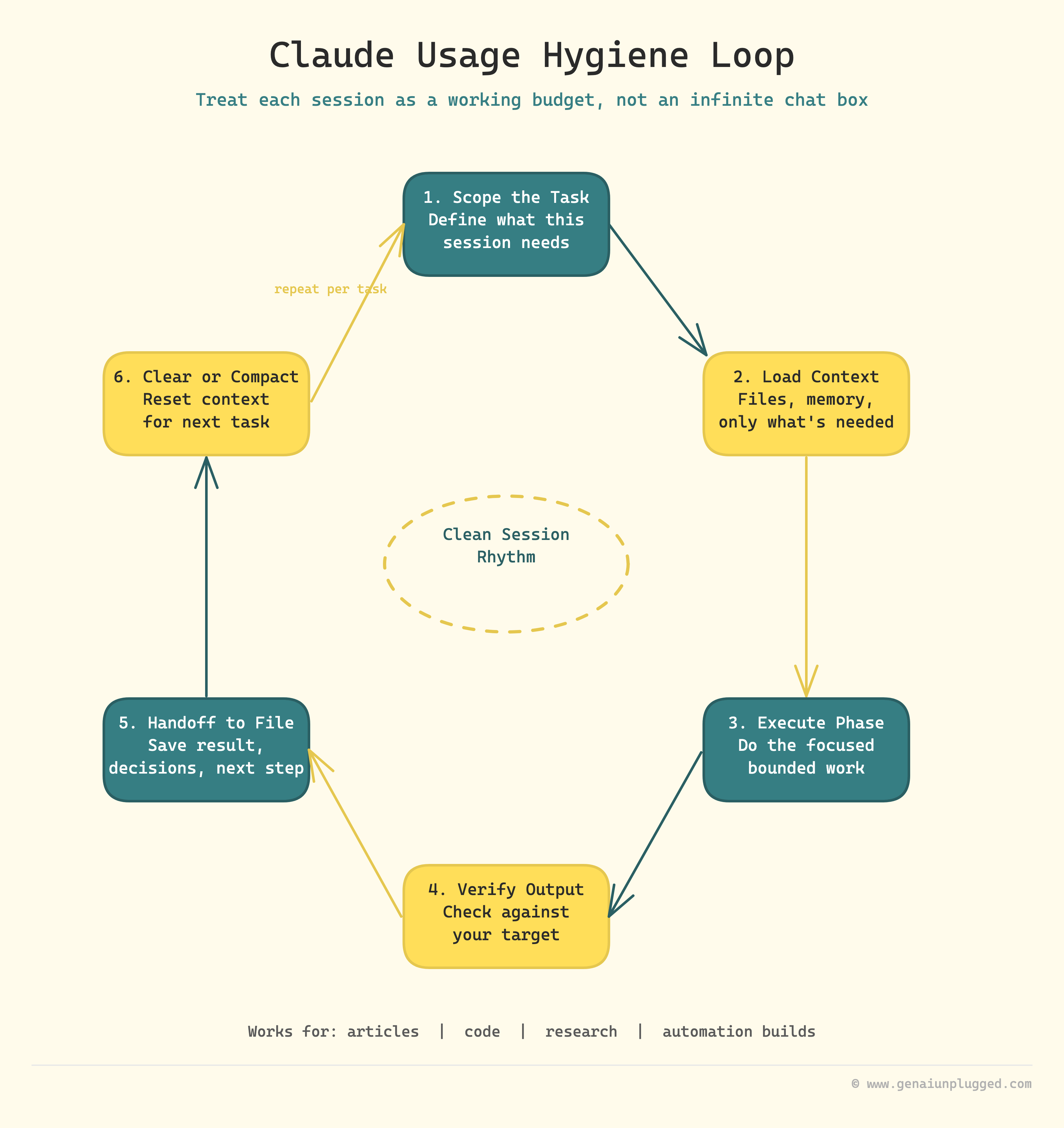
The Claude Usage Hygiene Loop
This is the loop I follow now:
Scope the task.
Load only needed context.
Execute in a bounded phase.
Verify with a target.
Handoff to a file.
Clear or compact.
That loop works for articles, code, research, and automation builds.
It also explains why I do not treat extra usage as the first fix. Extra usage is a seatbelt. It helps when a real deadline hits. But if the workflow is messy, more usage just lets you be messy for longer.
The better move is to make each session lighter.
Here is the first-party test from this article:
My first Codex-only quality gate came back at 76/100 and listed 10 concrete blockers before Stage 6. Because those blockers were saved in a file, I could clear the chat and continue from the report instead of asking the model to remember the review thread.
Troubleshooting
Use this sequence when the limit hits before the work is complete.
Stop asking new questions in the same session.
Save a handoff with goal, files, decisions, and next action.
Run
/contextif you are in Claude Code and identify stale material.Use
/compactif the same task must continue.Use
/clearif you are switching tasks.Move large pasted material into files and refer to paths.
Check
/mcpand disable unused tool surfaces.Use
/modelto move simple work to a lighter model.
If this keeps happening, do a context audit. Look at your project memory, recurring instructions, tool list, and habits around follow-up corrections. The limit may not be one big mistake. It is often 20 small leaks.
Frequently asked questions
Why do I hit Claude's usage limit so fast?
Usually because the session is heavier than it looks. Long chats, pasted files, attachments, tools, model choice, and Claude Code activity all affect usage.
Does Claude Code count against my Claude.ai usage?
Yes. Anthropic says Claude.ai, Claude Code, and Claude Desktop count toward the same usage pool.
Does /clear reset Claude usage limits?
No. /clear does not refund usage already spent or reset the rolling window. It clears context so future turns do not carry stale history.
When should I use /compact instead of /clear?
Use /compact when the same task must continue and you need decisions, files, tests, and next actions. Use /clear when the work unit is complete or the topic changes.
Do MCP tools increase Claude Code token usage?
They can. Keep only the MCP servers you need for the session and disable the rest with /mcp.
Should I upgrade to Claude Max if I keep hitting limits?
Maybe, but clean the workflow first. A higher plan gives you more room, but it does not fix sloppy context habits.
How do I get most of the output with less token waste?
Use a clean brief, batch related questions, point at files, compact with instructions, clear between tasks, and preserve handoffs in files.
Key Takeaways
Claude usage limits feel stricter when every turn carries stale context, old files, unused tools, and correction chains.
/cleardoes not reset usage, but it cuts stale history from future turns./compactworks best when you name exactly what to preserve.A lean
CLAUDE.mdshould hold durable rules, not rare workflows.Batch related questions, but split unrelated work into separate sessions.
Extra usage is a safety net. Cleaner context is the operating system.
The Claude Usage Hygiene Loop is simple: scope, load, execute, verify, handoff, then clear or compact.
Your 10-minute exercise
Open your current Claude setup and audit one thing: context that loads every time.
If you use Claude Code, run /context and look for stale files, oversized memory, or unused MCPs. If you use Claude Chat, look at your Project instructions and recurring documents. Cut anything that does not help the next task.
Then write one handoff template and one compact prompt you can reuse. If this becomes a weekly workflow, turn it into a reusable skill; I covered that pattern in the Claude Skills workflow guide.
That is the start of running Claude like a working system, not a bottomless chat box.
Thank you so much @Caitlin McColl 🇨🇦 for sharing it
I had no idea that you can add instructions in /compact, that's something I'm going to use from now on. I wonder if it's the same in Codex and Hermes.