



Jonas sent thousands of automated cold emails. He got two replies. One said: "Your AI sucks." The other said: "Not interested. Why are you contacting me?"
That failure was the best thing that happened to his outreach strategy.
In a recent One Shot Show session, Wyndo and I sat down with Jonas Braadbaart to walk through the system he built after that lesson. He spent more than a decade in enterprise AI, including leading agentic-AI teams at H&M Group, and now runs his own AI agency. Five steps.
One Claude Code skill. About 70 euros in total operating costs. And one sale from 80 companies on the first run.

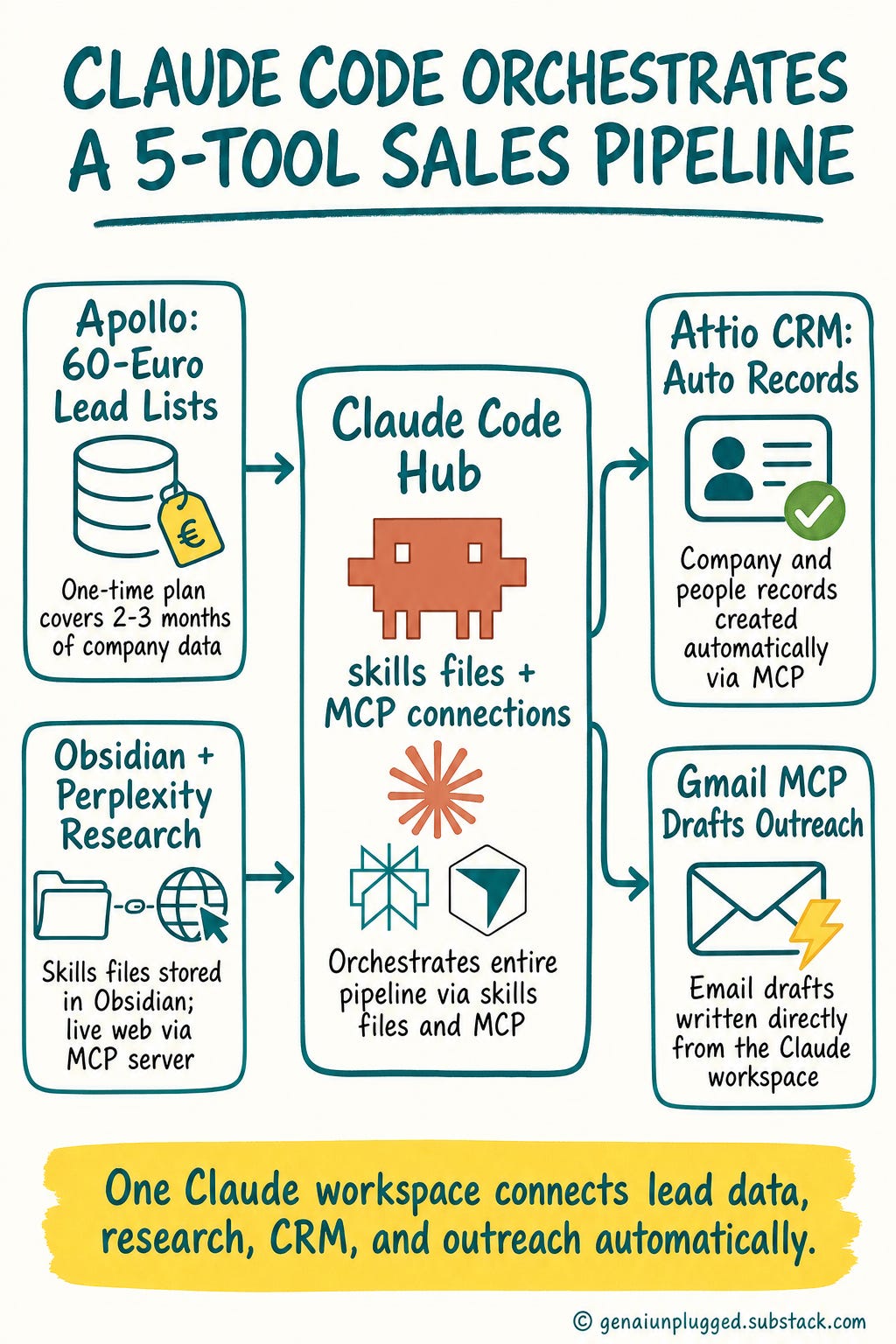
By the end of this article, you'll have a complete picture of how to build the same system:
Apollo for lead sourcing,
Claude Code for ICP scoring and research orchestration,
Perplexity MCP for desk research,
Attio for CRM population,
and Gmail MCP for outreach drafts.
You'll also understand the one thing automation cannot do for you, and why getting that wrong is worse than not automating at all.
👋 Julley, I'm Dheeraj and I'm an AI systems builder.
I build production-grade AI systems at work by day and ship my own products by night (9+). This newsletter is the bridge between those two worlds. Every system, every build, documented step by step.
Join 1,700+ builders getting the exact AI setups, prompts, and production configs that actually work in your business.
Why Manual Sales Research Doesn't Scale for a 1-Person Agency
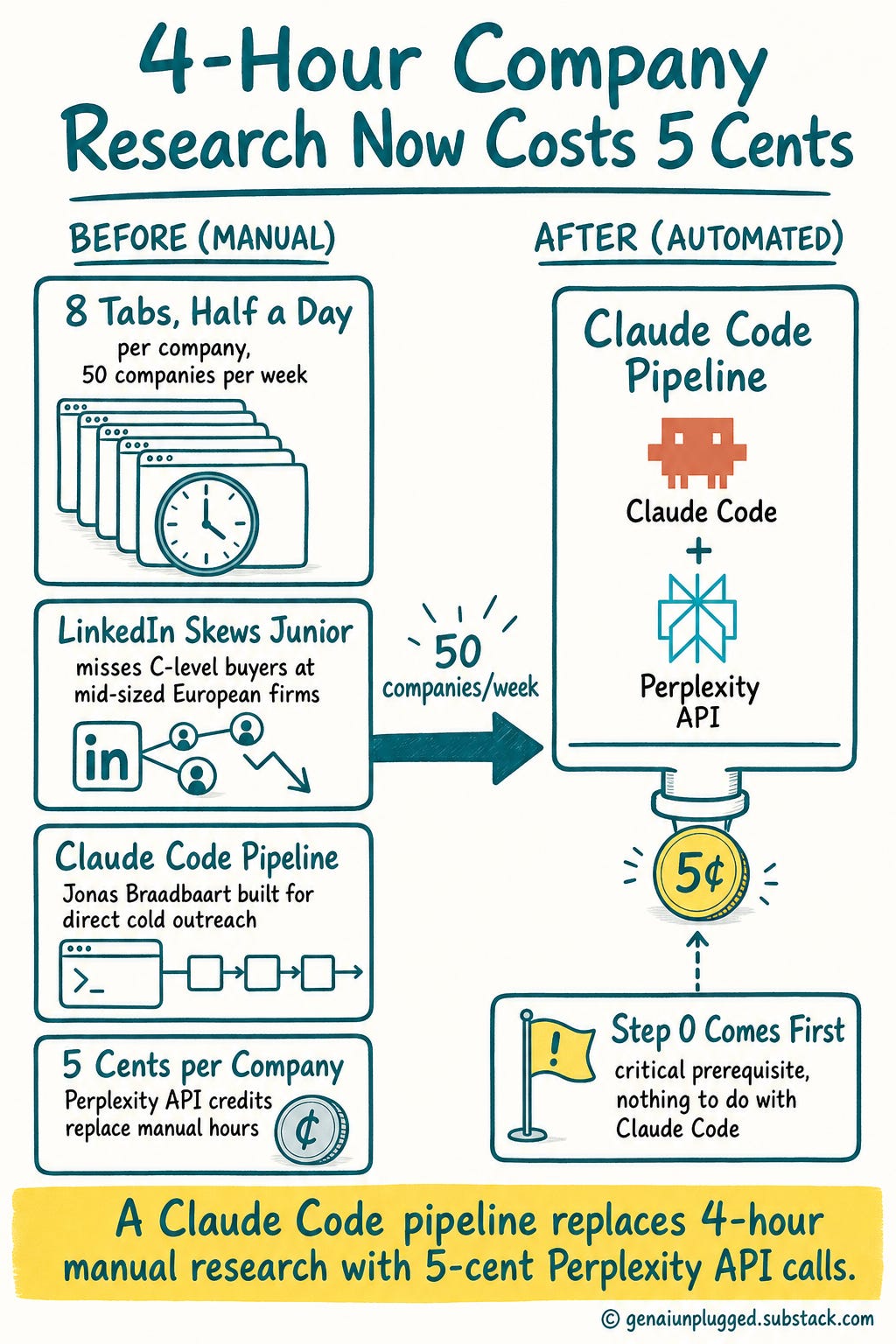
B2B sales research has a dirty secret. A sales rep preparing to contact a new company typically spends half a day on it, with eight Chrome tabs open, to understand what the company does, how they make money, and whether they are even a fit.
At 50 companies per week, that math breaks a solo operator.
Jonas Braadbaart came to this problem from more than a decade in enterprise AI. He wanted clients for his agency without going through recruiters or brokers who didn't have access to the right types of companies. LinkedIn skews toward junior job-seekers, not C-level buyers at mid-sized European firms.
So he built direct cold outreach, starting with the research bottleneck.
The result is a Claude Code pipeline that reduces 4 hours of manual research per company down to about 5 cents in Perplexity API credits. But the system only works if you do Step 0 correctly. And Step 0 has nothing to do with Claude Code.
“The human is the architect and the AI is the execution engine. AI handles the 70% of sales work that is administration, desk research, and CRM logging. The remaining 30%, the strategy, the relationship, and the actual communication, stays human.”
Jonas Braadbaart
Step 0: Define Your ICP Before You Touch Any Tool
Your ICP (Ideal Customer Profile) is the input that every downstream step depends on. If it's too broad, the Apollo list will be garbage. If the Apollo list is garbage, Claude's screening will be garbage.
You cannot automate your way out of a poorly defined ICP.
Jonas learned this the hard way. His first ICP was too broad and produced poor results. He now spends real time on it before running any automation.
For context on the full stack, you'll wire up a handful of tools across these five steps: Claude Code, Apollo, Perplexity, Attio, Gmail, and Obsidian. Costs and links are at the end.
How Jonas defines his ICP, as an example:
Geography: Netherlands and nearby countries
Company type: Professional services, marketing agencies, HR companies
Size: Mid-sized, not enterprise (enterprise already has dedicated AI teams)
Maturity signal: No existing AI expertise in-house, which is where his decade-plus of experience adds real value
Intelligence proxy: Revenue per employee, used as a signal for company sophistication
"I had an idea for an ICP. For the first round, mine was too broad. This is definitely something where you need to do your own thinking."
Jonas Braadbaart
Spend a full working session on this before you open Apollo. The ICP is what you'll load into your Claude workspace as context it keeps across runs, and it drives every scoring and research decision downstream.
Join My Claude Code Cohort
The founding batch of my Claude Code cohort starts July 25 on Maven. Six live sessions over 4 weeks. You bring your business problem, we build the system.
Only 12 Seats. When they’re gone, the founding price ($797) closes and Cohort 2 opens at $1,597.
Use code GENAI20 for 20% off. Expires July 22. Check the Syllabus →
Step 1: Export Your Lead List from Apollo (Do This Manually)
Apollo is a B2B lead database that lets you filter companies by geography, headcount, industry, revenue, and people data. Jonas used a one-time Apollo plan for about 60 euros, which gave him enough company data for two to three months of outreach.
He exported the list manually, not via Apollo's MCP integration. The reason: he wanted to inspect the raw data himself before automating anything. When you're building a new pipeline, you need to understand what you're feeding it.
Automation is most dangerous when you don't know what it's doing.
The Apollo export gives you: company name, headcount, location, revenue, industry, and people data including emails on paid plans. Revenue per employee becomes a useful secondary signal for ICP matching in the next step.
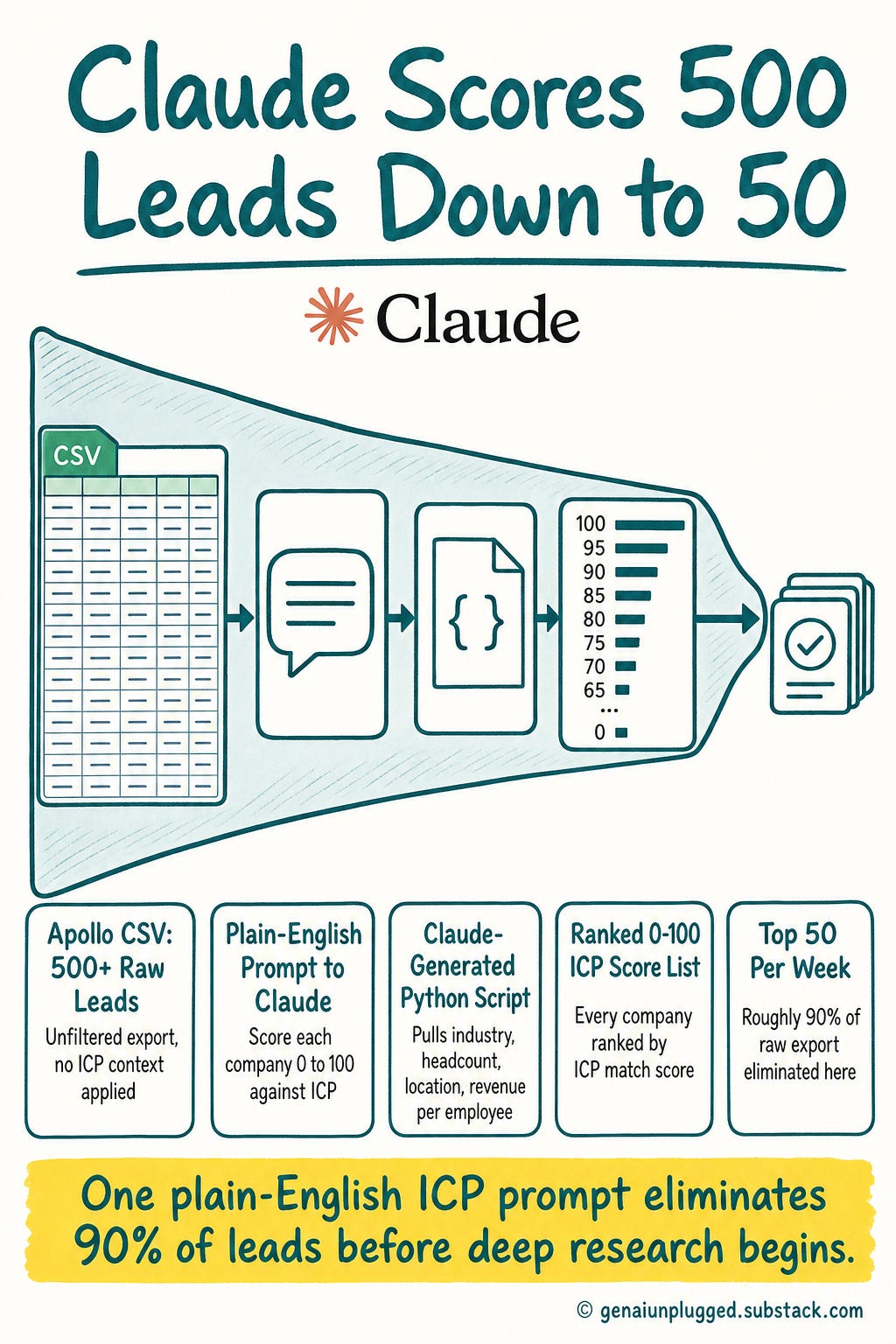
Keep your initial list manageable. Jonas picks a fixed batch of 50 companies per week for deeper research. The next step will filter the raw Apollo export down by about 90% before you even get there.
Step 2: Let Claude Score and Pre-Screen the List
Once you have the raw Apollo export, you load it into your Claude Code workspace and run a custom scoring script. Claude generates the Python scoring logic based on your ICP criteria. You don't write the code.
The prompt is plain English: ask Claude to read the Apollo CSV, score each company from 0 to 100 against your ICP, and output a ranked list. Jonas walks through the exact scoring file in the live session.
Jonas deliberately avoided using Apollo's built-in AI filter. His reasoning: he wanted his ICP context to stay within his own Claude workspace, not shared with Apollo's systems.
His custom screener also includes criteria Apollo's filter can't evaluate, like his specific positioning and what kinds of AI maturity gaps he solves best.
The scoring pulls from: industry, company description, headcount, location, revenue per employee, and total revenue. The output is a ranked list. Jonas picks the top 50 per week and passes them to Step 3.
This single step eliminates roughly 90% of the raw Apollo export. That's the point.
Deep research on 500 companies is not feasible. But deep research on 50 is.
Step 3: Automated Desk Research at 5 Cents Per Company
This is where the system earns its keep.
For each of the 50 shortlisted companies, Jonas runs a "lead-source skill" inside Claude Code. The skill combines a custom Perplexity MCP server with the Apollo enrichment data already in context.
MCP, the Model Context Protocol, is the connector standard that lets Claude talk to outside tools like Perplexity, Gmail, and your CRM.
The result: a complete company intelligence brief that covers what the company does, how they make money, their digital channels, customer service approach, recent investments, and key services.
"This is what a sales rep used to spend half a day doing: eight Chrome tabs open, eight different websites, just to figure out what a company does. Claude does this for me and it costs maybe five cents in Perplexity credits."
Jonas Braadbaart
The Perplexity MCP server is not a generic web search. It's configured with Jonas's ICP and goals, so it returns targeted intelligence rather than broad summaries. Claude handles the orchestration.
Perplexity provides real-time web data that Apollo's static database doesn't have.
Because Jonas runs this on a fixed Claude subscription, the marginal cost stays tiny even across hundreds of companies. The research files are stored in Obsidian so the same company is never researched twice.
Here's what the Claude Code skill orchestrates in sequence:
lead-source skill (per company):
1. Pull Apollo enrichment data for this company
2. Run Perplexity MCP desk research (ICP-configured)
3. Identify decision makers and contact info
4. Create company + people record in Attio CRM via MCP
5. Generate internal PDF research brief
6. Create Gmail draft for outreach via MCP
Step 4: CRM Population and Internal Research Briefs
As part of the same skill run, Claude creates company and people records in Attio CRM via MCP integration. Zero manual data entry. The CRM populates itself as the research runs.
Claude also generates a personalized PDF report that maps the company's research findings to Jonas's four service offerings. This brief answers: what does this company need? How do Jonas's services apply?
What are the specific hooks for outreach?
Here's what Jonas discovered about the PDF: never send it cold. He tried it once and it looked like phishing to recipients. Now it's an internal prep tool only.
Before he writes any outreach message, he reads the brief to identify the two or three relevant angles. The brief takes 30 seconds to scan. The outreach message takes about 30 more seconds to write based on it.
That brings total time per lead to about 1 minute.
Step 5: Outreach Drafts (Where the Human Takes Over)
The final step in the skill generates outreach drafts. Gmail drafts land directly in Jonas's inbox via MCP connector. LinkedIn messages are generated as text for manual copy-paste and rewriting.
Jonas rewrites every single message before it goes out. This is not optional in his system. It's the point.
"I think human to human communication should remain human. Volume and quality is a balance where you have to figure out exactly what works for your niche."
Jonas Braadbaart
Wyndo reinforced this from personal experience. The more you use AI tools, the more easily you spot AI-generated outreach. Heavy AI users filter it immediately as low-effort, even when it's technically "personalized." Consistency across the touchpoints matters too.
If your email sounds robotic, the first sales call will expose the disconnect.
Jonas's failure with full automation was definitive: thousands of automated emails, two replies, both negative. The lesson he took was precise: AI handles the research and admin. The human handles the message.
The Real Cost Breakdown
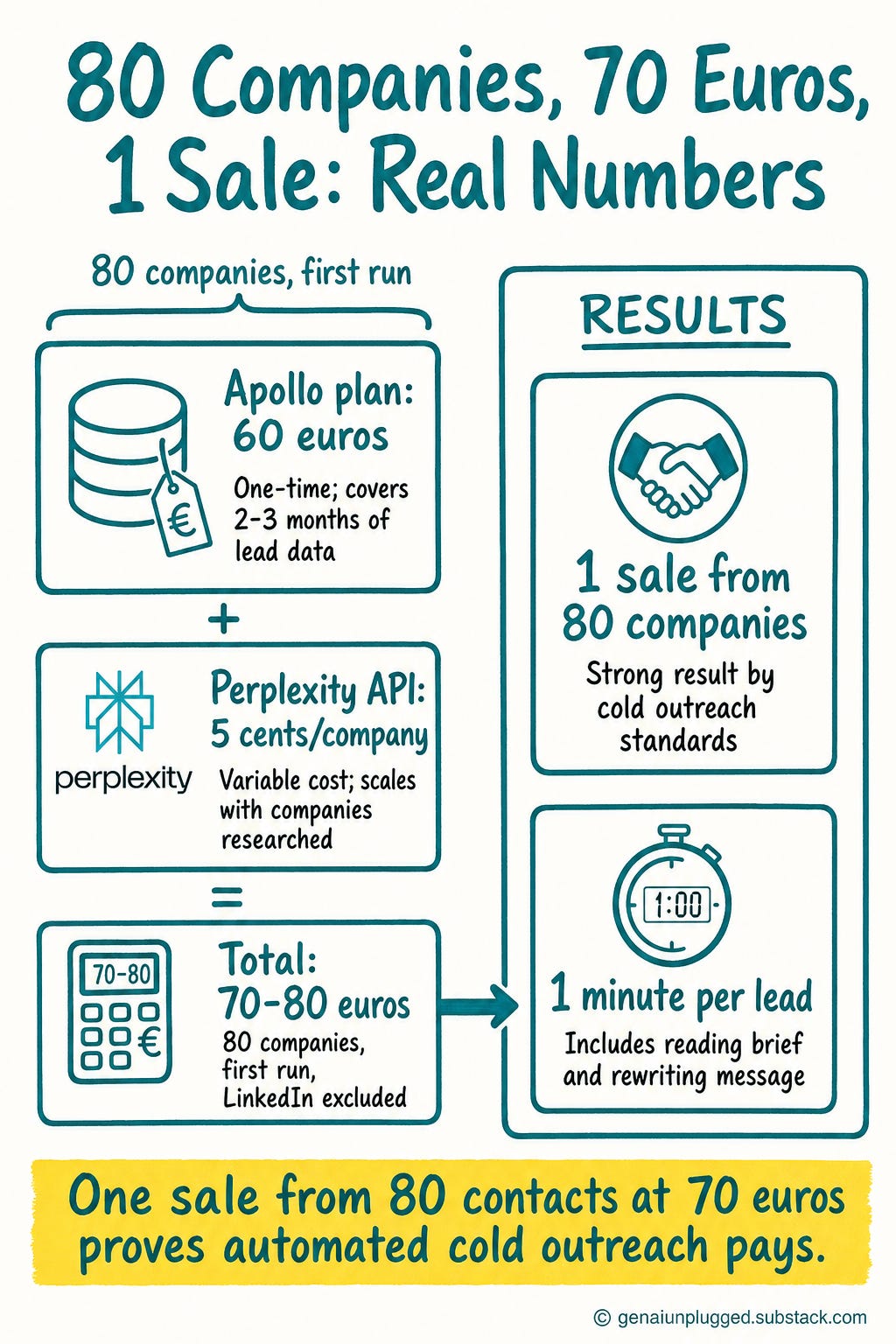
Here's what Jonas's system cost to build and run on the first run:
One-time costs
Apollo plan: 60 euros (covers 2-3 months of lead data)
Ongoing operational costs
Perplexity API credits: ~5 cents per company
Attio CRM: free tier covers basic needs
Claude subscription: already in place
Total for first run (80 companies): about 70 to 80 euros excluding LinkedIn. That figure already includes the one-time Apollo plan plus a few euros of Perplexity credits.
Add a paid LinkedIn plan and the all-in number reaches roughly 120 euros, but most sales reps already pay for LinkedIn, so the real marginal cost stays at 70 to 80 euros.
Results from first run: 1 sale from 80 companies contacted. By cold outreach standards, that's a strong result.
Time per lead with automation: 1 minute, including reading the research brief and rewriting the outreach message.
Frequently Asked Questions
How much does it cost to build and run a Claude Code B2B sales engine?
A Claude Code B2B sales engine costs about 70 to 80 euros to run, excluding LinkedIn. The bulk is a one-time Apollo data plan at roughly 60 euros that covers two to three months of lead lists.
On top of that you pay only a few euros in Perplexity credits, about 5 cents per company, and nothing for the free Attio CRM tier. The Claude subscription you likely already have covers the rest. Adding a paid LinkedIn plan brings the all-in total to around 120 euros.
At 50 companies per week, Perplexity desk research costs less than 5 cents per company.
What results should I expect from this system?
Cold outreach results depend heavily on your ICP definition and your outreach quality. Jonas contacted 80 companies on his first run and made 1 sale. He considers that a strong cold outreach conversion rate.
The system does not improve poor outreach; it eliminates the research bottleneck so your outreach has better inputs to work from.
Should I automate my LinkedIn outreach messages too?
No. LinkedIn outreach should be written by a human for every send. Jonas's failed experiment with automated emails (two replies from thousands sent, both negative) is the clearest case against full automation.
Heavy AI users immediately recognize AI-generated outreach and filter it as low-effort. Write every LinkedIn message yourself, even if you use the AI-generated draft as a starting reference.
Why use Perplexity for company research instead of just asking Claude?
Claude alone cannot access live web data. Perplexity MCP provides real-time searches about the company that Apollo's static database doesn't carry. The MCP server is also configured with Jonas's ICP and goals, so it returns targeted intelligence rather than generic results.
Claude handles orchestration and writing. Perplexity handles live research.
What is the right order for cold outreach: LinkedIn or email first?
LinkedIn first, always. Connect and have a real conversation on LinkedIn before sending any cold email. This proves you are a real person and builds a minimal layer of familiarity before your email arrives.
Jonas's sequencing: LinkedIn connect, brief LinkedIn message, then follow-up email only after a LinkedIn interaction.
Why not use Apollo's built-in AI screener?
Apollo's screener doesn't have access to your ICP context or your specific positioning. Jonas uses his own Claude-based screener to keep his ICP definition within his own workspace, and to apply criteria Apollo's system cannot evaluate, like the specific kind of AI maturity gap his agency solves.
What CRM does this system use?
Jonas uses Attio, integrated via MCP so Claude creates company and people records automatically during the research run. He used a secondary email address for the Attio sync to avoid giving it access to his main inbox. The free Attio plan covers the basic needs of this workflow.
Do you send the AI-generated research report to prospects?
No. Jonas experimented with sending the company brief cold and found it looked like phishing. The report is an internal prep tool only.
He reads it before writing his outreach message to identify the specific hooks and angles worth mentioning.
Key Takeaways
ICP quality determines everything downstream. Automate a broad ICP and you'll get a long list of companies that aren't a fit. Spend a full session on ICP definition before opening Apollo.
The 70/30 split is the operating model. AI handles the 70%: research, scoring, CRM logging, draft generation. Humans own the 30%: strategy, relationship, and actual communication.
Desk research at scale costs 5 cents per company. What used to take a sales rep half a day with 8 Chrome tabs open now runs in the background for less than the cost of a candy bar.
Full automation destroys response rates. Two replies from thousands of automated emails, both negative. The case against automating the human touch is definitive.
LinkedIn before email, every time. A prior LinkedIn interaction is the difference between cold and cold-but-recognized. Always sequence LinkedIn first.
Improve the system while you run it. Jonas keeps one window doing the outreach and another window refining the skills file. The setup cost is fixed. The improvements compound.
The PDF brief is for you, not your prospect. Use the research report as prep before writing your message. Never send it cold.
Resources Mentioned
Apollo: B2B lead database for company and people data. Jonas used a one-time 60-euro plan for 2-3 months of outreach lists.
Claude Code: AI coding and workspace tool that orchestrates the entire pipeline via skills files and MCP connections.
Perplexity: Live web research via a custom MCP server configured with ICP and goals.
Attio: CRM integrated via MCP for automatic company and people record creation.
Obsidian: Jonas's AI workspace for storing research files and skills files that Claude reuses across runs.
Gmail MCP: Creates Gmail drafts directly from the Claude workspace as the outreach step.
Gamma: Presentation tool Jonas uses after building slide outlines in Claude Code.
Your 15-Minute Challenge
Open a new document and write your ICP from scratch.
Not a marketing persona. A real ICP: geography, company type, size range, the specific problem you solve that they have, and the maturity signal that tells you they are ready for your service.
Then look at your last five sales conversations and check whether those companies match the ICP you wrote. If fewer than three match, your ICP needs tightening before you build any automation.
When you're done, watch the full One Shot Show session to see Jonas walk through the live skills file and the exact Apollo filters he uses. Come back when you're ready to build Step 1.


