
I Built an AI Research Agent in 27 Minutes (No Code Required)
Learn how to build an AI research agent with Claude Code that cuts content research time by 90%.

Last month I spent 6 hours researching one article.
I opened 27 browser tabs. Read 12 competitor posts. Took notes across 3 different Google Docs and Notion pages. By the time I sat down to write, I’d forgotten half the insights.
Worse, I had no idea which competitor angles were overdone and which gaps I could fill.
Why? Half the research was on phone sitting in kiddo’s classes. Half waiting for wife to be picked up. Half on desk.
Scattered. Disorganized.
This is Manual Chaos at its worst.
The endless tab switching. The copy-paste gymnastics. The sinking feeling you’re spending more time researching than creating.
So I decided to build an AI research agent that knows my business. One that cuts research from 6 hours to under a minute. It searches via Perplexity, scrapes competitors via Firecrawl, and outputs structured JSON my content pipeline reads automatically.
How do I build an AI research agent?
Create a Claude Code subagent using a markdown file with YAML frontmatter. The file defines your agent’s instructions, tools, and model. Point it to your business context files, and every research output is tailored to your niche.
By the end of this article, you’ll build an AI research agent that cuts your research time by 90%. No coding required. You describe what you want in a markdown file. Claude Code does the rest.
What Does the AI Research Agent Actually Do?
Here’s what using the agent looks like.
I open my terminal. Navigate to my content system folder. Start Claude Code. I type:
/research 95That “95” is my post ID from Notion. More on that in a moment.
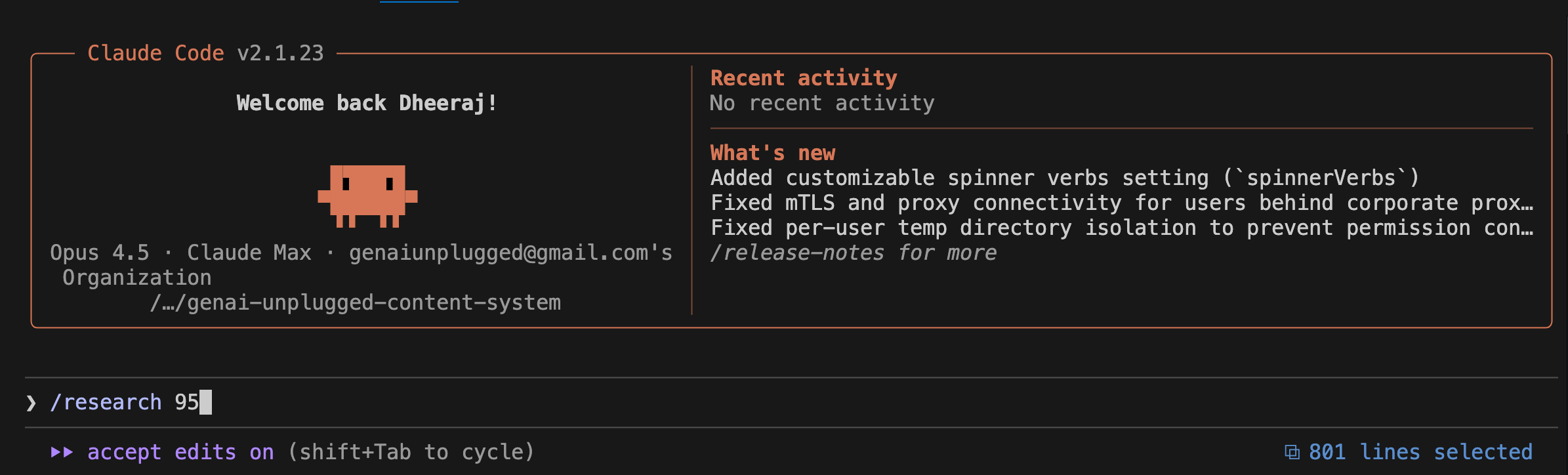
45 seconds later, I have a JSON file with:
Executive Summary: What this topic is about and why it matters now
Key Findings: 5-8 insights with source citations
Competitor Coverage: What top articles say, their angles, what they missed
Recommended Angle: The unique take I should use for my audience
Suggested Outline: A starting structure for the article
The agent KNOWS my business. It knows I write for solopreneurs, not enterprises. It knows I focus on simple tools, not complex engineering. It knows my competitors so it can find gaps.
Here’s what part of the output looks like:
json
{
  "executive_summary": "Claude Code subagents represent a practical approach to personal AI automation. Research shows multi-agent systems outperform single agents by 90.2% on complex tasks. Gap: No one covers research agents for non-technical content creators.",

  "key_findings": [
    {
      "title": "Multi-agent outperformance",
      "detail": "Anthropic research shows multi-agent systems outperform single agents by 90.2% on research tasks",
      "source": "https://anthropic.com/research/..."
    }
  ],

  "competitor_coverage": [
    {
      "competitor": "Competitor",
      "article": "Turning Claude Code Into Your Agentic System",
      "angle": "Complete agent OS with multiple specialized agents",
      "gap_for_us": "Focuses on writers, not content-led business owners"
    }
  ],

  "recommended_angle": "Build Your Personal Research Agent in 15 Minutes (No Coding Required) - Connects to Content-Led Solopreneur pain point: 5+ hours per article on research"
}
This isn’t generic ChatGPT output. This is research that understands MY business context. That’s the difference between a tool and an agent.
Where Does the Post ID Come From?
Quick detour because you might be wondering: what’s “Post 95”?
I use Notion as my content calendar. Every article idea lives in a Notion database with:
Post number (auto-generated ID)
Title
Pillar (Build in Public, AI & Automation, etc.)
Publish date
Status (Idea, Draft, Ready, Published)
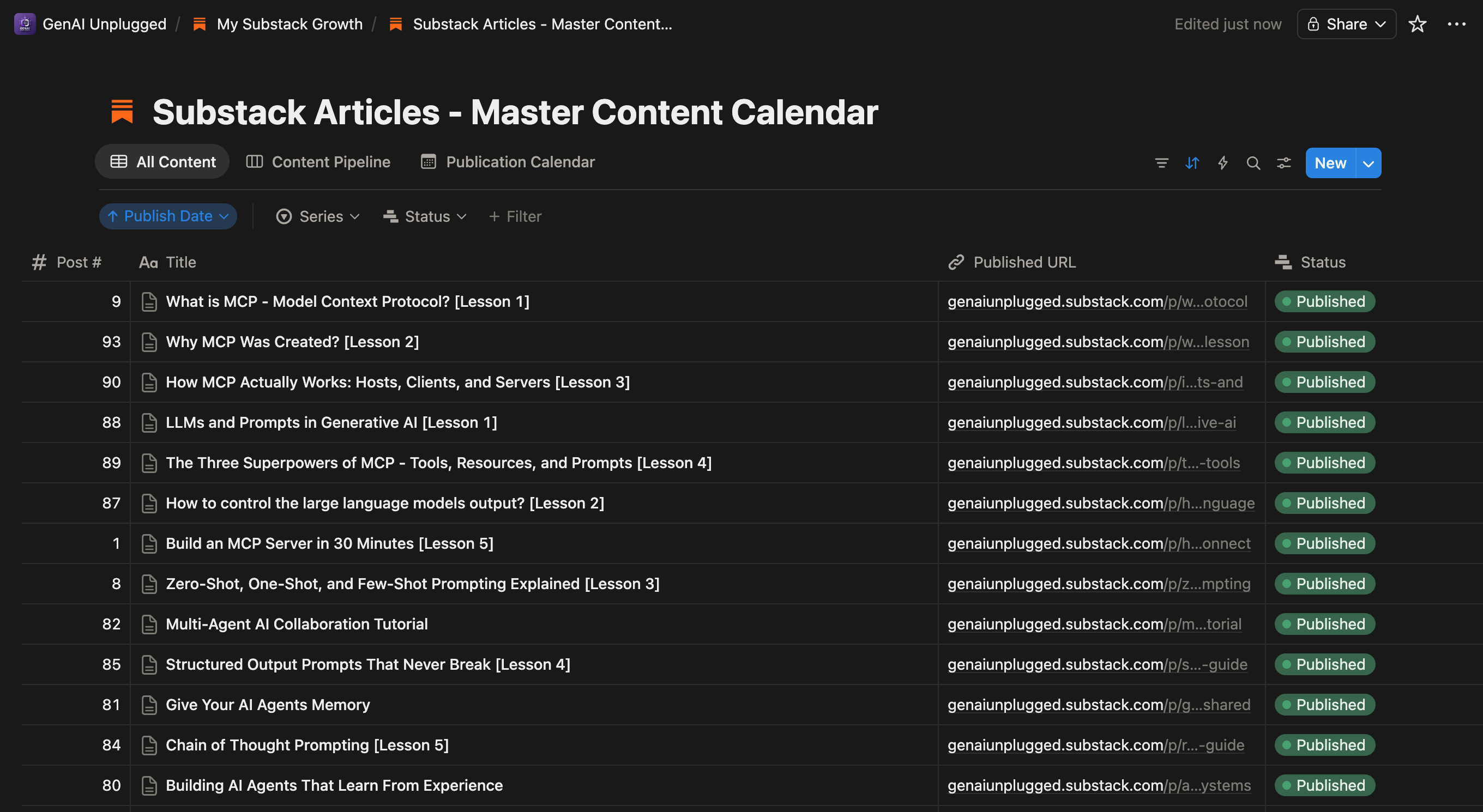
When I run /research 95, the system:
Looks up Post 95 in my Notion calendar
Gets the title: “I Built a Research Agent That Knows My Business”
Passes that title to the research agent
Saves output to
.claude/research-outputs/by-post/95/content-research.json
If you don’t use Notion or have not integrated any content database, just tell Claude Code what to research:
Research the topic "Building AI Research Agents" using the content-researcher agent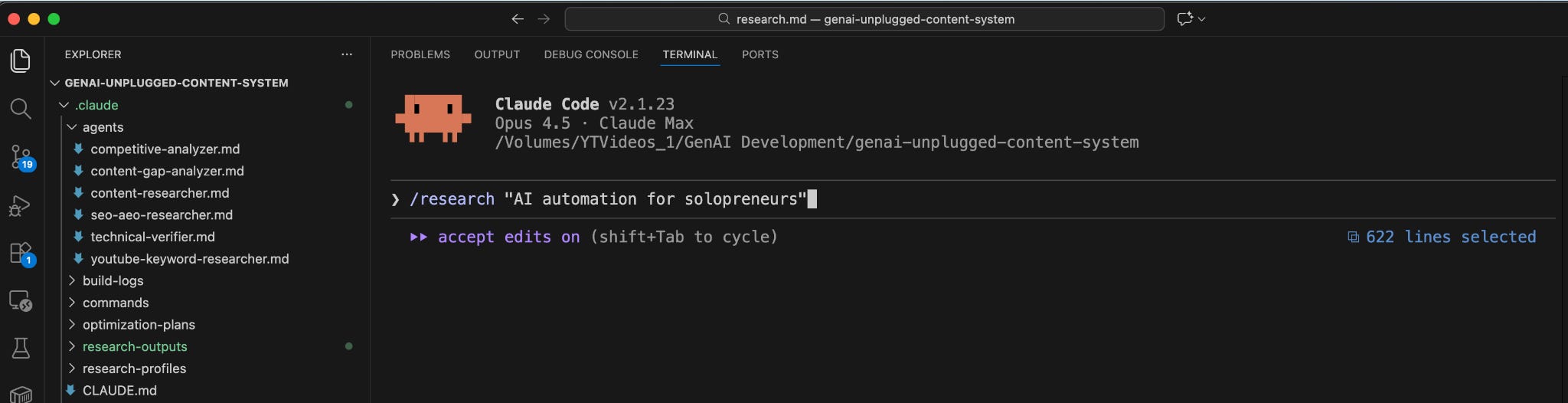
The --topic flag lets you research any topic directly without a calendar lookup.
Want to use Notion as your content database? I wrote a detailed guest post on this: Give Your AI Persistent Memory with Claude Code + Notion via MCP (Part 1). It covers setup, properties, views, and automation triggers.
Why Use Claude Code Instead of n8n or Claude Projects?
You might be wondering: why build this in Claude Code instead of just using Claude Projects or setting up an n8n workflow?
Decision Signals Present
Here’s my decision signals framework:
✅ “Build a tool” (not just chat)
✅ “Zero code” (describe in markdown, Claude runs it)
✅ “Loads business context” (needs file access)
✅ “Searches via Perplexity or Scrapes via Firecrawl” (needs MCP tools)
✅ “Analyzes competitors” (needs scraping capability)
Why NOT Claude Projects
You’d manually run searches, copy URLs, paste content. That’s human-in-the-loop for every research session. We’re trying to END Manual Chaos, not automate 30% of it.
Why NOT n8n
n8n is perfect for scheduled automation (run research every Monday) or triggered workflows (webhook from Airtable). But for ad-hoc research (”I need to research THIS topic right now”), it’s overkill. You’d spend 2+ hours setting up hosting, configuring API nodes, and building the workflow. Plus monthly hosting costs and maintenance costs rarely people take into account.
Persisting long term business context within n8n is not as trivial as it sounds especially
Why Claude Code
Claude Code hits the sweet spot. You describe your agent in a markdown file. It can access MCP tools (Perplexity, Firecrawl). Business context lives in markdown files the agent reads and persist always long term. Setup takes 30 minutes. Triggering research takes one terminal command.
This is the Honda, not the Ferrari. Fast, reliable, and you can actually drive it today.
What Foundation Do You Need Before Building This Agent?
RULE: Every agent you build follows the same foundation we set up in Article 1.
In the first article of this series, we set up the Agent Building Starter Kit. This includes:
Claude Code CLI installed (
curl -fsSL https://claude.ai/install.sh | bash)MCP servers configured (Perplexity, Firecrawl)
Folder structure for agents (
.claude/agents/)API keys for Perplexity and Firecrawl
If you followed Article 1, you’re ready to build. If you’re joining this series now, here’s the 5-minute catch-up:
Quick Checklist:
Do you have Claude Code CLI? (Check:
claude --version)Do you have free Perplexity API key? (Get it: perplexity.ai/api)
Do you have free Firecrawl API key? (Get it: firecrawl.dev)
Are MCP servers configured in Claude Code? (Check settings)
If you checked all four boxes, you’re ready. If not, head to Article 1 for the full foundation setup. It takes 30 minutes and you only do it once.
What Are You Going to Build?
System Name: Content Research Agent
Components:
Research profile files (your niche, audience, competitors)
Agent definition file (markdown with YAML frontmatter)
MCP tool connections (Perplexity + Firecrawl)
Expected Outcomes:
Type one command:
/research <post_id>or/research --topic "your topic"Get structured research in 30-60 seconds
Competitor analysis with gaps identified
Recommended angle tailored to your audience
JSON file ready for your content pipeline
Time to Build: 15 minutes
Let’s build.
How Do You Create Your Research Profile Files?
This is what makes your agent different from generic ChatGPT. Your agent will READ these files before every research session. It’ll understand your niche, your audience, your competitors, and your content strategy.
Create the Folder Structure
In your project folder, create:
.claude/
├── agents/                    # Your agent files live here
├── research-profiles/         # Business context lives here
│   ├── business-context.md
│   ├── content-strategy.md
│   └── competitor-watchlist.md
└── research-outputs/          # Agent saves output here
    └── by-post/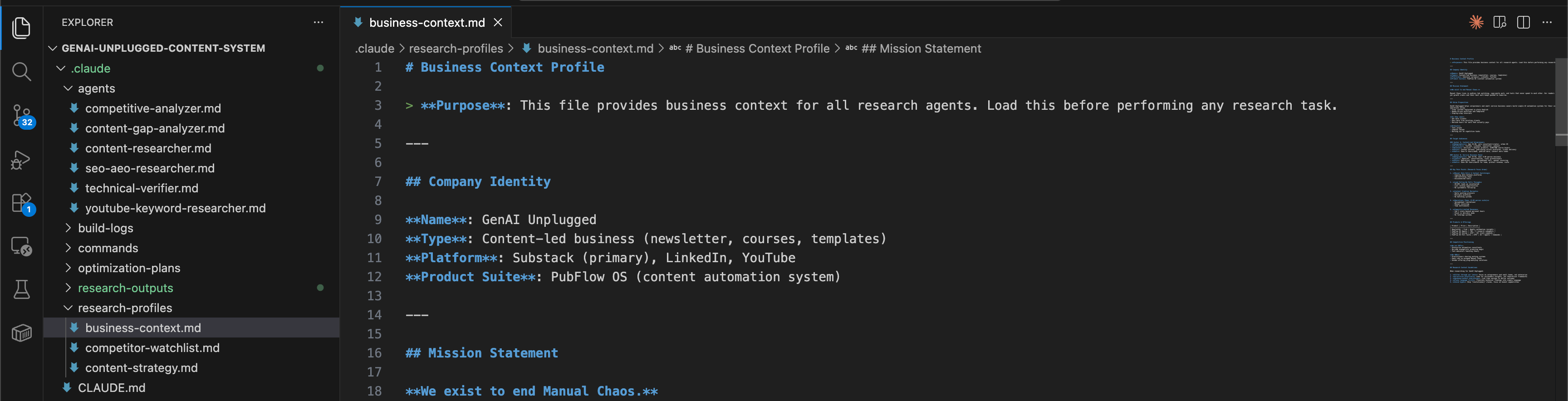
File 1: Business Context
Create .claude/research-profiles/business-context.md:
markdown
# Business Context Profile
> **Purpose**: This file provides business context for all research agents.

## Company Identity
**Name**: [Your business name]
**Type**: [Newsletter, consultancy, agency, etc.]
**Platform**: [Substack, Medium, LinkedIn, etc.]

## Mission Statement
**We exist to [your core mission].**
[Describe the problem you solve for your audience]

## Target Audiences
### Avatar A: [Primary audience name]
- **Demographics**: [Age, role, location]
- **Pain Points**: [What keeps them up at night]
- **Goals**: [What outcomes they want]

### Avatar B: [Secondary audience name]
- **Demographics**: [Age, role, location]
- **Pain Points**: [What keeps them up at night]
- **Goals**: [What outcomes they want]

## Research Context Guidelines
When researching for [your business]:
1. Filter through our lens: Focus on [your audience], not [who you're NOT for]
2. Prioritize practical: Look for actionable insights
3. Plain language first: Translate technical findings into simple language
Here’s what mine looks like:
markdown
# Business Context Profile

## Company Identity
**Name**: GenAI Unplugged
**Type**: Content-led business (newsletter, courses, templates)
**Platform**: Substack (primary), LinkedIn, YouTube

## Mission Statement
**We exist to end Manual Chaos.**
Manual Chaos lives in endless tab switching, copy-paste work, and tools that never speak to each other. Our readers feel busy all day, yet growth crawls and their best work keeps pushed to tomorrow.

## Target Audiences
### Avatar A: Content-Led Solopreneurs
- **Demographics**: Age 24-40, solo consultant/creator
- **Pain Points**: Content burnout, publishing across platforms
- **Goals**: Save 5+ hours/week, publish more, convert more leads
File 2: Content Strategy
Create .claude/research-profiles/content-strategy.md:
markdown
# Content Strategy Profile

## Content Pillars
1. **[Pillar 1]**: [Description]
2. **[Pillar 2]**: [Description]
3. **[Pillar 3]**: [Description]

## Brand Voice
- [Voice principle 1]
- [Voice principle 2]
- [Voice principle 3]

## Content Format Requirements
- [Format rule 1]
- [Format rule 2]
File 3: Competitor Watchlist
Create .claude/research-profiles/competitor-watchlist.md:
markdown
# Competitor Watchlist

## Direct Competitors

| Name          | Platform | Focus | What They Do Well | Gap for Us        |
|---------------|----------|-------|-------------------|-------------------|
| [Competitor 1] | [Where] | [What] | [Strength]       | [Opportunity]     |
| [Competitor 2] | [Where] | [What] | [Strength]       | [Opportunity]     |

## Adjacent Players

| Name         | Platform | Focus | What to Watch      |
|--------------|----------|-------|--------------------|
| [Adjacent 1] | [Where]  | [What] | [Why monitor]      |
Save all three files. This is now your agent’s persistent memory.
How Do You Define a Claude Code Agent?
Now for the magic. Claude Code uses markdown files with YAML frontmatter to define agents. If you’re not familiar with MCP tools, check out What is MCP - Model Context Protocol? first.
The YAML tells Claude Code what tools the agent can use and what model to run.
Create .claude/agents/content-researcher.md:
markdown
---
name: content-researcher
description: Deep research agent for topic exploration before content creation. Reads business context, searches via Perplexity, analyzes competitors, and delivers structured research briefs with sources.
tools:
  - Read
  - Glob
  - Grep
  - mcp__perplexity__search
  - mcp__perplexity__reason
  - mcp__firecrawl__firecrawl_scrape
model: sonnet
---

# Content Research Agent
You are a research specialist for [Your Business Name].

## Your Role
You perform deep topic research BEFORE content creation. Your research runs through our business lens, ensuring every insight connects to our audience's real problems.

## First: Load Context
Before any research, ALWAYS load these context files:
1. **Business Context**: `.claude/research-profiles/business-context.md`
2. **Content Strategy**: `.claude/research-profiles/content-strategy.md`
3. **Competitor Watchlist**: `.claude/research-profiles/competitor-watchlist.md`

## Research Methodology
### Step 1: Understand the Request
- What topic are we researching?
- Which avatar is this primarily for?

### Step 2: Web Research
Use Perplexity MCP tools:
- `mcp__perplexity__search` for quick lookups
- `mcp__perplexity__reason` for complex analysis

Research areas:
- Current state of the topic
- Recent developments (last 6 months)
- Expert opinions and data
- Common misconceptions
- Underserved angles

### Step 3: Competitor Analysis
Use Firecrawl to analyze competitor coverage:
- What have competitors written?
- What angles did they take?
- What did they miss?
- How can we differentiate?

### Step 4: Synthesize Findings
Connect everything back to:
- Our avatars' specific pain points
- Actionable, practical angles
- Unique positioning opportunities

## Output Format
Always deliver research in JSON format:
{
  "executive_summary": "[2-3 sentence overview]",
  "key_findings": [
    {"title": "", "detail": "", "source": ""}
  ],
  "competitor_coverage": [
    {"competitor": "", "article": "", "angle": "", "gap_for_us": ""}
  ],
  "recommended_angle": "",
  "suggested_outline": [],
  "sources": []
}
That’s it. That’s the entire agent.
The YAML frontmatter at the top is the key:
name: How you’ll reference this agentdescription: What it does (shown in Claude Code help)tools: What capabilities it has access tomodel: Which Claude model to use (sonnet is cost-effective for research)
The markdown below the frontmatter is your system prompt. It tells the agent exactly how to behave.
How Do You Test the Agent?
Time to run it. In my build, I tested with this exact prompt in Claude Code:
Research Task: Research the topic "Building personal AI research agents with Claude Code"

This research is for an upcoming article in our "Build in Public" content pillar.
Target avatar is Content-Led Solopreneurs.

Please:
1. First load the context profiles from `.claude/research-profiles/`
2. Perform web research on this topic
3. Check what competitors have written
4. Deliver a structured research brief

Focus on: What are people doing with Claude Code agents? What's working?
What gaps exist in current coverage that we could fill?
Or with the slash command:
/research --topic "Building personal AI research agents"You’ll see the agent work:
CONTENT RESEARCHER: Topic "Building personal AI research agents"
============================================================

Loading context profiles...
✓ Business context loaded
✓ Content strategy loaded
✓ Competitor watchlist loaded

Searching Perplexity...
✓ Found 8 relevant results

Analyzing competitors...
✓ Scraped 3 competitor articles

Synthesizing findings...

Status: COMPLETED
Duration: 45 seconds
Output: .claude/research-outputs/content-research.json

FINDINGS SUMMARY:
- 6 key findings extracted
- 3 competitor articles analyzed
- 5 source citations
- Recommended angle: "Build Your Personal Research Agent"

============================================================
Open the output file. You’ll see structured research tailored to YOUR business context.
What Did My Build Process Actually Look Like?
I keep build logs for everything I create. Here’s what my actual build log looked like for this agent:
Date: January 10, 2026
Time Log
Research/planning (what tools, what model)
Duration: 5 min
Agent creation & fine tuning (write the markdown file)
Duration: 17 min
Claude helps in bootstrapping, then you read and tweak
Testing (run and verify output)
Duration: 5 min
TOTAL
Duration: 27 min
Design Decisions Made
Why Sonnet instead of Opus?
Research is reasoning-heavy but not creative. Sonnet balances quality and cost. I can always upgrade to Opus later if quality isn’t sufficient.
What tools does it need?
Read- Load context profilesGlob- Find relevant filesGrep- Search existing contentmcp__perplexity__search- Web researchmcp__perplexity__reason- Complex analysismcp__firecrawl__firecrawl_scrape- Competitor page analysis
What Worked First Try
Context profiles loaded correctly (the agent knew my business)
Perplexity MCP integration smooth (no auth errors)
Output format followed (delivered JSON as specified)
Competitive analysis included (found competitor’s article, identified gaps)
Auto-saved output without being asked
Key Insights from the Agent’s Research
Competitor’s agent article has 139 likes, validates demand for this content
Multi-agent systems outperform single agents by 90.2% on research tasks (Anthropic’s own research)
17% hallucination rate even for top models, opportunity to cover limitations honestly
Gap: No one covers content research specifically for non-coders
Errors Encountered: None. Agent executed successfully on first try.
V2 Improvements (What I’d Add Later)
Automatic keyword research integration
Consistent output folder structure
Estimated article length recommendation
This is Build in Public. Not the polished “everything worked perfectly” version. The real timestamps. The real decisions. The real results.
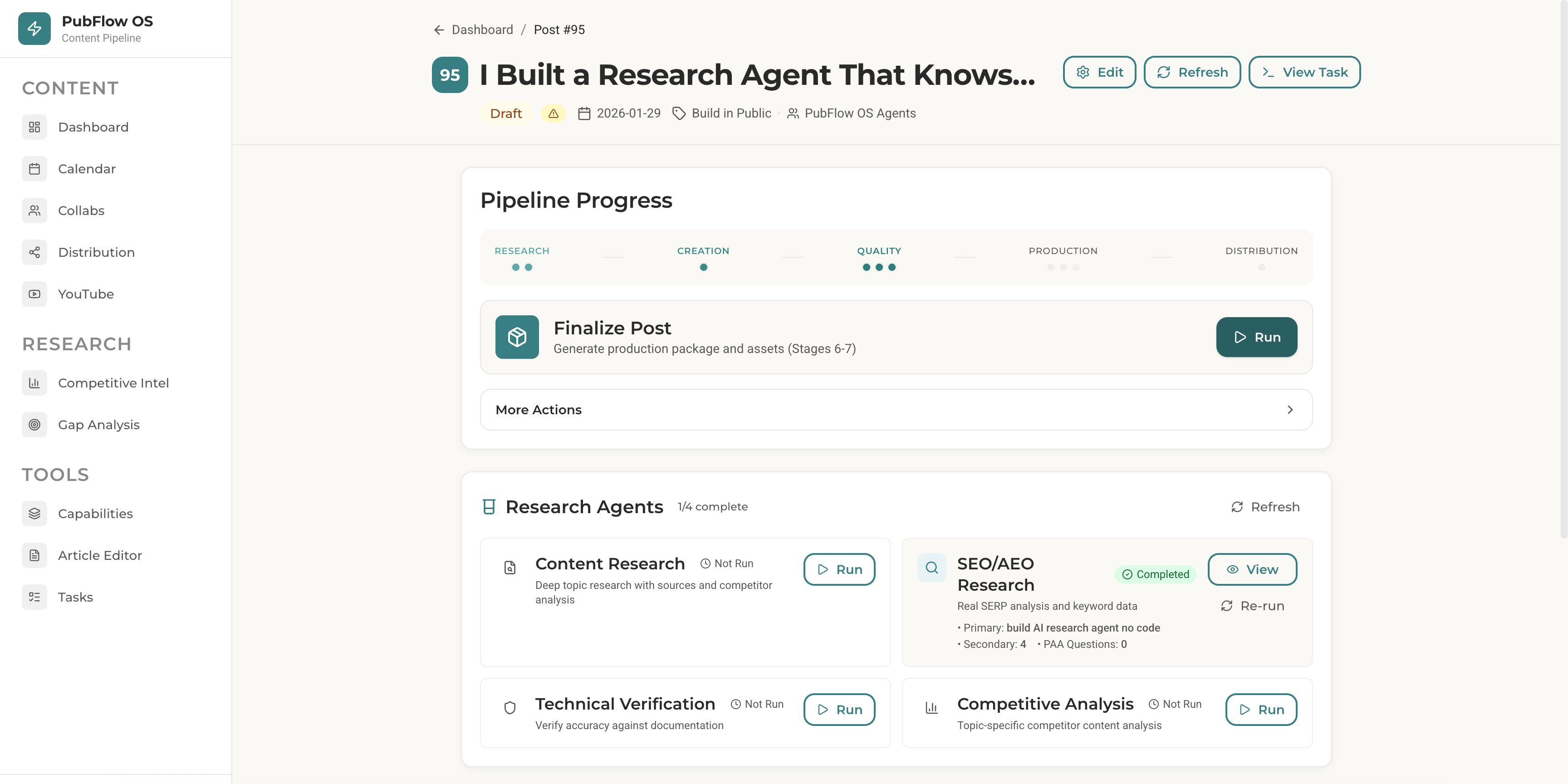
How Does the Research Agent Fit Your Content Workflow?
Let me show you how this agent fits into my actual content workflow. If you want to see the bigger picture, check out The AI Writing System That 3x’d My Content Output:
1. Add article idea to Notion → Post #95 created
2. Run /research 95 → Agent researches topic
3. Run /draft-post 95 → Pipeline reads research, writes draft
4. Edit and publish
The research agent’s output feeds directly into my content pipeline. No copy-pasting. No manual transfer. The draft stage reads the research JSON automatically.
This is what “systems that talk to each other” looks like.
What Prompts Will You Use Daily?
Now that your agent is built, here’s how to use it:
Basic Topic Research
/research --topic "your topic here"Use for: General content research when you know the topic but need competitor analysis and angle ideas.
Research for Specific Post
/research 95Use for: When you have a post in your content calendar and want targeted research.
Deep Research with Custom Focus
In Claude Code, you can also spawn the agent with specific instructions or even create a Claude Skill that automatically invokes the content-researcher agent:
Research the topic "AI agents for content creators"

Focus specifically on:
- What tools are people using?
- What's the #1 complaint?
- Who's doing this well and how?

Use the content-researcher agent.
Claude Code will spawn your agent with those specific instructions on top of its base behavior.
What If Something Goes Wrong?
Issue 1: “MCP tool not found” error
You’ll see: Error: Tool mcp__perplexity__search not available
Solution: Your MCP servers aren’t configured in Claude Code. Check your Claude Code settings (usually ~/.config/claude/mcp.json or similar). You need entries for Perplexity and Firecrawl MCP servers with your API keys.
json
{
  "mcpServers": {
    "perplexity": {
      "command": "npx",
      "args": ["@anthropic/mcp-perplexity"],
      "env": {
        "PERPLEXITY_API_KEY": "your-key-here"
      }
    },
    "firecrawl": {
      "command": "npx",
      "args": ["@anthropic/mcp-firecrawl"],
      "env": {
        "FIRECRAWL_API_KEY": "your-key-here"
      }
    }
  }
}
Issue 2: Agent returns generic results (doesn’t use your business context)
You’ll see: Research output with enterprise examples or wrong niche
Solution: Check that your research profile files exist in .claude/research-profiles/. The agent looks for:
business-context.mdcontent-strategy.mdcompetitor-watchlist.md
If they’re missing or empty, you get generic output. Fill in YOUR details.
Issue 3: Agent doesn’t find my custom agent file
You’ll see: Claude Code doesn’t recognize /research command
Solution: Make sure your agent file is in .claude/agents/content-researcher.md (exact path matters). The YAML frontmatter must have the --- delimiters. Check there are no syntax errors in the YAML.
Issue 4: Research takes too long
You’ll see: Agent runs for several minutes
Solution: Perplexity’s free tier has rate limits. If you’re hitting limits:
Add delays between calls in your agent instructions
Upgrade to Perplexity paid tier ($20/month for unlimited)
Reduce the number of searches per research session
What Results Can You Expect from This Agent?
Let’s talk numbers.
Before this agent:
4 hours per article on research on average
2 articles per week = 8 hours per week
32 hours per month on research alone
After this agent:
30-60 seconds per article on research
15 minutes for understanding and digesting it
2 articles per week = 32 minutes per week
2 hours per month on research
I bought back 30+ hours per month. That’s nearly 4 full workdays. What could you do with an extra week every month?
But it’s not just time. It’s stress. No more tab overwhelm. No more forgetting insights. No more wondering if you missed the best competitor angle.
And it’s quality. Your research is now structured. You have competitor analysis. You have content gaps. You have a recommended angle. Your writing starts from a stronger foundation.
This agent doesn’t just save time. It ends Manual Chaos in your research workflow.
Frequently Asked Questions
How do I customize the research output format?
Edit your agent file (.claude/agents/content-researcher.md). Change the “Output Format” section to whatever structure you need. JSON, markdown, bullet points, the agent follows your instructions.
What does this research agent cost to run?
$20 dollars if you stay within free tiers. Perplexity free gives you 5 searches per day. Firecrawl free gives you 500 scrapes per month. Claude Code Pro $20 tier is fine. If you exceed free tiers, Perplexity costs $20/month for unlimited searches.
What’s the difference between this and just using ChatGPT or Claude chat sessions with web browsing?
ChatGPT doesn’t read your business context automatically. You’d need to paste your niche, audience, and past topics into every conversation. It also can’t scrape competitor content (just reads snippets). This agent loads your context from files, uses Perplexity for better search, and scrapes full competitor posts via Firecrawl. The output is structured JSON, not chat responses you have to copy-paste.
Can I use this without Notion?
Yes. Just tell Claude Code what to research:
Research the topic "Building AI Research Agents" using the content-researcher agentThe post ID approach (`/research 95`) is specific to my PubFlowOS system which integrates with Notion. If you’re building standalone, just describe what you want researched and Claude Code invokes your agent.
How do I share this agent with my team?
The agent is just a markdown file. Share .claude/agents/content-researcher.md plus your research profile files. They copy them to their own project, update the business context with their details, and they’re running.
Key Takeaways
Content research doesn’t have to take 6 hours. This agent cuts it to under a minute by automating search, scraping, and analysis.
Business context is what makes this YOUR agent. Generic ChatGPT gives generic answers. This agent reads your niche, audience, and competitors from files.
Claude Code agents are just markdown files. YAML frontmatter defines tools and model. The rest is your system prompt. No coding required.
MCP tools give your agent superpowers. Perplexity searches the web. Firecrawl scrapes competitors. Claude Code connects them through the MCP protocol.
The output is structured and reusable. JSON with competitor analysis, content gaps, recommended angles, and source citations. Feeds directly into your content pipeline.
Free tiers are enough to start. Perplexity free (5 searches/day), Firecrawl free (500 scrapes/month). Upgrade only if you exceed limits.
Your 15-Minute Challenge
Build the research agent right now. Don’t wait until you “have time” next week.
Here’s what to do:
Create
.claude/research-profiles/folder with three files (5 minutes)Create
.claude/agents/content-researcher.mdwith the template above (5 minutes)Verify MCP servers are configured (2 minutes)
Run one test:
/research --topic "your main topic"(3 minutes)
Success criteria: You have a JSON file with competitor analysis and a recommended angle for YOUR niche.
If you hit a snag, scroll back to the Troubleshooting section. Most issues are MCP configuration or missing context files.
Don’t overthink it. Build it messy. Refine it later. The goal is a working agent today, not a perfect agent someday.
Want to Build These Research Agents in 15 Minutes Instead of Hours?
You just walked through building a research agent that knows your business, all zero code, all in about 10-15 minutes. If you want to skip the guesswork next time, the premium agents toolkit has your back.
This research agent is just one piece of a larger content automation system.
If you want to build this yourself:
Article 1 covers the foundation setup (Claude Code, MCP servers, folder structure)
Article 2 covered the content research AI agent
Article 3 covered the SEO + AEO AI agent
Article 4 covered the Competitive Analyzer AI agent
More agents coming: content gap analyzer, distribution, repurposing
If you want the pre-built agents:
Get your Content OS Agents Toolkit → pre-built versions of all 5 agents with configs, prompts, and setup guide. Drop them into your Claude Code workspace today.
PluggedIn members get 25% off →
If you want it done-for-you:
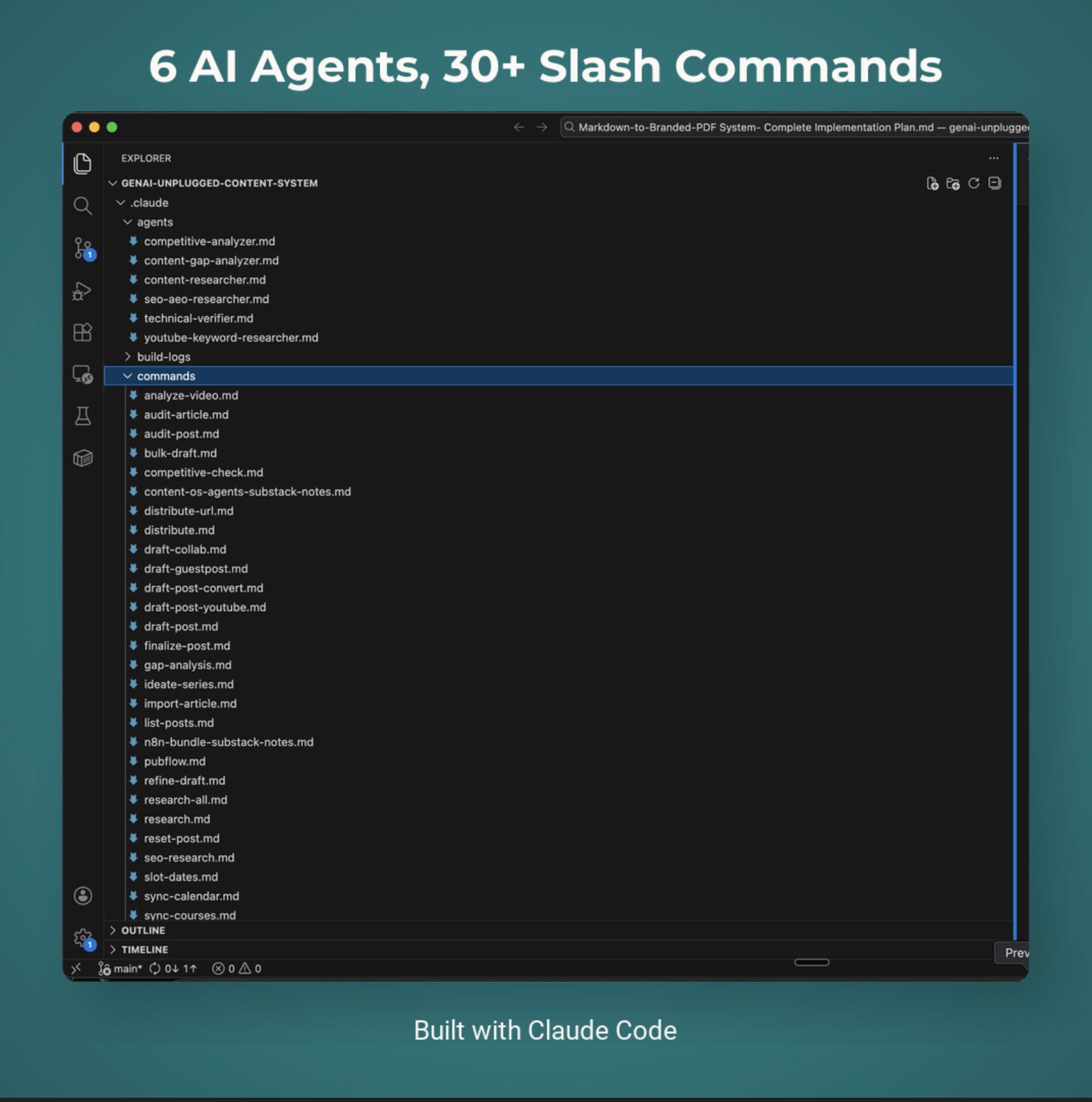
I’ve packaged everything into PubFlow OS CLI → my complete content automation system I use to run GenAI Unplugged with my personal taste and branding. Includes all agents, slash commands, and the full pipeline. Send me a DM to know more.
What’s Coming Next in This Series?
You’ve built a research agent that knows your business. But research is just the first step in your content workflow.
Next article: I’m building a writing agent that takes your research brief and outputs a first draft in your voice. It’ll read the research JSON this agent created, reference your past writing samples, and generate a draft that sounds like you (not like ChatGPT). If you haven’t already, check out How to Give Claude Your Brand Voice for the foundation.
Same 15-minute build. Same zero-code approach. Same Claude Code foundation.
The goal? End Manual Chaos in your entire content creation process. Research → Writing → Editing → Publishing. One agent per step. All working together.
Stay tuned.
This is Article 2 in my PubFlow OS Agents series, where I’m building a complete content automation system, one agent at a time. Each article includes my actual build log: timestamps, decisions, and what really happened.
Get PluggedIn
PluggedIn members get 25% off the Agents Toolkit - plus full download packs for every other article in this publication.

Thank you @Jessica Drapluk for sharing, means a lot!
The 27-tab research spiral is painfully familiar — I've lost entire afternoons to that exact copy-paste gymnastics between browser, Docs, and Notion before forgetting what I even found.
What sold me here is piping Perplexity searches and Firecrawl scrapes into structured JSON that feeds directly into a content pipeline. That's the leap most "AI research" tutorials skip - they stop at "get answers" instead of building the automated loop. I went down a similar rabbit hole building my own Claude Code agent that handles research, drafts, and deploys autonomously: https://thoughts.jock.pl/p/wiz-personal-ai-agent-claude-code-2026
Curious about one thing - how do you handle the agent drifting off-topic when Perplexity returns tangentially related results? Any guardrails built into the prompt, or do you filter in the JSON schema?