
Claude Code - Skills, Commands, Hooks & Agents Guide (And What Goes in Claude.MD)
Build a 4-layer Claude Code extension stack in 20 minutes. CLAUDE.md, skills (with auto-invocation), hooks, and agents - plus a decision framework for choosing the right one.

Claude Code forgot everything again.
That was my daily experience for the first two weeks. Every session started the same way: re-explain my project. Re-state my coding conventions. Re-describe my brand voice. Re-list the files I’d been working on.
I’d built an entire content multiplication system in a single session, then opened Claude Code the next day and it had no memory of it. Zero context. Clean slate. Like talking to a new hire every morning.
If you’ve felt that friction, this lesson fixes it permanently.
By the end of this article, you’ll have a working 4-layer extension stack and a decision framework for knowing which layer to use. You’ll build every layer as we go and it will take about 20 minutes of actual setup. When you’re done,
Claude Code will remember your project, respond to custom commands, automatically check your brand voice, and block dangerous operations. Every session. No reminders needed.
This is Lesson 2 of the Claude Code Full Course. In Lesson 1, we built a working content multiplication system. Today we build the 4-layer Claude Code extension stack that makes that system and everything else work better in your Claude Code setup.
Claude Code has four extension types. Most people know one or two. The creators who get real productivity gains use all four as each one is present for its intended purpose.
Four remote controls or one smart home?
Think about the last time you walked into a hotel room with four different remotes. One for the TV. One for the AC. One for the lights. One for the blinds. Every remote works. But you waste 10 minutes figuring out which remote does what.
Now think about a smart home where you say “movie mode” and the lights dim, the blinds close, and the TV turns on. Same devices. But a single system that knows what you want and executes it.
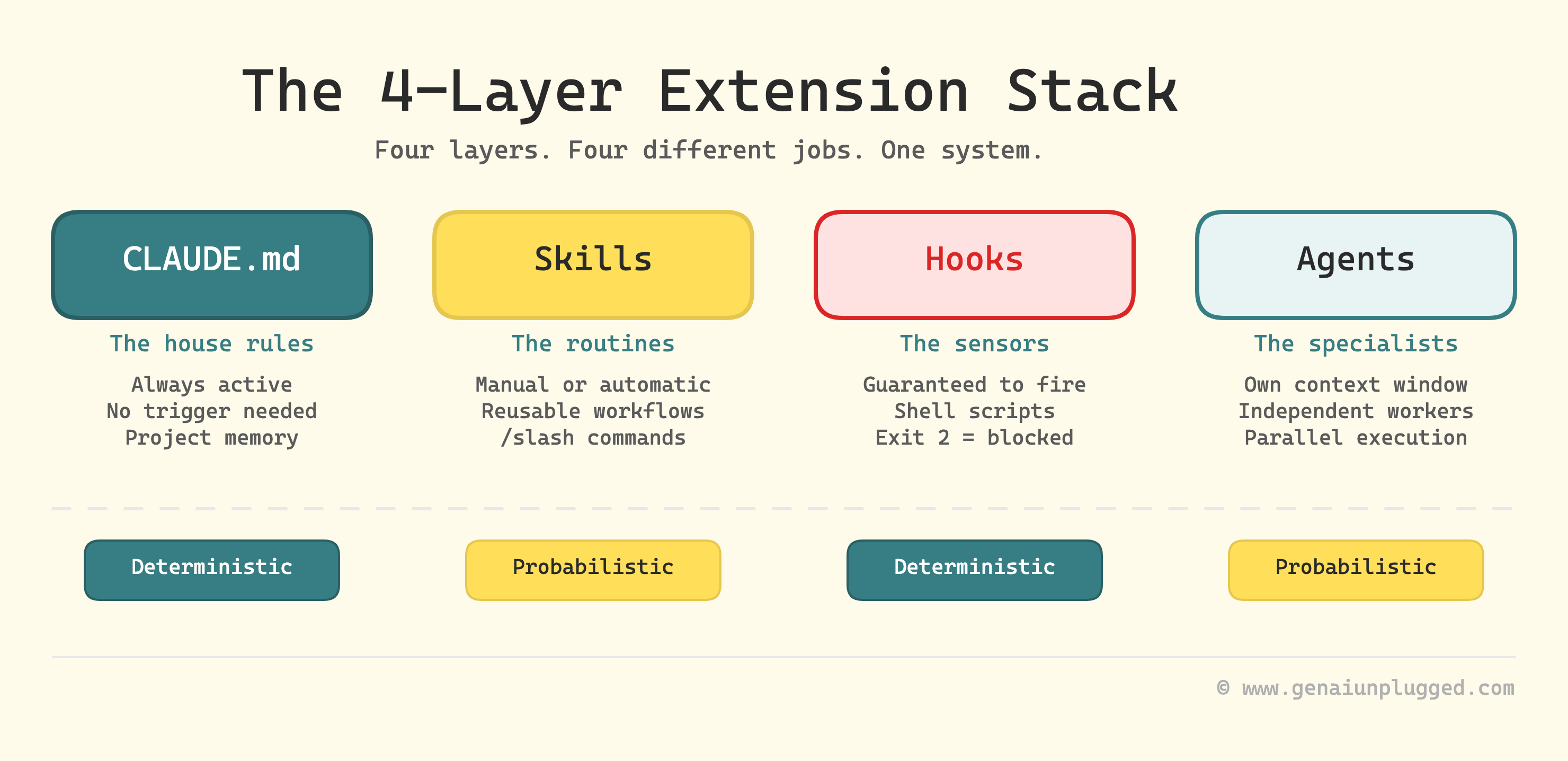
Claude Code’s four extension types work exactly like this. Each one controls a different layer of behavior:
CLAUDE.md          -> The house rules (always active, no trigger needed)
Skills (+Commands) -> The routines (manual or automatic), Commands are Skills now.
Hooks              -> The sensors (guaranteed to fire, every time)
Agents             -> The specialist contractors (independent workers)
Most people only know about CLAUDE.md. Some discover skills. Very few uses hooks or agents because nobody explains when to use each one.
Today we build all four layers. You’ll walk away with a working extension stack, not just an understanding of one.
Layer 1: CLAUDE.md - build the foundation
CLAUDE.md is a plain text markdown file that Claude Code reads at the start of every single session (almost).
Why “almost”? I will come to it in a while.
Whatever you put in this CLAUDE.md file becomes permanent context. There is no need to repeat it, less risk of Claude forgetting it. (If you’ve used Claude Projects on the web, think of CLAUDE.md as the same concept for the terminal.)
It’s the simplest and foundational extension type. And the highest-impact one for most users. So, both RIGHT and WRONG things in it makes HIGHEST impact.
What goes in CLAUDE.md file (3 things)
Think of CLAUDE.md as onboarding a new team member on their first day. You wouldn’t hand them the entire company wiki. You’d tell them three things:
Every CLAUDE.md that works well covers three layers. Miss any one and you’ll spend the first 10 minutes of every session correcting Claude instead of building.
1. The map
Claude opens your project and sees 200 files. It has no idea what’s important. Give it the lay of the land
What your project is?
What tech it uses?
Where things live?
My content system’s CLAUDE.md starts with:
“Python pipeline, 9 stages, config in config/, drafts in drafts/,
final output in ready-to-publish/.”
One paragraph. That’s all it took to stop Claude from editing the wrong files.
2. The intent
Claude can read your code. It can’t read your mind.
Why does the data flow this way?
Why is this module separate from that one?
What should never be touched without permission?
Here’s a real example from mine:
Notion is the source of truth for post metadata.
calendar-cache.json is the local state, synced from Notion.
Pipeline stages update the cache.
DO NOT create file-based state tracking.
Four lines. Prevents an entire category of architecture mistakes because Claude understands the design, not just the code.
3. The playbook
This is the one most people skip and it’s why Claude keeps doing things the wrong way. Tell it the specific patterns to follow when making changes.
Which function to call (and which one to never call)?
How to run tests?
How to deploy?
What the commit format looks like?
If your project uses a non-obvious pattern let’s say, a specific LLM wrapper instead of direct API calls, this is where you spell it out.
Claude will follow the pattern it finds in your codebase most of the time. The playbook catches the other 20%.
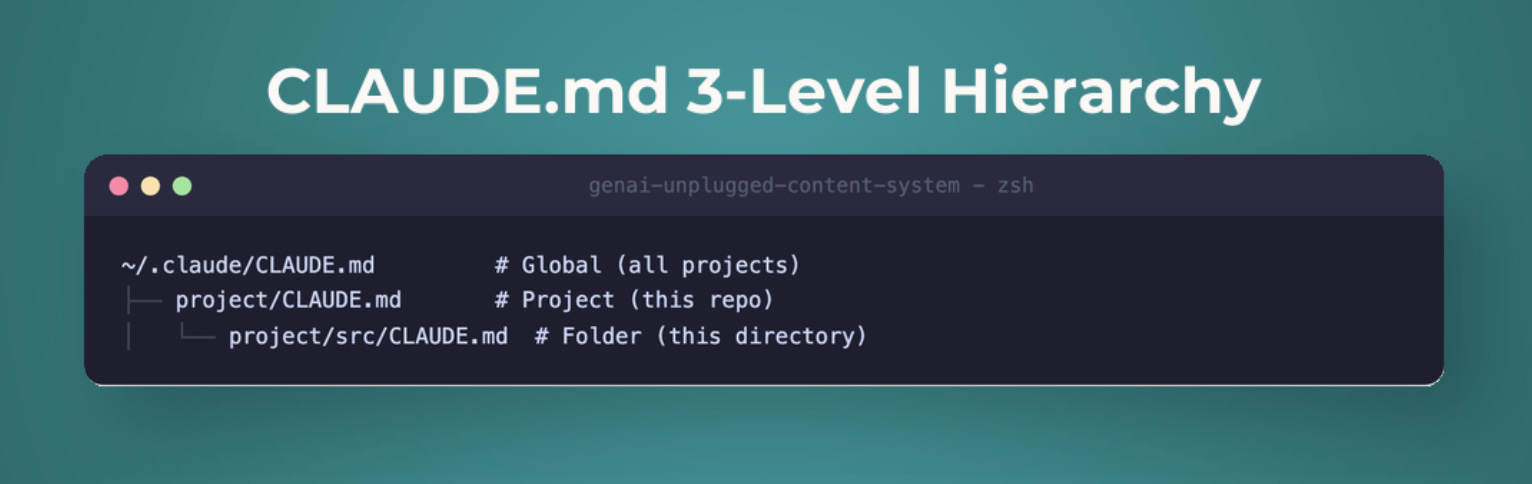
Where CLAUDE.md lives (3 levels)
CLAUDE.md works at three levels, and this matters more than most tutorials acknowledge:
Level 1: Project memory - .claude/CLAUDE.md (inside your project folder)
This is the most common placement. Claude Code reads it whenever you open a session in this project directory. It knows your project’s architecture, coding conventions, and key files.
Level 2: User memory - ~/.claude/CLAUDE.md (in your home directory)
This applies across ALL your projects. Put your personal preferences here - your preferred coding style, your name and business context, tools you always use.
Level 3: Auto memory - ~/.claude/MEMORY.md
Claude Code can write to this file itself, storing lessons learned across sessions. It’s the only memory file Claude Code actively updates.
The hierarchy: project-level overrides user-level.
If your project CLAUDE.md says “use Python,” but your user-level says “use JavaScript,” the project wins inside that project folder.
The 5 essential sections of CLAUDE.md file
After 3 months of iterating (including building my entire team of AI Research Agents around it), I’ve settled on 5 sections that every CLAUDE.md needs:
# Project Name - Claude Guidelines

## 1. Critical Rules (MUST follow)
- Always use [specific pattern] for [specific task]
- Never modify [specific files] without approval
- [3-5 non-negotiable rules - keep this tight]

## 2. Project Overview
- Tech stack: Python 3.11 / Next.js / PostgreSQL / etc.
- Key directories: what lives where
- Data flow: where does data come from? How does it move?
- Why things are built this way (design decisions)

## 3. How to Work Here
- Build command: [how to build]
- Test command: [how to run tests]
- Deploy: [how to deploy or what to avoid]
- Patterns to follow when making changes

## 4. What Claude Gets Wrong
- [Specific recurring mistake #1 and the fix]
- [Specific recurring mistake #2 and the fix]
- Add to this list every time Claude repeats an error

## 5. Deeper Docs
- For deployment details: .claude/docs/deployment.md
- For API patterns: .claude/docs/api-patterns.md
- [Point Claude to separate files instead of cramming everything here - it reads them when relevant]
CLAUDE.md mistake everyone makes: putting too much in
This is the single most common question about CLAUDE.md, “What should I put in it?”, and the answer surprises most people.
1. Less is more, and there’s research to prove it.
A 2025 study on instruction-following found that frontier LLMs reliably follow approximately 150-200 instructions before quality degrades. Not from the bottom up - uniformly across ALL instructions. And here’s the part nobody talks about:
Claude Code’s own system prompt already consumes roughly 50 of those instruction slots before your CLAUDE.md is even read. You’re working with about 100-150 remaining slots.
Every irrelevant instruction you add doesn’t just waste space. It degrades Claude’s attention to your critical rules.
2. Claude may filter your CLAUDE.md.
Claude Code does not treat your CLAUDE.md as law. It treats it as context, the context it may or may not use.
Internally, your CLAUDE.md gets loaded with a note to Claude Code that essentially says: “this might be relevant to the current task, or it might not be.” Claude decides.
If your file is full of rules that don’t apply to what Claude is working on right now, it starts ignoring more of them, including the ones that do apply.
I learned this the hard way when Claude kept skipping my “always read files before editing” rule. The rule was buried in a 700-line CLAUDE.md where half the content was about deployment workflows Claude never touched. I cut the file to 120 lines of universally relevant rules. The skipping stopped.
The takeaway: every line in your CLAUDE.md is competing for Claude’s attention. Make sure it deserves to be there.
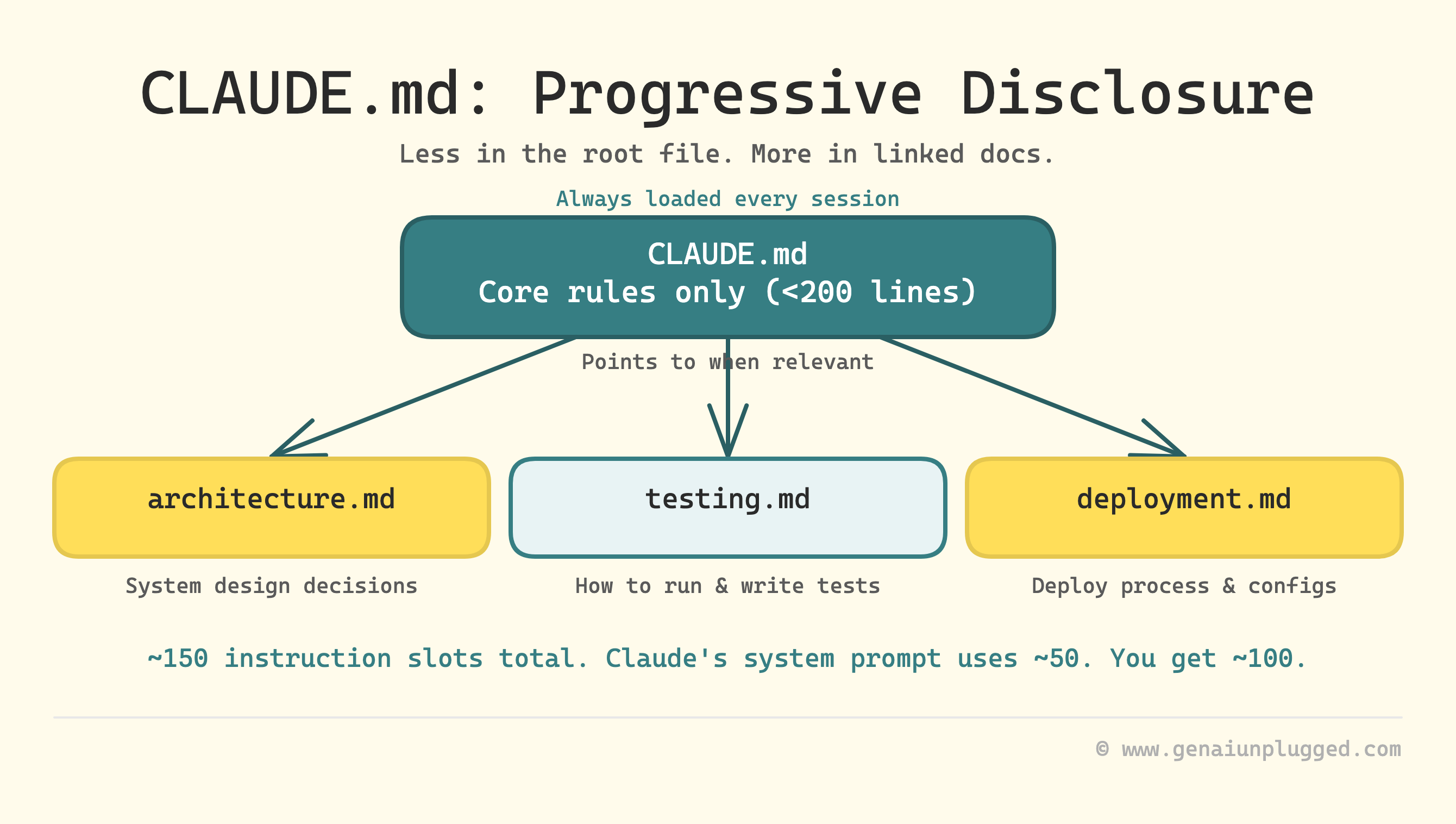
3. The fix: progressive disclosure.
Instead of cramming everything into CLAUDE.md, create a folder of separate doc files with descriptive names:
.claude/
├── CLAUDE.md              # Core rules only (under 200 lines)
└── docs/
    ├── architecture.md    # How the system is built
    ├── testing.md         # How to run and write tests
    ├── deployment.md      # How to deploy
    └── api-patterns.md    # API conventions and examples
In your CLAUDE.md, list these files and tell Claude to read the relevant ones for the current task. Claude loads the core rules every time but only reads the deployment guide when you’re actually deploying. Less context pollution. Better instruction-following.
4. What to keep OUT of CLAUDE.md:
Linting and formatting rules - use hooks or actual linters instead (we’ll build one in Layer 3)
Task-specific workflows - put these in separate docs files and reference them
Code snippets - they go stale fast. Use
file:linepointers to actual code insteadEverything - a 500-line CLAUDE.md hurts more than it helps. Target under 200 lines for the root file. Some production teams run under
The community is split on this. Some developers load comprehensive index files into CLAUDE.md so Claude always has a full map. Others keep it sparse and let Claude explore the codebase as needed.
After 3 months of testing both approaches I can say that sparse + progressive disclosure wins for projects that evolve. The index-file approach works for large, stable codebases you’re reading more than writing.
Build step: create your CLAUDE.md (5 minutes)
Start with /init - it scans your project and generates a starter CLAUDE.md in about 30 seconds. It won’t be perfect, but it gives you a 70% starting point.
/initThen immediately trim it.
Remove anything that isn’t universally applicable to every task in your project. Add 3 rules that Claude Code keeps getting wrong. For my content system:
## Critical Rules
- Always use `generate_with_system()`
- NEVER use `generate()` directly
- Always include post_id prefix in folder names (e.g., `45-templates/`)
- Read files before editing - never modify files you haven't read
Over time, refine it manually.
Every time Claude makes a mistake, add a rule.
Every time you notice Claude ignoring a rule, check if it’s too vague or buried in a wall of text.
The best CLAUDE.md files are built iteratively over weeks, not generated in one pass.
That’s Layer 1 built. Claude Code now remembers your project every session.
Layer 2: Claude Code Skills - build your routines
Skills are markdown files that package multi-step prompts into reusable workflows. They’re the most versatile extension type and the most misunderstood.
Commands v/s Skills 2026 - The merge you need to know about
If you’ve seen older Claude Code tutorials mention “commands” or “slash commands” in .claude/commands/, here’s the update:
Claude Commands have been merged into the Claude Skills system.
The .claude/commands/ folder still works (it’s supported as a legacy path), but the canonical location is now .claude/skills/ for project skills and ~/.claude/skills/ for global skills.
The format is the same: a markdown file with YAML frontmatter and a prompt body. But skills gained a critical new capability that commands never had: auto-invocation.
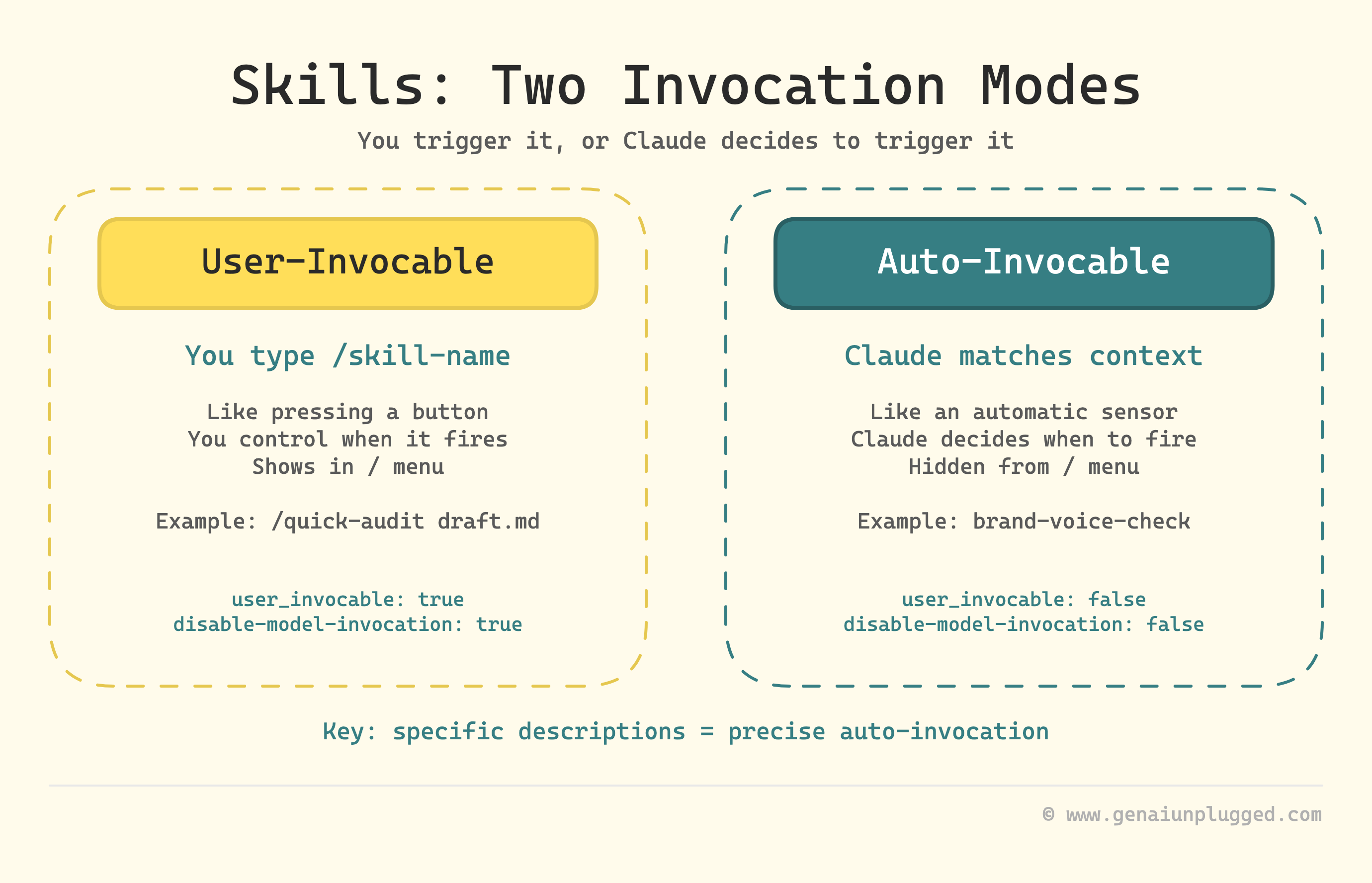
Two invocation modes for Claude Skills
This is what makes skills fundamentally different from the old command system:
Mode 1: User-invocable. You type /skill-name and it runs. This is what commands always did. You’re in control of when it fires.
Mode 2: Auto-invocable. Claude reads the skill’s description field and decides whether to invoke it based on context.
You write a blog post, and Claude automatically runs your brand-voice-check skill because the description says “Use when writing or editing content files.” You didn’t type anything. Claude matched the context to the description and applied the skill.
The frontmatter controls which mode (or both) a skill uses:
---
description: "What this skill does and WHEN Claude should auto-invoke it"
user_invocable: true                # Shows up in / menu (default: true)
disable-model-invocation: false     # Claude can auto-invoke (default: false)
---
The description field does double duty:
it explains the skill to users AND tells Claude when to auto-invoke.
A vague description like “checks content quality” triggers on everything. A specific one like “Checks markdown files in drafts/ against brand voice rules when writing or editing article content” triggers only when relevant.
Controlling who invokes what
By default, both you and Claude can invoke any skill. Two frontmatter fields let you restrict this:
disable-model-invocation: true
Only you can invoke the skill. Use this for skills with side effects or where timing matters. My /distribute skill generates social content and pushes to Notion. I don’t want Claude deciding my draft is ready and auto-distributing it. Same logic applies to /deploy, /commit, or anything that writes to external systems.
user_invocable: false
Only Claude can invoke the skill. Use this for background knowledge that isn’t actionable as a command. A legacy-api-patterns skill explaining how your old auth system worked is useful context for Claude when it touches that code. But /legacy-api-patterns isn’t a meaningful action for you to trigger manually.
Create Two Claude skills (10 minutes)
Let’s quickly create two basic variations of starter skills auditing your brand voice that you can start using in 10 minutes and keep refining later as part of your content pipeline.
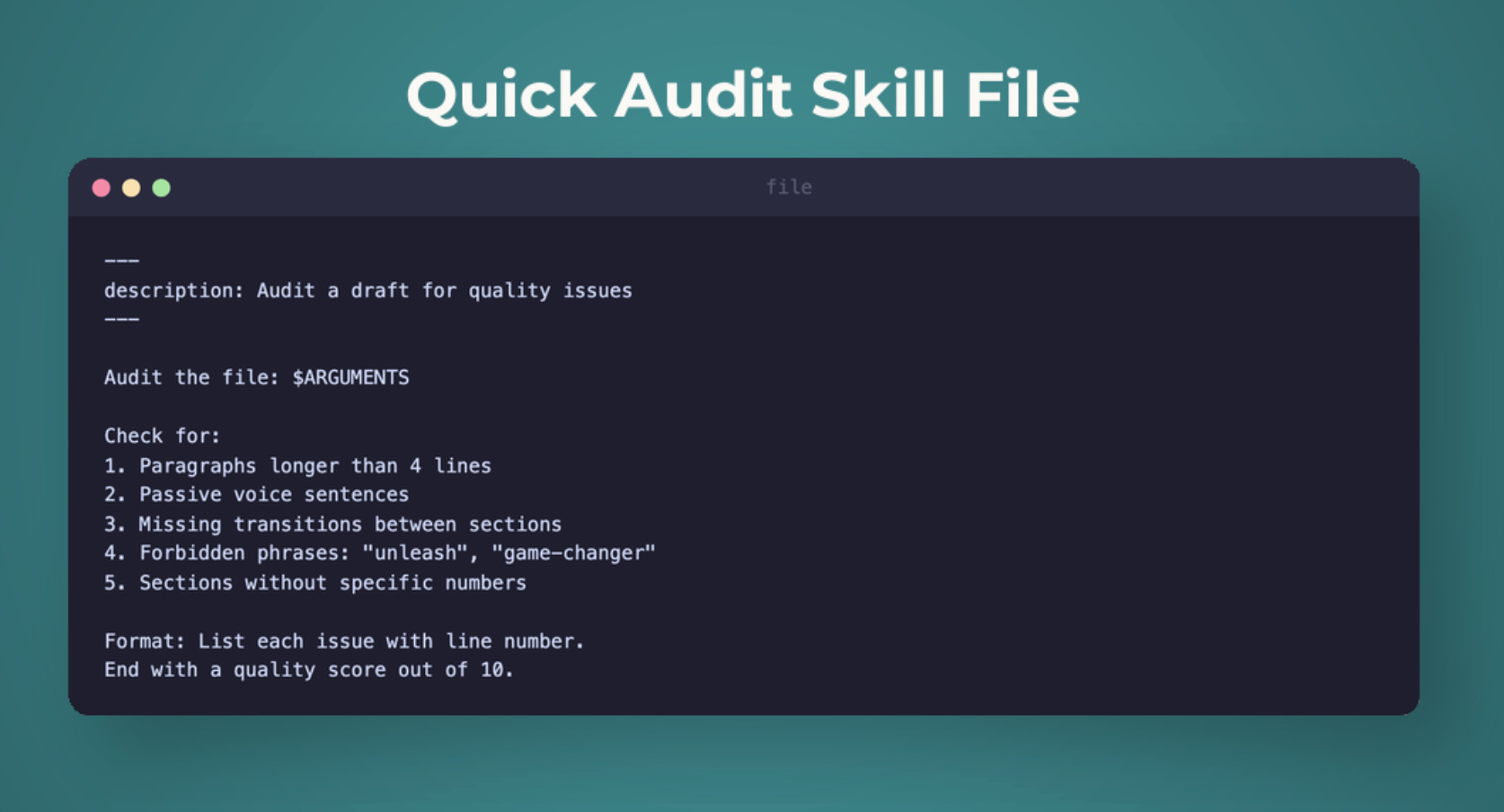
Skill 1: /quick-audit (user-invocable)
Create .claude/skills/quick-audit/SKILL.md:
---
description: "Quick quality audit of a draft article against brand voice and structure rules. Use /quick-audit <path> to check any draft."
user_invocable: true
---

# Quick Audit

Audit the following draft for quality: $ARGUMENTS

## Process
1. Read the draft file at the provided path
2. Check against brand voice rules:
   - No forbidden phrases (revolutionary, game-changing, unlock, unleash, supercharge, paradigm, next-level)
   - Paragraphs under 4 lines
   - First sentence under 10 words
   - Specific numbers in outcomes
3. Check structure:
   - Intro answers: what, problem, why, promise
   - Big idea statement present
   - Key takeaways are actionable bullets
   - Mini exercise included
4. Check readability: target Grade 8

## Output
- Overall score (1-10)
- Issues found (critical, major, minor)
- Specific fix suggestions with line numbers
Now type /quick-audit drafts/my-article.md and Claude runs the full audit in one step. No re-explaining the brand rules. No forgetting the checklist. One command, complete audit.
Skill 2: brand-voice-check (auto-invocable)
Create .claude/skills/brand-voice-check/SKILL.md:
---
description: "Automatically checks brand voice compliance when Claude writes or edits markdown files in drafts/ or ready-to-publish/ directories. Flags forbidden phrases, long paragraphs, and weak openings."
user_invocable: false
---

# Brand Voice Check
When writing or editing content files, automatically verify:

## Rules
- No forbidden phrases: revolutionary, game-changing, unlock, unleash, supercharge, paradigm, next-level, cutting-edge
- No em-dashes (use hyphens instead)
- Paragraphs: maximum 4 lines
- First sentence of article: under 10 words
- Tone: conversational, specific with numbers, practical
- Max 1 exclamation mark per section

## If violations found
- Flag them inline with specific locations
- Suggest replacements that match the conversational tone
- Fix automatically only if the fix is obvious (e.g., replacing a forbidden phrase with a simpler word)
Notice user_invocable: false. This skill doesn’t appear in the / menu. Instead, Claude reads the description, sees “when Claude writes or edits markdown files in drafts/”, and auto-invokes it when the context matches. You’re writing a draft, and brand voice compliance happens in the background.
The difference in practice:
/quick-audit= you decide when to run it (like pressing a button)brand-voice-check= Claude decides when to apply it (like an automatic sensor)
That’s Layer 2 built. You now have on-demand auditing and automatic brand voice enforcement.
PS: You can always provide referenceable detailed Brand Voice Guideline file references too instead of just a simple list of brand voice rules. Above is just an example for you to extend.
Layer 3: Claude Code Hooks - build your guardrails
Here’s the critical distinction most people miss: skills are suggestions. Claude code uses judgment about whether to invoke them. If it’s focused on a complex task, it might skip your brand-voice-check skill. It’s probabilistic.
Hooks are different. A hook is a shell script that runs automatically at a specific point in Claude Code’s workflow. It doesn’t ask Claude to do something. It does it. Every time. Zero exceptions. It’s deterministic.
How hooks work in Claude code?
Hooks are configured in your settings.json file (.claude/settings.json for project hooks or ~/.claude/settings.json for global). Each hook has three parts:
An event - when does it fire? (17 events covering session, tool, agent, and notification lifecycle)
A matcher - which tools should trigger it? (Bash, Edit, Write, or any tool name)
A script - what does it do?
The script communicates back through exit codes:
Exit 0 - everything’s fine, proceed
Exit 2 - block the action, don’t let it happen
Any other code - warning, proceed but show feedback
That exit code 2 is the key. It gives you a hard stop that Claude Code respects every single time.
Hooks come in 4 types:
commandhooks (runs a shell script),httphooks (calls a URL),prompthooks (asks Claude to evaluate), andagenthooks (delegates to an agent).
The full hooks documentation covers all 17 events and 4 types. Today we build a command hook - the most common type. Lesson 3 goes deeper.
Build step: create a dangerous-command blocker (5 minutes)
The script - save as .claude/hooks/block-dangerous.sh:
#!/bin/bash
INPUT=$(cat)
COMMAND=$(echo "$INPUT" | jq -r '.tool_input.command // empty')

# Block dangerous patterns
DANGEROUS_PATTERNS=(
  "rm -rf"
  "git push --force"
  "git push -f"
  "git reset --hard"
  "git clean -fd"
  "drop table"
  "DROP TABLE"
)

for pattern in "${DANGEROUS_PATTERNS[@]}"; do
  if echo "$COMMAND" | grep -q "$pattern"; then
    echo "BLOCKED: $COMMAND" >&2
    echo "This command is on the dangerous list." >&2
    exit 2
  fi
done

exit 0
Make it executable:
chmod +x .claude/hooks/block-dangerous.shThe configuration - create or update .claude/settings.json:
{
  "hooks": {
    "PreToolUse": [
      {
        "matcher": "Bash",
        "hooks": [
          {
            "type": "command",
            "command": "\"$CLAUDE_PROJECT_DIR\"/.claude/hooks/block-dangerous.sh"
          }
        ]
      }
    ]
  }
}
What happens:
Every time Claude Code tries to run a bash command, the hook fires before the command executes.
If the command matches a dangerous pattern, exit code 2 blocks it entirely.
Claude Code gets feedback explaining why and tries a safer alternative.
This hook has already saved me twice. Once when Claude tried git push --force to resolve a merge conflict. It would have overwritten my production changes for SubflowAI Chrome Extension that is being used by 48+ users currently in production.
And other time it saves was when it tried rm -rf on a directory with uncommitted files.
Why a hook instead of a CLAUDE.md rule?
You may already know it by know but I tested both. With “never run rm -rf” in CLAUDE.md, Claude followed the instruction about 70% of the time. With the hook, it’s blocked 100% of the time. For safety rules, deterministic beats probabilistic.
That’s Layer 3 built. Dangerous commands are now physically blocked, not just discouraged.
Layer 4: Claude Agents / Subagents - understand the specialists
The first three layers all run inside your main Claude Code conversation. Agents are different:
Claude subagents get their own separate context window, their own tool access, and their own instructions.
Why context isolation matters
Remember the problem from the opening of the tutorial?
Context windows fill up. After an hour of research, writing, and editing, Claude Code has forgotten what you researched at the start.
Agents solve this by splitting the work. A researcher agent searches the web in its own context window so your main conversation stays clean.
A writer agent drafts content in its own context window
the research findings don’t crowd out the brand guidelines.
Think of it as hiring specialists instead of asking one generalist to do everything.
Agent anatomy
Custom agents live as markdown files in .claude/agents/ (project) or ~/.claude/agents/ (global):
---
name: researcher
description: Deep web research on any topic
tools: WebSearch, WebFetch, Read, Glob, Grep
model: sonnet
memory: project
mcpServers:
  - perplexity
  - firecrawl
---

You are a research specialist. When given a topic...
[detailed instructions]
The frontmatter controls everything: which tools the agent can access, which model it uses, whether it remembers across sessions, and which MCP servers it can reach.
Built-in agents
Claude Code already has three agents working behind the scenes:
Explore: Uses Haiku (fast, cheap). Read-only. Fires when you ask “where is X?” or “find all files that import Y.”
Plan: Inherits your model. Read-only. Used in plan mode for research before implementation.
General-purpose: Full tool access. Used for complex delegated tasks.
When to use an Claude agent instead of a Claude skill
Use the decision framework:
Repeatable prompt you run often -> Skill
Work that needs its own context window -> Agent
Task that needs different tools than your main session -> Agent
Task that runs in parallel while you continue working -> Agent
We won’t build a custom agent today - that’s Lesson 4, where we build a full 3-agent research team.
If you want to see what agent-based research looks like in practice, I’ve documented building 5 research agents in a separate series. But understanding why agents exist and when to reach for them completes the mental model.
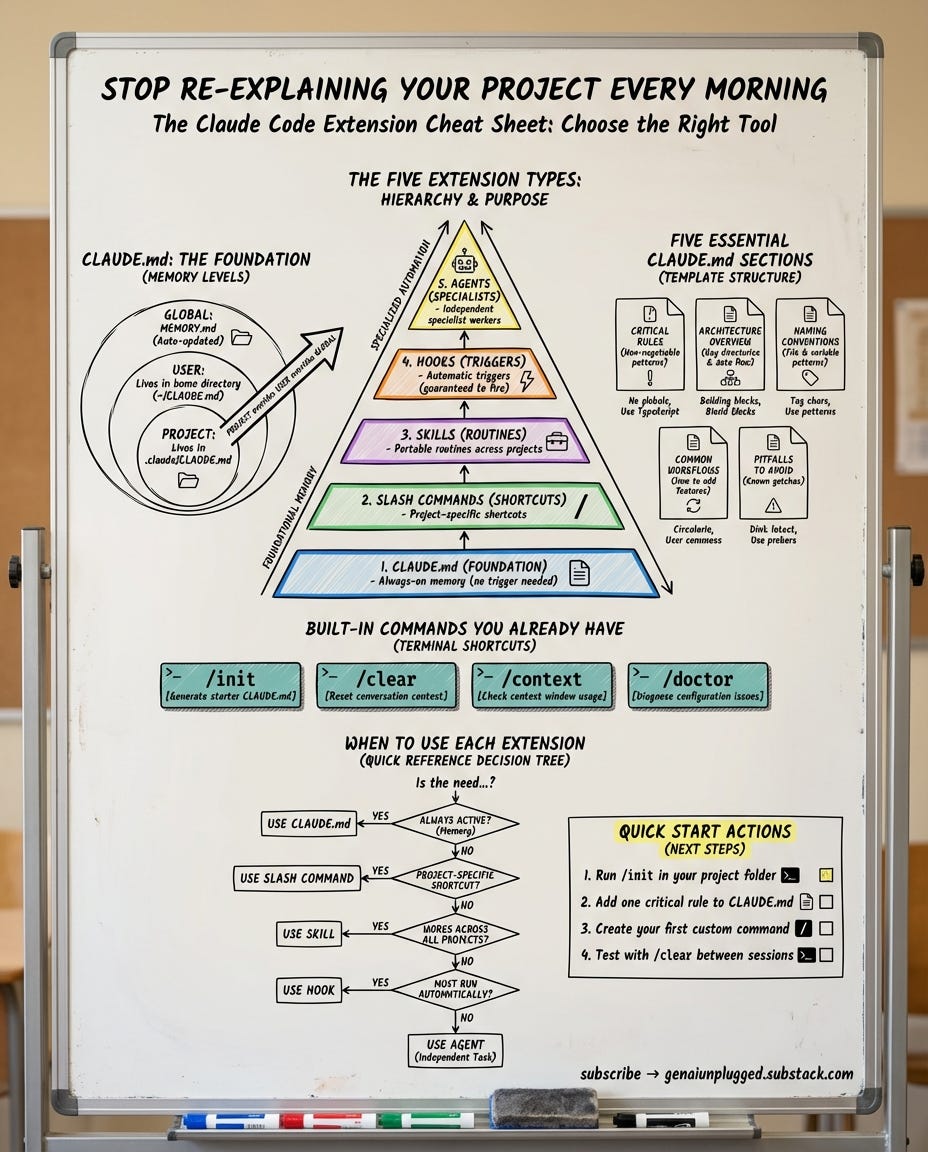
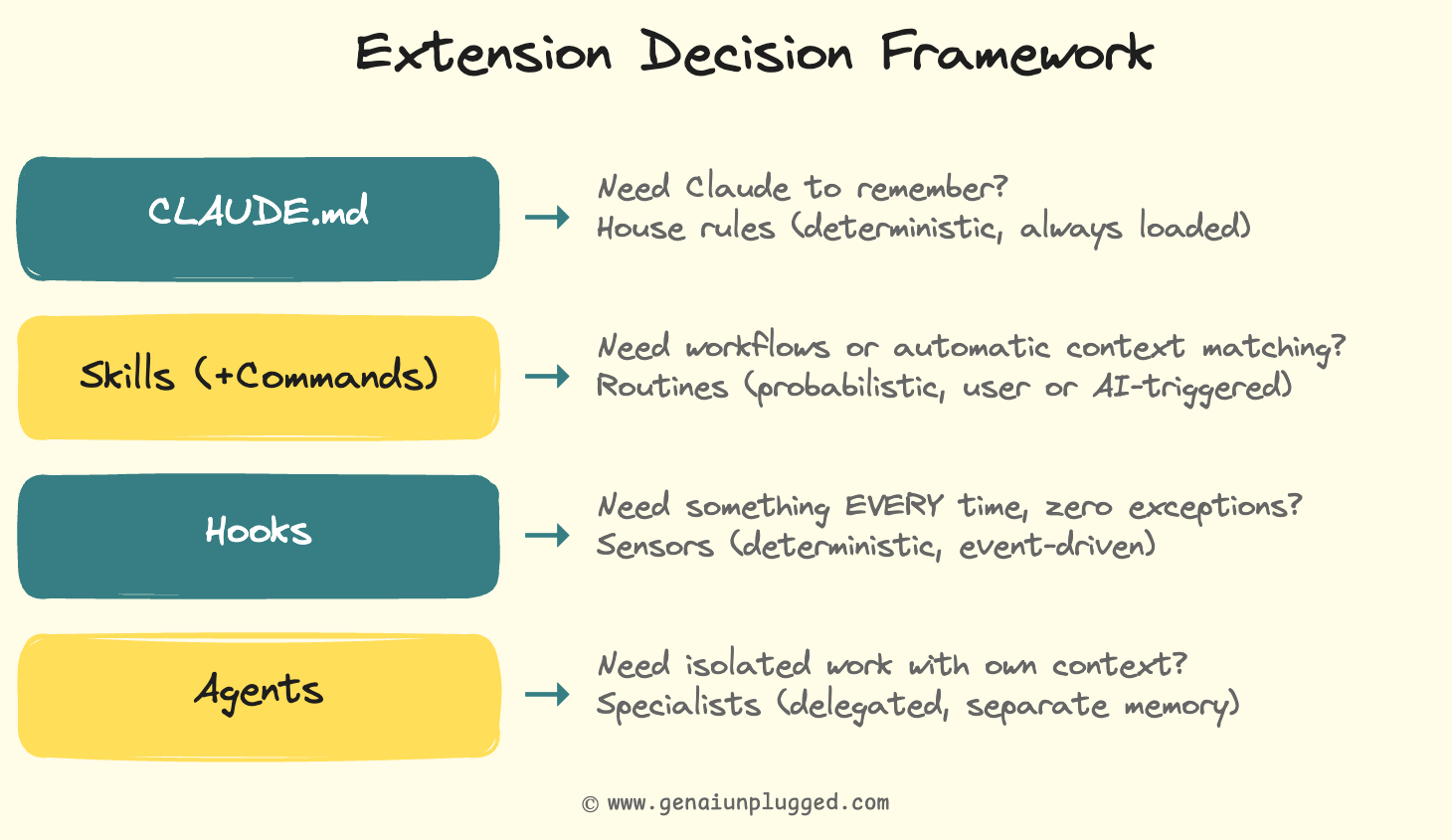
The decision framework - Claude Skills v/s Commands v/s Agents v/s Hooks
This is the signature artifact of the entire Claude Code Full Course. When you’re not sure which extension type to use, run through this 10-second decision tree:
And here’s the invocation model that makes it concrete:
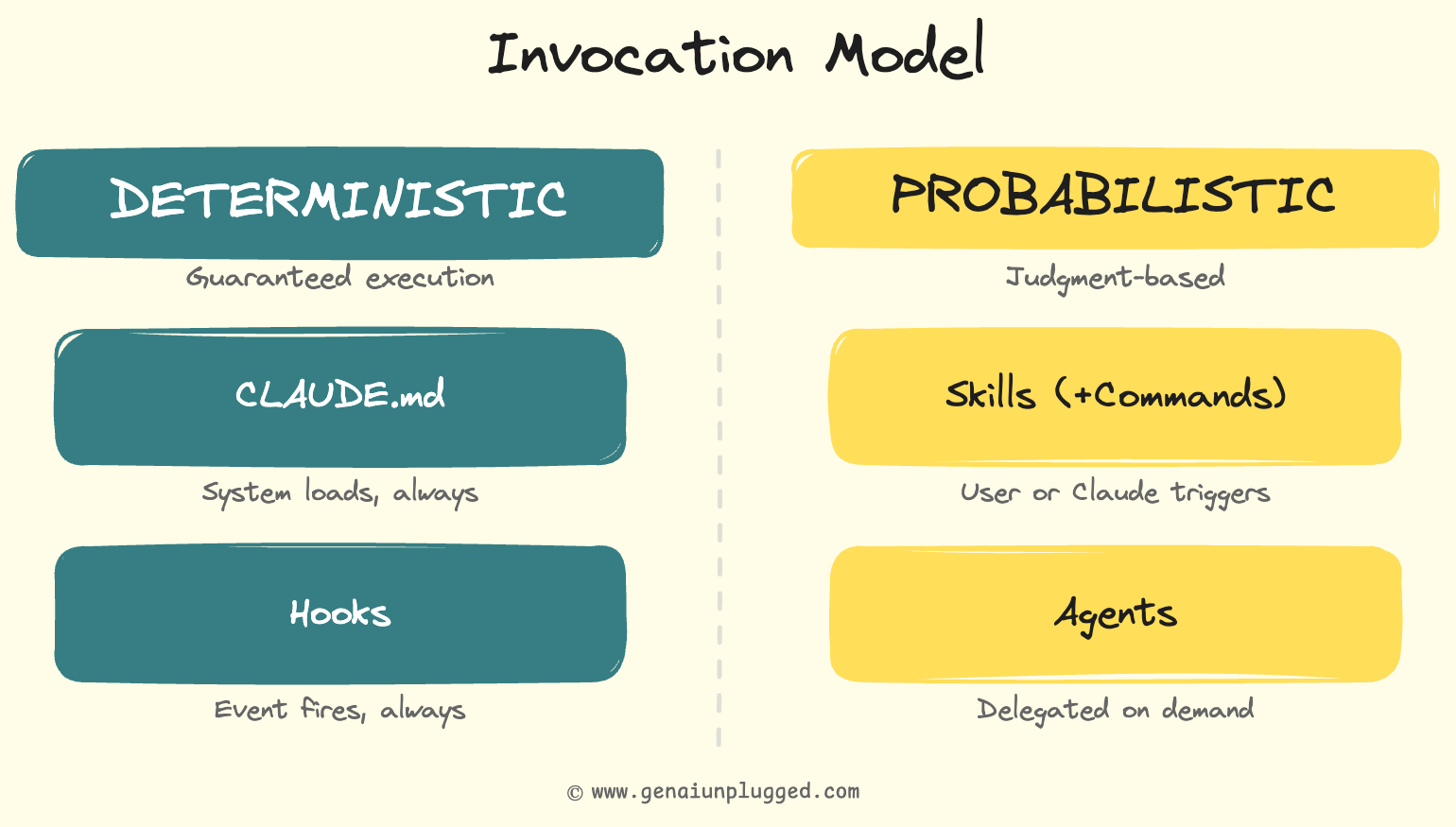
The critical insight most tutorials miss:
CLAUDE.md and hooks are deterministic - they run every time, no exceptions.
Skills and agents are probabilistic - Claude uses judgment about when and how to apply them.
This distinction drives every architecture decision.
Print that table. Tape it next to your monitor. You’ll reference it constantly for the first month.
The debugging story: the skill Claude kept auto-invoking
My first version of the brand-voice-check skill had a vague description: “Checks content quality for brand compliance.”
Sounds reasonable.
But Claude was auto-invoking it on everything. JSON config files, package.json, even README updates. Every file edit triggered a brand voice check on content that had nothing to do with brand voice.
The fix was making the description specific:
“Automatically checks brand voice compliance when Claude writes or edits markdown files in drafts/ or ready-to-publish/ directories.”
The directory scope and file type made Claude’s matching precise instead of overeager.
The key lesson: auto-invocable skill descriptions are instructions to Claude about when to fire. Treat them like search queries. The more specific, the better the results. “Checks content” matches everything. “Checks markdown files in drafts/ for forbidden brand phrases” matches exactly what you want.
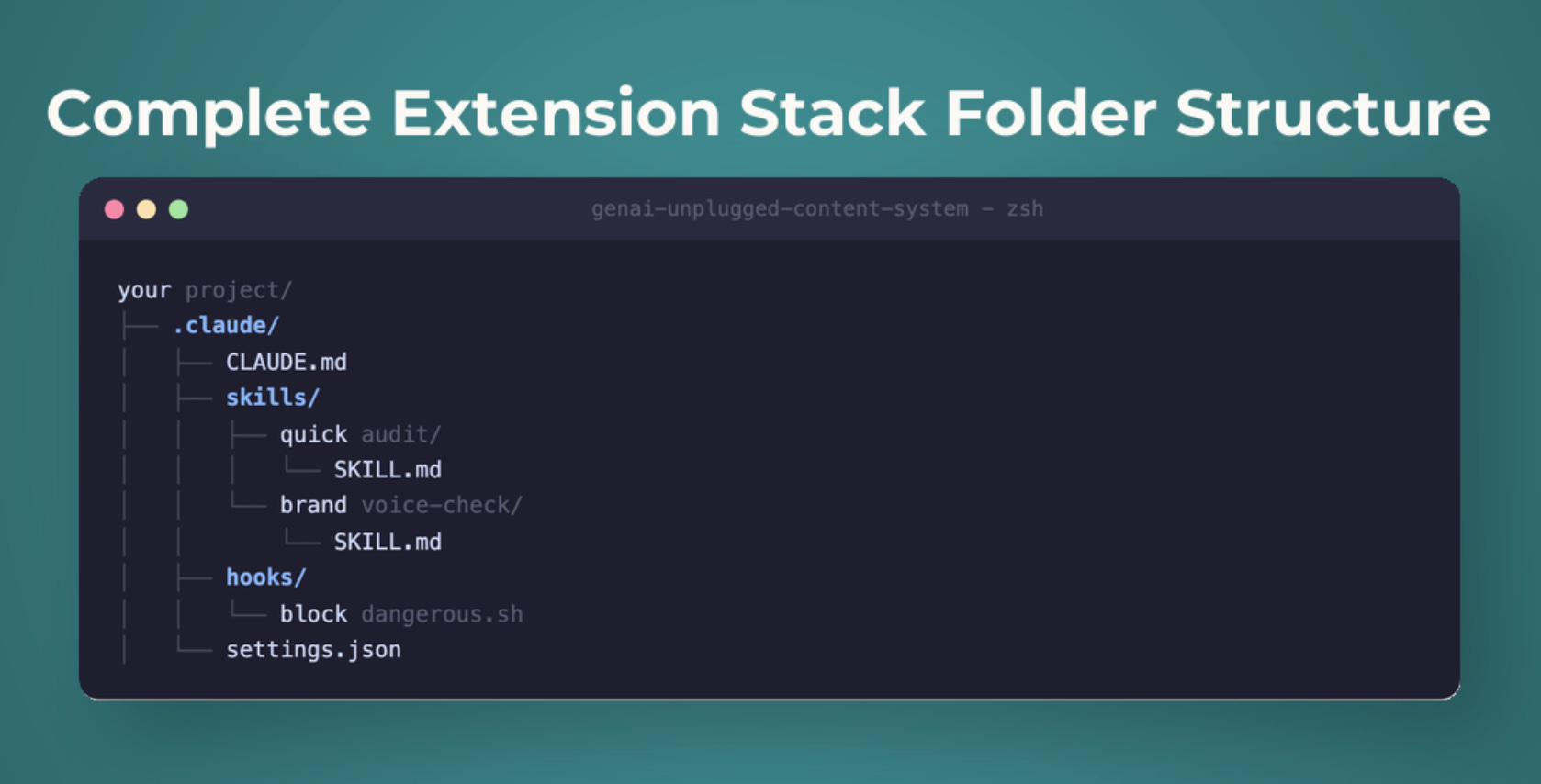
Your complete Claude Code extension stack
Here’s what you built over the last 20 minutes:
your-project/
├── .claude/
│   ├── CLAUDE.md                      # Layer 1: project memory
│   ├── skills/
│   │   ├── quick-audit/
│   │   │   └── SKILL.md               # Layer 2a: user-invocable
│   │   └── brand-voice-check/
│   │       └── SKILL.md               # Layer 2b: auto-invocable
│   ├── hooks/
│   │   └── block-dangerous.sh         # Layer 3: safety hook
│   └── settings.json                  # Hook configuration
Four layers. Four different jobs:
CLAUDE.md remembers your project (deterministic, always loaded)
/quick-auditruns a full quality check when you ask (probabilistic, on-demand)brand-voice-check enforces brand rules when Claude writes content (probabilistic, automatic)
block-dangerous.sh prevents destructive commands (deterministic, every time)
Layer 4 (Claude AI Agents) is the architecture you now understand and are ready for Lesson 4 where we build a full 3-agent research team.
The content multiplication system from Lesson 1 took 45 minutes to build. This extension stack? About 20 minutes.
But the compounding effect is permanent!
Every future session starts with your rules loaded, your skills available, your guardrails active, and your audit workflow one keystroke away.
Key takeaways
CLAUDE.md should be short and specific. Claude Code’s system prompt already uses ~50 of your ~150-200 instruction slots. Every vague or irrelevant rule degrades attention to your critical rules. Keep the root file under 200 lines. Use progressive disclosure. Put detailed docs in separate files and point Claude to them. Add rules every time Claude makes a mistake, but trim what it ignores.
Skills replaced/merged commands. The
.claude/commands/path still works, but.claude/skills/is the canonical location. Skills gained auto-invocationClaude can trigger them based on context, not just when you type
/name. See the official skills docs for the full reference.Auto-invocable skill descriptions are targeting instructions. Vague descriptions fire on everything. Specific descriptions (file types, directories, action contexts) fire only when relevant.
Hooks are deterministic. Skills are probabilistic. For rules that must be followed 100% of the time (safety, formatting), use hooks. For rules where Claude’s judgment is acceptable, use skills.
Exit code 2 blocks actions. PreToolUse hooks with exit code 2 prevent commands before they execute. This is the only way to get a hard guarantee in Claude Code.
Agents get separate context windows. When a task needs its own memory space, different tools, or parallel execution, that’s an agent - not a skill.
The decision framework is your daily reference. CLAUDE.md for memory, skills for routines, hooks for guarantees, agents for delegation. Print it. Use it.
Next lesson
In Lesson 3, we connect Claude Code to the outside world. MCP servers give it web search, page scraping, and database access. We go deep on hooks - all 17 events, all 4 hook types, and 3 production-ready hooks you’ll use daily. Claude Code stops being a smart local assistant and starts being a connected, automated system.
Lesson 3: I Connected Claude Code to 5 Tools using MCP and Added Automation Hooks ->
Unplugged Reads
Handpicked from creators I actually read.
Your PluggedIn assets for this post
What’s inside:
block-dangerous.sh
Block Dangerous
settings-hooks.json
Settings Hooks (config)
complete-extension-stack-example.pdf
Complete Extension Stack - Working Example
extension-decision-framework.pdf
Extension Decision Framework - Quick Reference Card
brand-voice-check-skill.pdf
Brand Voice Check Skill Template (Auto-Invocable)
claude-md-template.pdf
CLAUDE.md Template - Your Project Memory
quick-audit-skill.pdf - /quick-audit Skill Template

Claude code agents are becoming the standard. The agents + hooks combo is chef's kiss for automation
The four-layer stack consisting of CLAUDE.md, skills, hooks, agents is so important. Thanks for detailing such a well rounded repeatable use case for Claude Code, Dheeraj! ✨