



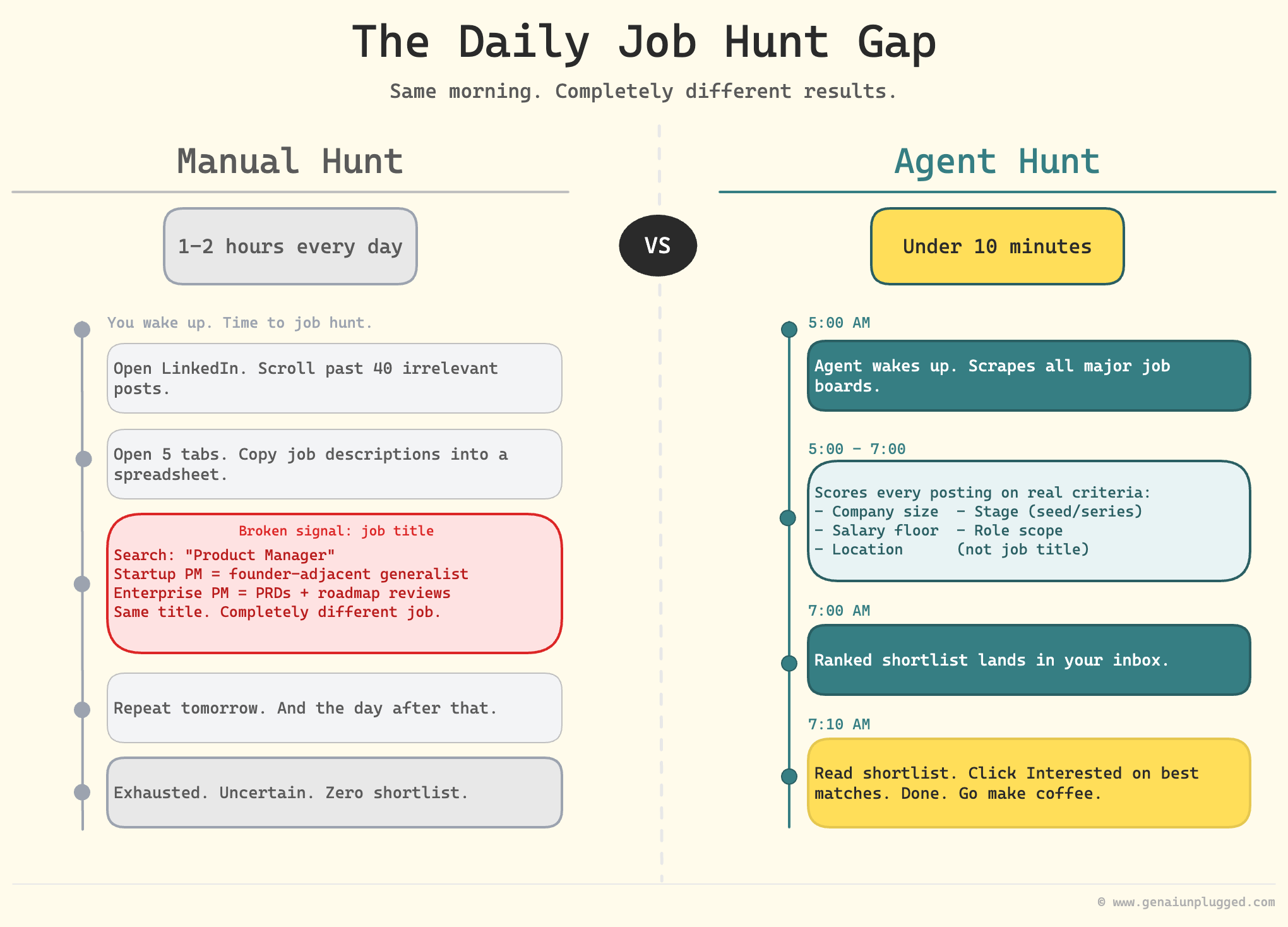
Job hunting is exhausting, repetitive, and mostly manual. You open LinkedIn, scroll past 40 irrelevant postings, open five tabs, copy job descriptions into a spreadsheet, and repeat this tomorrow. Good jobs exist.
The problem is finding them takes the same mindless effort every single day without a system.
In Episode 2 of One Shot Show Season 2, Wyndo and I had this opportunity to sit down with Pawel Jozefiak, an AI experimenter and builder behind Pawel's Substack, to walk through the agent he built to fix exactly this.
His job finder agent wakes up at 5am, scrapes job boards, scores every posting against his specific criteria, and delivers a curated ranked list to his inbox by 7am.
What used to take him 2+ hours of daily LinkedIn scrolling now takes under 10 minutes. Read the shortlist, click "Interested" on the best matches, let the agent generate tailored application materials.

By the end of this article, you'll know exactly how to build the same thing:
the five-layer architecture, the files you need,
how to make the agent improve over time, and
which tools to use for scraping.
You'll also understand one distinction that most agent builders miss, the difference between memory and learning.
👋 Julley, I'm Dheeraj and I'm an AI systems builder.
I build production-grade AI systems at work by day and ship my own products by night (9+). This newsletter is the bridge between those two worlds. Every system, every build, documented step by step.
Join 1,500+ builders getting the exact AI setups, prompts, and production configs that actually work in your business.
Most job search agents accumulate information and never get smarter. The difference is a feedback loop: email replies update your profile, and the next morning’s search uses your revised criteria. Memory stores what happened. Learning changes what happens next.
Why Job Titles Break Manual Job Searches
Job titles are broken as a search signal. "Product Manager" at a 10-person startup means founder-adjacent generalist. "Product Manager" at a 5,000-person company means someone who writes PRDs and attends roadmap reviews. Same title. Completely different job. Manual filtering against job titles is a losing game.
Pawel built his agent specifically because this problem was costing him hours every week (at 14:25, he walks through the exact pain point on screen).
He needed a system that could evaluate job descriptions against his actual criteria: company size, stage, role scope, salary floor, location, and the kinds of problems he wanted to work on. None of that lives in a job title.
The deeper issue with manual job searching is that your criteria shift as you learn. After reviewing 20 jobs, you might realize you want to filter out companies under 50 people.
After a few rejections, you might decide to expand your location radius. With a manual process, applying those updates means starting over. With an agent, it means sending one reply email.
“From October to now, I built a lot of crazy stuff. Some were fantastic and great and are still developing them. And probably like 70% of what I was doing and building is in the trash right now. But that’s also fine.” - Pawel Jozefiak
What Does the Job Finder Agent Architecture Look Like?
The agent has five layers that run in sequence every morning. Profile feeds Search, Search feeds Scoring, Scoring feeds the Email Digest, and the Feedback Loop updates the Profile for tomorrow's run.
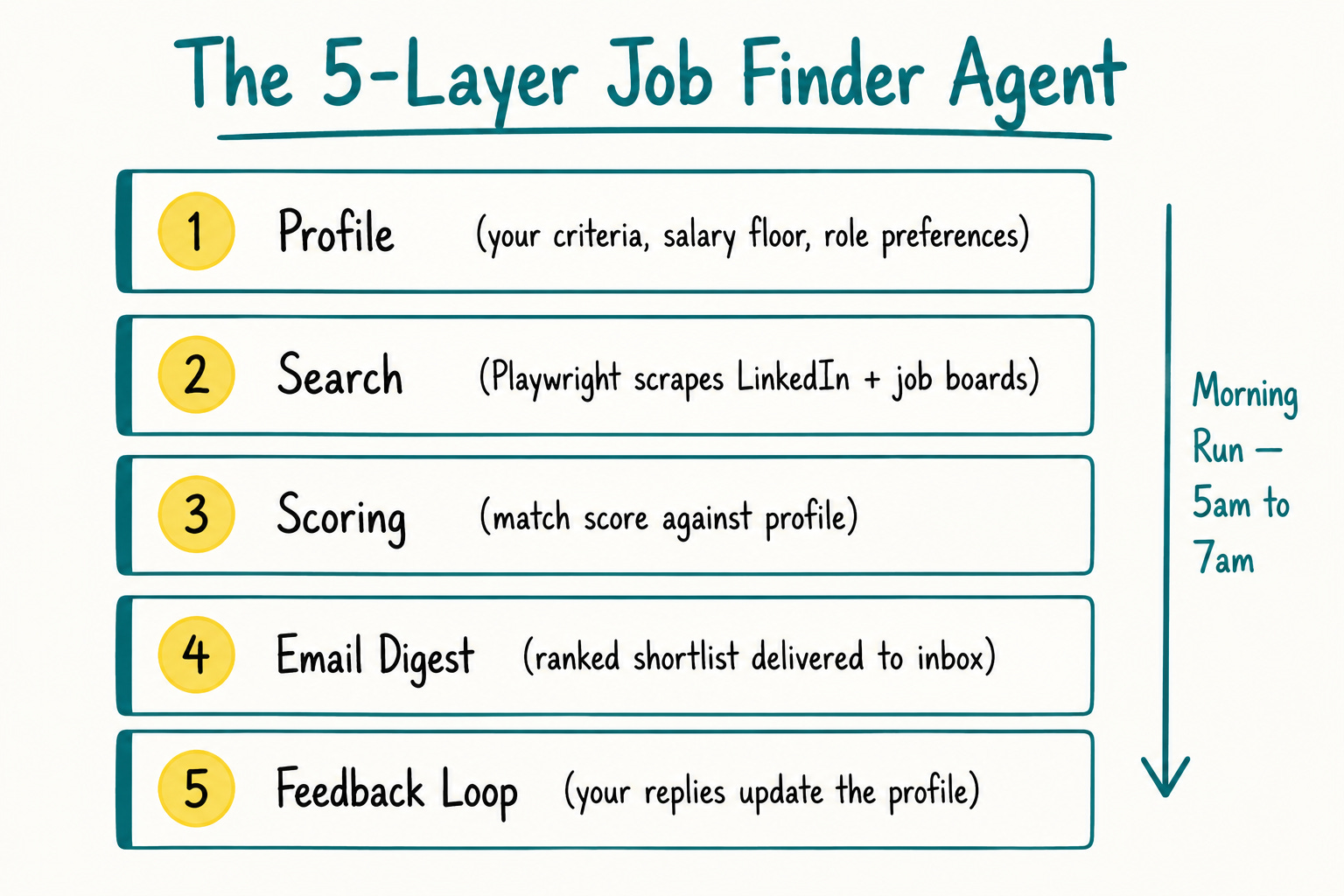
Layer 1: Profile profile.md is the agent's foundation. It contains your LinkedIn URL, portfolio links, case studies, target roles, salary floor, preferred locations, company stage preferences, and the kinds of problems you want to work on. Every scoring decision and every search query flows from this file.
Layer 2: Search Playwright handles the scraping. The agent logs into LinkedIn and any other job boards or company career pages you configure, extracts postings, and passes them to the scoring layer. You can also point it at specific company pages if you know which companies you want to track.
Layer 3: Scoring This is where subjectivity gets removed. The scoring layer evaluates each posting against your profile and outputs an objective match score. Pawel calls this "removing the vibing" from job evaluation. You are not excited or nervous about a posting at this stage. You are looking at a number.
Layer 4: Email Digest The agent sends a morning email with scored, ranked postings. Pawel reads this at 7am. The email is designed for a non-technical user. No CLI, no dashboard required. You read an email and reply.
Layer 5: Feedback Loop A Python script monitors replies from authorized email addresses. When you reply with feedback like "more roles like this" or "raise salary floor to $150K" or "exclude companies under 50 people," the script extracts the instruction and updates profile.md and memory_state.json. The next morning's run uses your updated criteria.
Commercial break: Claude Code Builder cohort
The founding batch of my Claude Code cohort starts June 20 on Maven. Six live Saturdays. You bring your business problem, we build the system.
Only 12 Seats. When they’re gone, the founding price ($797) closes and Cohort 2 opens at $1,597.

Use code GENAI20 for 20% off. Expires June 19. Check the Syllabus →
What Is the Difference Between Agent Memory and Agent Learning?
Memory is storing state. Learning is changing behavior based on feedback. They are not the same thing, and mixing them up produces an agent that accumulates information but never improves.
Wyndo asked this exact question during the session (at 27:03): when you reply to the email, does that update memory_state.json or profile.md? The answer matters architecturally.
memory_state.json tracks runtime state: which jobs were seen, when the last run was, what the agent fetched. It prevents duplicates and maintains session continuity. But it does not change the agent's behavior.
profile.md is where learning happens. When your feedback says "I'm no longer interested in remote-only roles" or "flag any role that mentions stakeholder management," that instruction updates your profile. The next run searches differently because the profile changed.
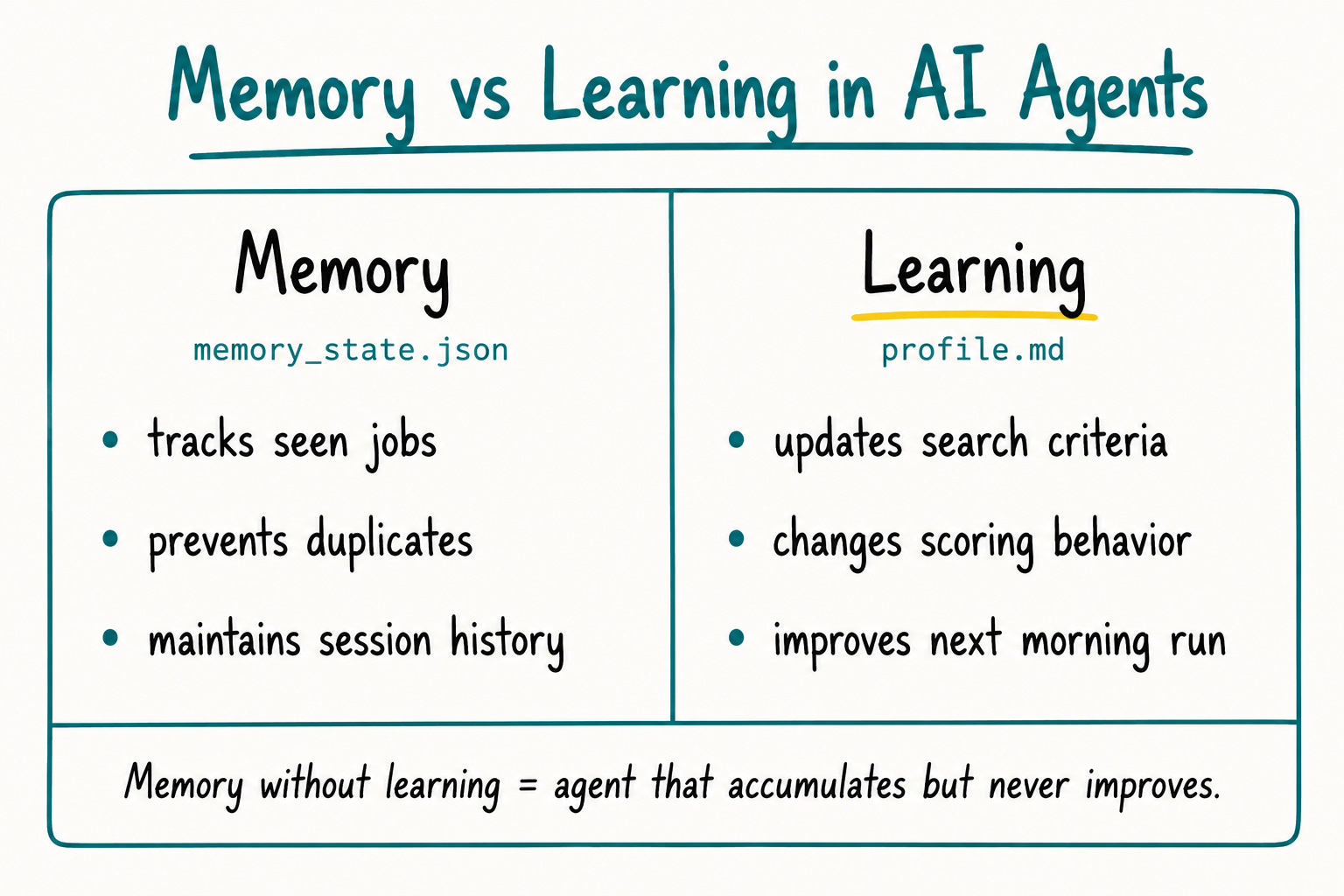
"Memory without learning will not help you that much when you are building agents."
The three-stage arc for building any agent that improves over time:
Get it working. Core output is valuable. Profile plus search plus scored email.
Add memory. Prevent duplicate jobs. Track what you have seen and reviewed.
Close the learning loop. Connect feedback to profile updates. Now the agent gets smarter.
Most builders stop at stage two. The email works, the duplicates are gone, and they call it done. But without the learning loop, the agent is static. It will keep surfacing the same types of roles because your profile never changed.
Pawel spent 2+ hours daily on manual job searches before this agent. Most builders stop after wiring the email digest. Deduplication works and they call it done. Without the learning loop, the agent surfaces the same irrelevant roles tomorrow that it surfaced today.
Get PluggedIn

How Should You Use Claude Models in a Daily Agent?
Pawel uses a deliberate cost hierarchy. The agent runs every morning, which means its token consumption compounds quickly. Choosing the wrong model tier turns a useful automation into a monthly bill that does not justify itself.
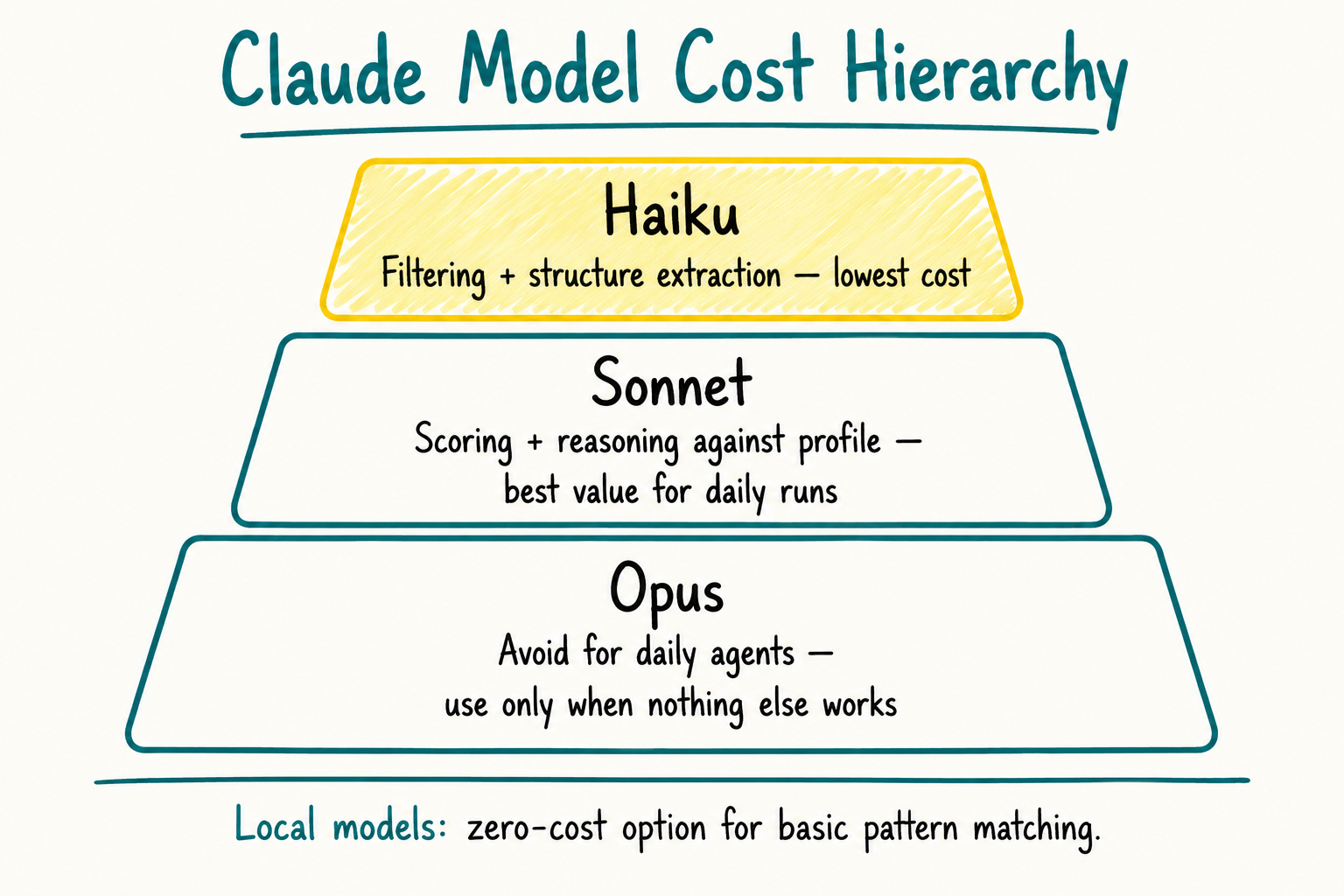
His model selection framework:
Claude Haiku
Use for: filtering, structure extraction, low-judgment tasks
Cost: lowest
Example task: extract job title, company, and salary range from a raw HTML block
Claude Sonnet
Use for: most agent work, scoring, reasoning against profile criteria
Cost: mid-range
Pawel calls this the "most value" model for everyday agent use
Claude Opus
Use for: genuinely complex tasks where nothing else works
Cost: high
Pawel's rule: avoid unless truly necessary
Small local models
Use for: structure extraction, simple pattern matching
Cost: zero
Viable for certain extraction tasks where you control the prompt tightly
"Try to avoid the strongest models if you can, because they are very, very expensive in terms of usage and tokens." - Pawel Jozefiak (at 30:50)
This is budget discipline and architectural thinking in one decision. When an agent runs daily, a 10x cost difference between Haiku and Opus shows up in your bill within a week. Design your task assignments to use the cheapest model that produces acceptable output.
How Does Playwright Compare to Firecrawl for Job Board Scraping?
Wyndo pushed on this at 51:31, and it is a question worth answering directly because the wrong tool choice will break your scraping before you even start.
Playwright
a full browser automation tool. It opens a real browser session, handles JavaScript rendering (where page content loads dynamically after the initial HTML), and can log into sites the way a human would.
LinkedIn requires an authenticated session (a real logged-in browser, not an anonymous web request). Many company career pages use JavaScript to render job listings. These sites break simple scrapers. Playwright is the right tool for this layer.
Firecrawl
A web crawler that extracts content from pages without managing a full browser session. It is faster and cheaper for sites with accessible HTML. If the job listing is in the page source without JavaScript rendering, Firecrawl handles it cleanly.
Tavily is a third option
A search API that handles structured web search without you managing your own scraping infrastructure. I migrated to Tavily from a Firecrawl plus Perplexity combination. For research-style queries where you want aggregated results rather than a specific page, Tavily simplifies the stack.
Pawel's approach is a tiered system: match the tool to the site requirements.
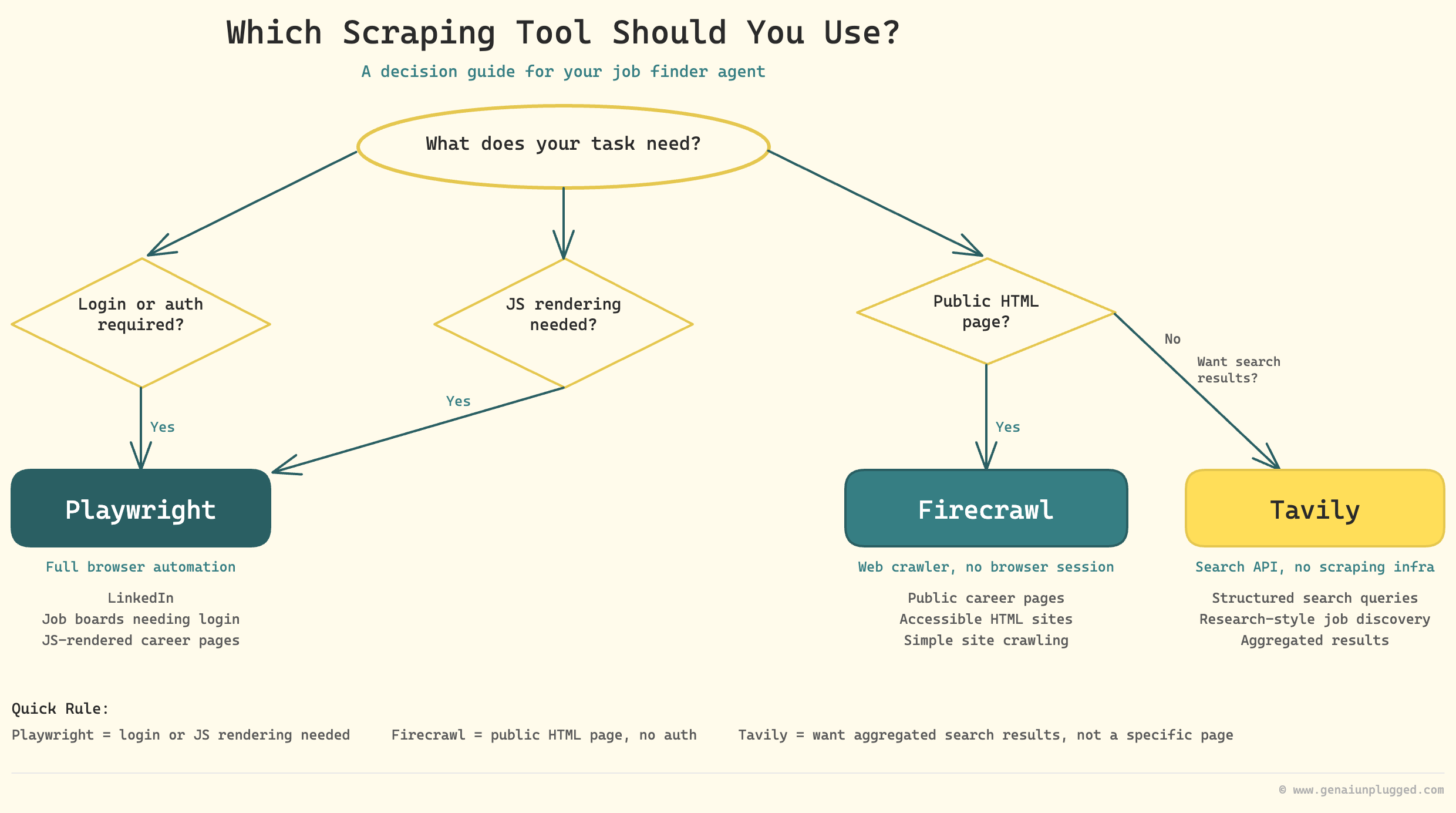
Web Scraping tool selection:
Playwright: LinkedIn, job boards requiring login, JavaScript-rendered career pages
Firecrawl: Public career pages with accessible HTML, simple site crawling
Tavily: Structured search queries, research-style job discovery
Do not pick one tool and try to force it everywhere. Job boards are not uniform. Some need a full browser session; some are just HTML.
How Do You Make the Agent Accessible to Non-Technical Users?
Pawel built the Job Tracker web app because his family needed it. He prefers CLI. He built the email digest for himself and it worked.
But when he set up the same system for a family member who was actively job hunting, the CLI interface was a barrier. So he built a local web app that served the same data in a fast, scannable format.
At 35:00, he demos the Job Tracker on screen. The key features are: a change log that shows exactly what is new since the last visit, an "Interested" button that triggers tailored application material generation, and real-time filtering when reply-based feedback removes disqualified jobs.
"I prefer to have things that are working rather than looking nice. That's my thing." - Pawel Jozefiak (at 47:07)
I had the same experience with a friend. I gave them a CLI-based version of a similar tool. They used it twice and stopped. Then I built a UI version. It worked. Interface choice determines adoption. For yourself, use whatever works. For anyone else, build a UI.
For deployment, Pawel started with a local server on a dedicated machine, then added DigitalOcean for remote access from any device. I use Oracle Cloud for most of my infrastructure. Claude Code will suggest Cloudflare or Railway when you ask it to make a local tool externally accessible.
Frequently Asked Questions
What is Playwright and why use it for job searching?
Playwright is a browser automation tool that lets an agent interact with websites the way a human would, including logging in, scrolling, and extracting data from dynamically rendered pages.
Job boards like LinkedIn require an authenticated session and use JavaScript rendering that simple scrapers cannot handle. Playwright solves both problems by running a real browser session.
Can the agent automatically apply for jobs on my behalf?
Deliberately, no. Pawel designed the agent as a curation and scoring system. When you click "Interested" in the Job Tracker, the agent generates tailored cover letter and application materials, but you make the final decision and submit the application yourself.
This preserves authenticity and ensures you apply only to roles you have consciously reviewed.
What is the difference between agent memory and agent learning?
Memory stores state: which jobs were seen, when the last run happened, session history. Learning changes behavior based on feedback: updating your salary floor, broadening your role criteria, filtering out specific company types.
Memory without learning means the agent accumulates information but never searches differently. The learning loop closes when your feedback updates profile.md and the next run uses the revised criteria.
Which Claude model should I use for a job finder agent?
Use Sonnet for most agent work including scoring and reasoning against profile criteria. Use Haiku for cheap filtering tasks and structure extraction. Small local models can handle basic pattern matching. Avoid Opus unless the task genuinely requires it. The agent runs daily, so model cost compounds quickly.
What is the difference between Playwright and Firecrawl?
Playwright opens a real browser session and can handle login flows and JavaScript-rendered pages. Firecrawl crawls pages without a full browser session, making it faster and cheaper for sites with accessible HTML.
Use Playwright for authenticated job boards, Firecrawl for simpler public career pages. Tavily is a third option for structured search queries where you want aggregated results without managing scraping infrastructure.
Do I need to know how to code to build a job finder agent?
No. Pawel built the Python scripts with AI assistance, focusing on whether the output was valuable rather than writing code manually. You need clarity about what you want, not coding skills. Claude Code or Codex generates the scripts. Your job is to define the intent clearly in plain language.
Key Takeaways
Profile quality determines output quality. The agent is only as good as the context you give it.
profile.mdis the foundation. Before building anything else, write a thorough profile with your background, criteria, salary floor, location, and company preferences.
Memory and learning are different.
memory_state.jsonprevents duplicates.profile.mdupdates make the agent smarter. Build the feedback loop that connects your email replies to profile changes, or the agent stays static forever.
Match model tier to task complexity. Haiku for filtering, Sonnet for main work, local models for structure extraction, Opus avoided. A daily agent compounds its costs fast.
Start with email, add the UI later. Email is the simplest working version. Build the web app only when the email proves valuable and you need a faster decision-making interface.
Use Playwright for authenticated sites, Firecrawl for simple crawling. Do not pick one tool and force it everywhere. Job boards are not uniform.
70% of what you build will end up discarded. That is not failure. That is the process. Build a version, evaluate the output, discard what does not work, iterate.
Execution is no longer the bottleneck. A well-structured idea with a clear profile and intent will get you somewhere good. Vague prompts will not.
Your 15-Minute Challenge
Open a new file called profile.md. Write three sections:
your background in 3-4 sentences with links to your LinkedIn and any portfolio work,
your target role criteria including title variations, company stage, team size, and salary floor,
three things that would immediately disqualify a role.
That file is the entire foundation of a job finder agent. Once you have it, ask Claude Code to write a search script that queries LinkedIn for roles matching your criteria and outputs a scored list to a text file.
Do not worry about email delivery, memory, or the feedback loop yet. Get the core output working first and evaluate whether the results are useful.
Watch the full recording of this session for the live demo of profile.md, memory_state.json, and the Job Tracker UI. Pawel walks through every file on screen starting at 14:25.
"Start small. That's the best thing I could say." - Pawel Jozefiak (at 55:46)


