



Everyone keeps asking the same question. Claude or Codex? Which one should I pick?
It is the wrong question.
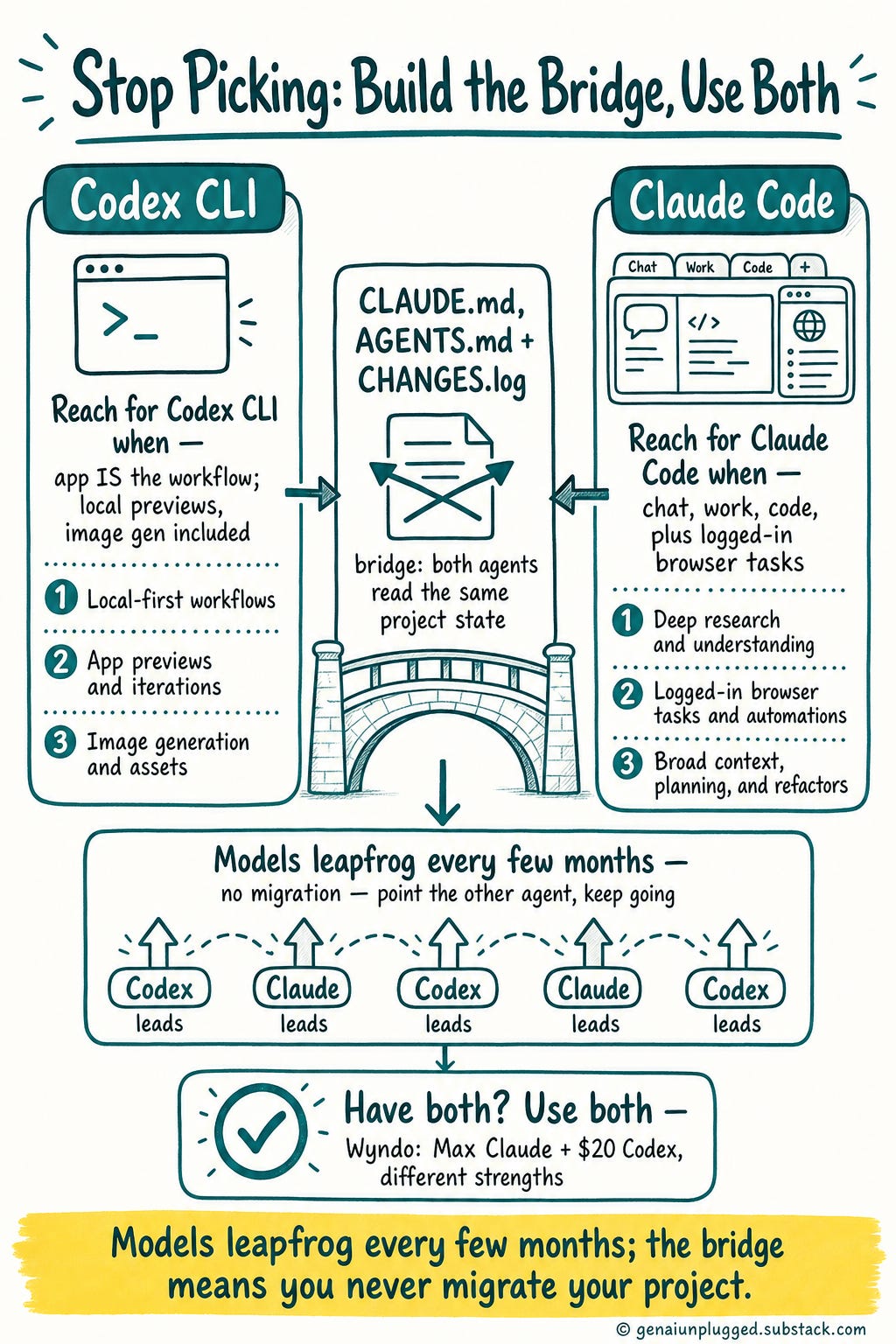
You do not have to pick. Three files and one log entry let Claude Code and Codex hand work back and forth on the same project, without overwriting each other.
A few episodes back we did a full Codex walkthrough on its own. This week on the One Shot Show, Wyndo (The AI Maker) and I put it next to Claude. We talked through where they differ, and then did something most comparison videos never do.
We ran a single project through both of them, live, and let them hand the work back and forth.
By the end, the calculator we built had been touched by Claude, then Codex, then Claude again. Neither agent overwrote the other. Neither got confused about what had already been done.
The trick was not a better model. It was a bridge.
👋 Julley, I’m Dheeraj and I’m an AI systems builder.
I build production-grade AI systems at work by day and ship my own products by night (9+). This newsletter is the bridge between those two worlds. Every system, every build, documented step by step.
Join 1,600+ builders getting the exact AI setups, prompts, and production configs that actually work in your business.
Should I use Claude Code or Codex in 2026?
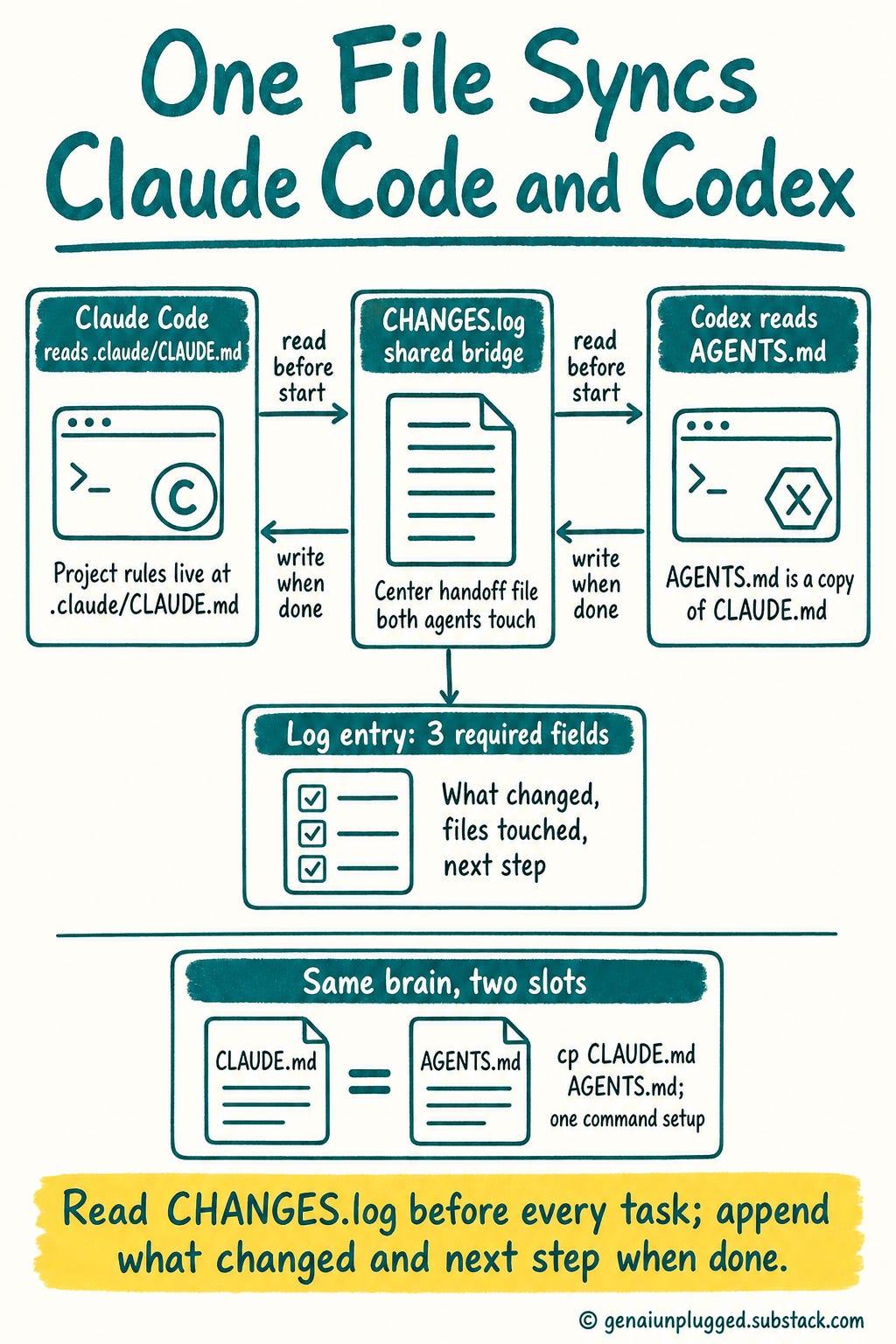
The short answer: You can use Claude Code and Codex together on one project. Create three files in your repo: CLAUDE.md (Claude’s project rules), AGENTS.md (the same rules, for Codex), and CHANGES.log (the handoff log both agents read before they start and write to when they finish).
When you add the folder to the Codex app, it auto-imports CLAUDE.md as AGENTS.md. That is the whole setup. Everything below is that pattern running live, as of June 2026.
Here is the full breakdown, written so you can use it without watching anything.
Why does opening Claude feel like a decision?
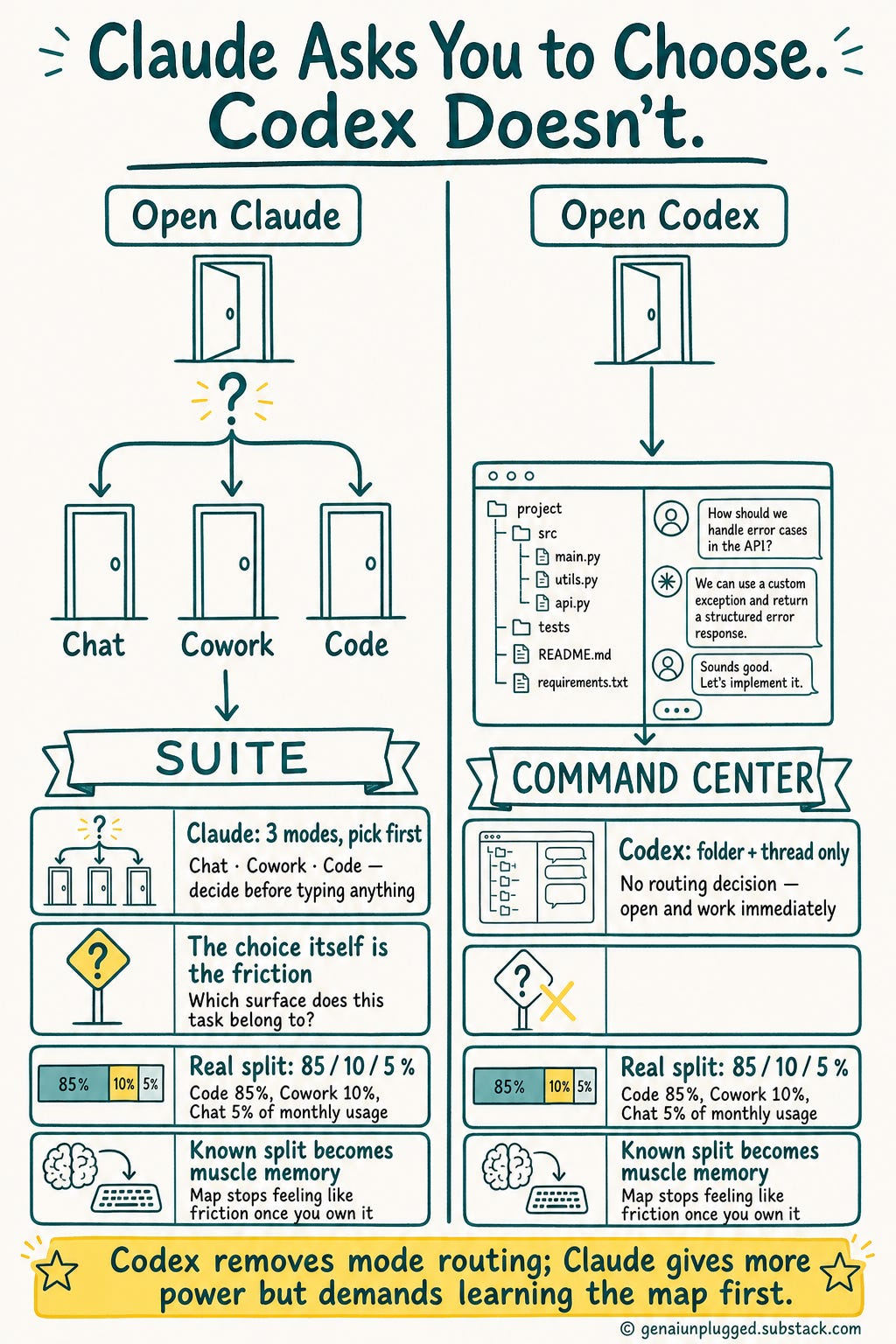
Because Claude’s desktop app gives you three modes, Chat, Cowork, and Code, and you choose one before you start. Codex opens to a single surface: a folder and a thread. Both are powerful, but Codex removes the upfront routing decision.
That is why Codex feels like a command center and Claude feels like a suite.
Start with why people are even asking the question.
Codex has been gaining ground fast since the GPT-5.5 launch. Part of it is the model. Part of it is that Claude’s usage limits had been burning a lot of us during heavy sessions, so people went looking for a second engine to fall back on.
One update: Anthropic recently extended Claude’s limits to roughly twice what they were a couple of weeks ago, good through early July. For once I am not complaining about usage limits.
But the bigger reason Codex feels easy is structural. When you open Codex, there is a left bar with your project folder and your chats, and the conversation in the middle. That is it.
In Wyndo’s words: “There is no mental overhead where I need to choose between chat, Cowork, or Claude Code. It’s just so easy with Codex as the super app.”
Claude is broader. The desktop app gives you Chat, Cowork, and Code, and each one makes sense on its own. The friction is the choice itself.
Before you type anything, you have to decide which surface this task belongs to.
That is the cleanest way to frame the whole comparison:
Codex feels like a command center. Claude feels like a suite.
Codex reduces the number of decisions. Claude gives you more specialized modes but asks you to learn the map first.
For what it is worth, here is how my usage splits right now: about 85% Claude Code inside VS Code, 10% Cowork, and 5% Chat. Chat is the “I’m on the go and need a quick answer or a second opinion” tool, and it is barely 5% of my month.
Code is where the real work lives because that is where all my pipelines were built. Cowork I have started reaching for more often because some tasks feel more natural there.
So the mode question is real. But once you know your own split, it stops being friction and becomes muscle memory.
How do Claude Code and Codex actually differ?
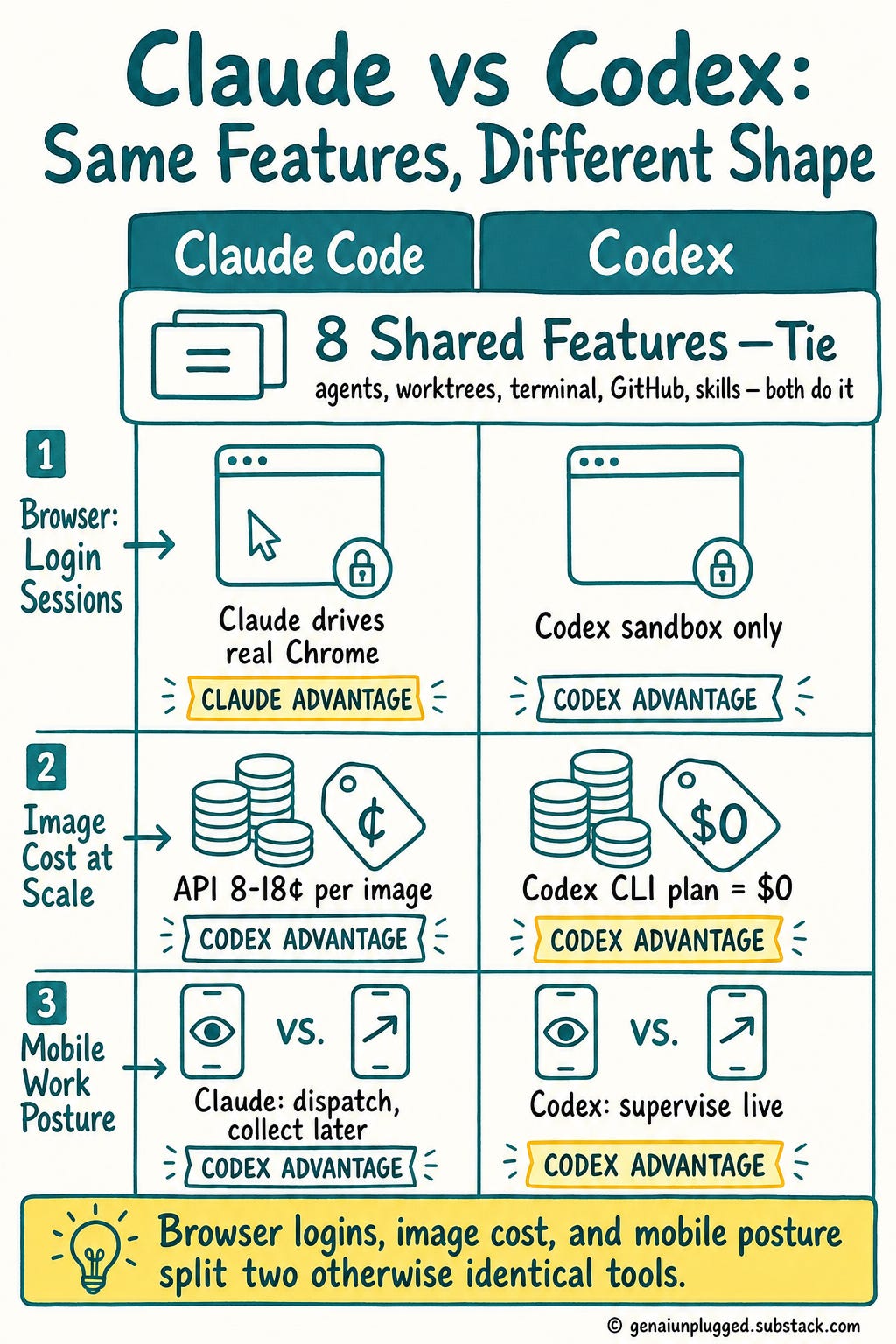
Most of the comparison is a tie: both have parallel agents, Git worktrees, local folders, terminals, GitHub, skills, and automation.
They diverge in four places that matter: the in-app browser versus Claude in Chrome for logged-in tasks, image generation cost, mobile (live supervision versus task dispatch), and how they bundle plugins. The real difference is shape, not features.
Here is the full tie list:
parallel agents with Git worktrees,
local project folders, computer use,
cloud and remote/SSH tasks,
an integrated terminal,
GitHub pull requests,
skills,
scheduled automation.
Both do all of it, and both do it well.
So the real differences come down to four things. Three change how you work day to day. The fourth is a quiet money difference.
One more before the big three: mobile.
Codex mobile is live supervision. You watch an active thread from your phone, approve commands, see diffs and screenshots and test output as it happens.
Claude’s mobile story is Dispatch, its task-delegation feature: you hand a job to your desktop and collect the result later.
Same destination, different posture: Codex lets you stand over the work, Claude lets you throw the work over the wall.
Learn with me: Claude Code Builder cohort
The founding batch of my Claude Code cohort starts July 11 on Maven. Four weeks, six sessions. Learn to build the AI system with me.
Only 12 Seats. When they’re gone, the founding price ($797) closes and Cohort 2 opens at $1,597.
Use code GENAI20 for 20% off. Expires July 9. Check the Syllabus →
The in-app browser in Codex vs Claude
Codex has a browser built into the app. As it builds, it can host a local server, deploy, preview the page, and even take annotated screenshots to verify its own work. For building and checking a UI, that loop is tight and visible.
The catch is the sandbox. The Codex in-app browser historically could not use your sign-in state, your cookies, or your existing Chrome profile. So a task like “go check my LinkedIn and tell me how my posts are doing” did not work there, because the browser had no logged-in session.
Claude handles that case differently. With Claude in Chrome, it drives your actual Chrome browser. If you are already logged into LinkedIn, Claude opens Chrome, lands on LinkedIn already signed in, and starts working inside your real session.
Wyndo flagged a possible update worth verifying: Codex may have recently added cookie persistence, so a site you log into in one session could still be logged in the next time. If that holds, the gap is closing.
The honest version for now: Codex is cleaner for local previews and public pages, Claude is stronger for anything behind a login. The direction of travel is multiple agents browsing in parallel tabs, one on X, one on LinkedIn, one on Amazon, all at once.
Image generation cost - Claude or Codex?
This one is my favorite, and it is pure economics.
A ChatGPT or Codex subscription includes image generation. So on a $20 plan, I can generate images as part of the subscription instead of paying per image through an API. When you make as much visual content as I do for YouTube and the newsletter, that adds up fast.
Here is the actual cost difference:
API image, standard: roughly 8 to 9 cents per image
API image, instant/priority: about 18 cents per image
Codex CLI on a flat subscription: included, no per-image charge
For high-volume creators: effectively free versus a metered API bill
Through the Codex CLI on a flat subscription, that marginal cost effectively disappears.
So I quietly use the Codex CLI to generate a lot of my images, then carry them back into Claude to drop into articles. This is one real capability gap where Codex offers something Claude’s plan does not.
Wyndo’s version keeps everything inside one app. He connects Codex to a design MCP (Paper Design / Magic Path), generates an HTML banner, and then asks GPT to generate the image directly inside that banner. No bouncing out to a separate image tool and pasting back.
The HTML design and the image both come from the same app.
Plugins, skills, and connectors
Both products are turning into agent platforms, not just chat tools, and both have made this area confusing.
In Codex, “plugins” bundle two things that used to be separate: connectors (Slack, GitHub, Gmail, Google Calendar, Amplitude, and so on) and skills (reusable task instructions).
Install the “creative production” plugin, for example, and you get connections to tools like Figma and Canva plus a set of skills built for that kind of work.
It is powerful. It is also genuinely hard to explain, because one tab is doing connector duty and skill duty at the same time. If you come from Claude Code, the mental model does not map cleanly yet.
Codex even calls its connectors “apps,” which behind the scenes are MCP connections, the same plumbing Claude uses. The two are converging on a similar shape. They are not there yet.
What is the CHANGES.log bridge between Claude Code and Codex?
The CHANGES.log bridge is a shared text file two AI agents use to hand work back and forth. Both Claude Code and Codex read the latest entry before they start a task and append a new one when they finish, noting what changed and the next step.
Paired with identical CLAUDE.md and AGENTS.md rule files, it keeps both agents in sync on one project without overwriting each other.
Here is the part that makes it work, and it is almost embarrassingly simple.
If you want two agents working on one project without stepping on each other, you give them a shared file they both read before acting and both write to after acting. I call mine CHANGES.log.
The rule is one line: read the latest entry before you start, append an entry when you finish. That single file becomes the memory both agents share. Claude knows what Codex just changed.
Codex knows what Claude just changed. And both know which agent made which change.
You set it up inside your .claude/CLAUDE.md (Claude’s project brain). The bridge section I use reads like this:
This project can be worked by two agents, Claude Code and Codex, never at the same time. They stay in sync through one shared file: CHANGES.log. - Before you start: read the latest CHANGES.log entry. - When you finish a unit of work: append an entry with what changed, the files touched, and the next step for whoever picks up.
A few hard-won notes on the wording. Be explicit that a one-line fix still requires a log entry, or the agent will decide small changes do not count.
Tell it to treat writing to the log as the final step of every task, the same way it would run tests or make a commit.
And be honest with yourself: even with perfect instructions, there is no 100% guarantee an agent follows them every time unless you back it with a hook. Wyndo does this slightly differently.
Instead of putting the handoff rule in CLAUDE.md, he wraps it in a skill and triggers that skill whenever an agent finishes. Same bridge, different switch.
Then comes the magic step. Claude reads .claude/CLAUDE.md. Codex reads a file called AGENTS.md at the project root.
So you copy the same brain into the spot Codex reads:
cp .claude/CLAUDE.md AGENTS.mdSame project rules, same bridge. Each tool reads its own file, the content is identical, nothing to rewrite.
So what is the difference between AGENTS.md and CLAUDE.md? Almost nothing. CLAUDE.md is the project-rules file Claude Code reads; AGENTS.md is the equivalent file Codex reads.
Same role, same content, different filename. Keep them identical and you have one brain in two slots.
And you do not even have to copy it by hand. When you add an existing folder to the Codex app, Codex detects that another agent has already been set up and offers to import the settings.
It found my CLAUDE.md and migrated it to AGENTS.md automatically, and if you had skills, hooks, or commands configured for Claude Code, it migrates those too.
The one thing it does not bring over is your MCP servers. Those you reconfigure manually, or ask Codex to set up for you.
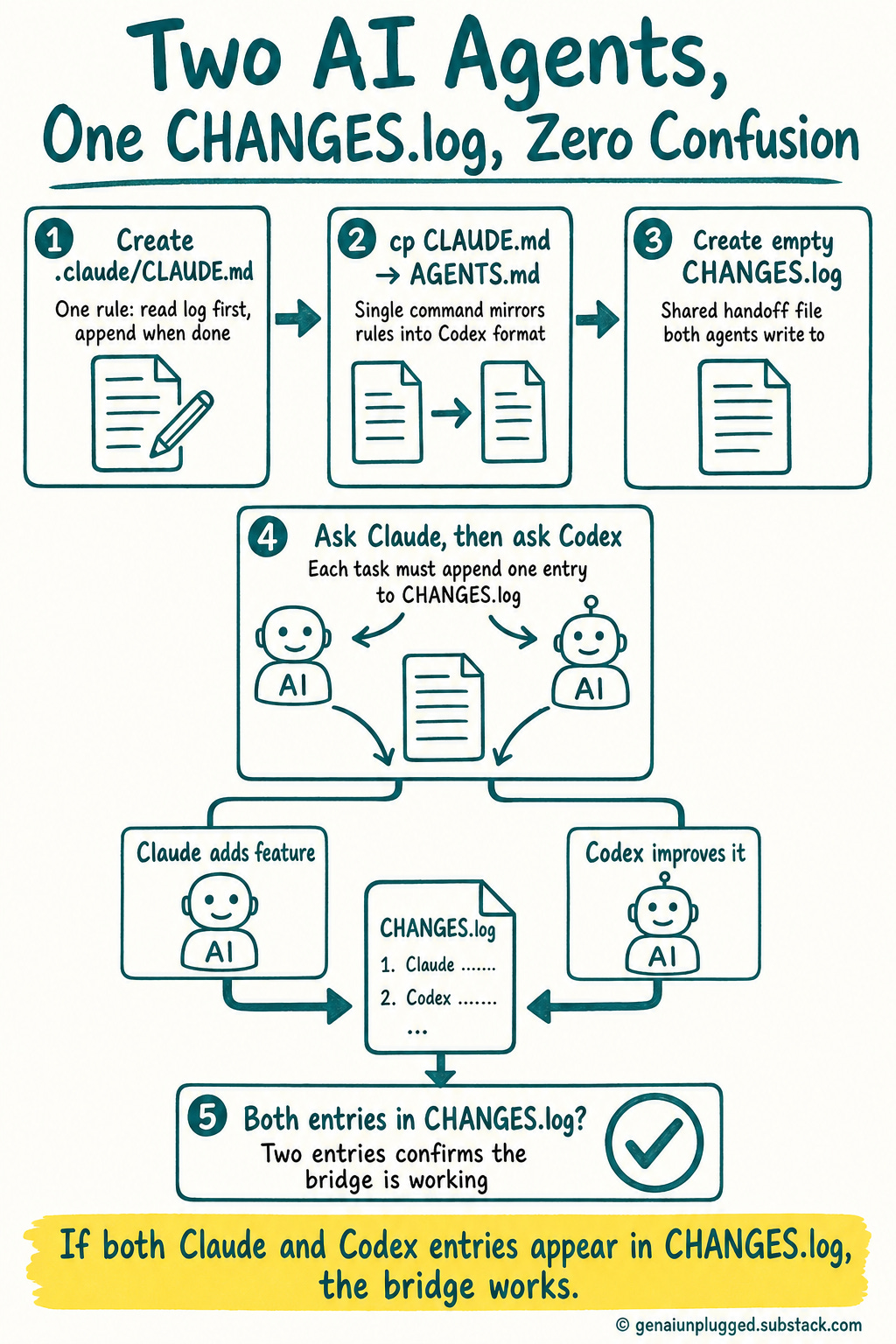
To recap the whole setup in four steps:
Create
CLAUDE.md(usually at.claude/CLAUDE.md) with your project rules plus the “Working with a second agent” bridge section.Run
cp .claude/CLAUDE.md AGENTS.mdso Codex reads the same rules.Add the folder to the Codex app and accept the auto-import offer.
Confirm
CHANGES.logexists and both files name it as the shared handoff log.
For bigger projects, add git worktrees so each agent works in isolation, then merge, and the merge writes back into the log so the other agent can pick up cleanly. But for most work, the single shared log file is enough.
Want the exact files? I packaged the whole bridge as a drop-in kit: a CLAUDE.md and AGENTS.md with the handoff rule already written, a CHANGES.log template, and the finished compound-calculator repo from this build. The wording is the fiddly part.
Get one line wrong and the agents quietly stop logging, which defeats the entire bridge. With the kit you copy it into any project in about thirty seconds instead of reverse-engineering it from screenshots. It is in the downloads section near the end.
Can you build one app with Claude Code and Codex together?
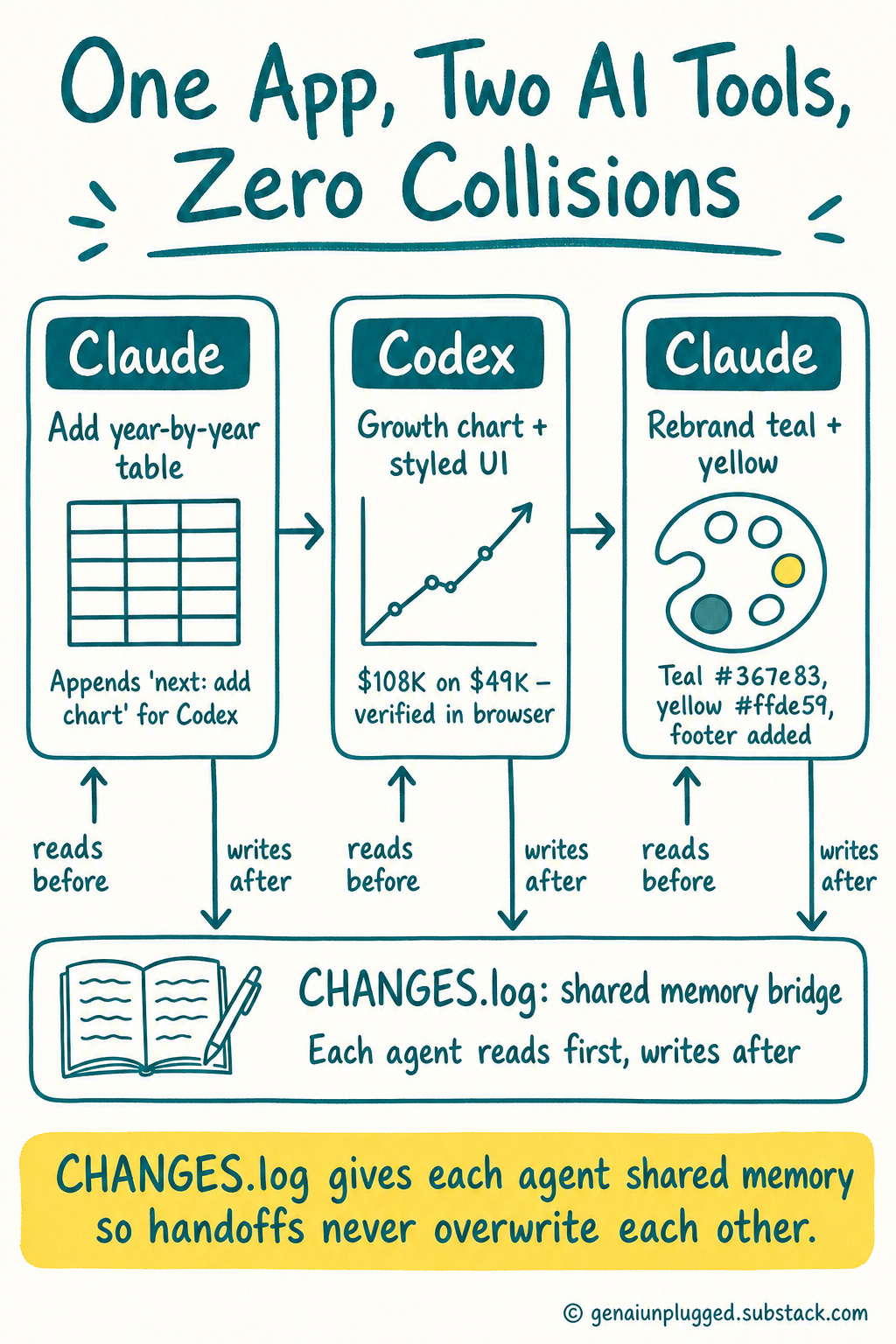
Yes. On the show we built a single calculator in three passes: Claude added a year-by-year table, Codex turned it into a growth chart and restyled it, then Claude rebranded it. Each agent read the CHANGES.log before acting and wrote to it after, so no pass overwrote the last.
Three handoffs, two tools, zero collisions.
To prove the bridge actually works, we built it live. The project was a plain compound interest calculator. Initial deposit, monthly contribution, a final balance, total contributed, total interest earned.
Functional, ugly, no styling.
Then we passed it around.
Every prompt below is one line. The prompts stay tiny on purpose. The files carry the method.
Pass one, Claude. I gave Claude (running Opus) a single instruction:
Add a year-by-year breakdown: show the balance at the end of each year in a table.Claude wrote the logic, built the table, and then, on its own, appended a CHANGES.log entry describing what it did and a “next:” note for whoever picked up. No reminder needed. The bridge rule did its job.
Pass two, Codex. I opened the same folder in the Codex app. This is where the auto-import happened: Codex spotted the Claude setup and offered to migrate .claude/CLAUDE.md to AGENTS.md, which I accepted. I told it to work locally, no worktree needed for something this small.
Then one prompt:
Improve the UI and turn the year-by-year breakdown into a growth chart. Verify it in the browser.Codex read AGENTS.md and the latest log entry, saw exactly what Claude had built, then added a real growth chart and polished the styling into a purple and teal theme. It opened its in-app browser, took a screenshot to verify, then wrote its own entry back to CHANGES.log.
With the demo numbers ($1,000 start, $200 a month, 7% return, 20 years), it landed a final balance of about $108,000 on $49,000 contributed.
Pass three, Claude again. The purple-and-teal look was nice, but it was not my brand. So back in the same Claude session, one more line:
Restyle the whole calculator to the GenAI Unplugged brand: teal #367e83 primary, yellow #ffde59 accent, cream #faf9f5 background, charcoal #2a2a2a text, Montserrat headings and Roboto body. Add a footer bar with “© 2026 GenAI Unplugged” in the brand colors. Keep the chart and numbers, just rebrand the look, and verify in the browser.Claude read the full state of all three files first, because the log told it the app had evolved significantly since it last touched it, then rebranded everything to my teal and yellow, added the footer, and took a verifying screenshot.
Round trip complete. Claude, then Codex, then Claude. Three handoffs, zero collisions, and at every step the next agent knew exactly what the last one had done.
The thing to notice is what the split was not. CLAUDE.md never said “Claude does logic, Codex does design.” The work split was whatever I asked each agent in the moment. The bridge does not assign roles.
It keeps a shared memory so roles do not matter.
Download the Codex - Claude Bridge Kit
The kit assets for this post include two folders.
`bridge-kit/` is the reusable handoff setup:
CLAUDE.mdandAGENTS.mdwith the “Working with a second agent” rule already writtenCHANGES.logwith the format header and example entries
`compound-calculator-demo/` is the finished build from the show (index.html, app.js, styles.css) with its own CLAUDE.md, AGENTS.md, and CHANGES.log, so you can read the full Claude to Codex to Claude round trip.
How to use it
Copy
bridge-kit/CLAUDE.mdinto your project (root or.claude/). Fill in your project name, files, and conventions. Leave the handoff section as-is.Run
cp .claude/CLAUDE.md AGENTS.mdso Codex reads the same rules.Add the folder to the Codex app and accept the auto-import.
Keep
CHANGES.login the root. Both agents read it before they start and write to it when they finish.
To see it in action, open compound-calculator-demo/index.html in a browser, then read its CHANGES.log to follow the three-pass handoff from end to end.
Two tips that are easy to miss
Two patterns came up in the live demo worth stealing.
1. Run Claude inside the Codex app.
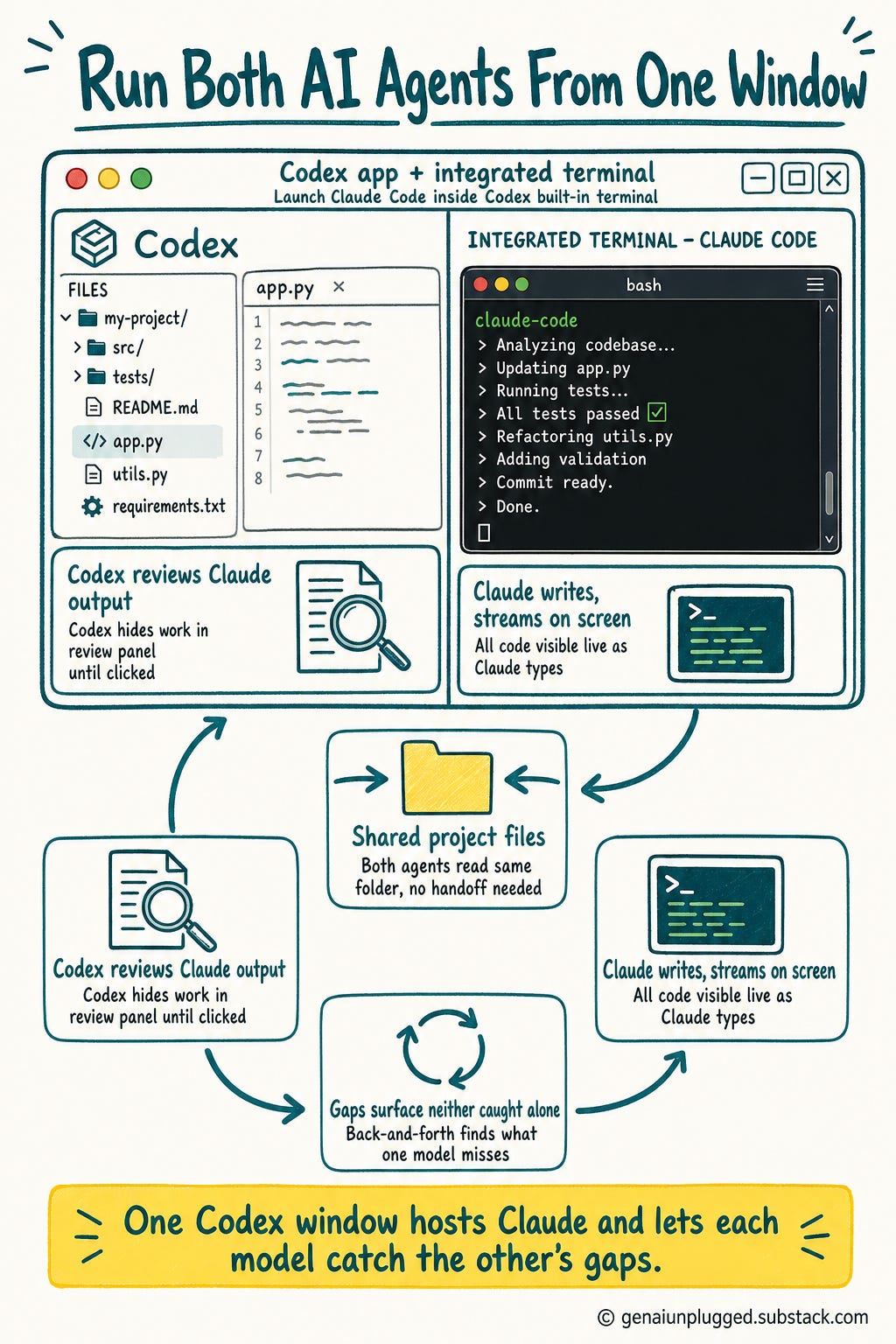
You do not have to bounce between VS Code and Codex. The Codex app has an integrated terminal, and you can launch Claude Code right inside it. As Wyndo put it: “You don’t have to go back and forth.
You can open the terminal and run Claude there as well.” Codex’s panes also let you open and read project files directly. One window, both agents.
2. Use one agent to review the other.
Because both agents can read the same project files, you can run a quality loop between them. Claude produces an output, you ask Codex to review it, and the back-and-forth surfaces gaps neither one catches alone.
In Wyndo’s words: “That’s a quite good hack to find missing opportunities based on the outputs each model generates.”
One small UI difference to set expectations: Claude Code streams all its code on screen as it writes. Codex hides most of it in a review panel until you click in. Early on that feels like Codex is doing less.
It is not.
Once you trust it, you stop watching the keystrokes and read the final output and the last comment. That is what matters.
Troubleshooting the bridge between Claude and Codex
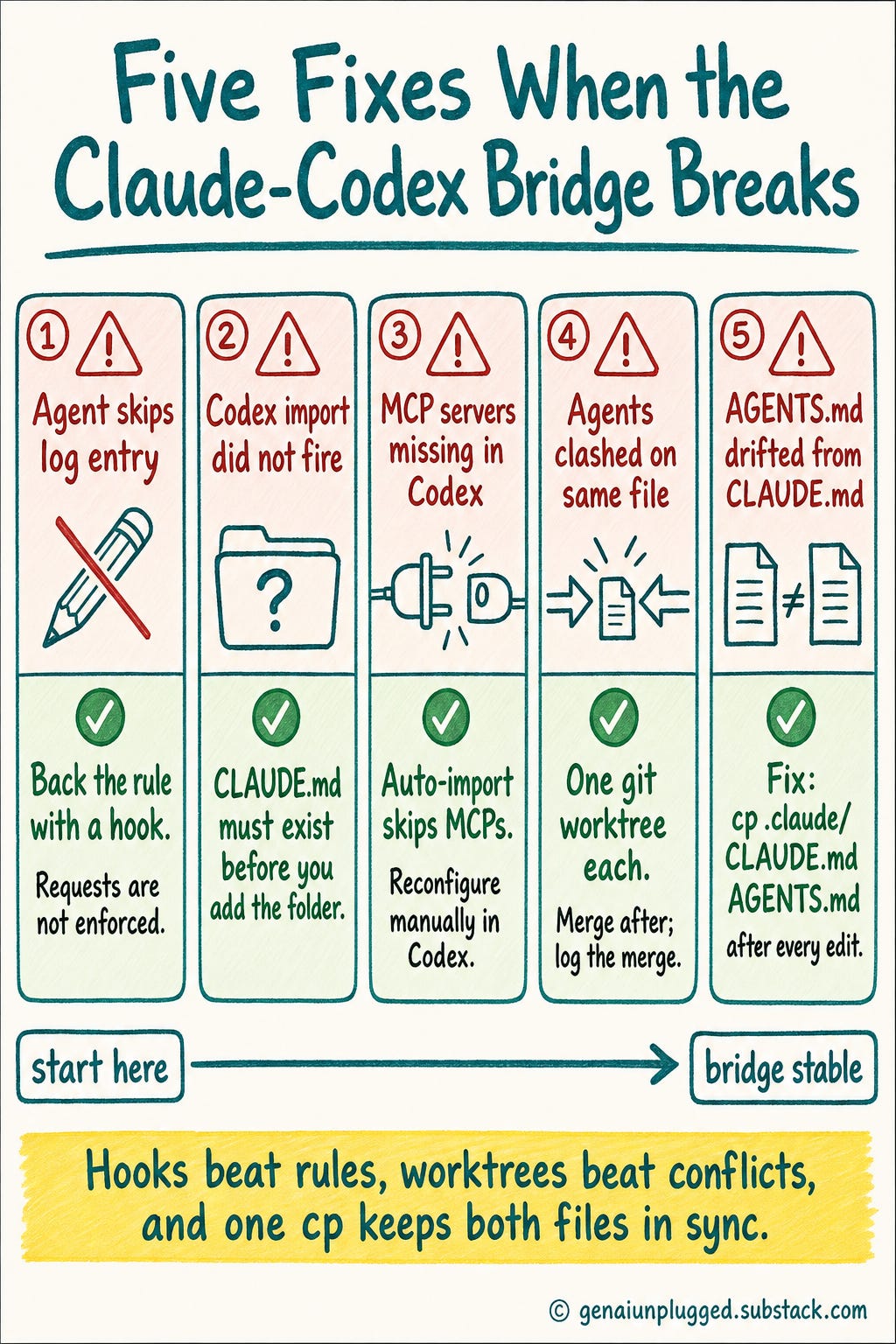
A few predictable snags, and the fix for each:
An agent skips the log entry. This is the most common one. Make the rule explicit (”a one-line fix still needs a log entry”) and, for a real guarantee, back it with a hook so the entry is enforced, not just requested.
Codex did not offer to import your Claude setup. The auto-import only fires when it can see your Claude config. Make sure
CLAUDE.mdexists (at the root or in.claude/) before you add the folder, then remove and re-add the project in the Codex app.Your MCP servers are missing in Codex. Auto-import brings over rules, skills, hooks, and commands, but not MCP servers. Reconfigure those manually in Codex, or ask Codex to set them up for you.
The two agents clashed on the same file. Never run them at the same time on the same files. For genuine parallel work, give each one its own git worktree, then merge and let the merge write back to the log.
`AGENTS.md` and `CLAUDE.md` drifted apart. If you edit one, re-copy it to the other (
cp .claude/CLAUDE.md AGENTS.md). They only work as a bridge while they stay identical.
Which should you use, Claude Code or Codex?
Use both if you can. They share one project cleanly through the bridge, and the models leapfrog every few months.
If you must pick one, choose Codex when the app is the workflow and you want a single command center, and choose Claude when you want range across chat, work, and code plus logged-in browser tasks. The decision is about shape, not a missing feature.
Here is the honest answer. You do not have to pick.
If you have both subscriptions, use both, and let the bridge make them one workflow. I lean on Codex CLI for free image generation and as a second engine when Claude limits run out, and I live in Claude Code for everything else.
Wyndo runs the Max plan on Claude and the $20 Pro plan on Codex, mostly using Codex for writing, while noticing Codex sometimes shows sharper context awareness on certain requests.
If you are only going to pick one, the question is not “which is better.” It is “which is simpler for the way your brain works.” Is Codex’s single command center the thing that gets you moving?
Or is Claude’s suite, more modes but more power, the thing you will grow into?
Here is the cleaner way to decide.
Reach for Codex when:
The app is the workflow, one place to watch an agent work a folder
You want local previews plus live mobile supervision
Image generation already in your plan matters to your budget
You want a command center for one focused build
Reach for Claude when:
You want range in one assistant: chat, work, and code under one roof
The task needs logged-in browser tasks in real Chrome
You want a deep, multi-pane cockpit
You want a suite that deepens the work over time
(If you are weighing these against no-code automation instead of each other, I did a separate n8n vs Claude Code breakdown across eight categories.)
And remember the models leapfrog. Claude leads for a few weeks, then Codex ships an update and leads for a few months, then it flips again. Wyndo’s whole strategy is to stay at the edge of that and not marry either one.
The bridge is what makes that posture cheap. When the lead changes hands, you do not migrate your project. You point the other agent at the same log and keep going.
Stop picking. Build the bridge.
What to take away
You do not need to pick between Claude Code and Codex. Both can work the same project.
Three files create the bridge:
CLAUDE.md(Claude’s rules),AGENTS.md(same rules for Codex), andCHANGES.log(the shared handoff log).When you add a folder to Codex, it auto-imports your Claude setup. You do not rewrite anything.
CHANGES.logis the shared memory: read the latest entry before you start, write one when you finish.Codex includes image generation in the subscription. For high-volume creators paying per API image, this is a real cost difference.
Codex is cleaner for local previews and sandboxed builds. Claude is stronger for tasks that need a real logged-in browser session.
The models leapfrog. The bridge lets you change lead agents without migrating the project.
Try it in 10 minutes
In any project folder, create
.claude/CLAUDE.mdwith one bridge rule: “Read CHANGES.log before starting. Append an entry when finished.”Run
cp .claude/CLAUDE.md AGENTS.md.Create an empty
CHANGES.logfile.Add the folder to Codex and accept the auto-import prompt.
Ask Claude to add one small feature. Then ask Codex to improve it. Check that both log entries appear in
CHANGES.log.
If both entries appear, the bridge works. That is the whole test.
Frequently Asked Questions
How do I use Claude Code and Codex on the same project?
Create three shared files in your repo: CLAUDE.md (Claude’s project rules), AGENTS.md (the same rules, for Codex), and CHANGES.log (the handoff log both agents read before they start and write to when they finish).
Run cp .claude/CLAUDE.md AGENTS.md to make the two config files match, then add the folder to the Codex app, which auto-imports your Claude setup. Both agents now share one memory through the log, so they hand work back and forth without overwriting each other.
What is the difference between AGENTS.md and CLAUDE.md?
They play the same role for different tools. CLAUDE.md is the project-rules file Claude Code reads before it acts. AGENTS.md is the equivalent file Codex reads.
Same content, different filename. Keep them identical and you have one set of project rules that both agents follow.
Is Claude Code better than OpenAI Codex?
It depends on the job, and you do not have to pick. Reach for Codex when the app is the workflow: one place to watch an agent work a folder, local previews, live mobile supervision, and image generation already in your plan.
Reach for Claude when you want range in one assistant: chat, work, and code together, logged-in browser tasks in real Chrome, and a deep multi-pane cockpit. The models also leapfrog every few months, which is the real argument for bridging both instead of betting on one.
What is a CHANGES.log file in an AI coding workflow?
It is a plain text file that acts as a shared handoff log between two AI agents working the same project.
Each agent reads the latest entry before it starts a task and appends a new entry when it finishes, noting what changed, which files it touched, and the next step. That single file becomes the memory both agents share, so Claude knows what Codex did and the reverse.
Can you run Claude Code inside the Codex app?
Yes. The Codex app has an integrated terminal, and you can launch Claude Code right inside it, so you do not have to bounce between your editor and Codex. Codex’s panes also let you open and read project files directly.
One window, both agents.
Does Codex include image generation in the subscription?
Yes. A ChatGPT or Codex subscription includes GPT image generation, so on a $20 plan there is no per-image charge. Generating through an external API instead runs roughly 8 to 9 cents per image (about 18 cents for instant), which adds up fast for high-volume creators.
That makes the Codex CLI a cheap image engine even if you do your main work in Claude.
How does Codex’s in-app browser differ from Claude in Chrome?
Codex’s browser is built into the app and is great for local previews, hosting a dev server, and verifying a UI with screenshots, but it has historically run in a sandbox without your cookies or sign-in state.
Claude in Chrome drives your actual Chrome browser, so it can do logged-in tasks like checking your LinkedIn. Use Codex for local and public pages, Claude for anything behind a login. (Codex may have recently added cookie persistence, so verify the current behavior.)
Will AI agents always follow CHANGES.log bridge rules?
Mostly, if your instructions are explicit, including a line like “a one-line fix still needs a log entry.” But there is no 100% guarantee from instructions alone.
For a real guarantee, back the rule with a hook so the log entry is enforced as part of the task, not just requested.
Can I generate images in Codex through an MCP like Nano Banana or Midjourney?
Codex already includes its own GPT image generation, so for most cases you ask Codex directly and skip the MCP entirely. If you want other models, Ideogram can act as a multi-model router (GPT, Midjourney, Nano Banana) over MCP, though MCP image generation is not the smoothest experience.
My own approach skips MCP: I have Claude build a small Python wrapper, essentially a skill, that routes image requests to whatever model I name as a parameter. No MCP server, a local file I control.
What’s Next
If you are weighing these coding agents against no-code automation, n8n, Make, or Zapier, I ran that comparison across eight categories: n8n vs Claude Code breakdown.


