



Sixty hours of research. One article. Every time.
That was Michael Simmons’s reality before he built what I’d call the most impressive solo content system I’ve seen in person. Michael has 100M+ views across Forbes, Harvard Business Review, and Fortune. He’s not struggling to write.
He’s been struggling with the same thing every serious solo creator struggles with: research is the real bottleneck, and no tool had solved it.
In the last episode of One Shot Show, Michael walked us (Wyndo and I) through the exact architecture he built on top of Claude Code. Not a demo. Not a tutorial.

The actual system he uses weekly to produce 5,000-word articles that get close to one-shotted. He also shared the failures, including 150 hours poured into make.com that he eventually abandoned.
By the end of this piece, you’ll understand the three layers of his system (audio capture, second brain architecture, and skill chaining), why progressive disclosure beats a vector database at 11,000 notes, and the one mistake he made that you don’t have to repeat.
👋 Julley, I’m Dheeraj and I’m an AI systems builder.
I build production-grade AI systems at work by day and ship my own products by night (9+). This newsletter is the bridge between those two worlds. Every system, every build, documented step by step.
Join 1,300+ builders getting the exact AI setups, prompts, and production configs that actually work in your business.
The bottleneck in serious content creation was never writing. It was research. Michael Simmons built a Claude Code pipeline that handles 60 hours of research work in two hours of autonomous AI runtime, and the architecture runs on plain Obsidian markdown, no vector database required.
Why Did Michael Simmons Spend 150 Hours on the Wrong Tool?
Michael’s honest account of his tool evolution is the most useful part of his story, because it mirrors what most content creators go through when they try to automate research and writing.
He started with ChatGPT in December 2022. He mapped out 100 prompts. Each one required him to copy the output, paste it into the next step, adjust, repeat. Forty steps. Manual every time.
The content wasn’t bad. The process was exhausting and brittle in a different way than he expected, not because the AI failed, but because the workflow required him to be present at every handoff.
Then he hired a developer and spent 150 hours in make.com building what he envisioned as the complete system. He walked me through exactly what went wrong (at 10:39). Every time a piece of content structure changed or an API updated, something broke. He was spending more time debugging than creating.
“I spent 150 hours learning make.com and building parts of it, but also realizing I was spending a lot of time fixing bugs and it was very brittle.” - Michael Simmons
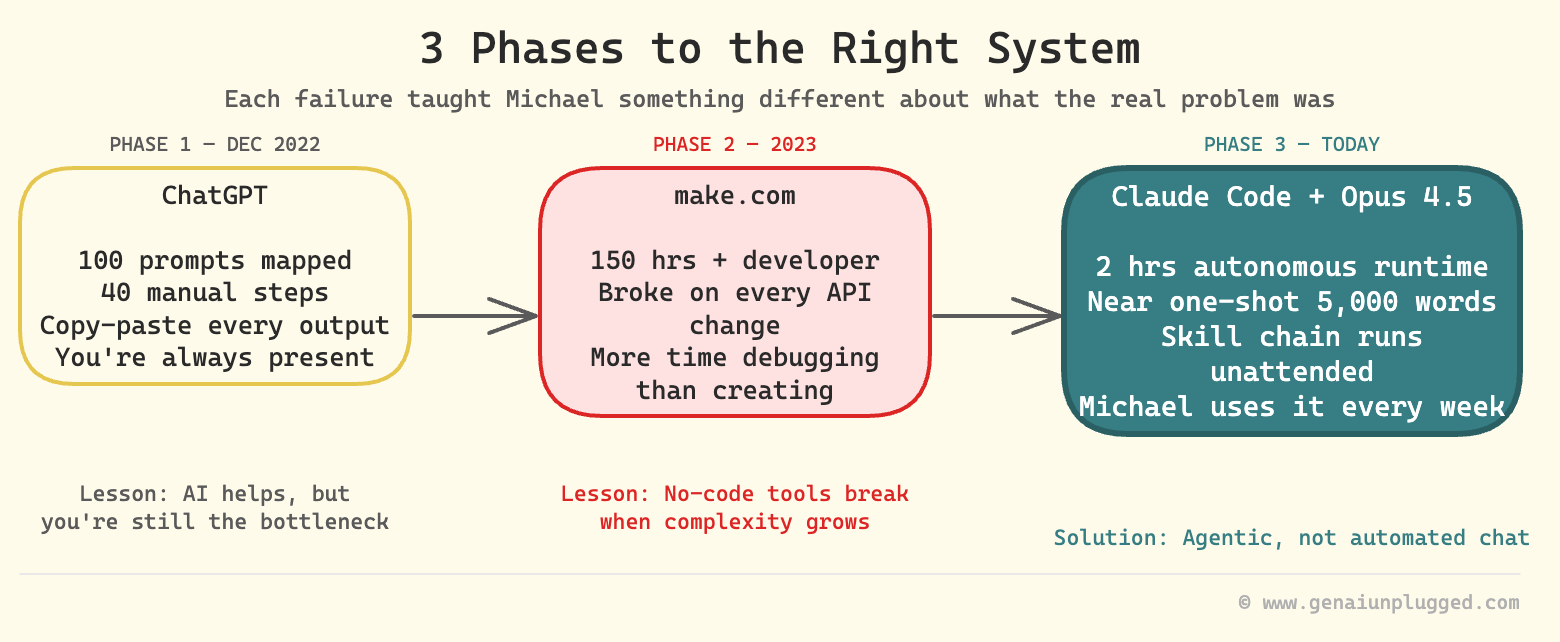
The make.com problem wasn’t effort. It was the approach. He was trying to automate a chat-style workflow inside a no-code tool, and neither was designed for what he needed.
What Is the Difference Between Chat and Agentic Approaches?
The chat approach treats AI as a question-answering service. You ask, it answers, you copy the answer somewhere, you ask again. The agentic approach treats AI as a worker. You describe the job, set it running, and it reports back when done.
Michael articulated this distinction better than anyone I’ve heard (at 14:50):
“In a chat paradigm you have to do one step then copy it, 40 different steps. With agentic, it’ll just go off and work for two hours and then come back to me.” - Michael Simmons
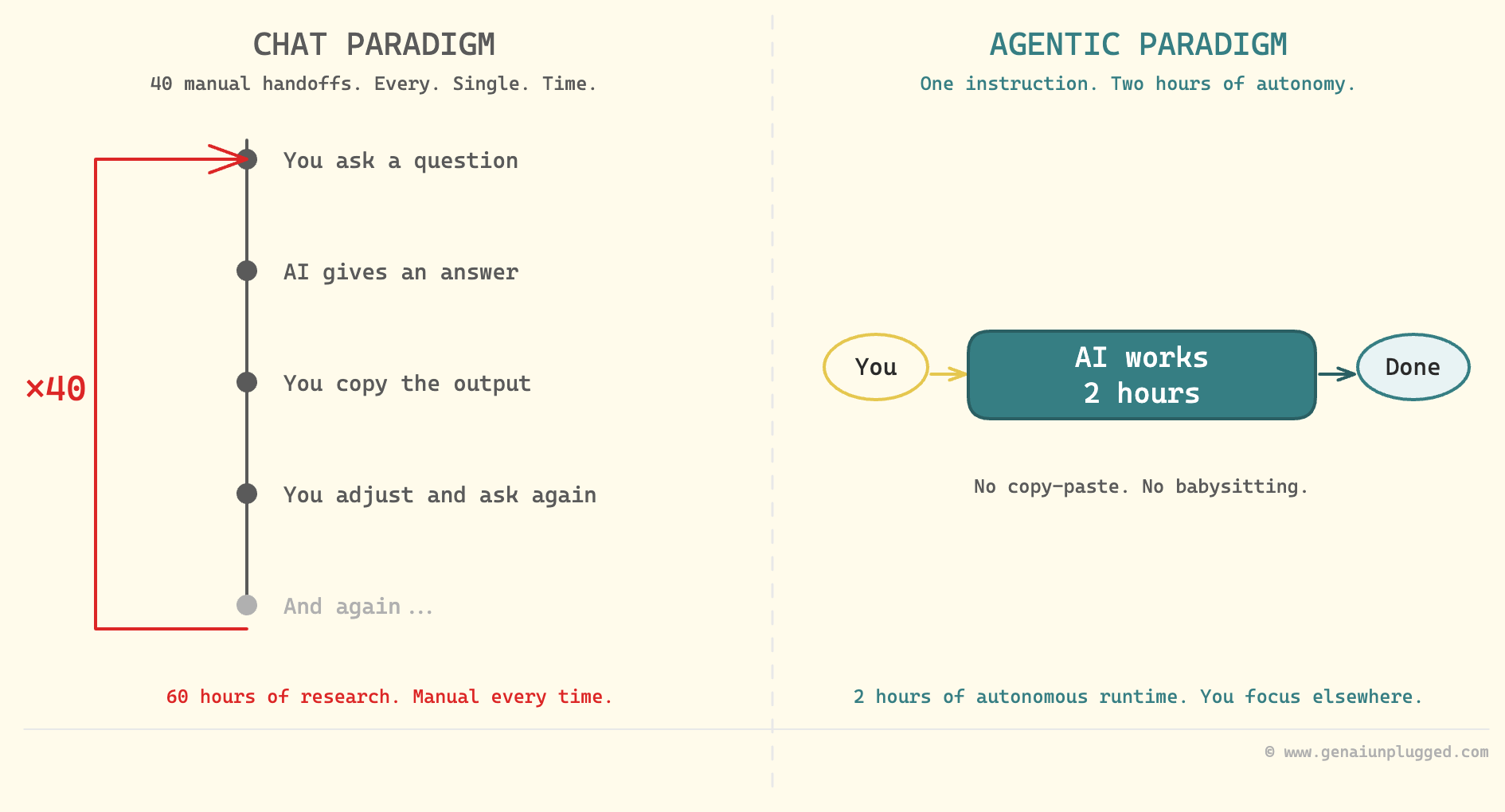
This isn’t a small upgrade. It’s the difference between having an assistant who needs to be micromanaged on every task versus one who can run a research project independently while you do something else. Claude Code with Opus 4.5 was the first tool where Michael found the agentic experience reliable enough to trust.
The version matters. Earlier models weren’t capable enough to follow a multi-step research chain without going off-track. With Opus 4.5, Michael says he can nearly one-shot 5,000-word articles with story structure, historical precedents, and voice calibration baked in.
How Does Michael’s Content Pipeline Work?
Michael’s pipeline has a concrete trigger and a predictable output. The trigger can be any news item. He used a specific example during our session (at 16:16): Jack Clark, Anthropic co-founder, published a prediction on his Import.AI newsletter that AI will close the loop (meaning build and improve itself) by 2028.
That article became the input. Here’s what happened next, with no manual involvement:
The system researched all published reactions to the Import.AI piece
It brainstormed article angles through the mental models stored in Michael’s second brain
It surfaced historical precedents for the prediction
It narrowed to three to five viable article angles
Michael picked one
The system drafted a full article with his voice calibration applied
Steps one through four ran autonomously. Steps five and six took Michael less than an hour. The research process that previously consumed 60 hours is now a pipeline output.
I run a similar research chain for my own articles inside Manthan, my 11-agent content system. The numbers translate. What used to be three hours of upfront research per piece is now under thirty minutes, and the agent does the slow work while I keep building.
What Is Skill Chaining in Claude Code?
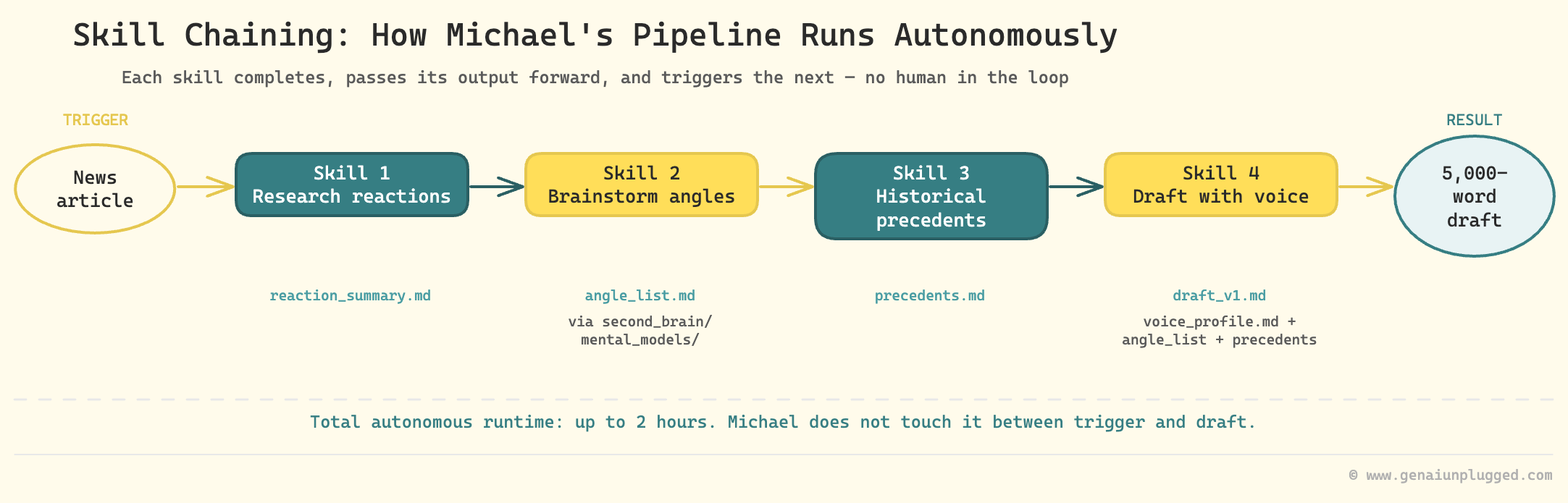
Skill chaining is the technical mechanism that makes the pipeline autonomous. Each Claude Code skill is a discrete unit of work. When a skill completes, it automatically triggers the next skill, passing its output forward as input. No copy-paste. No manual handoff.
Michael explained the architecture at 18:37. Each skill in his chain does one thing well: find reactions, brainstorm through mental models, check historical precedents, draft with voice calibration. Chaining them means the pipeline runs like a relay race, not like a series of phone calls where someone has to keep dialing the next person.
Here is what a simplified version of this looks like conceptually:
Skill 1: Research reactions to [input_article]
  → passes: reaction_summary.md

Skill 2: Brainstorm angles using second_brain/mental_models/
  → passes: angle_list.md

Skill 3: Research historical precedents for top_3_angles
  → passes: precedents.md

Skill 4: Draft article using voice_profile.md + angle_list + precedents
  → passes: draft_v1.md
Each skill is reusable independently. But chained together, they produce a research-to-draft pipeline that runs for up to two hours without Michael touching it.
Does a Second Brain Need a Vector Database to Work with AI?
No. Michael’s second brain has around 11,000 notes and clips, and it runs on plain Obsidian markdown without semantic search or a vector database.
Michael calls this progressive disclosure (at 19:34). Instead of one flat folder of 11,000 files, the knowledge base uses layered index files. A top-level index points to topic-level indexes. Topic indexes point to individual notes.
Every note is heavily interlinked with related notes.
Claude navigates this structure the same way a person would: start at the index, follow the relevant path, read what’s there, follow links to related content.
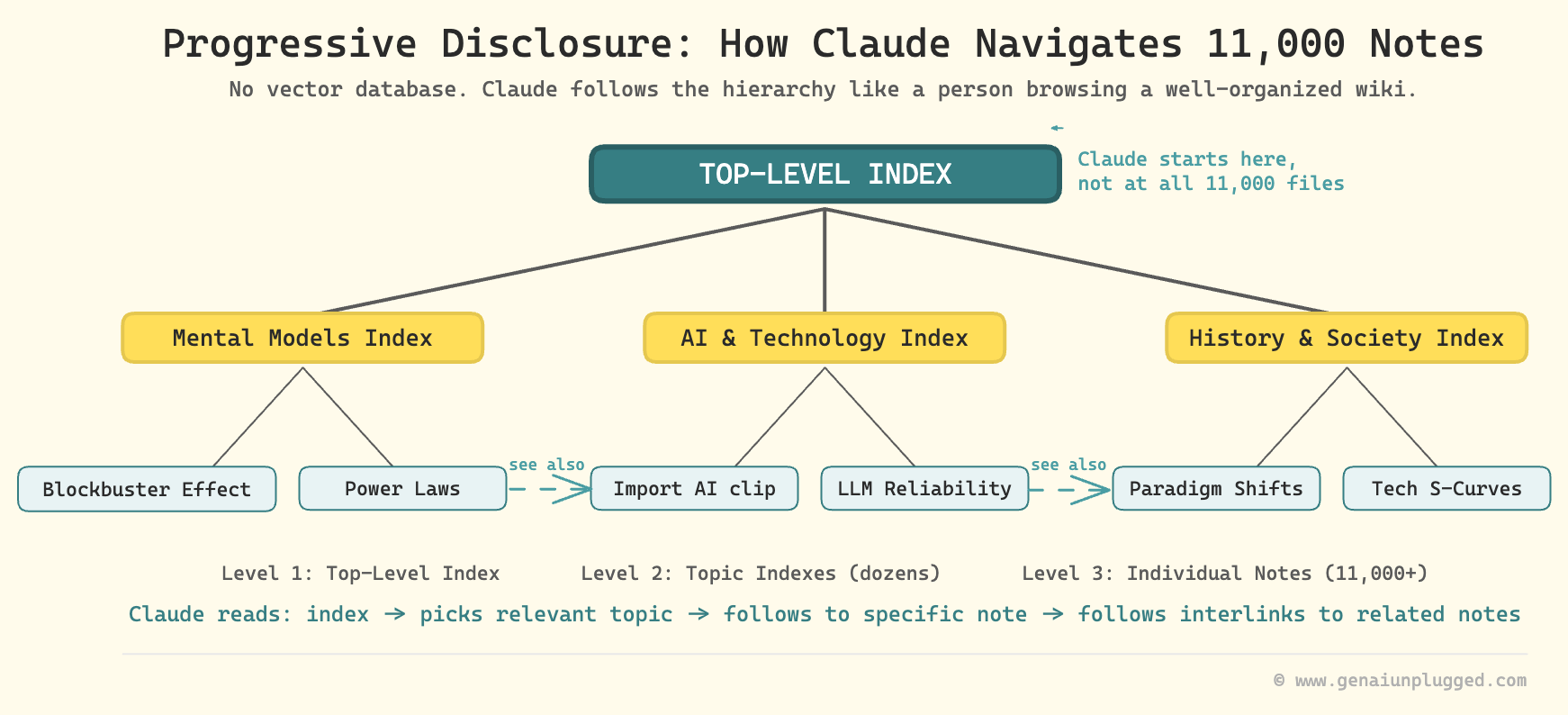
“It’s using primarily progressive disclosure. It has an index file, multiple layers of index files. And then all the files are really interlinked. AI can navigate them really well.” - Michael Simmons
This matters because most people assume they need RAG (retrieval-augmented generation, which is a system that uses embeddings to find semantically similar text) to use a large knowledge base with AI. Michael’s experience shows that structured markdown with good interlinking is sufficient at this scale. He mentioned a vector database is on his roadmap, but it’s not required to start.
Second Brain Architecture at a Glance:
Scale: 11,000 individual notes and clips
Storage: Obsidian (local markdown)
Structure: Progressive disclosure (layered index files)
AI access: Claude Code reads the folder directly
Search method: Structural navigation, not vector similarity
Vector database: On roadmap, not currently needed
How Does Audio Become Part of the Second Brain?
The audio input layer is where Michael’s system gets genuinely inventive.
He uses Snipd as his primary audio intelligence hub (at 29:12). Snipd is an AI podcast player built for knowledge workers, not passive listeners. The features that matter for his system:
Follow specific thinkers (not shows), so he never misses Andrej Karpathy appearing as a guest on any podcast
AI chapters that let him skip to exact topics within an episode
Smart clipping that captures full context around a highlighted segment, not just the last 60 seconds
Full transcripts with word-level highlighting
Direct sync to a designated Obsidian folder
When Michael creates a clip in Snipd, it automatically appears in his Obsidian second brain with the transcript, metadata, and show information. That clip becomes a searchable, linkable node in his knowledge base.
He also built a Claude Code skill on top of Snipd. When he wants richer notes from a podcast clip, the skill finds the related YouTube video, downloads its full transcript, and adds it to the Obsidian note. A podcast clip becomes a complete record.
The article-to-audio pipeline closes the loop for written content (at 34:00). Michael’s Claude Code skill takes an article URL, sends the text to ElevenLabs for text-to-speech conversion, publishes the resulting MP3 to a private RSS feed, and that feed appears in Snipd.
He listens to articles the same way he listens to podcasts. He clips the useful parts. Those clips flow into Obsidian automatically.
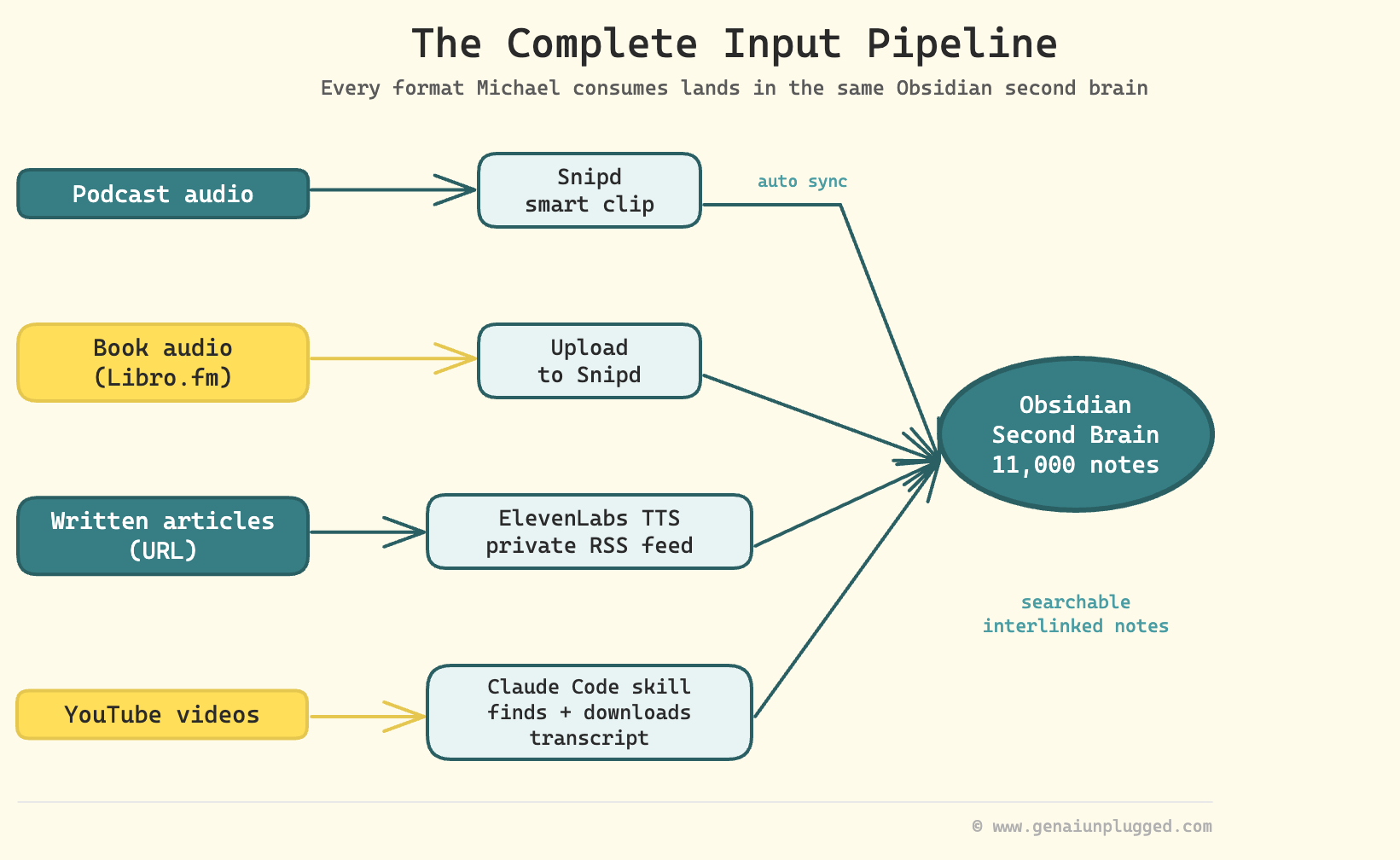
The Complete Input Pipeline:
Podcast audio: Snipd → smart clip → Obsidian folder (automatic sync)
Book audio: Libro.fm MP3 → upload to Snipd → clip → Obsidian
Written articles: Article URL → Claude Code skill → ElevenLabs → private RSS → Snipd → clip → Obsidian
YouTube: Snipd clip → Claude Code skill finds matching YouTube video → downloads transcript → appends to Obsidian note
Everything the system consumes, regardless of original format, lands in the same place in the same structure.
Want to Build Similar Second Brain in Weekend Instead of a Weeks?
You just mapped out the full system: Snipd captures the clips, Obsidian holds the indexed knowledge, Claude Code runs the skill chain, and the article pipeline writes itself. The architecture makes sense.
Now comes the part nobody talks about - actually wiring it up without spending two days on trial-and-error folder structures and CLAUDE.md configs that don’t quite work the way you expected.
Included in your PluggedIn subscription:
CLAUDE.pdf - CLAUDE.md - Second Brain Navigation Guide
example-pipeline-output.pdf - Example: Research-to-Draft Pipeline Output
example-second-brain-structure.pdf - Example: Completed Second Brain Vault Structure
01-first-second-brain-query.pdf - Your First Second Brain Query
02-research-to-draft-skill-chain.pdf - Research-to-Draft Skill Chain Prompt
03-voice-profile-extractor.pdf - Voice Profile Extractor Prompt
progressive-disclosure-index-template.pdf - Progressive Disclosure Index Template
second-brain-setup-checklist.pdf - Second Brain Setup Checklist
That’s the difference between understanding how the system works and actually having it work by end of day.

What Is the Biggest Mistake People Make When Building a Second Brain?
Building too much before proving it works.
Michael spent months with a developer building what he envisioned as the ultimate make.com content system. He never ended up using it consistently. The habit didn’t form because the system was designed for the end state, not the starting state.
“I feel like a mistake I’ve made is trying to create ultimate systems. Just get one data source in it, see if you can query it, and just increase it from there.” - Michael Simmons
His current system started with one data source: his own articles. He built the folder, structured the indexes, ran a few queries with Claude, confirmed he was getting value from it.
Then he added podcast clips. Then Zoom transcripts. The habit formed at each layer before the next layer was added.
Wyndo raised a related caution during our session. A combined second brain covering multiple disciplines can start producing forced connections if you don’t give Claude explicit rules.
Without guardrails, the AI will find patterns between notes that have no real connection, which looks like insight but isn’t. Michael’s fix is to keep the mental models folder separate and explicit, so the brainstorming skill pulls from a curated set of lenses rather than hallucinating connections across random notes.
7 Questions About Building a Second Brain in Claude Code
1. Do you need a vector database or RAG to build an AI second brain?
No. Michael Simmons runs 11,000 notes without semantic search. He uses progressive disclosure: layered index files and heavily interlinked markdown in Obsidian. Claude navigates the structure by following links from index to topic to specific note, the same way a person would.
A vector database is on his roadmap for scale, but it’s not required to start.
2. What is skill chaining in Claude Code?
Skill chaining is a pattern where one Claude Code skill automatically triggers the next skill when it finishes, passing its output as input to the next step. No manual copy-paste between steps. Michael’s research pipeline chains four to six skills that run for up to two hours autonomously, from research to draft, without him touching it between steps.
3. How does Snipd connect to Obsidian?
Snipd has a built-in Obsidian integration. You set a target folder in your vault, and every smart clip you create in Snipd automatically syncs to that folder, including the clip transcript, show metadata, and speaker information. Michael also built a Claude Code skill that layers on top, finding the related YouTube video for any podcast clip and downloading its full transcript to enrich the Obsidian note.
4. What is progressive disclosure for a second brain?
Progressive disclosure is an architecture pattern where information is organized in layers. A top-level index points to category-level indexes, which point to individual notes. Notes interlink with related notes.
Claude navigates this structure hierarchically rather than searching across all 11,000 files simultaneously. It’s the same navigation pattern a person would use inside a well-organized wiki.
5. How do you start building a second brain without getting overwhelmed?
Start with one data source. Michael’s starting point was his own published articles. He loaded them into an Obsidian folder, built a simple index, and ran a few Claude queries to confirm he got value from it.
Only after proving the habit and the value did he add podcast clips, then Zoom transcripts. Starting with the complete vision produces a system nobody uses.
6. What made Claude Code succeed where make.com failed?
Make.com is a no-code automation tool built for defined, predictable workflows. When something breaks or changes, you debug nodes manually. Claude Code’s agentic approach treats complex multi-step tasks as autonomous work rather than conditional logic. It handles ambiguity, adapts when something unexpected happens, and doesn’t require a developer to fix a broken trigger every time an API changes.
7. Should I use one second brain or separate ones for different topics?
Michael leans toward one combined brain because cross-disciplinary connections are part of the value. Wyndo’s caution is that without explicit guardrails, a combined brain produces forced connections that look like insight but aren’t. The practical advice: use one brain, but give Claude explicit rules about which note categories to pull from during each phase of the pipeline.
Key Takeaways
The chat approach has a ceiling. If you’re copy-pasting between steps, you’re doing the work the AI should be doing. Skill chaining in Claude Code eliminates the manual handoffs.
Progressive disclosure is enough at 11,000 notes. You don’t need a vector database to use a large knowledge base with Claude. Layered indexes and linked markdown files is a sufficient navigation structure.
Snipd closes the audio gap. Every podcast, book, and article Michael consumes can become a searchable, interlinked node in his Obsidian second brain within minutes of creating a clip.
The article-to-audio loop is underused. Converting long-form articles to audio via ElevenLabs and a private RSS feed means even written content becomes Snipd-native and clippable.
150 hours of make.com was tuition, not failure. Michael’s honest account of what didn’t work is what makes his current system legible. The lesson is approach, not tool selection.
Start with one data source, prove value, then layer. The make.com system he never used was built for the end state. The Claude Code system he uses daily was built incrementally, habit first.
Opus 4.5 was the version that made this reliable. Earlier models weren’t capable enough for multi-hour autonomous chains. If you tried this with an earlier version and gave up, the model situation has changed.
Resources Mentioned
Claude Code: Michael’s primary building environment for all research and writing skills. The shift to agentic AI after ChatGPT and make.com.
Snipd: AI audio intelligence hub with smart clipping, Obsidian sync, people-following, chapter navigation, and book/MP3 upload support. Michael’s primary audio input layer. (upload.snipd.com for file uploads)
Obsidian: Michael’s second brain storage. Around 11,000 individual notes using progressive disclosure architecture.
ElevenLabs: Text-to-speech service used by Michael’s Claude Code skill to convert articles to audio MP3s for his Snipd pipeline.
make.com: The no-code automation tool Michael spent 150 hours on before moving to Claude Code. Too brittle for complex content workflows.
Libro.fm: DRM-free audiobook service that provides actual MP3 files. Michael uploads books from Libro.fm to Snipd to use AI features on them.
Import.AI: Jack Clark’s (Anthropic co-founder) newsletter. Michael used a specific Import.AI piece as the trigger example for his live pipeline demo.
HeyGen: Michael is experimenting with HeyGen to create video clips from his weekly digest. Early stage.
n8n: The workflow tool I use at GenAI Unplugged. I use n8n workflows to distribute video clips from live sessions to social channels.
Anita Elberse: Author of “The Blockbusters” (2013). Her research shows blockbusters have grown larger across every media category. Informs Michael’s focus on quality over volume.
Blockbuster Blueprint: Michael Simmons’s newsletter and content brand. Worth following if this system appeals to you.
WhatsApp group: Michael’s distribution layer for paid subscribers. He shares interesting clips from his knowledge pipeline to a group of a few hundred subscribers.
Your 15-Minute Challenge
Pick one data source you already have. If you write, it’s your past articles. If you run a podcast or record video, it’s your transcripts. If you consume a lot of podcasts, it’s your existing notes from the last month.
Create a folder in Obsidian (or any markdown folder) called second-brain. Drop that one data source in. Build a single index file with a list of the documents and a one-line summary of each.
Then open Claude Code, point it at the folder, and ask it a question you’d normally have to search manually. Something like: “What themes appear most consistently across my articles from the last six months?” or “What did I capture about [specific topic] in my podcast notes?”
If the answer is useful, that’s your signal. Add the next data source next week.
If you want to see Michael’s full architecture in context, including the live Snipd demo and the exact explanation of how skill chaining passes information between steps, watch the session recording starting at 18:37.


