



Table of Contents
A loop with no exit condition does not fail politely. It runs until your usage limit stops it, and that is the part nobody warns you about before your first one.
Loop engineering in Claude Code means your agent can now generate something, check its own work, and retry until it passes. It is the most useful thing I have added to my workflow this year, and also the easiest way to spend a week of quota in a single afternoon.
I sat down with Ilia Karelin from Prosper In AI for episode 19 of the One Shot Show, alongside my co-host Wyndo, to walk through the newest Claude Code desktop app features and something bigger underneath them: loop engineering.
By the end of this article, you’ll understand what a loop actually is, why it only became possible now, and how to build one for your own content workflow the same way Ilia built one for SEO audits and I built one for a 17-year-old travel blog.
“As earlier it was prompt engineering, then it came like context engineering, and now it is like loop engineering. So we are becoming a lot of engineers.” - Dheeraj Sharma
That line sums up the whole episode. Every wave of AI tooling has added a new layer of control. Loops are the newest layer, and they are simpler to build than most people assume.
👋 Julley, I’m Dheeraj, an AI systems builder.
I build production-grade AI systems at work by day and ship my own products by night, 9 and counting, including SubflowAI and the Content OS Agents Toolkit. This newsletter is the bridge between those two worlds. Every system, every build, documented step by step.
Join 2,000+ builders getting the exact AI setups, prompts, and workflows that actually work in your business.
Why Does Loop Engineering Matter Right Now?
Loop engineering matters now because two things matured at once. Models got reliable enough to finish long multi-stage tasks without quitting halfway, and harnesses like Claude Code got good enough to check their own work and retry.
Together they turn a supervised chat session into a workflow that finishes on its own.
Before this, a self-correcting system meant hand-building a team of agents: a writer, a verifier, a fact-checker, a publisher, all wired together. Loops collapse that team into one workflow in a single session.
One number made it click for me. The thing that used to break long loops was the model quitting partway through:
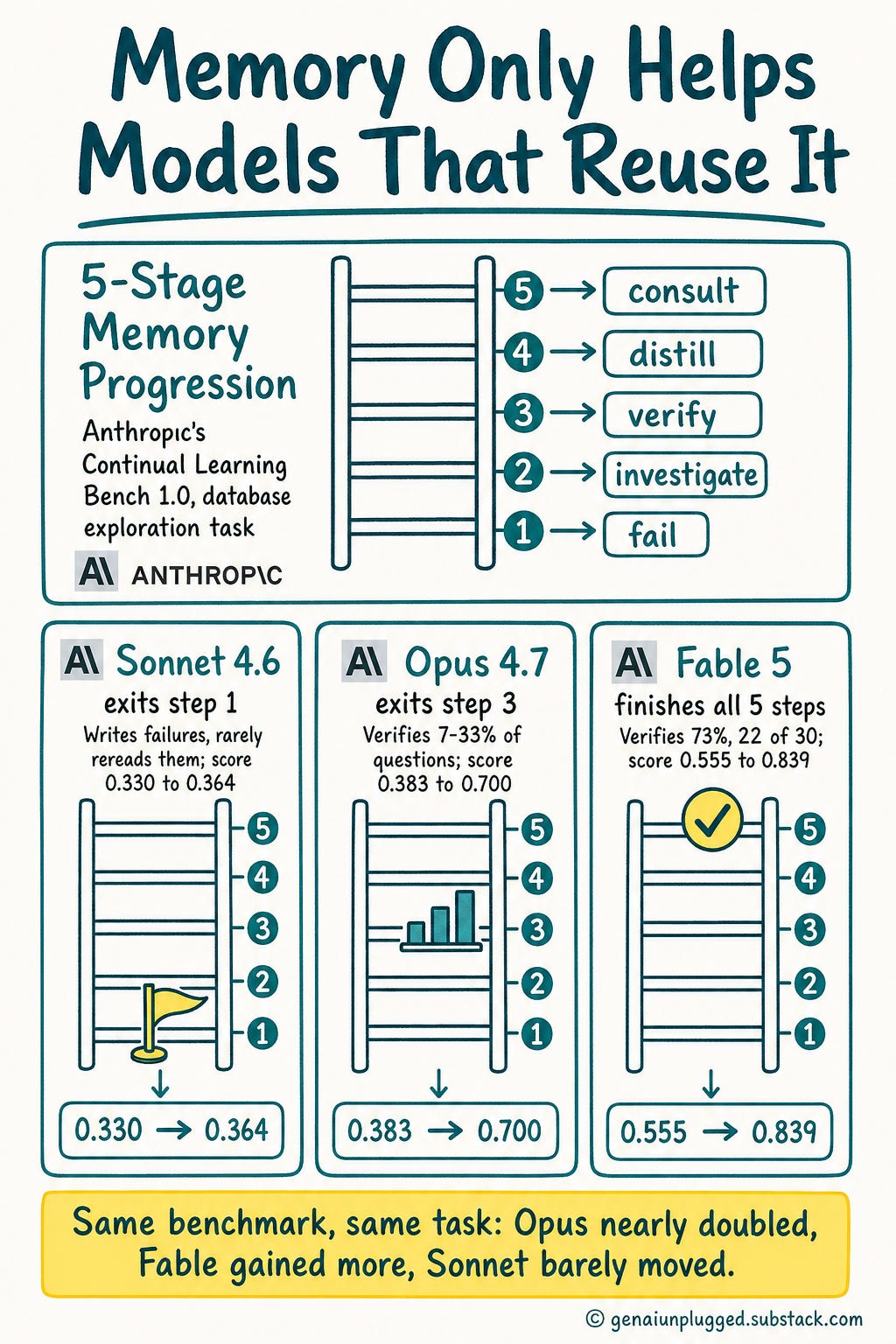
The Continual Learning Bench measures whether an AI system actually improves with experience, across six domains including database querying.
On the database exploration task, Anthropic measured how far each model gets through a five-stage memory progression: fail, investigate, verify, distill, consult.
Each stage is a structural move, and each model drops out at a different point.
Sonnet 4.6 exits at step 1. It writes down failures and open guesses, then rarely reads them again. Memory exists but does not compound.
Opus 4.7 exits at step 3. It builds a schema reference and flags its own uncertainty, verifying 7 to 33% of questions, median around 17%.
Fable 5 tends to finish the progression. In its strongest runs it verifies 73% of questions, 22 out of 30, and distills what it learned into rules it reuses later.
The before-and-after is the part worth keeping. Same models, same task, scored with a memory store against a stateless baseline:
Sonnet 4.6: 0.330 to 0.364
Opus 4.7: 0.383 to 0.700
Fable 5: 0.555 to 0.839
Opus nearly doubles. Fable adds roughly half again on an already higher score. Sonnet barely moves, because a model that never consults its own notes gains almost nothing from having them.
That matters most for solo operators. I have no content ops team. I have me, a laptop, and whatever Claude Code can run unsupervised.
Every loop I build ends up in the PluggedIn library for members, mostly because I got tired of rebuilding the same scaffolding each time.
What’s New in the Claude Code Desktop App?
The Claude Code desktop app now supports multi-pane sessions, two permission tiers, an in-app Browser, terminal-created Artifacts with live data, and Routines.
Together these turn the app from a terminal wrapper into somewhere you can run several agents, watch a site render, and ship a dashboard without leaving the window.
Wyndo pointed out that Claude went the opposite way from OpenAI. ChatGPT split into separate consumer and Codex apps. Claude consolidated into two modes, Home and Code.
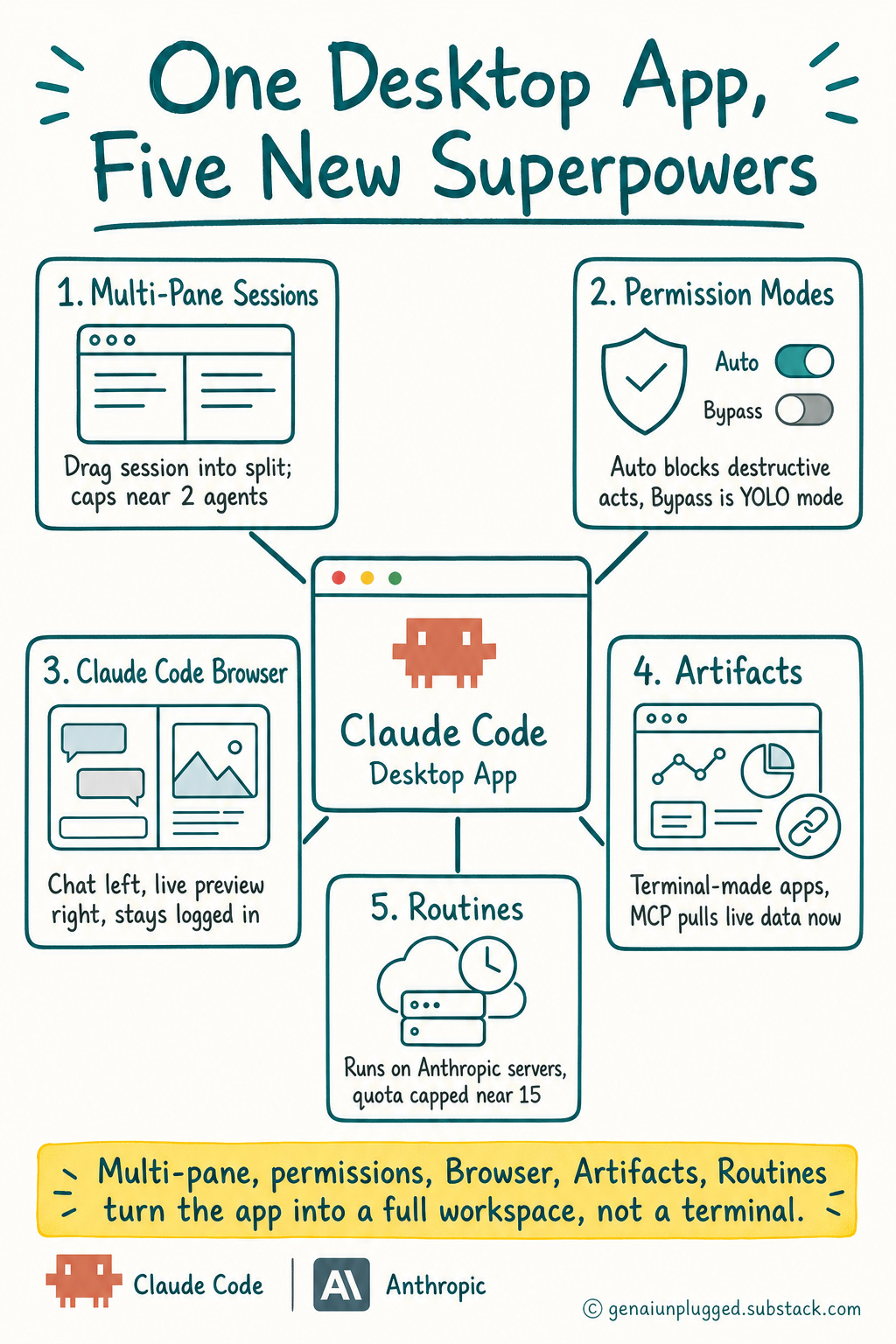
Here’s the quick breakdown of what changed:
Multi-Pane Sessions
Best for: Running two agents at once, potentially on different models
Setup: Drag a session from the sidebar into a split, side-by-side or stacked
Ceiling: All three of us cap out around 2 concurrent “important” sessions, despite people online claiming they run 5-10 subagents at once
Permission Modes
Auto: Blocks destructive or production actions unless you explicitly grant permission in the prompt
Bypass (”YOLO mode”): Runs everything without asking
Best for: Auto when you’re still trusting the workflow, Bypass once you’ve verified it repeatedly
Claude Code Browser
Best for: Editing a live site without alt-tabbing between a terminal and a browser window
Setup: Chat on the left, live rendered preview on the right, inside the desktop app
Bonus: Persistent logged-in sessions, so the agent can act inside Substack, X, or LinkedIn while you’re logged in
Live Artifacts in Claude
Best for: Shareable mini web apps and dashboards with a stable link and version history
Setup: Can now be created directly from the terminal, not just the chat window
New capability: MCP connectivity means an artifact can pull live data instead of showing frozen numbers
Routines
Best for: Recurring tasks you want hosted on Anthropic’s own servers instead of your machine
Cost: Draws from a separate usage quota, which I recall being capped around 15 on my plan
My take: I skip these because I run my own orchestration server already
Learn with me: Claude Code Builder cohort
The founding batch of my Claude Code cohort starts in July on Maven. Four weeks, six sessions. Learn to build the AI system with me.
Only 7 Seats left now. When they’re gone, the founding price ($797) closes and Cohort 2 opens at $1,597.
Use code GENAI20 for 20% off. Expires July 25. Check the Syllabus →
How the New Permission System Works in Claude
Claude Code offers two permission tiers. Auto mode blocks high-risk actions like production deploys unless you explicitly grant permission in your prompt. Bypass mode removes every approval gate and runs everything without asking.
The practical rule: stay in Auto until you have watched a workflow behave correctly several times. Ilia Karelin described Bypass plainly:
“It’s essentially, yes, like a YOLO mode.” - Ilia Karelin
Ilia shared a story about a client project on Expo.dev. Claude was in Auto mode, midway through a package update, when it stopped itself.
“It was like, okay, this is destructive kind of an action and it stopped itself even though it wasn’t in auto mode... So I feel like that was super helpful.” - Ilia Karelin
The permission mode gets the credit here, but it should not. The harness itself is getting better at recognizing destructive actions, independent of whatever mode you set.
That is the detail people miss in the Auto versus Bypass debate. The safety net improves on its own, under whichever mode you pick.
What Can You Do With Claude Code Browser?
Claude Code Browser is a browser built into the desktop app. You chat with Claude on one side of the screen and watch your changes render live on the other, without ever switching windows.
It also keeps logged-in sessions, so the agent can act inside Substack, X, or LinkedIn while your authentication holds.
Ilia Karelin walked through it live, including a select-and-annotate tool: circle any element on the rendered page, and it gets sent straight into the chat as context.
What it replaces, in practice:
A screenshot, an upload, and a paragraph explaining which element you meant
Alt-tabbing between terminal and browser on every visual change
Re-authenticating each time the agent needs to act inside a logged-in site
This isn’t new. Windsurf built the original select-to-edit pattern and Cursor picked it up first. What’s new is having it inside Claude Code, next to a logged-in browser session.
One honest concern. I avoided the desktop app before because it felt sluggish and crashed at 4-5 concurrent sessions.
Wyndo says that’s now largely resolved, but I’m still testing it under real daily load before I trust it completely.
Claude Code Loop Engineering: What Is a Loop, and How Do You Build One?
A loop in Claude Code is a self-evaluating, self-retrying workflow built from four steps: generate, evaluate, retry, and done. Ilia Karelin laid this out as the reusable framework behind every loop. The shape never changes.
Only the thing being scored and the rubric change from one loop to the next.
Here’s the anatomy, broken down:
Generate - the loop produces an output, like an SEO-optimized version of a post, based on reference files you give it
Evaluate - the loop scores that output against your criteria and returns a verdict, pass or fail, with reasoning
Retry - if it fails, the loop applies the suggested fixes and reruns generate and evaluate, typically for 3-4 rounds
Done - once the score clears your threshold, the loop stops and reports what changed and why
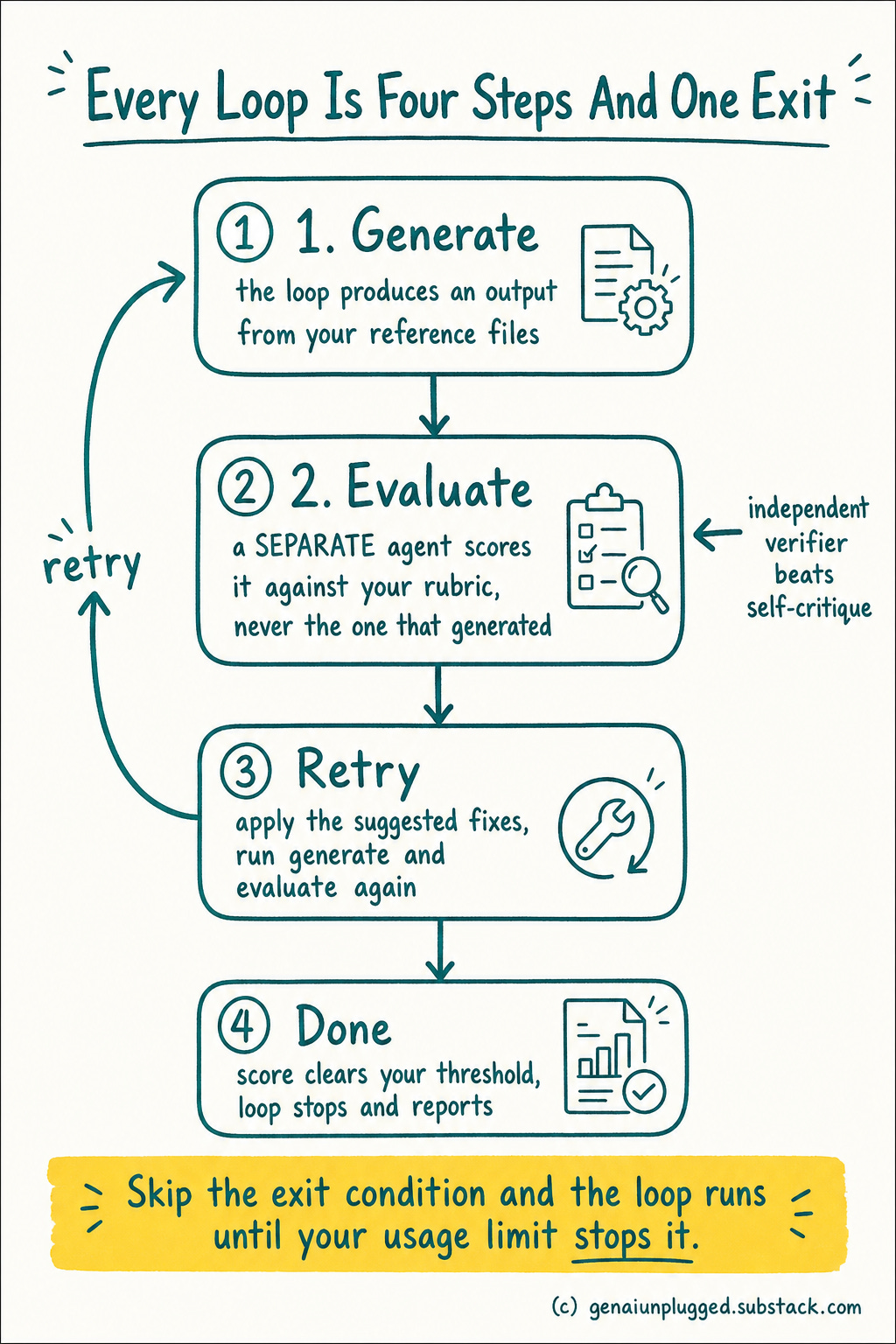
One detail that is easy to miss in step 2: the agent that evaluates should not be the agent that generated.
Anthropic's Claude Code team found that a verifier sub-agent outperforms self-critique, and the reason is structural rather than effort. A model grading its own output can see its own reasoning trail, so it favours conclusions it already committed to.
A separate agent sees only the artifact and the rubric, with nothing invested in the answer being right the first time.
Claude Skills are the other half of this.
A loop that reloads your project context every run wastes tokens on things it should already know, which is why I keep reusable Claude workflows as skill files instead of re-explaining the project each time.
Anthropic’s Claude Code SDK docs cover the programmatic side if you want to drive a loop from your own script.
The step people skip, and the one that will cost you the most if you skip it, is step 4.
“You need to have like a definitive exit condition from the loop. Otherwise, you will exhaust your usage limits like right away with just one loop.”
Without a measurable done condition, a loop just keeps running. It burns through your usage limits and bloats your context window with no natural stopping point.
If you have ever wondered where your quota goes, I broke down how usage limits actually get burned through separately, and an unbounded loop is the fastest version of every problem in that post.
Every loop needs a trigger too, whether that’s scheduled, webhook-based, condition-based, tied to a pull request, or simply manual. The official Claude Code documentation covers the permission and session mechanics these triggers sit on top of.
What Does Claude Code Loop Engineering Cost to Run?
A loop costs far more than a single prompt because it is not one call. It is every generate, every evaluate, every retry, and every subagent, stacked into one run.
This is the part that decides whether you ever build a second loop, and almost nobody leads with it, which is how people get surprised by their usage limits.
The rough shape of it:
A single medium coding loop: 50K to 200K tokens
A fleet loop, one orchestrator plus several specialists: 500K to 2M tokens
A scheduled daily loop: into the millions of tokens per week
Now put that next to the exit-condition point. A loop with no measurable done condition does not fail politely. It runs until something else stops it, and the thing that stops it is your usage limit.
That is why Ilia’s warning lands the way it does: one badly-bounded loop can eat a limit that was supposed to cover your whole week.
A retry you supervise costs attention. A retry inside a loop costs tokens. Only one of those has a budget you can set in advance.
So the honest before-and-after here is not hours saved. It is this. Before, a retry costs you attention, because you are the one noticing the output was wrong and typing the follow-up.
After, a retry costs you tokens, and tokens are a budget you can cap in advance with a round limit and a pass threshold. You are trading an unbounded call on your attention for a bounded call on your quota.
That trade only works if you actually set the bound. Skip the threshold and you have not automated the loop, you have just automated the spending.
When Should You Use a Claude Loop?
Loops work best on a project already 60-70% complete, with a contained artifact you are refining rather than a new build from zero. The reason is guardrails. A mostly-finished piece gives the loop a rubric, reference files, and a pass threshold, so there is less room to wander.
Wyndo made this the practical rule of the whole episode:
“I don’t think I want to use loop for like a project that I need to start from zero to one. I would just use it for a project that already may be like 60 to 70% done.” - Wyndo
The reasoning is straightforward. An unsupervised agent working on a zero-to-one build has too much room to exercise its own judgment, and it will drift from what you actually wanted. A loop on a contained, mostly-finished piece has clear guardrails: a scoring rubric, reference files, and a defined pass threshold.
There’s less room to wander.
Ilia was direct about the other side of this too. A loop isn’t a “set it and forget it forever” tool.
“You can’t just completely 100% give freedom for AI to do everything and not learn anything about it. So I feel like you need to work as a partner with it.” - Ilia Karelin
That’s why he built his loop to explain its reasoning every round, not just pass or fail silently. You stay the partner, not the bystander.
Get PluggedIn
You understand the loop now. Without the pieces already built, you are still spending an afternoon assembling reference files and a scoring rubric before your first run tells you anything.

Every loop you build from a blank folder costs you an afternoon of setup, and an unbounded first run can burn a week’s usage limit before you learn where the threshold should have been.
Get PluggedIn to go from assembling loop scaffolding by hand every time, to running a bounded loop on your own content the same day you read about it
How Does a Live SEO Loop Work?
Ilia Karelin’s SEO loop reads a set of reference markdown files for a real Substack post, scores the post against them, explains any failures, applies fixes, and reruns the scoring until it passes. He triggered it live with a custom slash command, /seo-loop.
The reference files it pulls from cover:
Title and subtitle drafts
Keyword research
Meta description requirements
Internal linking targets
Google Search Console and audit data
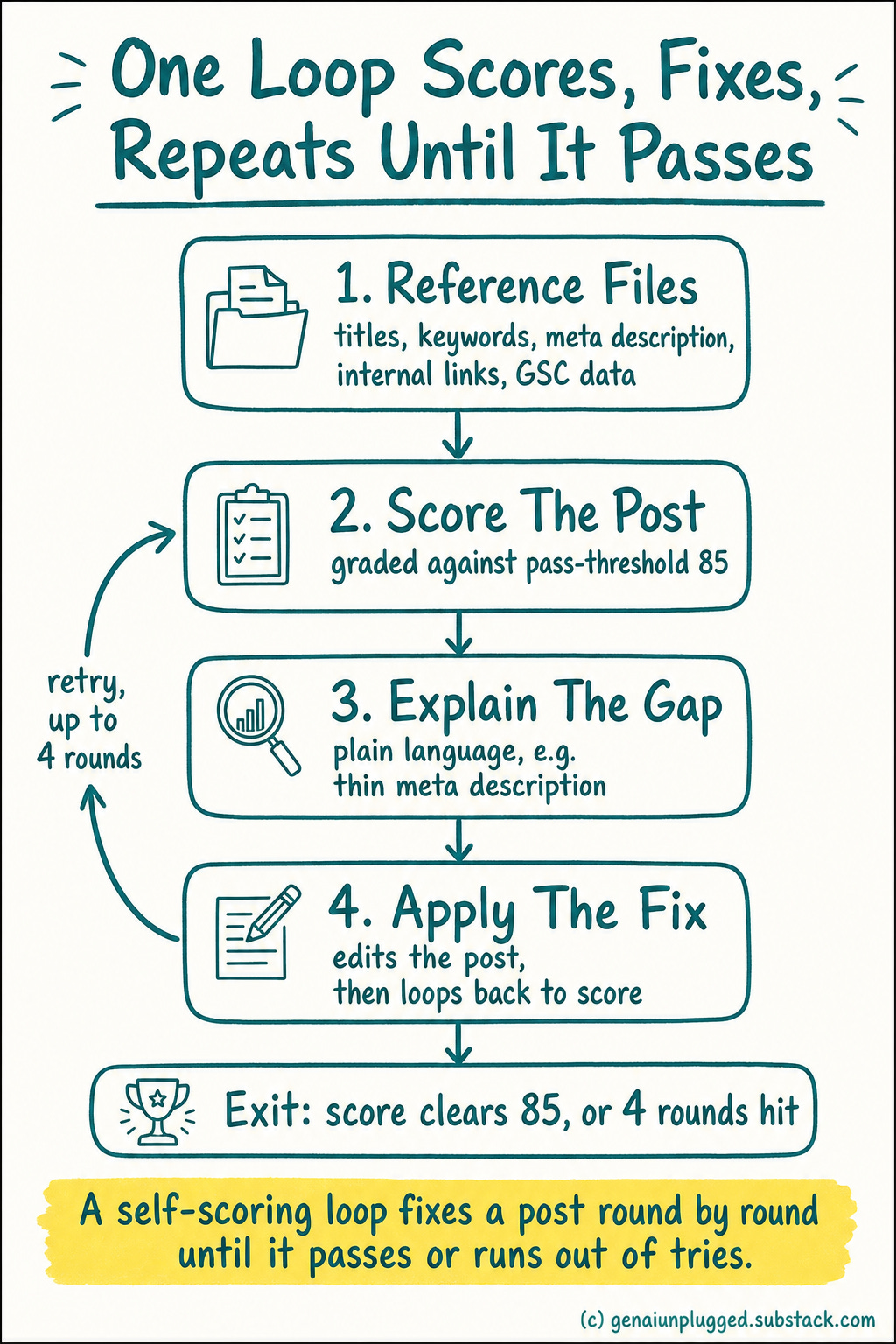
Each round, the loop returns a score and a plain-language explanation of what’s missing, whether that’s a thin meta description or a missed internal link. It applies the fix, then scores again.
If you want the non-loop version of this first, I published the standalone Claude Code SEO and AEO agent that does the same scoring as a one-shot run, which is a reasonable place to start before you wrap it in a loop.
Ilia built it this way on purpose, so every round teaches him something instead of just silently patching the post.
The loop stops when the score clears the threshold or the round cap runs out, whichever comes first.
I built the same pattern for a much older project: a travel blog I’ve run for 17 years. It used to lean on a fragile set of interdependent scheduled tasks, where one failure would cascade into the next task failing too.
I replaced all of it with one self-contained weekly loop that pulls updates from my WhatsApp and Telegram channels, runs an SEO gap analysis, checks competitors, and reports back. One failure now stays contained instead of taking down the whole pipeline.
/seo-loop --post <draft-id> --reference-dir./seo-references --max-rounds 4 --pass-threshold 85That’s roughly the shape of the command. The specifics (your reference file names, your scoring threshold) will differ, but the structure holds: point it at a contained artifact, give it reference files to score against, and cap the rounds.
The reference files are the slow part. Mine took a few iterations to get right, because a vague rubric produces a loop that passes everything on round one.
PluggedIn members get my working set as a starting point, but you can absolutely write your own if you would rather learn it by hand.
What’s the Difference Between a Loop and a Goal?
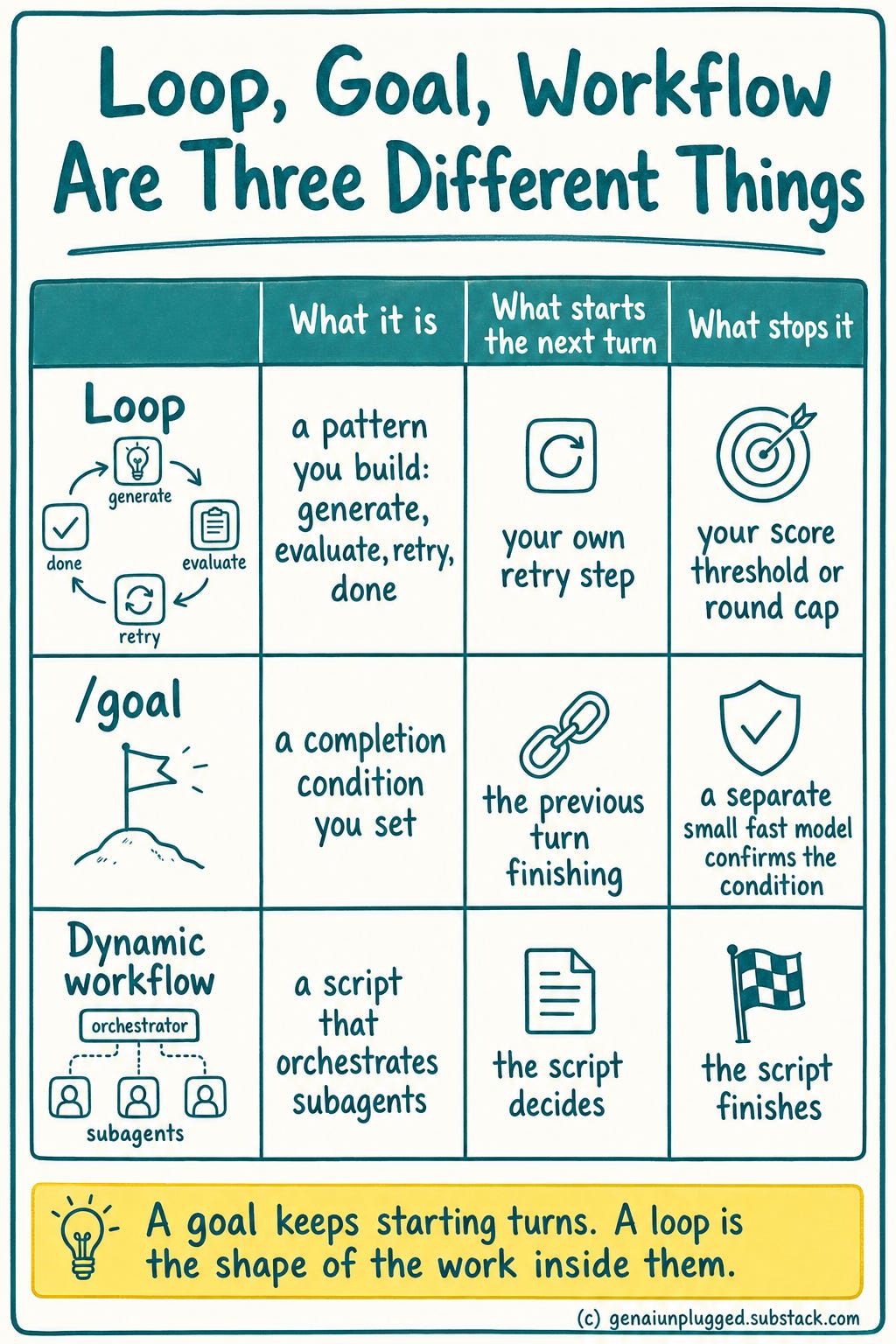
A goal is not a bigger loop. In Claude Code, /goal sets a completion condition, and after every turn a separate small fast model (Haiku by default) reads the conversation and decides whether that condition holds.
If it does not, Claude starts another turn instead of handing control back to you. When it does, the goal clears itself.
That is the real distinction, and it is the same structural move from earlier in this article. The thing deciding you are done is not the thing doing the work.
Anthropic's own docs put it plainly: completion is decided by a fresh model rather than the one doing the work.
Two practical limits worth knowing before you set one.
The evaluator does not run commands or read files, so it can only judge what Claude has already surfaced in the conversation. Write conditions Claude's own output can demonstrate, like "npm test exits 0", not "the code is correct".
And a goal runs until the condition is met or you run
/goal clear, so bound it in the condition itself with something like "or stop after 20 turns".
Worth separating three things that all sound alike.
A goal keeps starting new turns until a condition is met.
Claude Code's
/loopre-runs a prompt on a time interval instead.Dynamic workflows are a different feature again, a JavaScript script that orchestrates subagents, which you opt into explicitly rather than one a goal chooses for you.
What This Article Does Not Cover
Accurate as of July 2026, based on the Claude Code desktop app as it shipped that month. Anthropic ships changes to this surface often, so check the current documentation before you copy any specific setting or flag from this article.
The concepts age well but the exact menu paths and mode names do not.
One honest limit on what you just read. The per-model scores come from Anthropic's own run on this benchmark rather than an experiment I ran, and a database exploration task is not your content workflow.
The benchmark paper and Claude Code's glossary are the places to check the definitions for yourself. Treat the direction as transferable and the exact scores as belonging to that task.
And the token ranges are broad on purpose. Your actual spend depends on your context size, how many subagents you run, and how many retries your threshold allows, so the only reliable number is the one you measure on your own first run with a low round cap.
I have also not tested loops running unattended for days. Everything here comes from loops I supervised.
Frequently Asked Questions
What’s the difference between Auto mode and Bypass Permissions mode in Claude Code?
Auto mode still blocks certain high-risk actions, like production deploys, unless you explicitly grant permission in your prompt.
Bypass Permissions removes all approval gates entirely and runs everything without asking, which Ilia Karelin calls “YOLO mode.” Use Auto while you are still learning how a workflow behaves, and switch to Bypass only after you have watched the same loop run cleanly several times.
Does Claude Code stop itself before doing something destructive, even in Auto mode?
Yes. In a real example from Ilia Karelin’s client work, Claude halted mid-task on an Expo.dev package update because it judged the action destructive, even though nothing was technically blocking it from continuing.
That safety behavior comes from the harness itself rather than the permission mode, so it applies regardless of which mode you selected.
What is Claude Code Browser?
Claude Code Browser is a built-in browser inside the Claude Code desktop app. It shows your chat with Claude on one side and a live, rendered preview of your changes on the other, so you never alt-tab between a terminal and a separate browser window.
What is loop engineering in Claude Code?
Loop engineering means building a self-evaluating, self-retrying AI workflow made of four steps: generate, evaluate, retry, and done. Instead of prompting one task at a time and reviewing the output yourself, you define the standard once and let the loop keep working until the output meets it.
It became viable when models got reliable enough to finish long tasks without quitting partway.
Why does a Claude Code loop need a defined “done” condition?
Without an explicit, measurable done condition, a loop keeps running indefinitely. It burns through your usage limits and expands your context window with no natural stopping point.
A done condition is usually a score threshold plus a maximum round count, so the loop stops either when the work passes or when it has tried enough times.
How many tokens does a Claude Code loop use?
A single medium coding loop typically runs 50K to 200K tokens. A fleet loop, meaning one orchestrator plus several specialist agents, can reach 500K to 2M. A scheduled daily loop climbs into the millions per week.
Every retry, verification, and subagent adds to that total, which is why a round cap and a pass threshold matter more than any other setting.
Should I use a loop for a brand new project or only for something already built?
Loops work best on projects already 60-70% complete, with a clearly contained artifact to refine. For true zero-to-one work, an unsupervised loop has too much room to exercise its own judgment and will drift from what you actually wanted.
Start a new build manually, then wrap a loop around it once the shape is settled and you can write a scoring rubric.
What’s the difference between a loop and a goal in Claude Code?
A goal sets a completion condition, and after every turn a separate small fast model checks the conversation to decide whether the condition holds. If not, Claude starts another turn automatically. A loop is the pattern you build yourself out of generate, evaluate, retry, and done. The goal is the mechanism that keeps starting turns; the loop is the shape of the work inside them.
Key Takeaways
Define your done condition first. A loop with no exit point burns your usage limits in one run.
Only loop on contained, mostly-finished work. Reserve loops for the 60-70% done stage.
Keep the loop explaining itself. Score, explain, fix, rescore. You stay a partner, not a bystander.
Stay in Auto mode until you trust the workflow. Bypass has its place, but later.
Cap concurrent sessions at what you can supervise. All three of us landed on about 2.
Your 15-Minute Challenge
Pick one piece of content you’ve already published, an article, a landing page, anything at least 60% finished.
Write three reference criteria for it (a keyword target, a meta description length, an internal link count) and ask Claude Code to score the piece against those three criteria, then fix what fails. That’s a loop, minus the slash command.
Watch the full conversation and the live SEO loop demo in One Shot Show episode 19 for the exact file structure Ilia Karelin used.


