Workflow Contracts That Stop Your AI Automations Breaking at 2 AM
Build three-layer validation contracts in n8n that catch AI automation failures before they reach your audience. Input, output, and error validation all in this article.

Your newsletter automation sent 847 emails with broken formatting.
You wake up to Slack notifications. Unpleasant replies. Unsubscribes.
The automation "worked" and it ran without errors.
But somewhere between the AI generating content and email automation system or Gmail sending it, the formatting broke. Now you're spending your morning manually checking every automation output, which defeats the entire point of automation.
This isn't about perfect code. It's about defensive automation: systems that catch problems before they become emergencies.
By the end of this article, you’ll have a working three-layer validation system in n8n. In my own workflows, this approach cut failures by about 90%.
👋 Julley, I’m Dheeraj and I’m an AI systems builder.
I build production-grade AI systems at work by day and ship my own products by night (9+). This newsletter is the bridge between those two worlds. Every system, every build, documented step by step.
Join 1,300+ builders getting the exact AI setups, prompts, and production configs that actually work in your business.
Build validation contracts that check data before and after processing. Input contracts verify data at entry, output contracts validate AI results, and error contracts route failures to notifications instead of letting them cascade silently.
Why Your Automations Break (And Why You Never Catch It Early)
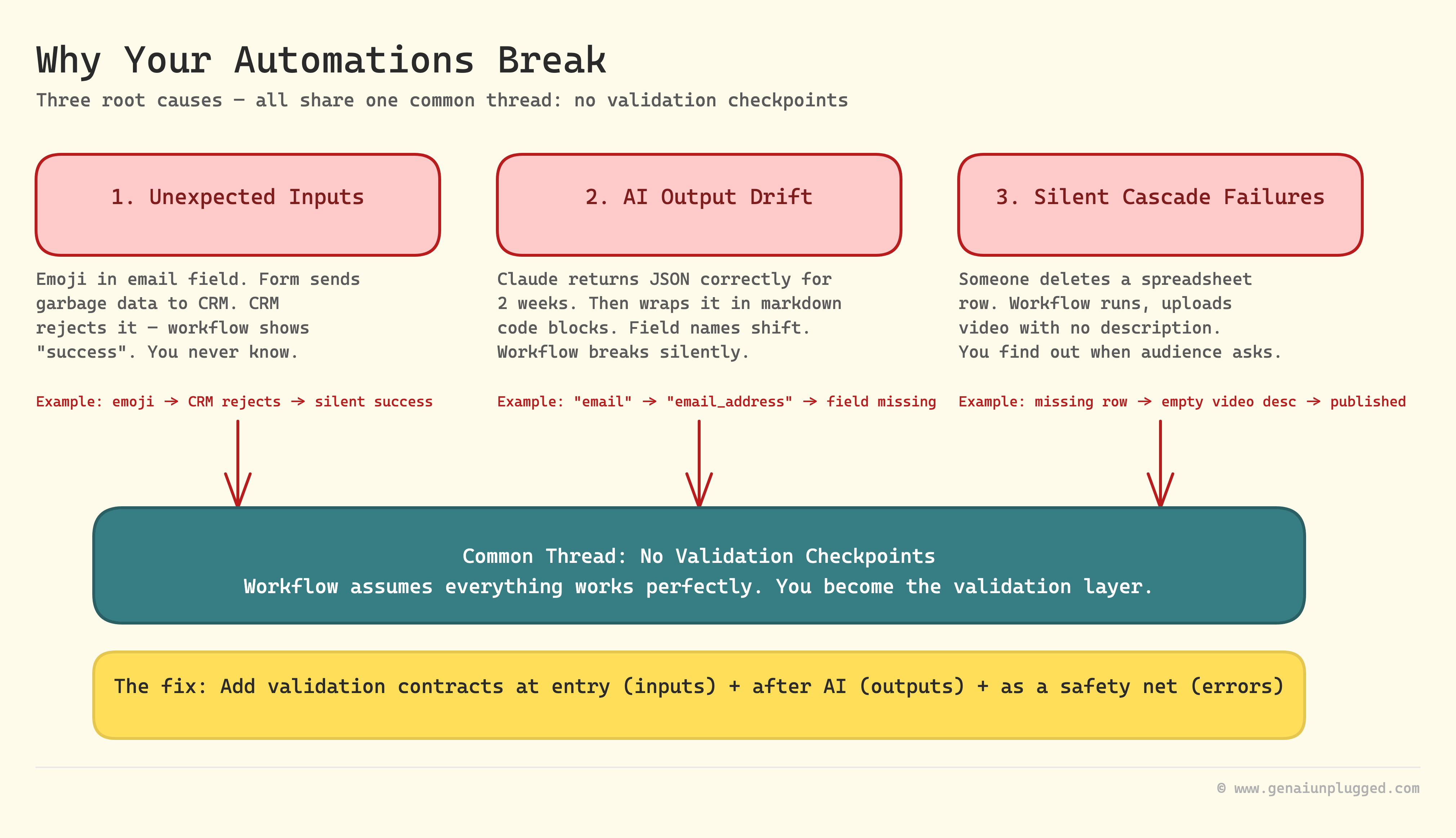
Your workflows fail for three reasons:
1. Unexpected inputs break processing.
Someone submits a form with emoji in the email field. Your workflow doesn't validate format. It passes garbage data to your CRM.
The CRM rejects it, but your workflow shows "success" because technically it ran.
2. AI outputs change structure.
You prompt Claude to return JSON with specific fields. It works perfectly for two weeks. Then one day, Claude returns a slightly different structure.
Maybe it wraps the JSON in markdown code blocks, or uses "email_address" instead of "email". Your workflow breaks because it expected exact field names.
3. Silent failures cascade.
Your YouTube upload workflow pulls video descriptions from a spreadsheet. Someone accidentally deletes a row. The workflow runs, uploads the video with no description.
You don't notice until your audience asks why there's no show notes link.
The common thread: no validation checkpoints. Your workflow assumes everything will work perfectly. When it doesn't, you become the validation layer: manually checking outputs, fixing errors, re-running workflows.
Think Like This: Workflow Contracts as Airport Security
Think of workflow contracts like TSA checkpoints at an airport.
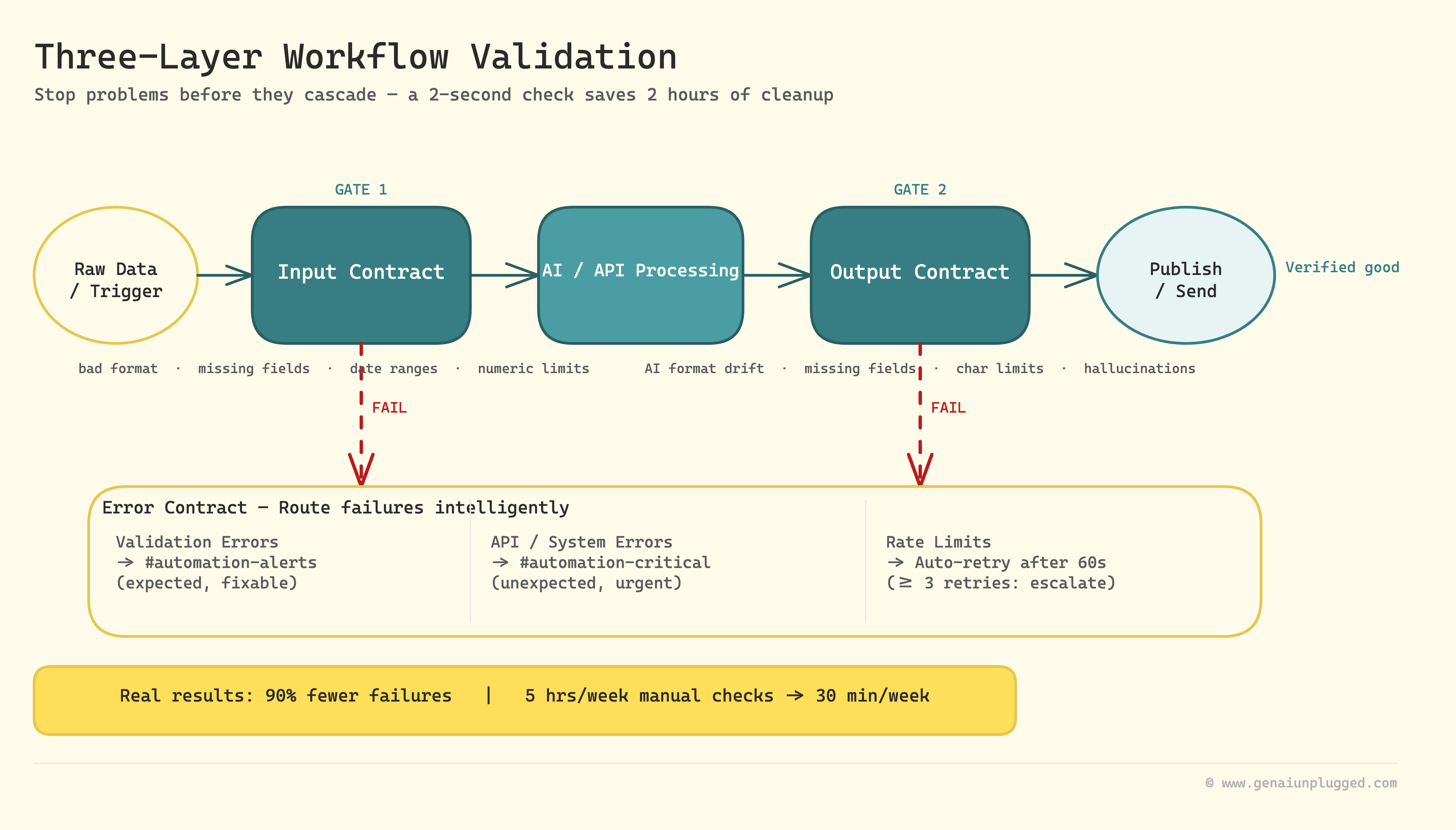
Input contracts check your ID before you board. If your ID is expired or doesn't match your ticket, you don't get past security. You don't board a plane with an invalid ID, discover the problem mid-flight, and cause an emergency landing.
Output contracts scan your bags for prohibited items. If something's wrong, they catch it at security, not after you've boarded, not at your destination. The checkpoint prevents problems from cascading.
Error contracts define what happens when validation fails. TSA doesn't just reject you silently. They tell you what's wrong ("ID expired"), where to fix it ("go to DMV"), and route you appropriately (to secondary screening or back to check-in).
Your workflows need the same checkpoints. Validate data at entry. Verify outputs before publishing. Route failures to notifications instead of letting them cascade silently.
The small delay at each checkpoint prevents massive problems downstream. A 2-second validation check saves 2 hours of manual cleanup.
What Are Input Contracts?
Input contracts define "valid data" before processing starts.
They answer: What shape should this data be? What fields are required? What formats are acceptable?
Common validations you need:
Email format validation. Before adding a contact to your CRM, verify the email field contains a valid email address. Not just "does it have an @ symbol." Use proper format validation with regex patterns.
Date validation. If your workflow schedules social posts, verify the date is in the future. Don't let someone accidentally schedule a post for 2023 when they meant 2026.
Required field checking. Before processing a form submission, verify all required fields are present and not empty. Don't assume "optional" means "the workflow can handle missing data."
Numeric range validation. If your workflow processes pricing, verify numbers fall within acceptable ranges. A $10,000 course price might be a typo for $100.
The principle: fail fast. Reject bad data immediately, at the workflow entry point. Don't let it poison downstream steps. Don't waste API calls processing data that will fail later anyway.
Validation also saves money. Understanding the hidden costs of AI automation shows exactly how.
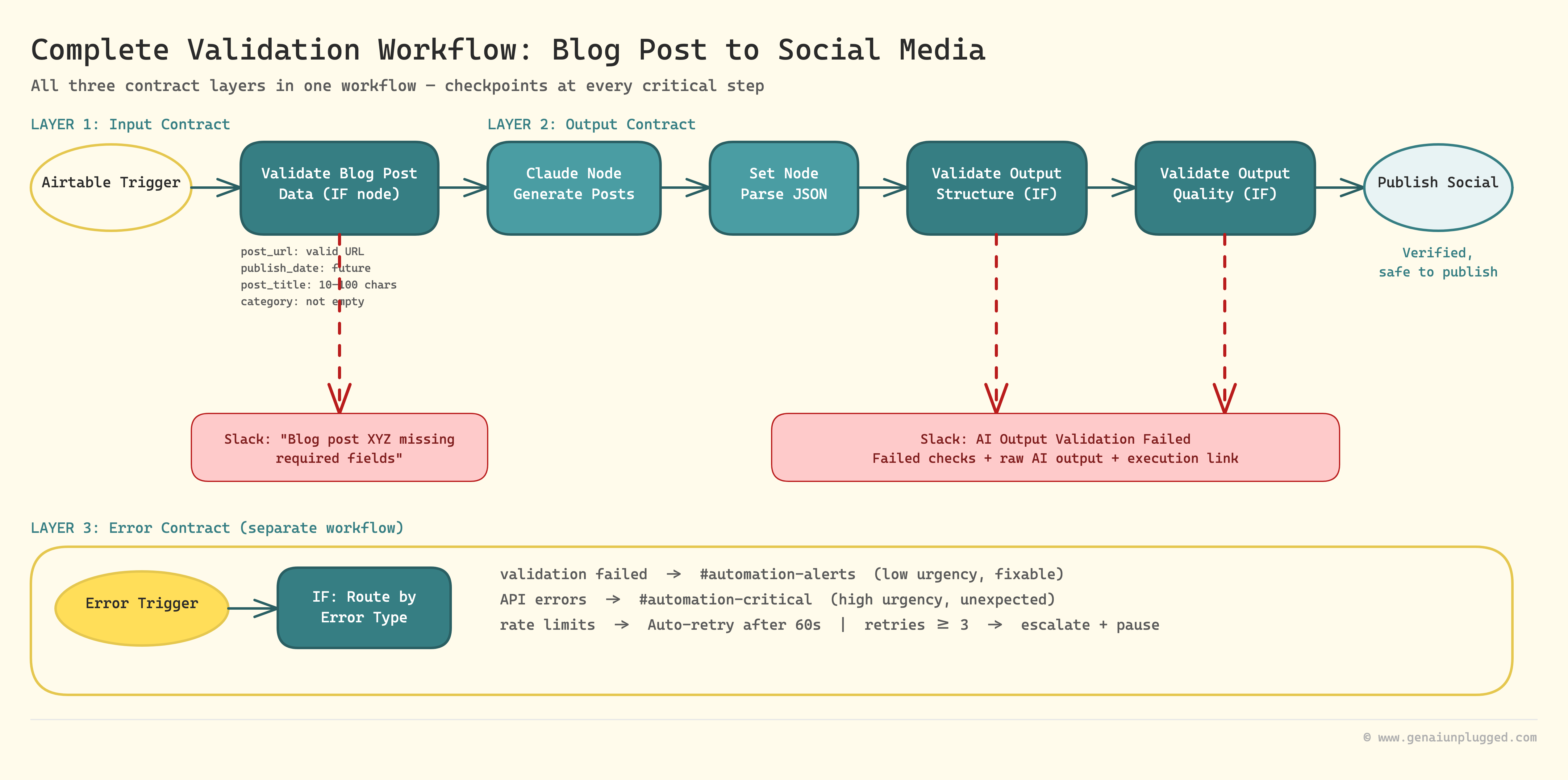
Real example: Your content workflow pulls blog post metadata from Airtable. Before generating social posts, validate that "post_title," "post_url," and "publish_date" fields exist and aren't empty.
If validation fails, send a Slack notification: "Blog post XYZ missing required fields" instead of generating broken social posts.
How Do You Build Input Validation in n8n?
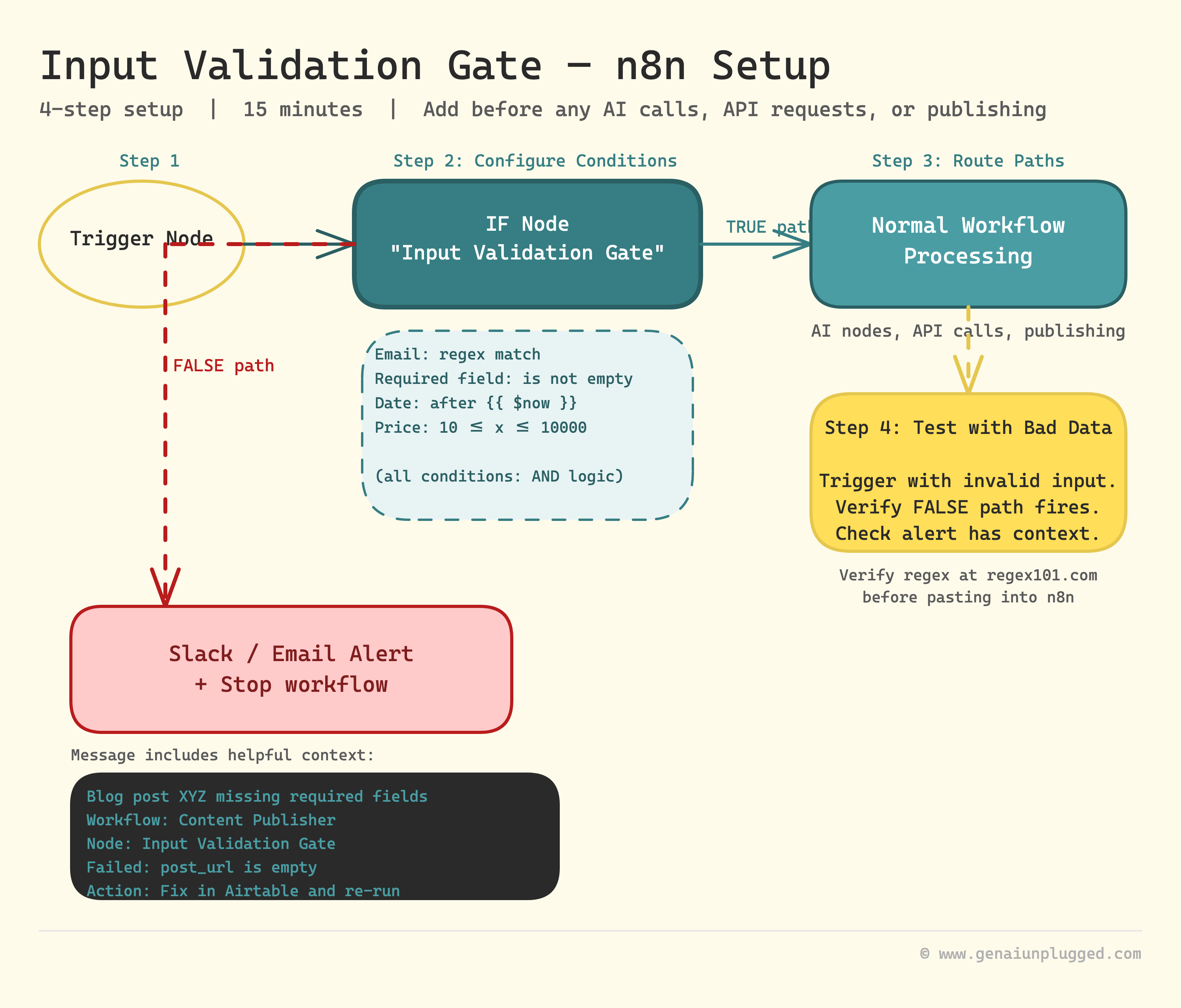
Add an IF node immediately after your trigger, configure validation conditions for each required field, and route the fail path to a Slack or email alert instead of continuing the workflow. The whole setup takes under 15 minutes for a basic three-field check.
Here's how to add input validation to any n8n workflow:
Step 1: Add an IF Node Immediately After Your Trigger
Place this before any processing, AI calls, or API requests. This is your security checkpoint. In n8n:
Add an IF node after your trigger
Name it "Input Validation Gate"
You'll configure multiple conditions here
Step 2: Configure Validation Conditions
For each required validation, add a condition in the IF node. Here are the most common patterns:
Email format validation:
Condition Type: String
Value 1: {{ $json.email }}
Operation: Regex Match
Value 2: ^[a-zA-Z0-9._%+-]+@[a-zA-Z0-9.-]+\.[a-zA-Z]{2,}$
This checks if the email field matches proper email format. If it doesn't match, the validation fails.
Required field checking:
Condition Type: Boolean
Value 1: {{ $json.title }}
Operation: Is Not Empty
This verifies the "title" field exists and contains data. Repeat for each required field.
Date validation (must be future date):
Condition Type: Date & Time
Value 1: {{ $json.publish_date }}
Operation: After
Value 2: {{ $now }}
This ensures the publish_date is after the current time. Prevents scheduling posts in the past.
Numeric range validation:
Condition Type: Number
Value 1: {{ $json.price }}
Operation: Larger Than or Equal
Value 2: 10

AND

Condition Type: Number
Value 1: {{ $json.price }}
Operation: Smaller Than or Equal
Value 2: 10000
This checks the price falls between $10 and $10,000.
Step 3: Route Pass and Fail Paths
Configure two paths from your IF node:
True path (validation passed): Connect to your normal workflow processing: AI nodes, API calls, publishing steps.
False path (validation failed): Connect to error handling: Slack notification, email alert, or a separate "Failed Validations" database.
Step 4: Test with Intentionally Bad Data
Before trusting your validation:
Manually trigger the workflow with invalid email format
Verify it routes to the False path
Check that your error notification includes helpful context
Test each validation condition individually. Don't assume regex patterns work. Verify them using regex101.com before pasting into n8n. The n8n IF node documentation shows all supported condition types.
Copy-Paste Validation Conditions
Use these exact expressions in your n8n IF nodes:
Email validation (comprehensive pattern):
{{ $json.email.match(/^[a-zA-Z0-9._%+-]+@[a-zA-Z0-9.-]+\.[a-zA-Z]{2,}$/) }}URL validation:
{{ $json.url.match(/^https?:\/\/(www\.)?[-a-zA-Z0-9@:%._\+~#=]{1,256}\.[a-zA-Z0-9()]{1,6}\b([-a-zA-Z0-9()@:%_\+.~#?&//=]*)$/) }}Required field (not empty, not null):
{{ $json.field_name && $json.field_name.trim().length > 0 }}Date is in future:
{{ new Date($json.date_field) > new Date() }}Number in range (10-10000):
{{ $json.number_field >= 10 && $json.number_field <= 10000 }}String length validation (minimum 10 characters):
{{ $json.text_field && $json.text_field.length >= 10 }}Copy these into your IF node conditions. Replace field_name, date_field, number_field, and text_field with your actual field names.
What Are Output Contracts?
Input validation catches bad data entering your workflow. Output validation catches bad results before they're published.
This is critical for AI steps because AI outputs are variable by nature. The same prompt can return different structures, formats, or quality levels on different runs.
Why AI Outputs Need Validation
Format drift. You prompt Claude to return JSON with fields "title," "summary," and "tags." It works perfectly for weeks.
Then one day, Claude wraps the JSON in markdown code blocks. Your workflow expects raw JSON, so it breaks.
Hallucinations. Claude generates a blog post outline but invents fake statistics or references. Without validation, these get published.
Incomplete responses. Your prompt asks for 5 social post variations. Claude returns 3.
Your workflow expects 5, so downstream steps fail.
Quality thresholds. You need summaries under 280 characters for Twitter. Claude returns 350 characters. It technically "worked" but doesn't meet your requirements.
Output validation catches these before publishing, sending, or storing.
Building Output Contracts
Define your output contract in two places:
1. In your AI prompt (preventive):
[AI CONTENT GENERATION WITH STRUCTURE ENFORCEMENT]

You are a content generator for social media posts.

Input: {{ $json.blog_post_url }}

Required output format:
Return ONLY a JSON object with these exact fields:
{
  "linkedin_post": "string (max 1300 characters)",
  "twitter_post": "string (max 280 characters)",
  "post_title": "string (max 100 characters)",
  "hashtags": ["array", "of", "3-5", "hashtags"]
}

Rules:
- Don't wrap JSON in markdown code blocks
- All fields are required
- Respect character limits exactly
- Return only the JSON object, no additional text

Example output:
{
  "linkedin_post": "Your complete LinkedIn post here...",
  "twitter_post": "Your Twitter post here...",
  "post_title": "Compelling Title Here",
  "hashtags": ["#Marketing", "#AI", "#ContentStrategy"]
}
This prompt tells Claude exactly what structure to return and what the limits are. It's preventive validation, reducing the chance of format drift. For more on getting consistent AI outputs, see structured output prompts that never break.
2. In your n8n workflow (detective):
After the AI node, add validation steps that verify the output matches your contract.
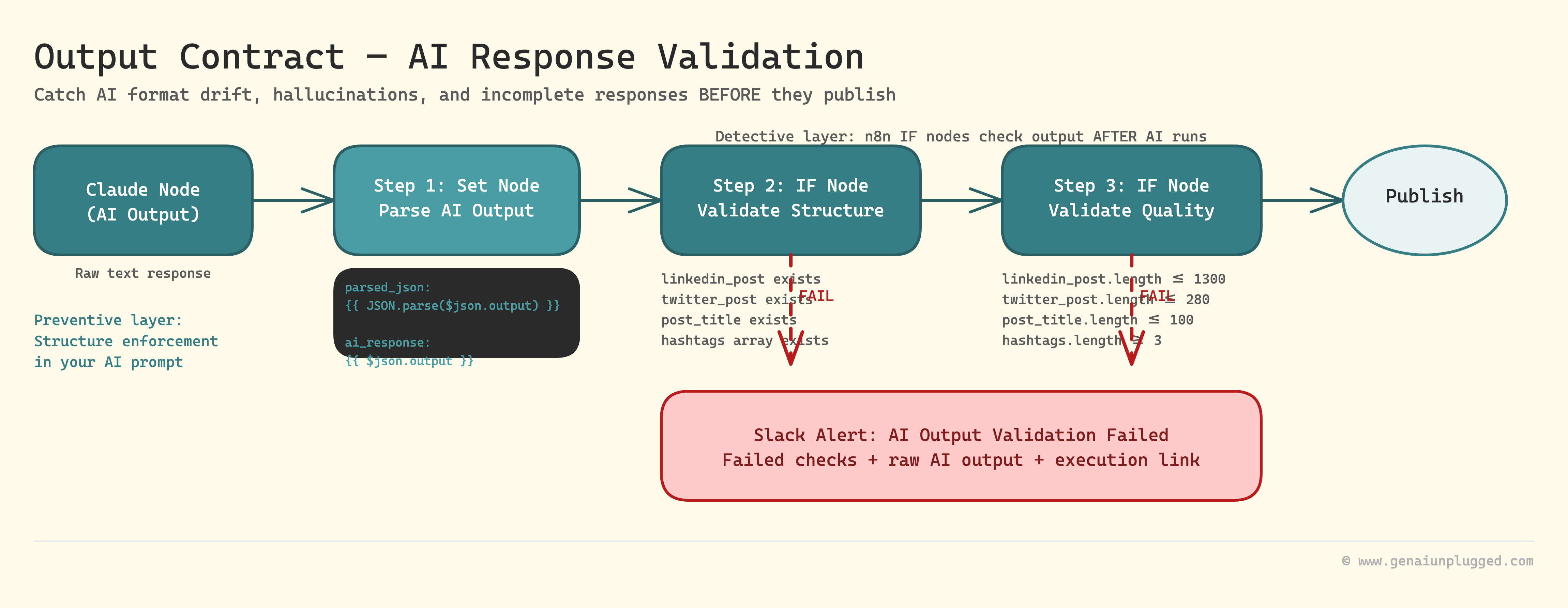
Step 1: Extract and Parse AI Output
Add a Set node immediately after your AI node:
Field 1: ai_response
Value: {{ $json.output }}

Field 2: parsed_json
Value: {{ JSON.parse($json.output) }}
This parses the AI's text response into a JSON object you can validate.
Step 2: Validate Required Fields
Add an IF node after the Set node with these conditions:
Condition 1: {{ $json.parsed_json.linkedin_post }} exists
Condition 2: {{ $json.parsed_json.twitter_post }} exists
Condition 3: {{ $json.parsed_json.post_title }} exists
Condition 4: {{ $json.parsed_json.hashtags }} exists
All conditions must be true (use AND logic) for validation to pass.
Step 3: Validate Content Requirements
Add another IF node for quality checks:
Condition 1: LinkedIn post length
{{ $json.parsed_json.linkedin_post.length <= 1300 }}

Condition 2: Twitter post length
{{ $json.parsed_json.twitter_post.length <= 280 }}

Condition 3: Title length
{{ $json.parsed_json.post_title.length <= 100 }}

Condition 4: Hashtags count
{{ $json.parsed_json.hashtags.length >= 3 && $json.parsed_json.hashtags.length <= 5 }}
If any condition fails, route to error handling.
Step 4: Handle Validation Failures
On the False path from your validation IF nodes, add a Slack or Email node:
Message: ⚠️ AI Output Validation Failed

Workflow: {{ $workflow.name }}
Execution ID: {{ $execution.id }}

Failed checks:
- LinkedIn post: {{ $json.parsed_json.linkedin_post.length }} characters (max 1300)
- Twitter post: {{ $json.parsed_json.twitter_post.length }} characters (max 280)

Raw AI output: {{ $json.output }}

Action needed: Review and re-run
This gives you context about what failed and the actual output that caused the failure.
A single broken automation costs 2+ hours of manual cleanup. Do that three times in a month and you've lost a full workday to checking outputs your workflows were supposed to handle.
PluggedIn has the copy-paste regex patterns, IF node conditions, and the complete three-layer contract template so the 45-minute build actually takes 45 minutes.

What Are Error Contracts?
Input and output contracts catch problems. Error contracts define what happens next.
Without error contracts, failures are silent. The workflow shows "success" in n8n, but the output's broken. You don't discover it until someone complains.
With error contracts, failures are visible, actionable, and routed appropriately.
Using n8n Error Triggers
n8n has a built-in Error Trigger node that catches any workflow errors automatically. Here's how to use it:
Step 1: Create a Separate "Error Handler" Workflow
Create a new workflow in n8n
Name it "Error Handler - Main Workflows"
Add an Error Trigger node as the first node
Step 2: Configure Error Notification
After the Error Trigger, add a Slack or Email node:
Message: 🚨 Workflow Error Detected

Workflow: {{ $json.workflow.name }}
Node: {{ $json.node.name }}
Error: {{ $json.error.message }}

Execution: {{ $json.execution.id }}
Time: {{ $json.execution.startedAt }}

Full error details: {{ JSON.stringify($json.error, null, 2) }}

View execution: https://your-n8n-instance.com/workflow/{{ $json.workflow.id }}/executions/{{ $json.execution.id }}
This sends you immediate notification with:
Which workflow broke
Which node failed
The exact error message
A link to view the full execution
Step 3: Route Errors by Type
Add an IF node after the Error Trigger to route different error types:
Condition: {{ $json.error.message.includes('validation failed') }}
True path: Slack channel #automation-validation-errors
False path: Slack channel #automation-critical-errors
This separates validation failures (expected, fixable) from system errors (unexpected, urgent).
Step 4: Add Error Recovery
For certain errors, you can add automatic recovery:
Retry logic:
IF: {{ $json.error.message.includes('rate limit') }}
THEN: Wait 60 seconds → Retry workflow
Fallback data:
IF: {{ $json.error.message.includes('API unavailable') }}
THEN: Use cached data from yesterday
Human escalation:
IF: {{ $json.execution.retries >= 3 }}
THEN: Send urgent Slack notification + pause workflow
Real Example: Content Publishing Workflow with Full Validation
Here's a complete workflow that demonstrates all three contract types: