

Get Reliable JSON from LLMs: Structured Output Prompting Guide
Learn how to get consistent JSON and structured output from any LLM. Prompt templates that never break, with schema examples for beginners.

Picture this: you ask an AI to extract product information from a description and return it as JSON. The first time, it works perfectly. The second time, it adds extra commentary before the JSON. The third time, it misspells a field name. The fourth time, it returns a table instead of JSON. You copy the output into your code, and everything breaks.
This is the nightmare of unstructured outputs. When you need clean data that flows directly into your systems, spreadsheets, or databases, “pretty close” is not good enough. One extra word, one missing bracket, one inconsistent field name, and your entire workflow stops.
But it does not have to be this way. When you know how to request structured outputs properly, AI models can give you perfect JSON, flawless tables, and consistent formats that work the first time, every time. No manual cleanup, no parsing errors, no frustration.
👋 Julley, I’m Dheeraj and I’m an AI systems builder.
I build production-grade AI systems at work by day and ship my own products by night (9+). This newsletter is the bridge between those two worlds. Every system, every build, documented step by step.
Join 1,100+ builders getting the exact AI setups, prompts, and production configs that actually work in your business.
What is structured output in AI?
Structured output means telling your AI exactly what format to return data in - usually JSON. Instead of getting a paragraph of text you have to parse manually, you get a clean, machine-readable response your tools can use directly. When you do this right, AI outputs flow into databases, spreadsheets, and automations without any manual cleanup.
In this lesson, you will learn how to write prompts that produce bulletproof structured outputs. You will discover schema definitions, strict field rules, validation techniques, and retry strategies that make your AI workflows reliable enough to automate completely.
My own success rate for valid JSON jumped from around 60% to consistently above 95% after adding the schema instructions covered in this lesson. The techniques are simpler than you might expect.
Prompt Engineering Course - Complete Series
Get Reliable JSON from LLMs: Structured Output Prompting Guide ← You are here
Why JSON Outputs Break (The Recipe Database Story)
Imagine you are creating a recipe database. You need every recipe formatted exactly the same way so your app can read it.
You hire three assistants to help.
Assistant A gets vague instructions: “Write down recipes in an organized way.” They return recipes with different formats every time. One has prep time as “about half an hour,” another says “30 mins,” another just says “quick.” Your app cannot parse any of it.
Assistant B gets better instructions: “Use this format: Name, PrepTime, Ingredients, Steps.” They are more consistent, but sometimes they add extra notes, sometimes they forget a field, and sometimes they spell “PrepTime” as “Prep Time” with a space. Still breaks your app.
Assistant C gets a complete template with an example recipe, strict rules (”PrepTime must be a number in minutes, no text”), and a validation checklist (”Check: all four fields present, PrepTime is numeric”). They return perfect recipe cards every single time. Your app processes them automatically with zero errors.
The same principle applies to AI outputs. Generic requests produce messy data. Templates help. But templates plus strict rules plus validation create bulletproof structured outputs.
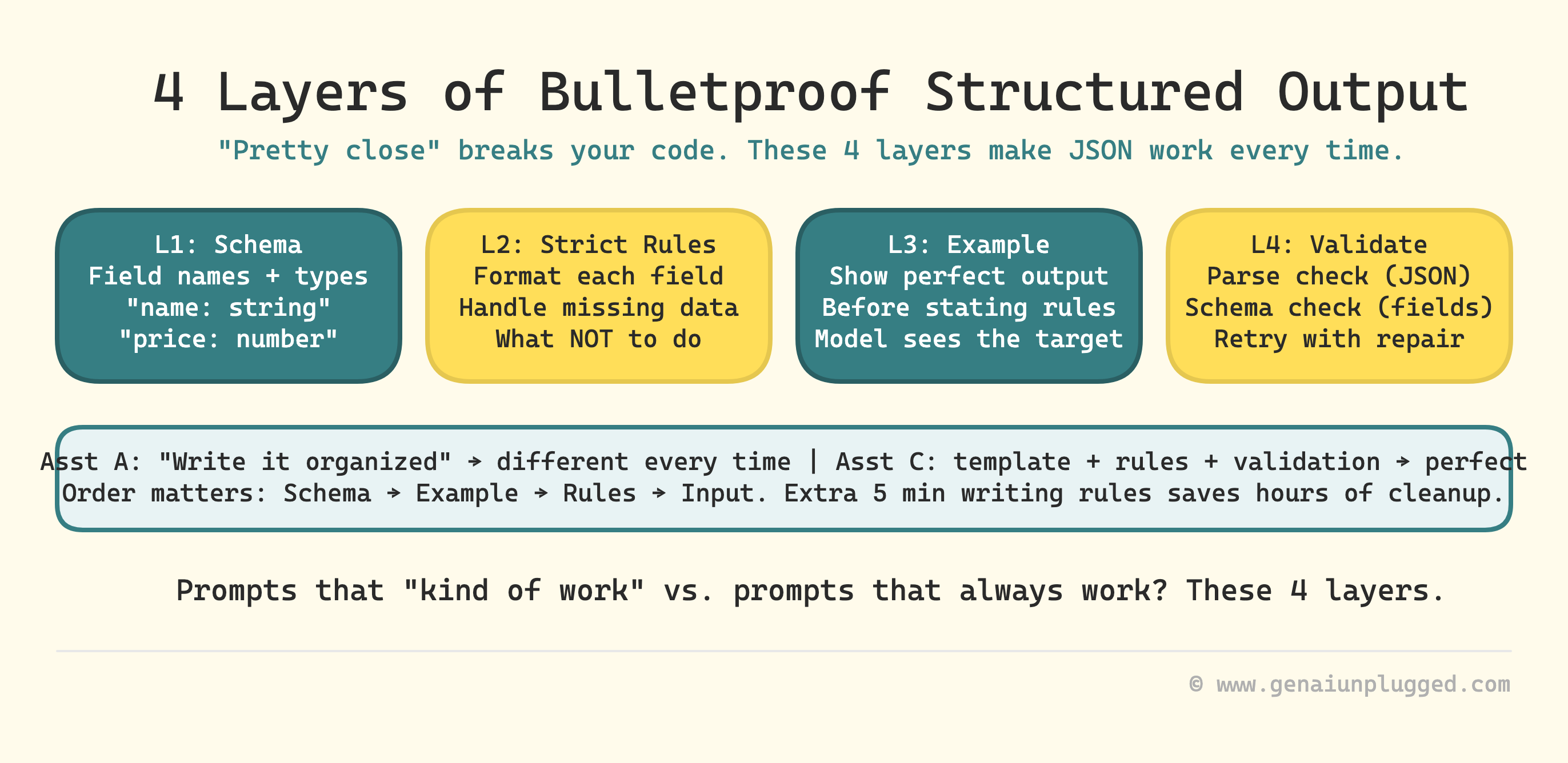
The Anatomy of a Reliable JSON Prompt
Structured outputs need four layers to be bulletproof:
Schema - what fields and types you want
Example - one perfect output that shows the target
Strict rules - how to format each field and what to avoid
Validation instruction - telling the model to check its own work
Skip any of these, and you introduce failure points. Add all four, and you get reliable JSON on the first try.
Layer 1: Schema Lines
A schema line is a clear definition of exactly what fields you want and what type of data each field should contain.
Weak schema: “Return the information as JSON.”
Strong schema: “Return a JSON object with these exact fields: name (string), age (integer), email (string), active (boolean).”
The strong schema names each field, specifies the data type, and makes it impossible for the model to guess what you want.
Example of schema line in a prompt:
Extract customer information and return ONLY a JSON object with these fields:
- firstName: string (customer's first name)
- lastName: string (customer's last name)
- email: string (valid email address)
- phone: string (10 digits, format: XXX-XXX-XXXX)
- orderTotal: number (dollar amount without $ symbol)
- isPremium: boolean (true if premium customer, false otherwise)
Layer 2: Strict Field Rules
Schema lines tell the model what to include. Field rules tell it how to format each piece of data and what to avoid.
For strings:
“Use title case for names”
“Maximum 50 characters”
“Use empty string “” if value not found, never use null or N/A”
For numbers:
“Return as integer with no commas or decimals”
“Use 0 if value not found, never use null or empty string”
“Currency values should be numbers only, no $ symbol”
For booleans:
“Use true or false only, never yes/no or 1/0”
“Use false as default if uncertain”
For arrays:
“Return empty array [] if no items found”
“Each item should be a string in quotes”
“Maximum 10 items”
These rules prevent the most common errors that break parsers: inconsistent null handling, wrong data types, extra fields, and surrounding text.
Layer 3: One Perfect Example
Showing one perfect example before stating rules dramatically improves consistency. The model sees the target, then reads the rules that explain why it is formatted that way.
Recommended structure:
Schema definition
One perfect example output
Strict rules
Input to process
Extract contact information from the text below and return as JSON.

Schema:
{
  "name": "string",
  "email": "string",
  "phone": "string",
  "company": "string"
}

Perfect example output:
{
  "name": "Sarah Johnson",
  "email": "sarah.j@techcorp.com",
  "phone": "415-555-0123",
  "company": "TechCorp"
}

Strict rules:
- Output ONLY the JSON object, no other text
- Use empty string "" if any field is missing
- Phone format must be XXX-XXX-XXXX
- Match field names exactly as shown in schema

Now process this text:
[input text here]
How to Write Prompts That Return Strict JSON With Schema Validation
This section directly targets the approach that most guides skip. You do not just want valid JSON - you want JSON that matches a specific schema. Here is how to get it consistently.
Schema validation in a prompt means asking the model to check its own output against the schema rules before returning it. You are not relying on an external parser to catch errors - you are building the check into the generation step.
The four-step method
State the schema explicitly with field names, data types, and format requirements.
Include one perfect example that demonstrates every rule in action.
Add a validation instruction: “Before returning, verify that all required fields are present, all data types match the schema, and no extra text appears outside the JSON object.”
Add a fallback rule: “If you cannot extract a required field with high confidence, use the designated default value (empty string, 0, or false) rather than guessing.”
The complete strict schema prompt
You are a data extraction specialist. Extract information from the text below and return ONLY a valid JSON object.

Schema (required fields with types):
{
  "fieldName1": "string",
  "fieldName2": "number",
  "fieldName3": "boolean",
  "fieldName4": ["array", "of", "strings"]
}

Perfect example output:
{
  "fieldName1": "example text",
  "fieldName2": 42,
  "fieldName3": true,
  "fieldName4": ["item1", "item2"]
}

Strict formatting rules:
- Output ONLY the JSON object, no preamble or explanation
- Match field names exactly (case-sensitive)
- Use empty string "" for missing text fields
- Use 0 for missing numeric fields
- Use false for missing boolean fields
- Use empty array [] for missing array fields
- Do NOT add any fields not in the schema
- Do NOT include markdown code fences or backticks
- Do NOT include the word "json" before the output
- Ensure all strings are in double quotes
- Ensure proper comma placement between fields

Validation check: Before returning, verify that all required fields are present and all data types match the schema.

Text to process:
[input text here]
This is the pattern that took my JSON extraction success rate from around 60% to above 95%. The validation instruction at the end is the part most people leave out - and it makes a material difference.
The Strict Mode Approach to JSON Output
Beyond the four-layer technique, there is a specific set of instructions that puts the model into what I call “strict mode” - where it treats format correctness as the top priority.
These are the exact phrases that make the biggest difference:
Anti-preamble instructions:
“Output ONLY the JSON object, nothing before or after”
“Do not write any introduction or explanation”
“Do not include phrases like ‘Here is the JSON:’ or ‘Sure, here’s the data:’”
“Start your response with the opening brace {”
Anti-markdown instructions:
“Do not wrap the output in code fences or backticks”
“Do not include ```json at the start”
“Return raw JSON only”
Type enforcement:
“All numbers must be numeric types, never strings”
“All booleans must be true or false, never ‘true’ or ‘false’ in quotes”
“All arrays must use square brackets, even for a single item”
When you combine these with a clear schema and one example, you eliminate the vast majority of parser failures. This is also what the GSC query “strict mode enabled - output json only” is pointing at - people searching for exactly this pattern, because it works.
Tool-Specific Notes: ChatGPT JSON Mode and Claude Structured Output
Using ChatGPT’s Built-In JSON Mode
OpenAI offers a native JSON Mode that forces responses to be valid JSON. To use it via the API, set response_format: {"type": "json_object"}. The OpenAI Structured Outputs documentation also covers a newer feature that enforces an exact schema using JSON Schema format.
What this means in practice: even with JSON Mode enabled, you still need to specify the schema in your prompt. JSON Mode guarantees syntactic validity (valid JSON), but it does not guarantee your field names, types, or values match what you want. The prompting technique in this lesson handles both.
Getting Structured Output from Claude
Claude does not have a separate JSON Mode toggle as of early 2026, but it follows structured output instructions very reliably when you write clear schemas and add the validation instruction. In practice, Claude’s adherence to format rules is excellent with the prompt patterns in this lesson.
For Anthropic API users, Anthropic’s tool use documentation covers an alternative approach using tool schemas. For most content creators and non-developers, the prompting approach in this lesson is simpler and does not require API access.
If your JSON success rate sits around 60%, you are manually fixing or re-running 4 out of every 10 AI outputs. That is not a workflow, that is a babysitting job that compounds every time you add a new automation.
PluggedIn members get the exact schema templates, strict field rules, and validation prompts from this course bundled and ready to copy, so you skip the trial-and-error entirely.
Product Entity Extraction JSON Format: A Complete Template
This is one of the most common structured output use cases. You have a product description and need to extract clean, structured data.
You are a product data extractor. Extract product information and return ONLY valid JSON.

Schema:
{
  "productName": "string",
  "price": "number",
  "category": "string",
  "inStock": "boolean",
  "features": ["array of strings"]
}

Example output:
{
  "productName": "Wireless Bluetooth Speaker",
  "price": 79.99,
  "category": "Electronics",
  "inStock": true,
  "features": ["Waterproof", "20-hour battery", "360-degree sound"]
}

Rules:
- price must be a number without $ symbol
- category must be one word title case
- features array must contain 3-5 items
- Use false for inStock if not mentioned
- Output ONLY the JSON, no other text

Validation check: Before returning, confirm all five fields are present with correct data types.

Product description:
[paste description here]
Copy this, swap in your field names, and you have a production-ready extraction prompt.
Why Your LLM Keeps Breaking the JSON Format
If you are getting inconsistent JSON despite following the above techniques, here are the most common culprits and fixes:
Problem 1: Model adds text before or after the JSON. Fix: Add “Start your response with { and end it with }. No text outside the JSON object.”
Problem 2: Field names have inconsistent capitalization. Fix: Add “(case-sensitive - match exactly as written)” after your schema definition.
Problem 3: Numbers come back as strings like “79.99” instead of 79.99. Fix: Add “All numeric values must be unquoted numbers, not strings in quotes.”
Problem 4: Null values appear instead of your defaults. Fix: Add “Never use null. Use empty string “” for missing text, 0 for missing numbers, false for missing booleans.”
Problem 5: Extra fields appear that were not in the schema. Fix: Add “Do NOT add any fields not listed in the schema, even if the text contains additional information.”
Problem 6: The model wraps JSON in code fences (```json). Fix: Add “Return raw JSON without any markdown formatting or code blocks.”
Temperature note: For JSON extraction, set temperature to 0.0-0.1. Higher temperatures introduce the randomness that causes format drift. This is one of the clearest examples of where low temperature in LLM settings makes a concrete, measurable difference.
Validation: Catching Errors Before They Break Your System
Even with perfect prompts, occasional errors happen. Building validation into your workflow catches them before they cause problems.
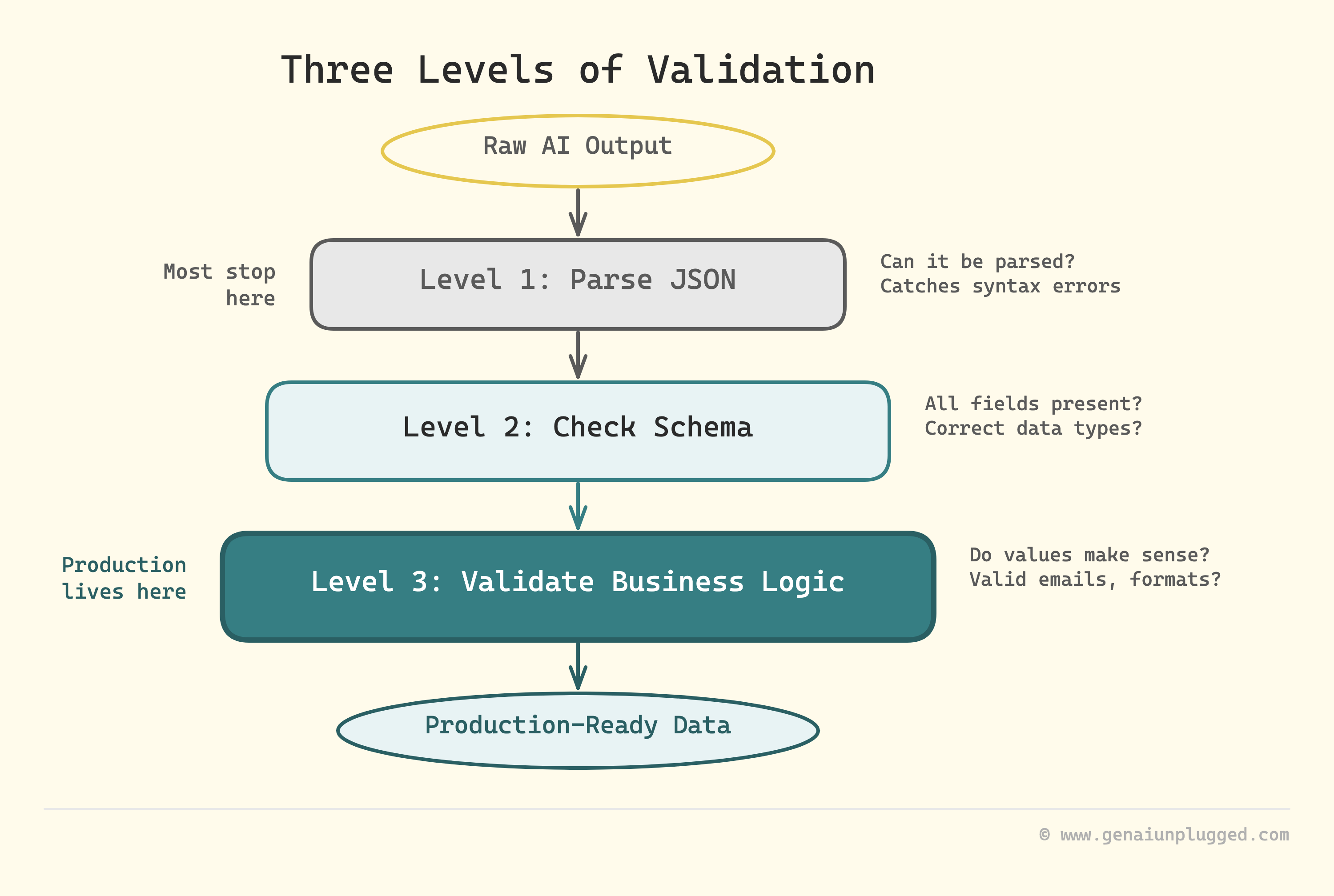
JSON validation (basic): Check if output is valid JSON that can be parsed.
python
import json

try:
    data = json.loads(model_output)
    # Valid JSON, proceed
except json.JSONDecodeError:
    # Invalid JSON, retry with stricter prompt
Schema validation (better): Check if JSON has all required fields with correct types.
python
required_fields = ["name", "email", "phone", "company"]
for field in required_fields:
    if field not in data:
        # Missing field, retry
Business logic validation (best): Check if values make sense for your use case.
python
if len(data["phone"]) != 12:  # Should be XXX-XXX-XXXX
    # Invalid phone format, retry
if "@" not in data["email"]:
    # Invalid email, retry
Retry strategy: When validation fails, do not just run the same prompt again. Add a repair instruction:
The previous output had this error: [specific error]
Please fix it and return ONLY the corrected JSON object.
Remember: [state the specific rule that was broken]
This targeted retry works much better than rerunning the original prompt because it tells the model exactly what went wrong.
Refusal Rules: When to Admit Uncertainty
Sometimes the input does not contain the data you need. Teaching the AI when NOT to try prevents garbage outputs.
Add a refusal rule to any extraction prompt:
Refusal rule:
If any required field cannot be determined from the text with high confidence, return this exact error object instead:
{
  "error": "insufficient_data",
  "message": "Cannot extract required fields from input text",
  "missing_fields": ["list", "of", "fields", "that", "are", "missing"]
}
This prevents the model from guessing or hallucinating data when it should admit uncertainty. For business-critical extractions, this is essential.
Three Copy-Paste Templates for Common Tasks
Template 1: Support email classification
You are an email parser. Extract key information and return valid JSON.

Schema:
{
  "senderName": "string",
  "senderEmail": "string",
  "subject": "string",
  "category": "string",
  "priority": "string",
  "summary": "string"
}

Example:
{
  "senderName": "John Smith",
  "senderEmail": "john@email.com",
  "subject": "Refund request for order #12345",
  "category": "Billing",
  "priority": "High",
  "summary": "Customer requests refund for damaged item in order 12345"
}

Rules:
- category must be one of: Billing, Technical, Shipping, General
- priority must be: Low, Medium, High, Urgent
- summary must be under 100 characters
- Use "General" for category if unclear; "Medium" for priority if unclear
- Output ONLY JSON

Refusal rule:
If email does not contain enough information, return:
{"error": "insufficient_data", "message": "Cannot classify email with confidence"}

Email to process:
[paste email here]
Template 2: Meeting transcript to action items
You are a meeting assistant. Extract action items and create a table.

Table format:
| Action | Owner | Due Date | Priority |
|--------|-------|----------|----------|

Rules:
- Due Date format: YYYY-MM-DD
- Priority must be: High, Medium, or Low
- Use "Unassigned" if no owner mentioned
- Use "TBD" if no due date mentioned
- Sort by priority (High first)
- Maximum 10 rows
- No text before or after the table

Meeting transcript:
[paste transcript here]
Template 3: Product entity extraction
You are a product data extractor. Return ONLY valid JSON.

Schema:
{
  "productName": "string",
  "price": "number",
  "category": "string",
  "inStock": "boolean",
  "features": ["array of strings"]
}

Example:
{
  "productName": "Wireless Bluetooth Speaker",
  "price": 79.99,
  "category": "Electronics",
  "inStock": true,
  "features": ["Waterproof", "20-hour battery", "360-degree sound"]
}

Rules:
- price must be a number without $ symbol
- features array must contain 3-5 items
- Use false for inStock if not mentioned
- Output ONLY the JSON

Product description:
[paste description here]
Why Structured Outputs Unlock Real Automation
Structured outputs are the bridge between AI conversations and real automation. When you can reliably get clean JSON or perfect tables, you can:
Feed AI outputs directly into databases without manual cleanup
Build automated workflows that run 24/7 without breaking
Process hundreds or thousands of items consistently
Trust the data enough to make business decisions
Save hours of manual data entry and reformatting
The difference between a prompt that “kind of works” and one that “always works” is often just these four layers: clear schema, strict rules, good examples, and validation. Once this clicks, you start seeing opportunities to automate things you previously had to do by hand.
For putting these structured outputs to work in larger systems, see the guide to building production AI workflows where we chain these patterns together.
Key Takeaways
Structured outputs need four layers: schema, rules, examples, and validation
Schema lines define exactly what fields and data types you want
Strict field rules prevent the most common formatting errors and inconsistencies
Showing one perfect example before rules dramatically improves consistency
Always specify how to handle missing data (empty string, 0, false, empty array)
Tell the model what NOT to do (no extra text, no markdown fences, no null values)
The validation instruction catches errors at generation time, not at parse time
Retry with targeted repair instructions when validation fails
Refusal rules teach the model when to admit uncertainty instead of guessing
Low temperature (0.0-0.1) is essential for JSON tasks - randomness causes format drift
Frequently Asked Questions
How do I make ChatGPT always return valid JSON?
Include the exact JSON schema in your prompt with field names, types, and one example. End with “Respond ONLY with valid JSON matching this schema. No additional text.
Start with { and end with }.” Set temperature to 0-0.1. For the OpenAI API, you can also enable JSON Mode with response_format: {"type": "json_object"}, though you still need the schema in your prompt to control field names and types.
What is the difference between JSON mode and structured outputs?
JSON Mode (OpenAI API) ensures the response is syntactically valid JSON but does not enforce a specific schema - you can still get wrong field names or unexpected fields.
Structured Outputs (OpenAI, newer feature) enforces an exact JSON Schema definition. For Claude and other LLMs, you achieve reliable schema adherence through careful prompting with schema definitions, examples, and validation instructions as covered in this lesson.
What is structured output in AI?
Structured output means getting AI to return data in a predictable format - usually JSON or a markdown table - instead of free-form text. This is essential for automations where the AI’s output feeds into another system that expects specific data fields. The key is combining a schema definition, an example, and strict formatting rules in your prompt.
How do I get Claude to output structured data?
Claude responds well to explicit schema definitions and example outputs. Use the four-layer approach: (1) define the schema with field names and types, (2) show one perfect example, (3) add strict formatting rules, (4) include a validation instruction asking Claude to verify the output before returning. Claude tends to follow these instructions carefully, especially the “no text outside the JSON” rule.
How do I validate JSON output from an LLM?
Start with basic parsing (try to load it as JSON). Then check for required fields. Then check data types and business logic (valid email format, correct phone length, etc.). When validation fails, send a targeted repair prompt that identifies exactly which rule was broken rather than rerunning the original prompt from scratch.
How do I prevent LLM from adding extra text to JSON output?
Use these three instructions: (1) “Output ONLY the JSON object, nothing before or after”, (2) “Start your response with { and end with }”, (3) “Do not include any explanation, introduction, or code fences.” Also set temperature to 0-0.1. High temperature is a common cause of format drift where the model starts adding conversational text around the JSON.
Get PluggedIn
Stop hand-fixing broken JSON on every fourth output and start running automations that actually complete.

Without the schema layer, you keep manually cleaning up roughly 4 in 10 outputs every single time you run the workflow.
Get PluggedIn to go from a ~60% JSON success rate with constant manual cleanup to 95%+ valid outputs that flow straight into your systems on the first try
What’s inside the Prompt Engineering Mastery Bundle:
Complete 9-lesson ebook (PDF)
7 niche-specific prompt packs (55+ prompts):
Customer support automation
Content creation on a budget
Client proposals & SOWs
Research & analysis
Email & communication
Sales & lead nurture
Operations & SOPs
What’s Next
You now know how to get perfect structured outputs that flow directly into your systems. In the next lesson, we will explore chain of thought prompting - a technique that improves factual accuracy and step-by-step problem solving by making AI models think before they answer.