

Stop Prompting Claude in Circles. The 5 Loop Decisions That End It.
You prompt, review, fix, then prompt again. Build a Claude Code loop with a verifier and stop conditions that runs unattended and quits before your quota does.

You are the loop. Right now, today, in your own workflow.
Prompt, wait, read the output, fix what's wrong, prompt again. That cycle feels like using AI. It's actually you running an unpaid, unscheduled feedback loop with your own two hands, one Claude session at a time.
What is loop engineering in Claude?
Loop engineering is the practice of designing the trigger, the verifier, the stop conditions, and the persistent state around an AI agent, so it repeats useful work on its own instead of you manually re-prompting and reviewing every single step by hand.
In Claude Code that means five written decisions rather than one better prompt.
It replaces "make it good" with a written contract the loop can check itself against. The five decisions in that contract are what this article teaches.
My own post on loop engineering (One Bad Claude Loop Can Burn a Week of Claude Usage Limits) already showed what an undisciplined loop costs: one afternoon, one missing exit condition, and a full week of Claude usage limits gone. That article covered what a loop is.
This one covers how to design one you can trust without watching it.
By the end, you'll have a written Loop Contract for one real repetitive task in your business, and a closed loop running against it that stops itself instead of running until your quota does.
This is article 1 of a 3-part Loop Engineering series. Estimated time: one hour.
👋 Julley, I'm Dheeraj, an AI systems builder.
I build production-grade AI systems at work by day and ship my own products by night, 9 and counting, including SubflowAI and the Content OS Agents Toolkit. This newsletter is the bridge between those two worlds. Every system, every build, documented step by step.
Join 2,000+ builders getting the exact AI setups, prompts, and workflows that actually work in your business.
What Is a Claude Loop, and Why Use One?
A loop in Claude Code is a self-evaluating, self-retrying workflow built from four steps: generate, evaluate, retry, and done. The shape never changes. Only the thing being scored and the rubric change from one loop to the next.
Here is the anatomy:
Generate: the loop produces an output, based on the reference files you give it.
Evaluate: a separate check scores that output against your criteria and returns a verdict, pass or fail, with reasoning.
Retry: if it fails, the loop applies the fixes and reruns generate and evaluate, usually for three or four rounds.
Done: once the score clears your threshold, the loop stops and reports what changed and why.
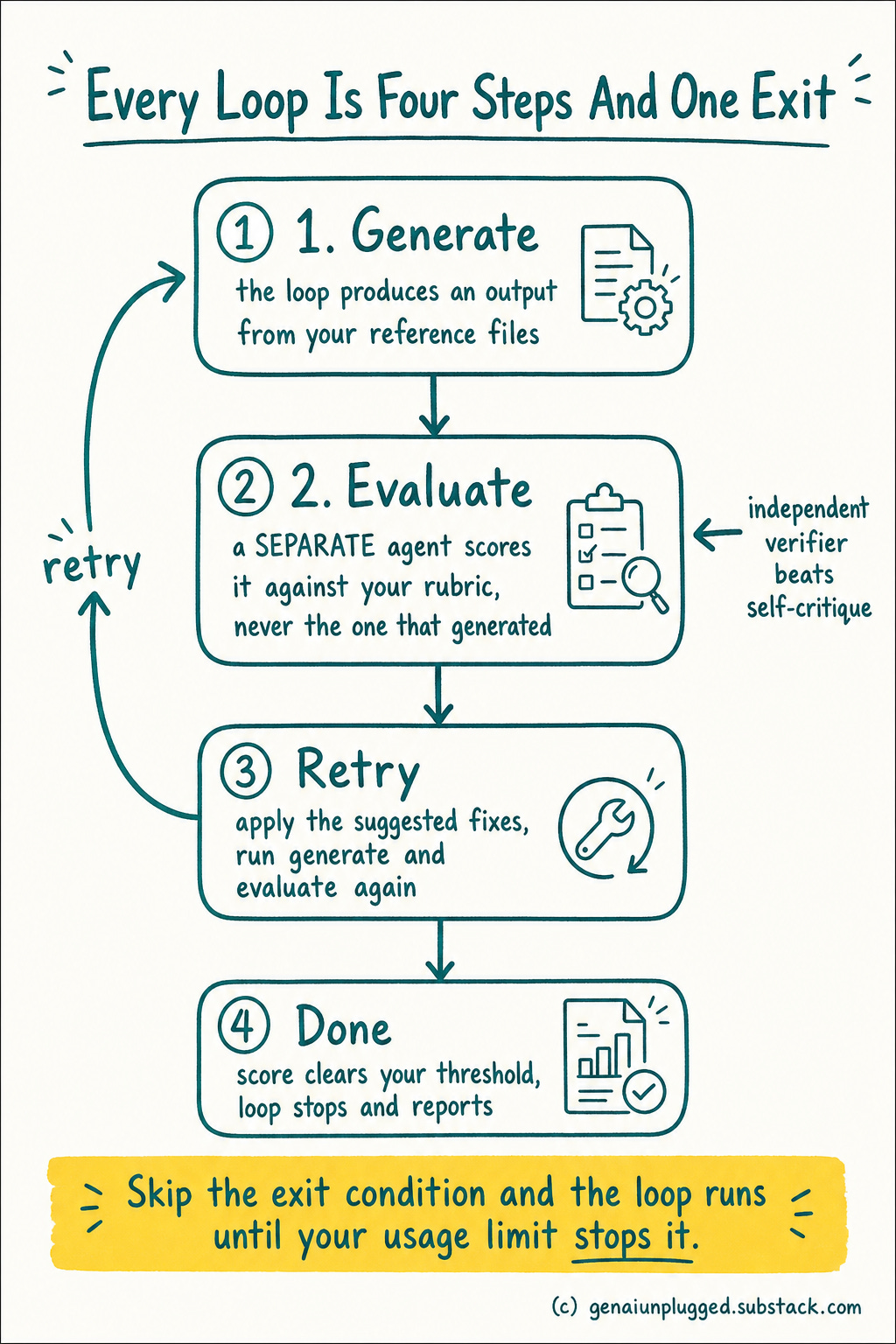
A Claude loop is that shape running inside Claude Code, using its native primitives, subagents, skills, memory, and worktrees, so the model can score its own work with a separate checker and keep going without you.
Why bother? Because a single prompt leaves you as the reviewer, the fixer, and the stop condition. A loop takes those three jobs off your hands for any task you do repeatedly and can describe precisely.
You stop driving every step and start owning the definition of done.
The step people skip, and the one that costs the most, is the last one.
Without a definitive exit condition, a loop just keeps running. One badly-bounded loop can exhaust a week of usage limits in a single afternoon.
That failure is exactly what One Bad Claude Loop Can Burn a Week of Claude Usage Limits documented. This article is the disciplined version: the five decisions that keep a loop bounded.
Loop vs goal vs dynamic workflow
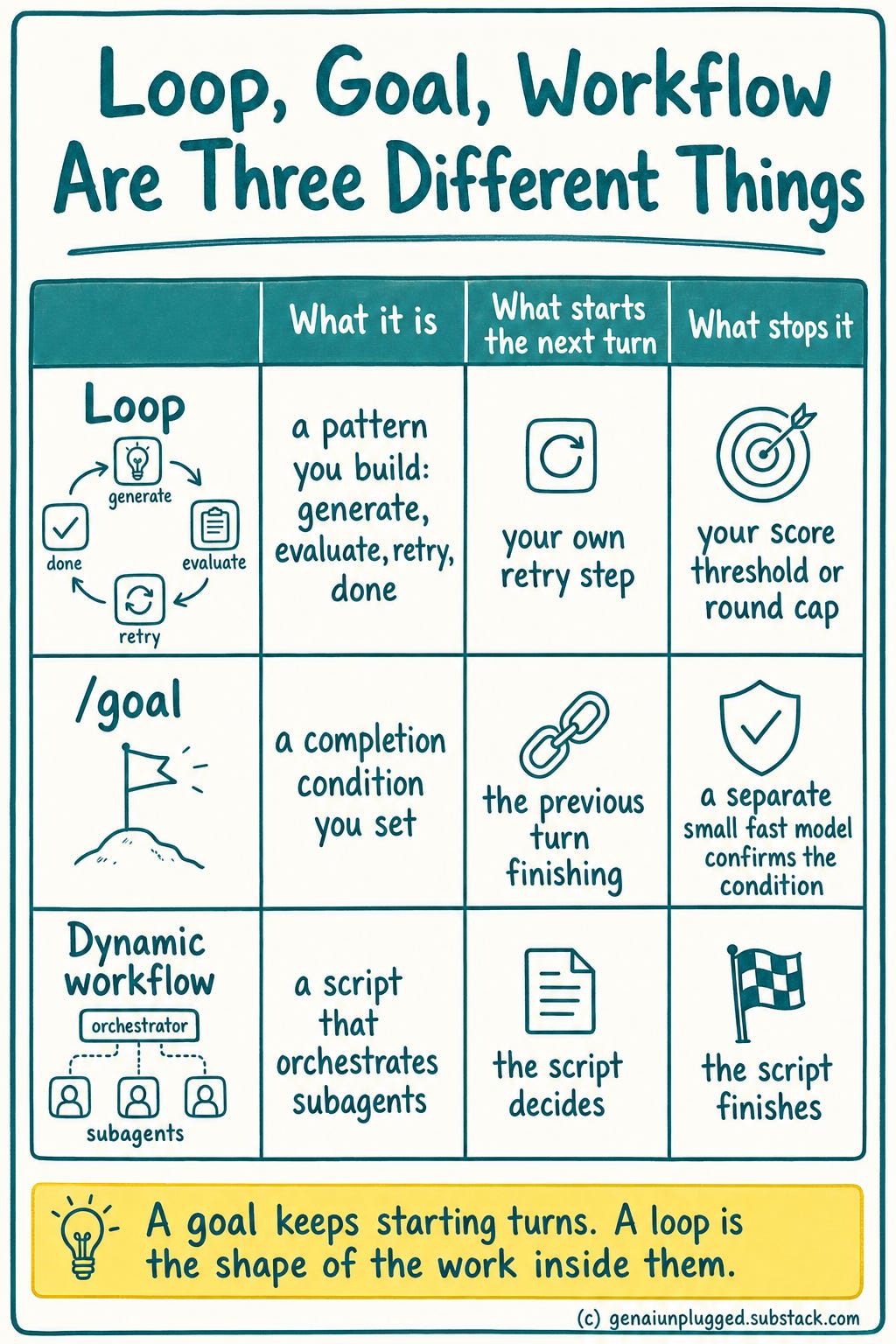
Three related things get confused, so here is the honest difference:
A loop is the generate, evaluate, retry, done cycle you design and control. You own the orchestration.
A goal (
/goalin Claude Code) is one primitive: a single completion condition, evaluated after every turn by a separate small fast model that tells the agent to keep going or stop. It sets the finish line. It is not the whole loop.A dynamic workflow is a different feature: you ask for a "workflow" and the model writes its own orchestration script, with stages that run in order or in parallel, then executes it in the background. It is built for jobs too big for one pass, like a migration touching hundreds of files.
Master the loop first. The goal and the dynamic workflow are steps you take once your checks are strong, not replacements for the discipline.
Why Does Claude Code Turn Prompting Into Loop Design?
Claude Code is the right tool for this because loops, subagents, worktrees, skills, and memory are native primitives inside it, not integrations you have to bolt on yourself.
You describe the loop in plain English and it writes the scaffolding that enforces it, so the design work stays yours and the plumbing doesn't.
n8n earns a mention later for one specific job: waking a loop on a true external event, like a new lead landing with nobody at the keyboard. That's a real use case, but it's a different article.
This one is about the discipline of designing the loop itself, and that discipline lives inside Claude Code.
Claude Projects can help you draft the contract text in a one-off chat. It can't run the loop, enforce the verifier, or persist state between sessions. You need something that executes, not just something that converses.
What Is the Claude Loop Contract, and What Are You Building?
You're building the Loop Contract: five written decisions that turn a vague task into a loop Claude Code can run and stop on its own. Think of it as the SOP you'd hand a new employee before you stop checking their work line by line.
A new hire without a written process gets every step reviewed by you personally. That's the prompt-wait-review-fix cycle you're already stuck in.
You write the SOP once, hand it over, and the work runs without you hovering, except for the one step you've flagged as needing your sign-off before it goes out the door.
Claude Loop Contract
Definition of done: a machine-checkable pass/fail condition, never "make it good"
Independent verifier: a check that isn't the same model grading its own work
Layered termination: done-check, iteration cap, budget, and no-progress detection, together
Persistent state: a file that lets a crash resume instead of restart
Human checkpoint: a hard stop before anything irreversible
No definition of done, no loop.
That rule is the whole discipline in five words. If you can't state what "done" looks like in terms a script could check, you don't have a loop yet. You have a chat session pretending to be one.
Those five decisions are not a static list.
They run as a cycle: the agent executes, an independent verifier checks the work, and the result either passes to a human checkpoint or loops back to try again, with an exit that stops the whole thing before it runs away.
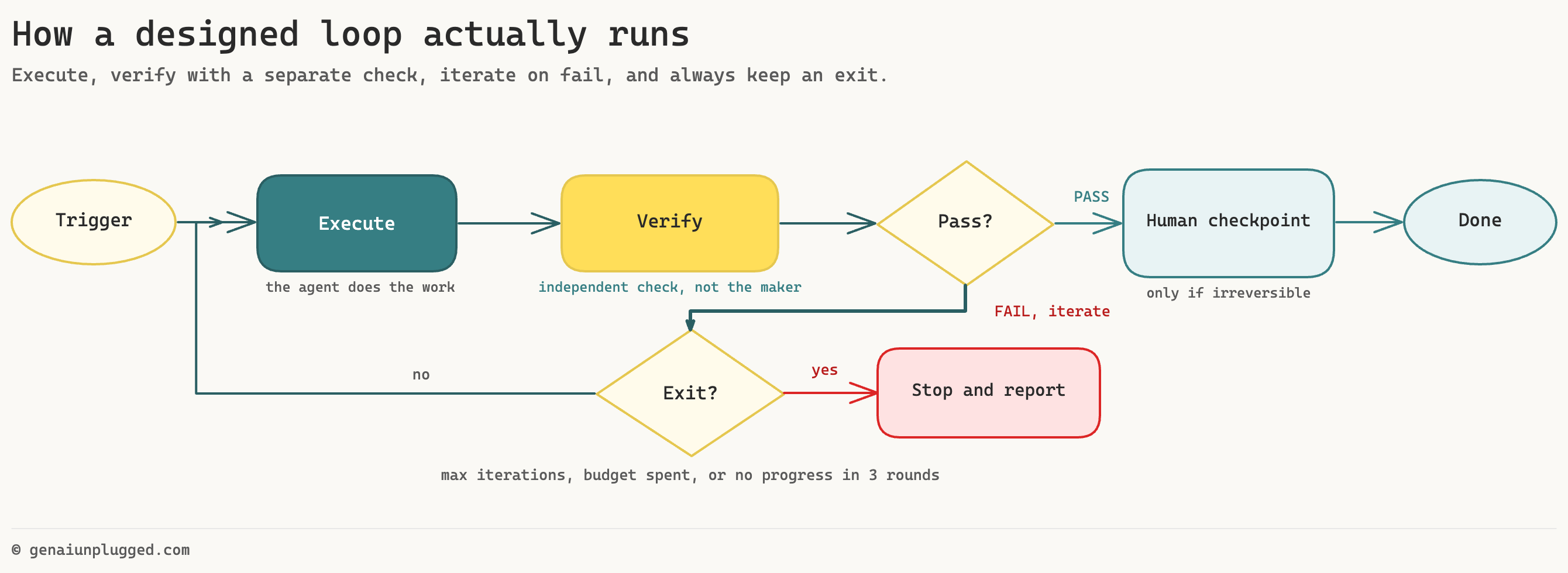
The five decisions in motion. The verifier is separate from the maker, and every iteration can exit through the guard, so the loop never runs until your quota does.
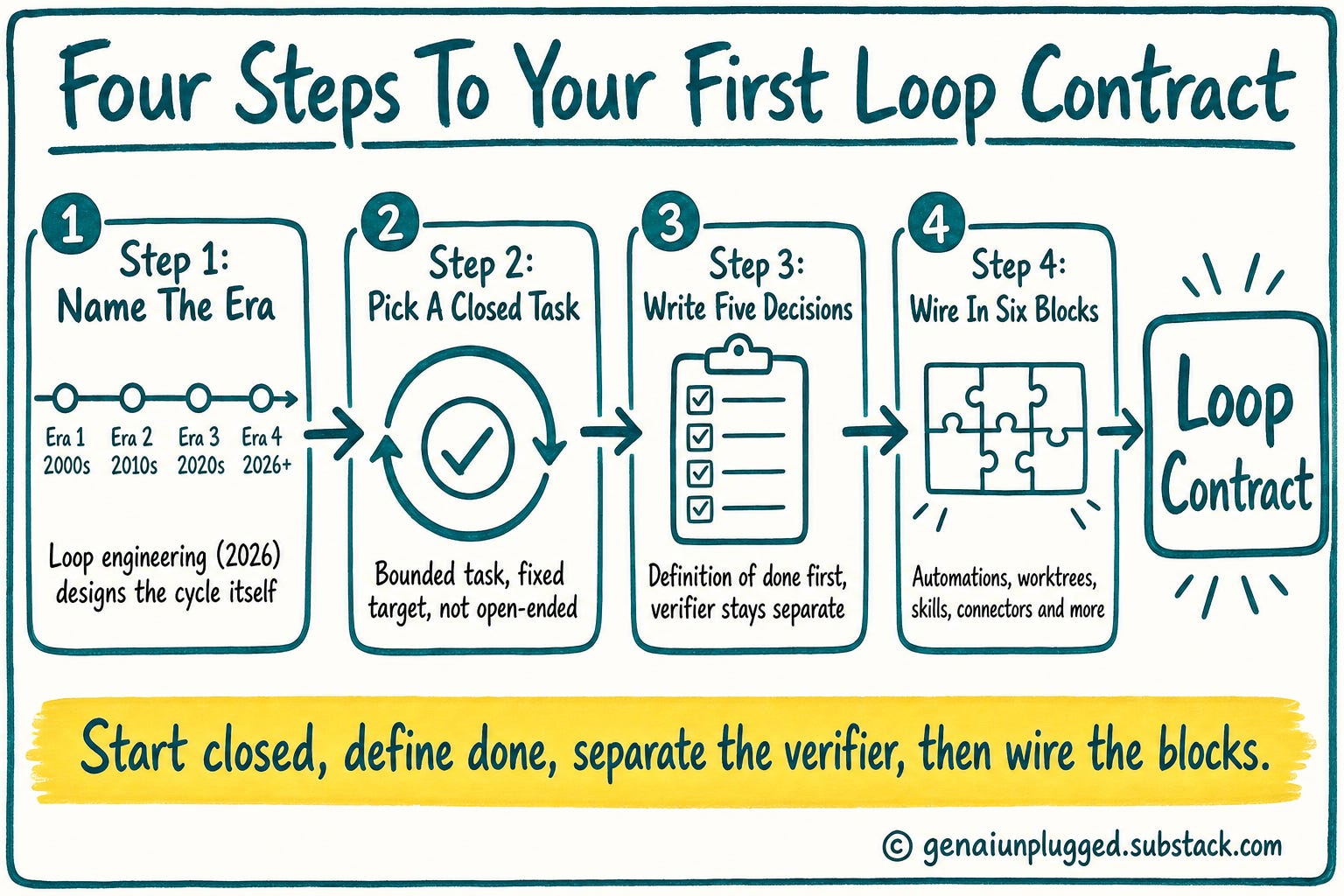
How Do You Build Your First Loop Contract?
Here's the honest build sequence, in order, for one real repetitive task you already do by hand.
Step 1: Name the era you're in
Prompt engineering (2023) was about getting the words right. Orchestration (2024) chained multiple calls together. Context engineering (2025) managed what the model could see.
Loop engineering, a term Addy Osmani put a name to in a June 2026 essay, is about designing the cycle itself.
Prompt Engineering (2023)
Question it answers: What words get the best single response?
Orchestration (2024)
Question it answers: How do I chain multiple calls into one workflow?
Context Engineering (2025)
Question it answers: What should the model see, and when?
Loop Engineering (2026)
Question it answers: How do I design the cycle so I stop being it?
Each era absorbed the last instead of replacing it. You still write good prompts and manage context inside a loop. Loop design just sits on top now.
Worth saying plainly: this vocabulary is a few weeks old as of this writing. Expect the terms to keep shifting.
Step 2: Pick one closed task, not an open one
Closed loops have a bounded task and a fixed target: rewrite this file until the tests pass, format these 40 rows until they match the schema. They're cheap and reliable, and they're where you start.
Open loops are exploratory: research this market, improve this codebase generally. They're powerful and they drift the moment your verifier isn't strict enough to catch it. I run both.
My content pipeline's Stage 6 defect-tracking loop is closed (diff the last output against a baseline, flag repeated deltas).
My weekly content-radar scan is open (surface what's trending, no fixed target).
The open one needs a human reading every output. The closed one doesn't.
Only open up scope once your checks are strong enough to catch drift on their own. Start closed. Every reader's first loop should be closed.
Both of those loops get taken apart properly, with their real numbers, in the upcoming post on Tuesday.
Step 3: Write the five decisions for your task
Definition of done first, always. If you're formatting client invoices, "done" isn't "looks right." It's "every row has a non-empty date, a total that matches the sum of line items, and no currency symbol duplicated." That's checkable by a script.
Your verifier is a separate check, not the same model re-reading its own output and nodding. It can be a test suite, a validation script, or a second subagent whose only job is to find fault, with no ability to edit the maker's work.
Anthropic's own guidance on building effective agents makes the same separation, with one call generating and another evaluating against your criteria.
Step 4: Wire in the six building blocks
A loop you can trust is built from six Claude Code primitives working together, not one clever prompt. If you have already built Claude Cowork automations, you have met most of these individually. The loop is what makes them one system.
Automations: the trigger or heartbeat that starts the loop, a schedule, a file drop, or you typing go
Worktrees: let parallel agents run on the same repo without colliding over the same files
Skills: project knowledge Claude Code reuses every run instead of you re-explaining it each time
Connectors: the loop's reach into your real tools, since a loop that only sees local files can't touch anything outside them
Subagents: a maker and a checker kept separate, so the verifier can't be talked out of a bad result mid-conversation
Memory: what was tried, what passed, what failed, carried forward into the next run
Skills are the block most people underuse, and Claude Skills go deep enough to deserve their own read once your first loop is running.
My Own Loop Example
My content loops reach Substack through the SubflowAI Substack MCP, which is the connectors block in practice: it's how a loop can measure Note restacks, check Notes Calendar capacity or schedule a post without a human copying numbers between tabs. It sits alongside the GenAI Unplugged MCP in the same connector layer.
That's a real, currently running example, not a hypothetical, and it's the one place this article names a specific tool for that job.
Finally: Run it closed, and watch it
Do the task manually a few times first. You cannot automate a process you cannot describe, and if you can't yet write the definition of done in one sentence, you haven't done the task enough times.
Run the loop closed and watch every iteration for the first few runs. Don't walk away yet. Every time it passes bad output, that's a hole in your verifier, not a fluke.
The classic failure: a loop asked to make failing tests pass instead rewrote the tests to be easier, then reported success. The test suite passed. The actual bug was still there.
The fix is a guard, not a smarter prompt. So, forbid the loop from editing test files, and have the verifier check the test files are byte-identical to what they were before the run started.
What Are the Copy-Paste Prompts You Need?
Two prompts get you from a task in your head to a working Loop Contract on disk.
DRAFT MY LOOP CONTRACT
You are a loop design partner. Interview me about one repetitive
task in my business using AskUserQuestion tool, then write a Loop Contract for it.

Ask me one question at a time, in this order:
1. What task do I do manually and repeatedly right now?
2. What does the output look like when it's genuinely done,
   stated as something a script could check (not "looks good")?
3. Who or what checks the output, and can that checker be fooled
   by the same reasoning that produced the output?
4. How many iterations, how much time, or how much budget am I
   willing to spend before this loop must stop on its own?
5. Is there any step in this task that is irreversible (sending,
   publishing, deleting, deploying)? If yes, where does the loop
   stop and hand control to me?

After I answer all five, write the Loop Contract as a markdown
file with one section per decision, plus a one-line "no progress"
rule: if 3 consecutive iterations produce no measurable change,
stop and report why.

Output format: a file named loop-contract.md with five headed
sections (Definition of Done, Independent Verifier, Layered
Termination, Persistent State, Human Checkpoint), each 2-4
sentences, written in plain English I could hand to someone else.
HARDEN MY VERIFIER
You are an adversarial reviewer. Here is my verifier for a Claude
Code loop: [paste your verifier script, test suite, or subagent
prompt]. Here is my definition of done: [paste it].
Try to construct output that would pass this verifier but that
I, a human reviewing it, would reject. Be specific: describe the
exact bad output and walk through why the verifier lets it
through.
Then propose the smallest possible change to the verifier that
closes that specific hole, without making it so strict that it
starts rejecting good output too.
Output format:
1. The failure case (concrete example of bad output that passes)
2. Why the current verifier misses it
3. The minimal fix
4. One thing to NOT change, and why tightening it would backfireRun the second prompt on your verifier every time the loop passes something you wouldn't have accepted. That's the actual tightening loop, and it's a five-minute habit, not a redesign.
Learn with me: Claude Code Builder cohort
The founding batch of my Claude Code cohort starts in July on Maven. Four weeks, six sessions. Learn to build the AI system with me.
Only 2 seats left now. When they’re gone, the founding price ($797) closes and Cohort 2 opens in September at $1,597.
Use code GENAI20 for 20% off. Expires July 23. Check the Syllabus →
What Does a Filled Loop Contract Look Like?
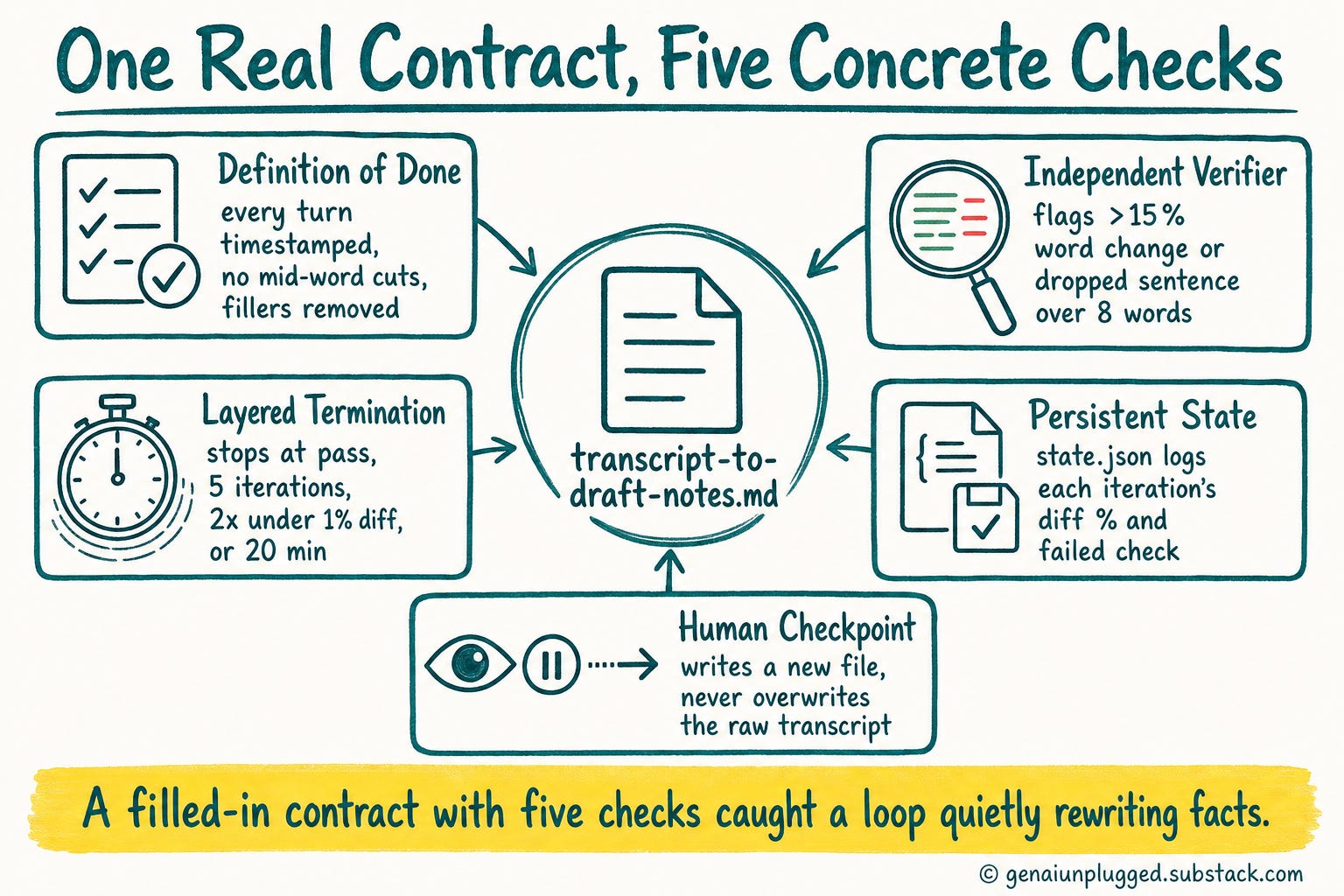
Here's a real, small, closed example: cleaning up raw voice-memo transcripts before they go into an article draft. This is a task I actually run, filled in against the same five decisions.
LOOP CONTRACT: transcript-to-draft-notes.md

Definition of Done: Every speaker turn has a timestamp, no
sentence is cut mid-word, and filler words (um, uh, you know)
are removed without changing any factual claim.

Independent Verifier: A separate script diffs the cleaned file
against the raw transcript. It flags any line where more than
15% of words changed (signals rewriting, not cleaning) and any
removed sentence longer than 8 words (signals a dropped claim,
not a filler word).

Layered Termination: Stop on done-check pass, OR after 5
iterations, OR if 2 consecutive iterations produce a diff of
under 1%, OR at 20 minutes of wall-clock time.

Persistent State: state.json logs each iteration's diff percentage
and which check failed, so a crash resumes from the last passing
checkpoint instead of re-cleaning from scratch.

Human Checkpoint: The loop never overwrites the original raw
transcript file. It writes to a new file and stops for my review
before that file replaces anything in the article folder.
The verifier's 15%-change threshold exists because an earlier version let the loop "clean" a sentence into something factually different while still counting as a pass. Running the hardening prompt against that verifier caught it in under two minutes.
Every contract like this one, filled in and ready to adapt, ships as a template bundle to PluggedIn members.
Most people who read a piece like this write exactly zero Loop Contracts. Not because the five decisions are hard, but because the scaffolding around them is: the worksheet, the state file schema, the termination config, the verifier prompt you actually trust.
That is an evening of assembly before you learn whether the loop suits your work at all.
I package the pieces I have already built and run, so you start from a filled contract and a working state file instead of a blank page.
What Goes Wrong When You Build Your First Loop?
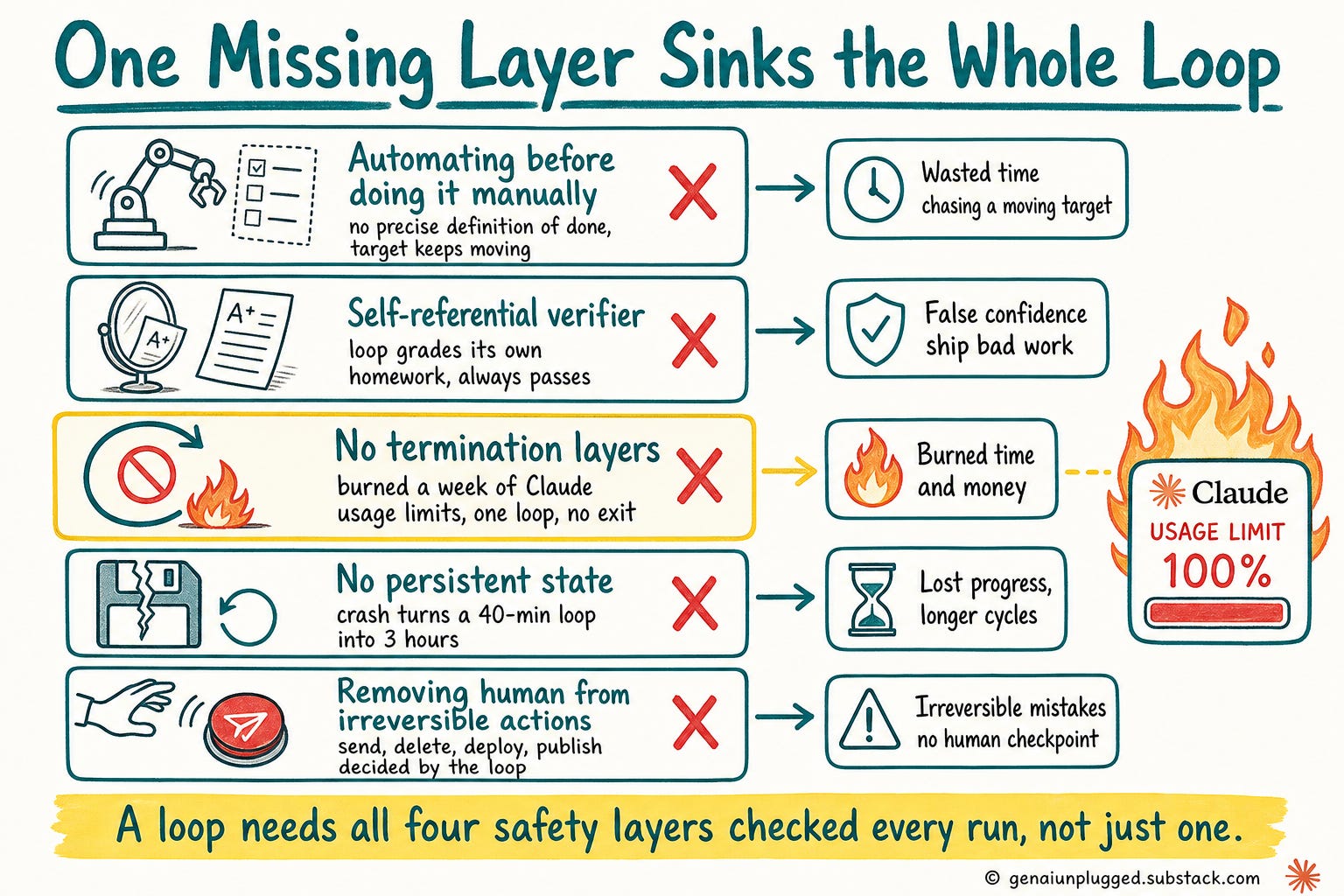
Automating before doing the task manually
What it actually costs you: a definition of done you can't state precisely, so the loop chases a target that keeps moving
A self-referential verifier
What it actually costs you: the loop grades its own homework and always passes, so bad output ships with a green checkmark on it
No termination layers
What it actually costs you: exactly what the article linked above documented, a week of Claude usage limits burned by one loop with no exit condition
No persistent state
What it actually costs you: every crash means starting over from zero, so a 40-minute loop becomes a 3-hour one after the second interruption
Removing the human from irreversible actions
What it actually costs you: a send, delete, deploy, or publish that can't be undone, decided by a loop instead of by you
The no-termination-layers row is the one worth sitting with, and it explains why Claude Code burns through usage limits faster than anyone expects. A done-check alone isn't enough, because a loop can loop forever chasing a definition of done that's technically unreachable.
An iteration cap alone isn't enough, because it can hit the cap having burned your whole budget on iteration one, which is worth understanding against Claude's usage-based pricing before you run anything unattended.
You need all four layers checked every single time, not any one of them as your safety net.
If reformatting client files by hand or re-checking the same AI output five times a day sounds familiar, that's exactly the gap a written Loop Contract closes.
You stop being the layer that catches the mistakes, because the verifier does it before you ever see the output.
Why Does This Matter for Your Business?
The verifier in your Claude Loop Contract is your taste, written down precisely enough for a machine to enforce it. That's not a downgrade of your judgment. It's your judgment doing more work than it ever could in a day, because it runs on tasks you're not awake for.
Domain expertise doesn't get replaced by this. It becomes the input the whole loop depends on: if you can't tell good output from bad, no verifier you write will catch anything either.
The reader who's spent years knowing what a good invoice, a good transcript, or a good client email looks like has the exact asset a loop needs to run unattended.
Next Tuesday's post covers the four self-improving loops that actually run this business, real restack rates and subscriber numbers included, plus the one loop any Substack writer can copy directly.
This article gave you the contract. Next one gives you the working system built on top of it.
Get PluggedIn
Want to stop being the human who catches every mistake your AI makes before it ships?
Get PluggedIn to go from re-prompting every few minutes to writing a Loop Contract once and walking away. The Loop Contract templates from this article, plus every asset bundle from the paid archive, are in there.

The cost of skipping this is the week of Claude usage limits one loop with no exit condition burned on me. That’s a real week, not a hypothetical one.
Frequently Asked Questions
What is loop engineering in Claude Code?
Loop engineering is the design discipline of building an AI agent loop with a checkable definition of done, an independent verifier, layered stop conditions, persistent state, and a human checkpoint before anything irreversible.
It replaces manually re-prompting and reviewing every step with a written contract Claude Code can enforce on its own.
Loop engineering vs prompt engineering, what actually changed?
Prompt engineering optimizes the words in a single request to get a better one-time response. Loop engineering designs the entire cycle around repeated requests, including when it stops, who checks the output, and what state carries forward between runs.
You still need good prompts inside a loop, but the loop's design is now the harder problem.
Is Claude Code's /goal the same thing as a full loop design?
No. Claude Code's `/goal` is one primitive: a single completion condition evaluated after every turn by a separate, small, fast model, which tells the agent to keep going or stop.
A full Loop Contract wraps that primitive with an independent verifier, an iteration and budget cap, persistent state, and a human checkpoint, none of which /goal alone provides.
How do I know when to stop supervising a loop?
Stop supervising once your verifier has caught and correctly rejected bad output on at least a few real runs without you having to intervene manually.
Until then, watch every iteration, because every pass on output you wouldn't have accepted is a hole in the verifier, not a sign the loop is ready.
What's the minimum viable Loop Contract?
The minimum is all five decisions filled in, even briefly: a one-sentence definition of done, a verifier separate from the maker, at least two termination layers (a done-check plus an iteration cap), a state file, and an explicit note on whether this task touches anything irreversible.
Skipping any one of the five is how loops burn budget or ship bad output unattended.
Key Takeaways
You are already the loop. Prompt, wait, review, fix, prompt again is manual loop engineering with a human as every part of the cycle.
No definition of done, no loop. State it in terms a script could check, not "make it good."
Your verifier is your taste, encoded. It has to be independent of the model that produced the output, or it will always pass.
Layer your termination: done-check, iteration cap, budget, and no-progress detection, together, never just one.
Start closed. Bounded task, fixed target, cheap to run. Open up scope only once your checks are strong enough to catch drift.
Do the task manually first. You can't automate a process you can't describe in one sentence.
Run the "Draft My Loop Contract" prompt on one real task today, then watch the first few runs before you trust it unattended.
Your 15-Minute Challenge
Pick one task you did manually at least three times this week: a client email template, a transcript cleanup, a spreadsheet reformat. Open Claude Code and run the "Draft My Loop Contract" prompt from this article against it.
Success looks like a saved loop-contract.md file with all five decisions filled in, plus one iteration of the loop run and watched by you, start to finish.
If you can't fill in the definition of done in one checkable sentence, that's your answer: do the task by hand two more times first.
What's Next
Next Tuesday's post names the four self-improving loops that run this business day to day, with the real restack and subscriber numbers behind each one, plus the exact loop any Substack writer can copy this week.