


Running a Substack seriously is a second job.
That is not a complaint. It is the math. If you publish consistently and want to grow, you are writing notes every day, checking analytics, replying to comments and DMs, and re-stacking other creators to stay visible.
I did all of it by hand for first two months. It cost me nights and weekends I did not get back.
I built SubflowAI to fix that grind, and it worked. I hit the Substack bestseller badge within six months. But even with my own dashboard, I was still doing what I call "click ops." Clicking buttons, waiting for pages to load, reviewing one screen at a time.
The SubflowAI Connect feature today changes that. It adds a SubflowAI Substack MCP, so Claude, Claude Code, or ChatGPT can run your Substack directly from a chat prompt. You ask in plain English, it acts, and it asks before every action.
By the end of this post you will know how to connect Claude or ChatGPT to your Substack, the one safety rule that keeps it sane, and the three-move system I use to plan a month of notes from a single conversation.
You connect Claude or ChatGPT to your Substack by adding a custom connector that points at the SubflowAI Substack MCP address, then entering the 8-character code in SubflowAI Settings, Connect. It takes about five minutes and needs a paid SubflowAI license. Nothing gets scheduled without your yes.
👋 Julley , I'm Dheeraj, an AI systems builder.
I build production-grade AI systems at work by day and ship my own products by night, 12 and counting, including SubflowAI and the Content OS Agents Toolkit. This newsletter is the bridge between those two worlds. Every system, every build, documented step by step.
Join 3,000+ builders getting the exact AI setups, prompts, and workflows that actually work in your business.
Why does running a Substack take so much manual work?
Running a Substack takes manual work because publishing the newsletter is the easy part. The real load is everything around it: daily notes for reach, analytics checks, replies to comments and DMs, and re-stacking other creators to stay in the network.
Serious growth needs a real notes cadence and hands-off operations as there is so much to do.
The baseline most creators aim for is four to five notes a day, which lands around 150 notes a month. That is on top of the newsletter you already send.
I personally run seven notes a day. Two of those go out while I am asleep, timed for readers in other time zones.
That cadence is what nearly broke me before I built a system for it. Every night and most weekends went to keeping up. The manual grind is not a minor annoyance.
It is the reason most solo creators either burn out or stop showing up.
The gap between a good dashboard and real automation is not features. It is the clicks still sitting between you and the outcome. A connector closes that gap by letting the agent operate the tools, instead of you operating them through a screen.
What is the SubflowAI Substack MCP, and why does it matter?
The SubflowAI Substack MCP is a bridge. It connects your Substack to an AI app like Claude or ChatGPT, so you run SubflowAI by asking instead of clicking.
MCP stands for Model Context Protocol, an open standard that lets an AI app call outside tools the same way it might search the web or read a file.
SubflowAI itself started as a Chrome extension for scheduling notes. It grew into a full Substack growth system: a calendar view, an AI repurposer of existing content, brand-voice configuration, and server-side scheduling so notes go out with your laptop closed.
The Connect feature is the newest layer, shipped across the version 3 releases.
Once connected, ChatGPT or Claude stops suggesting what you should click. It reads your posts and your data, writes in your voice, and schedules the result, all from the chat window.
The dashboard already automated the writing. The connector automates the operating. That is the whole shift.
One honest note up front. SubflowAI and the SubflowAI Substack MCP are independent tools. They are not affiliated with, endorsed by, or sponsored by Substack.
As of July 2026, Substack has no official public API, so this works through your own authenticated session and Substack's unofficial internal API. Read Substack's terms before you connect anything.
Learn with me: Claude Code Builder cohort
Learn with me: the Claude Code cohort
I run the Claude Code cohort on Maven for founders, creators and tech teams: six live sessions across six weeks, building a real AI system with me. If you would rather build it alongside me than read about it, this is the room.
Each cohort is a small, hands-on group, and a new one starts every month.

Use code GENAI20 for 20% off. Check the Syllabus →
How do you connect Claude or ChatGPT to your Substack?
You connect once, in about five minutes, and your Substack login stays in your browser. There are two ways to do it, and they give you different tools.
Before you start, you need an active paid SubflowAI license (a trial will not turn on the AI connection) and an MCP-capable client: Claude Desktop, Claude Code, Claude Cowork, or ChatGPT.

Relay Mode (recommended)
SubflowAI runs each request right there in your browser, so your Substack login never leaves Chrome. This is the only mode that turns on SubflowAI's own tools: calendar planning and AI repurpose. The one trade-off is that Chrome has to be open for a live request.
Notes you already scheduled still publish on time with Chrome closed, because Substack schedules those natively.
Here is the whole relay flow, three steps:
In Claude or ChatGPT, add a custom connector and point it at
https://substackmcp.genaiunplugged.com/mcp.On the sign-in page that opens, tick the box to agree to the terms, then click "Connect with SubflowAI." It shows you a short 8-character code, like
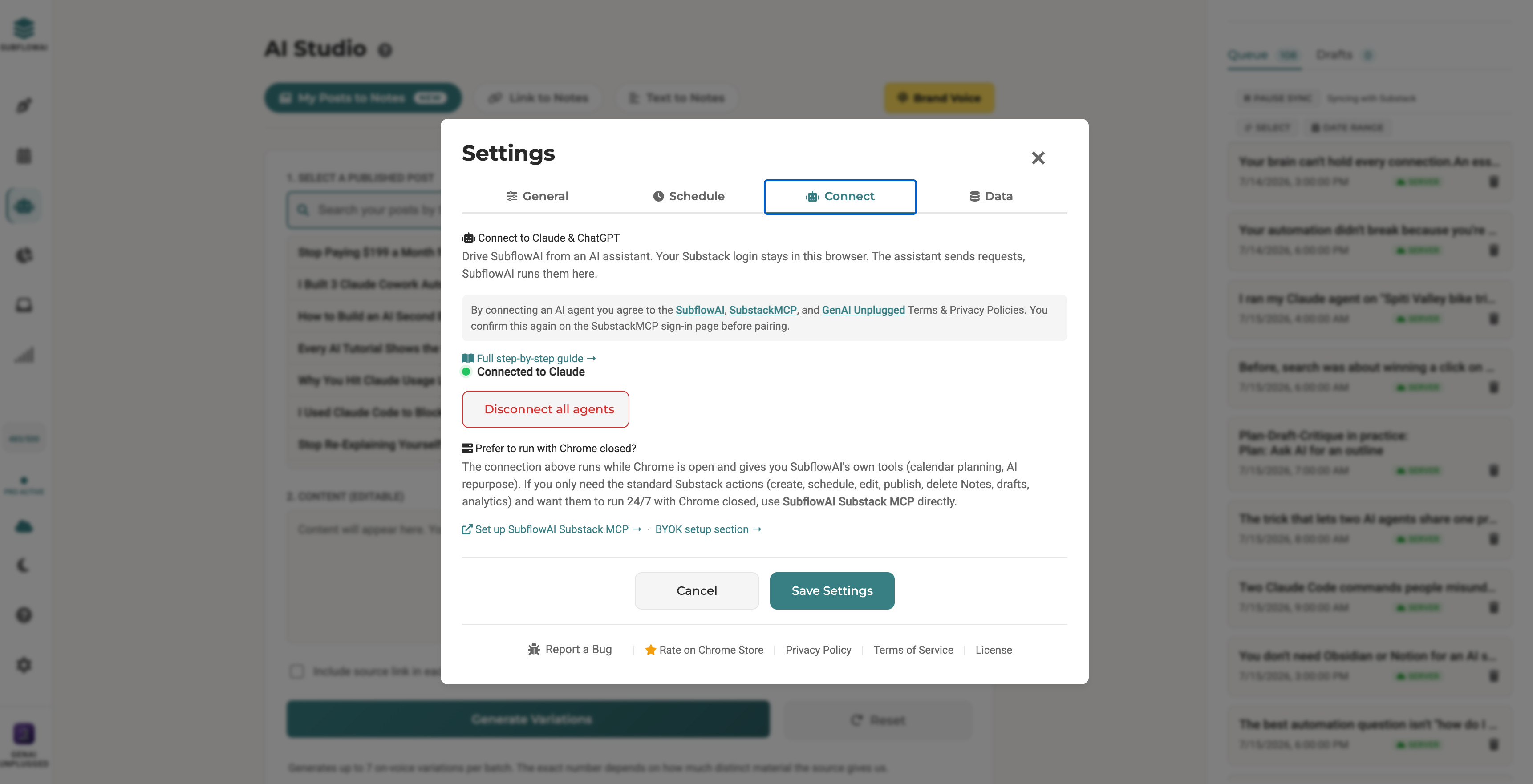
ABCD-EFGH.Open SubflowAI, go to Settings, then Connect, paste the code into the box, and click Connect.
That is it. Back in your AI app, prove it with a read-only command:
Is my Substack Notes calendar full next week? If not, draft
Notes from my last article and fill the open slots.
If it answers with your calendar status, everything downstream will work. You can also ask "What Substack tools do you have?" to see the full list.
To disconnect at any time, go to Settings, then Connect, and click "Disconnect all agents." Access is revoked instantly.
Setting it up in ChatGPT (updated October 2026)
ChatGPT moved custom connectors into Plugins in October 2026. If you see Plugins and no Apps & Connectors, use these steps. A reader on ChatGPT Plus followed them and was connected the same day.
Open chatgpt.com in Chrome, not the desktop app, and go to Plugins in the left sidebar. You can also open
chatgpt.com/pluginsdirectly.Click the + button, then Add custom MCP server.
Name it SubflowAI. The description is optional.
Under Connection, paste
https://substackmcp.genaiunplugged.com/mcpas the Server URL.For Authentication, pick OAuth. If it shows fields for a Client ID or Client Secret, leave them empty. Our server registers ChatGPT on its own.
Tick "I understand and want to continue" and click Create as a plugin.
When ChatGPT asks you to sign in, a SubflowAI page opens. Tick the box to agree to the terms and click Connect with SubflowAI to get your 8-character code.
Open SubflowAI, go to Settings, then Connect, paste the code and click Connect.
Back in ChatGPT, open your plugins, open SubflowAI and click + to install it if it is not installed yet.
Start a new chat, type
@, pick SubflowAI and try "List my scheduled Notes for this week."
It works in a regular chat, no special mode needed. If there is no Add custom MCP server after you click +, your plan or workspace does not allow custom connectors yet. On a Business or Enterprise workspace, an admin has to allow it first.
The full walkthrough is here: How to connect SubflowAI to Claude and ChatGPT
Standalone (Chrome closed)
If you want an agent that runs 24/7 with your browser closed, or you only need the standard Substack actions (create, schedule, edit, publish, delete Notes, manage drafts, read analytics), connect to the SubflowAI Substack MCP directly with your own Substack session.
It keeps working with Chrome closed, but it does not include the SubflowAI-only tools, since calendar planning and AI repurpose are relay-only. Paid SubflowAI customers are recognized by the email they bought with.
The step-by-step for this route, including the config-file setup, is in the SubflowAI Substack MCP guide.
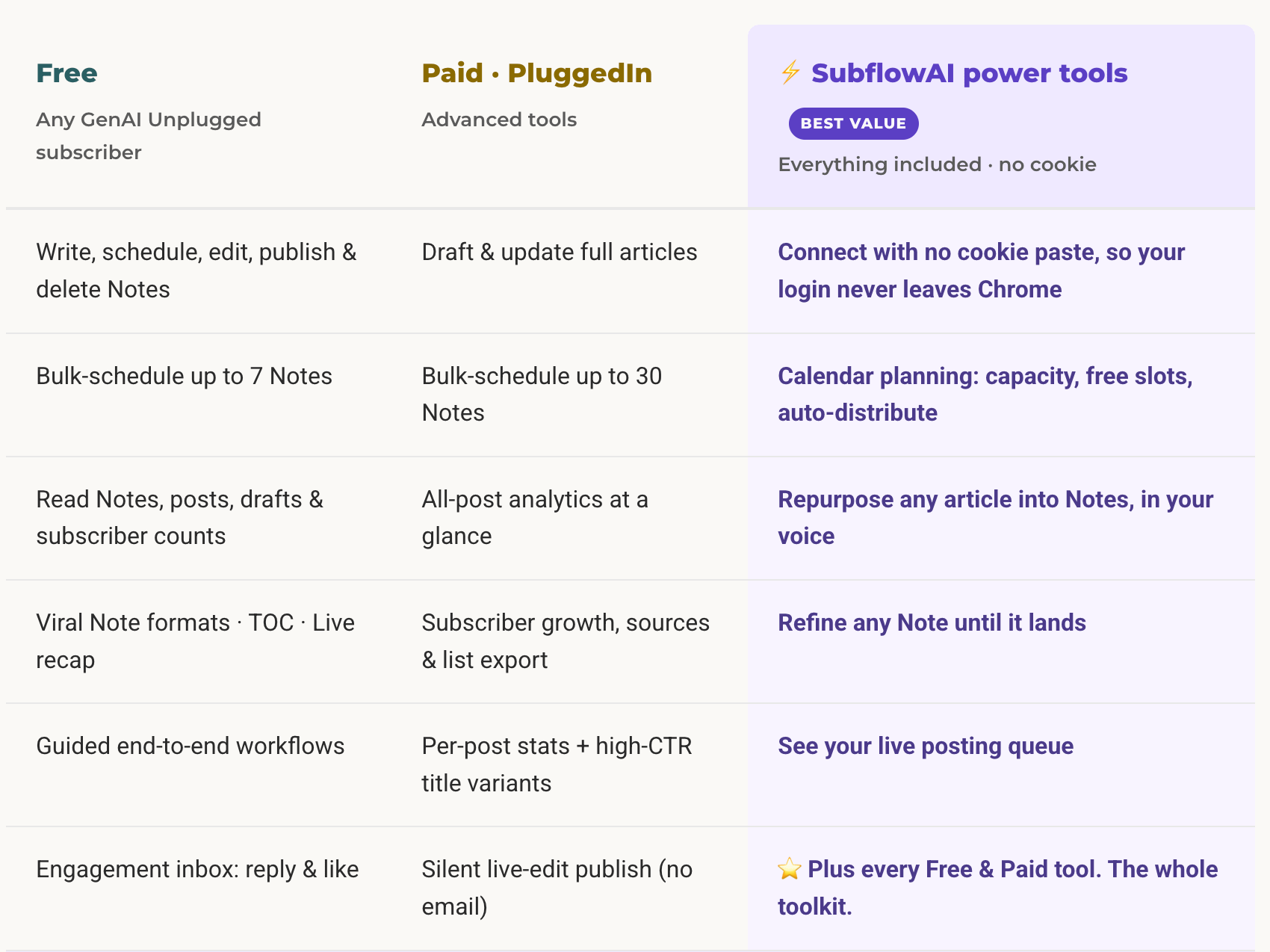
A quick word on access, so nothing surprises you. The core notes loop is free. Connect, the layer that lets an AI agent drive SubflowAI, is a one-time $30 add-on on top of a paid SubflowAI license, and it comes bundled with SubflowAI Premium.
Free users get the base Substack tools, paid users get more, and SubflowAI users get the full set.
What others are saying about it
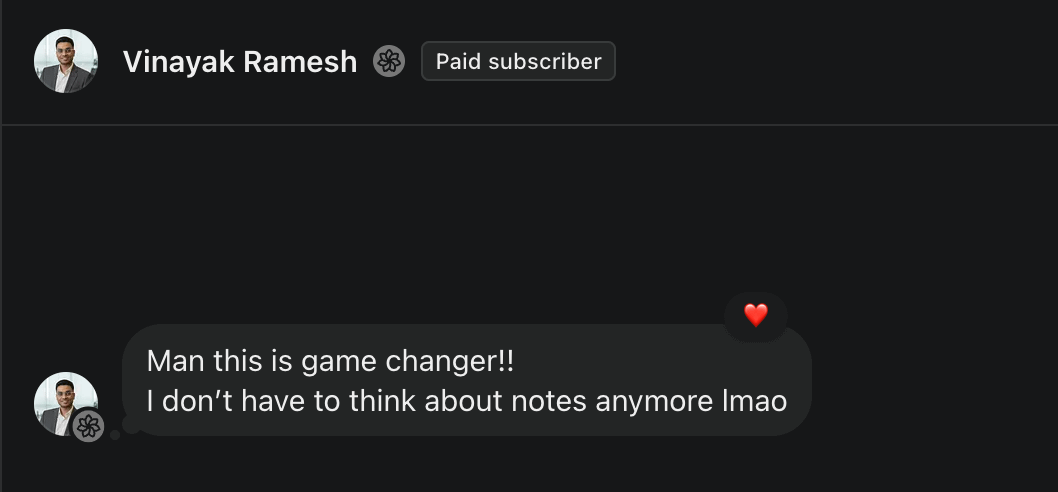
Vinayak Ramesh just left a DM as he was the first one to try it :)
I Spent 2 Weeks Reverse-Engineering Substack's API. Now Claude Runs My Analytics.

Every time I open my Substack dashboard, the numbers are right there. Subscribers. Views. Open rate.
The one rule that makes this safe
The rule is simple: nothing gets scheduled, published, or replied to without the agent showing you a plan or a preview first, and you saying yes. Watch for that gate through every workflow below. It is the difference between a helper and a loose cannon.
Two guardrails back it up. Every write action runs a dry-run that shows you exactly what will change before you approve. And on the relay path, your Substack login never leaves your browser, so nothing sensitive touches an outside server.
My practical settings: start in manually-approved mode so you confirm every action, and keep delete operations disabled in the connector settings until you trust how the agent behaves. The agent is probabilistic, so it can still make choices you did not script.
Loosen the approvals only once you have built confidence.
The three-move system: a month of notes from one chat
Everything I would normally do across a month, I run in three moves from the chat window. Each move stops at the approval gate. Together they turn your own posts and your own data into a planned, scheduled month.

Move 1. Ask what is actually working
Before writing a single note, ground the month in evidence, not vibes. Ask your account what performs, then build around it:
Compare all my published posts and tell me my best by opens,
and what they have in common.
Then: where have my subscribers come from over the last 90 days?
Then: so what should I make more of next month?
That runs the analytics tools and hands you a pattern. When I ran it, it pulled about 19 new paid subscribers in the last 30 days and close to 1,000 signups over 90 days, broken down by source, then recommended what to double down on.
Beginners learn what "good" looks like. Advanced creators get a doubling-down strategy from the same three prompts.
Move 2. Turn your posts into a month of notes
This is where the real payoff is. Take a strong post and mine it for standalone notes in your voice:
Take my best recent post and repurpose it into standalone
notes in my voice.
Then: make a couple of them punchier.
Then: now do the same with these two other posts.
Here is the honest math, because it matters. One post gives you about seven notes, which is roughly a week. A full month is four or five posts repurposed, not one.
Anyone who tells you one post becomes thirty great notes is selling you slop. You stay the editor, and I trim any off-voice line by hand as it comes back.
Move 3. Schedule the month, approving each step
One prompt lays the whole thing across your open slots and stops at a dated plan:
Look at my open slots for the next month, lay these notes
across them, and show me the plan before scheduling anything.
Then, after you review the plan: schedule the first two weeks now.
Here is the kind of plan it returns before it commits anything:
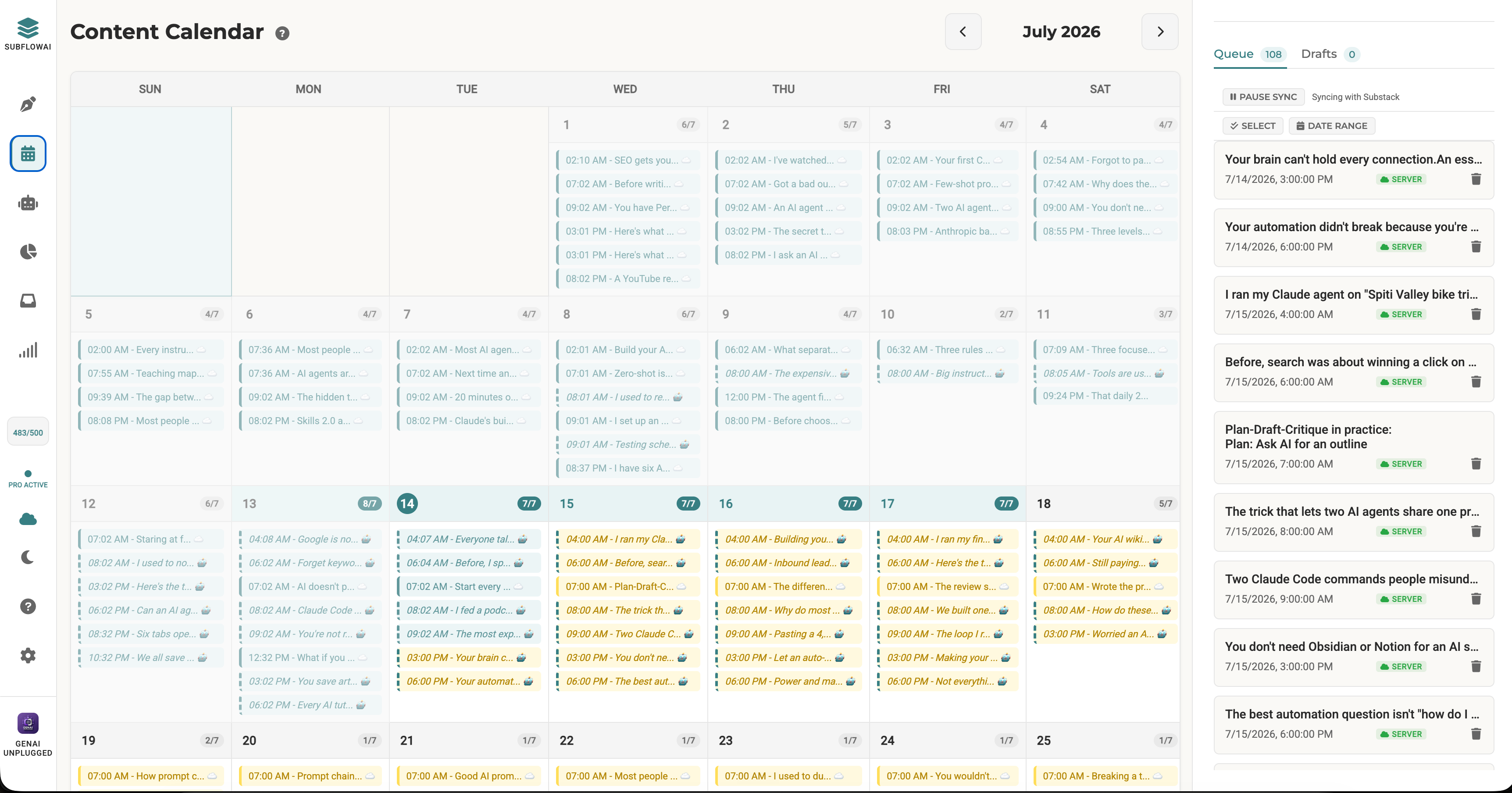
15 notes planned across your 34 open slots (12-16 July).
No two consecutive slots share a source post.
Each note ends with a reply-driving CTA. Full text staged.
Confirm to commit to SubflowAI.
Scroll to see the scale, spot-check two or three for voice, then approve. One detail worth knowing: cadence comes from your slot settings in SubflowAI, not from the prompt. If you want three notes a day instead of seven, set that in your schedule before you start.
The free tier schedules up to seven notes per batch; paid goes up to thirty.
Ask your Substack what is actually working
Notes are only half the story. The same connection turns your Substack analytics into a conversation. Instead of reading dashboards, you ask a plain-English question and get the answer, with a recommendation, in seconds.
This is where SubflowAI does some of its heaviest lifting. It can pull your publication dashboard, track your subscriber growth week by week, show exactly where new subscribers come from, split free versus paid, and give you the full traffic and engagement on any single post.
Try this in one message:
Give me my publication dashboard: total subscribers, 30-day views, and open rate.
Then show my subscriber growth week by week, and split free versus paid.
Then pull the full traffic and engagement for my last post.
It does not hand back raw numbers and leave you to it. It reads the trend and tells you what it means, so you can see which channel drives your paid conversions and where your growth comes from. You stop guessing, and you never open the analytics tab.
Clear your inbox and own your list
The other job you cannot outrun is engagement. Replies, mentions, and relationships are what turn a list into a community, and they normally mean living inside the Substack app. The connector brings that into the chat too.
It reads your engagement inbox, so every reply and mention shows up in one place with the context attached. You can have it draft a warm response to each, like a comment, or sort the whole queue by priority, and it always stops for your yes before anything goes out.
Show me my recent replies and mentions. Draft a warm reply to each,
but do not send any of them yet.
You can also export your subscriber list whenever you want, so the one asset you truly own is a file in your hands, not a screen you rent. I keep the final send on replies human, and I explain why further down. Everything up to that point, the reading, the sorting, the drafting, and owning your list, happens without opening Substack.
What else it can do
The same connection runs four more jobs. Pick the one that fits your week. I have marked which tier each needs.
Draft a full post (paid). Turn a rough outline into a real Substack draft, subtitle set, left unpublished for you to shape.
Add a table of contents (free). Insert anchored navigation into a live post and push it live without emailing your subscribers.
High-CTR titles (paid). Get eight headline options grounded in what already works on your account.
Clear the reply inbox (free). Read your replies and mentions and draft on-brand responses, sending only the ones you approve.
Each one runs through the same plan-then-confirm gate. For the table of contents, for example:
Add a table of contents to my last published post, placed just
before the first H2. Show me the change first, then push it live
without emailing subscribers.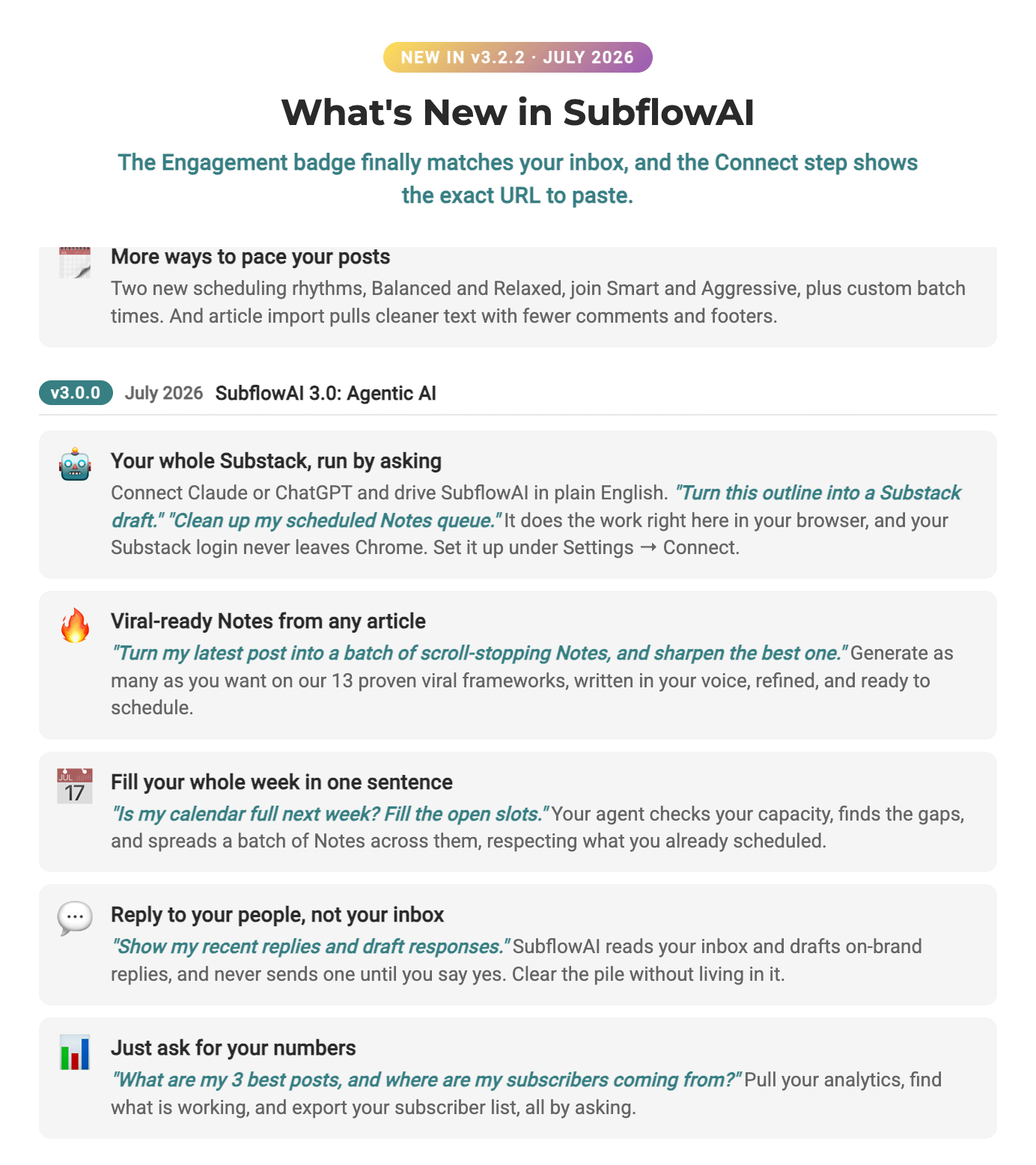
Starting from zero: the free path
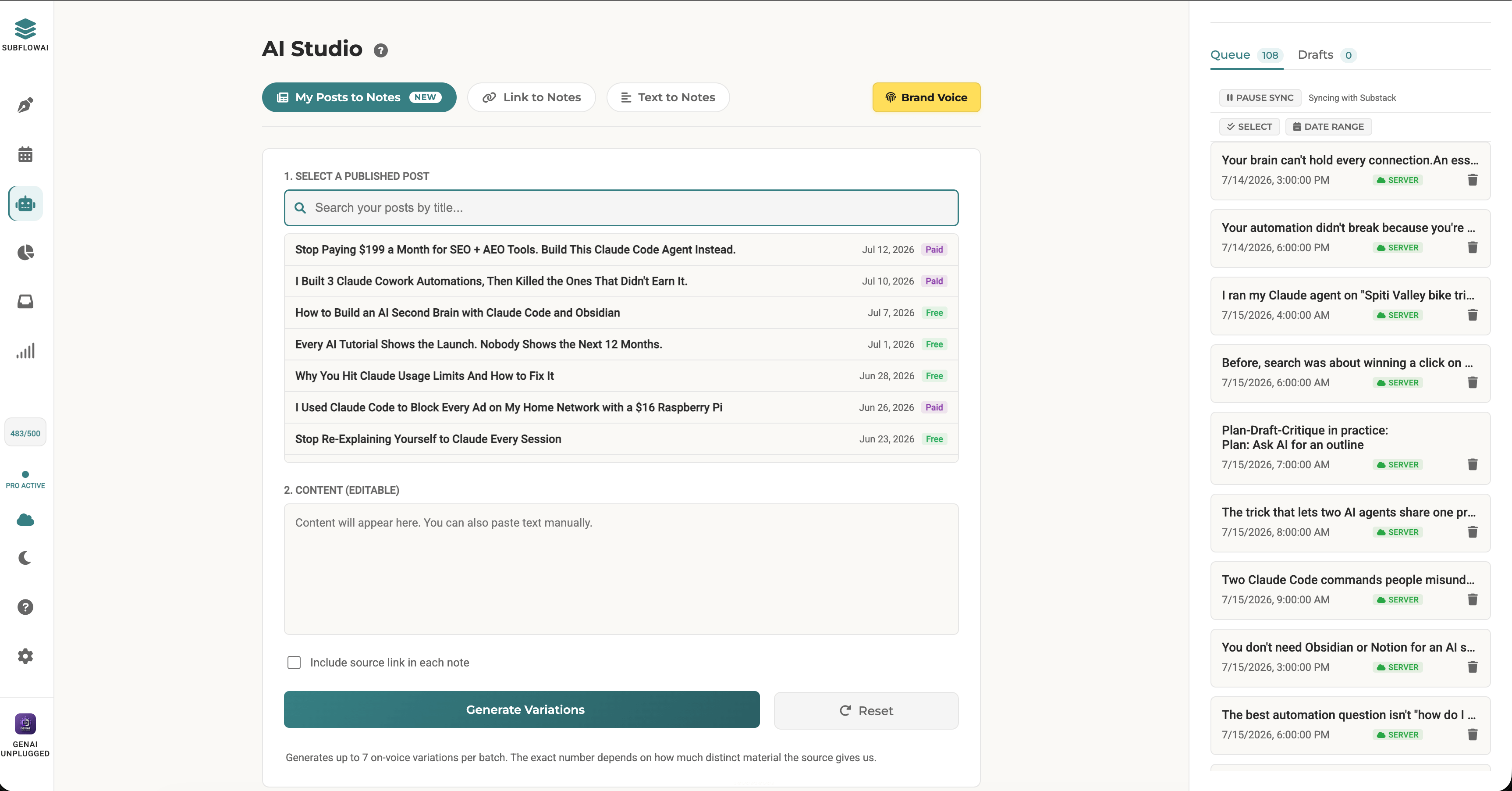
No archive yet? The shape is the same, and it works on the free tier. Instead of repurposing old posts, you generate fresh ones from proven formats:
Show me proven note formats, then write me a week of notes
for someone just starting out in <your niche>.
Then: find my open slots, lay these across the week, show me
the plan, then schedule them.
That generates and schedules a clean week of notes without a single blank-box moment. Generating and scheduling a week is free, and it is exactly the loop the paid tools scale up. The month-from-your-posts, analytics, and full-post drafting are the paid upgrade.
Where I still draw the line
Comment and DM replies are the one place I keep human, even though the connector can draft and send them. The tooling can do it. I choose not to.
That last genuine touch is the bare minimum a reader should get from a real person. When a reply is clearly automated, people notice fast, and it is the thing that breaks trust quickest.
I do let the agent surface what is waiting and draft a starting point. But I write the send myself, or run it through an agent trained on my own voice DNA. Drafting is a time-saver.
Sending is a relationship.
Troubleshooting the connection
Most setup problems trace back to a few known issues. Here is how to clear them.
"Connection expired" or "connection issue" right after adding it. This usually means a stale session from a previous connect. In SubflowAI, go to Settings, then Connect, and click "Disconnect all agents." Then click "Connect with SubflowAI" in your AI app again and paste the fresh 8-character code.
The pairing did not seem to finish. Click "Connect with SubflowAI" again to generate a new code, then paste it into SubflowAI under Settings, then Connect. When SubflowAI shows the agent as connected, you are set.
You only see the base Substack tools, no calendar or analytics. You connected in standalone mode. Reconnect through the relay, by pasting the code into SubflowAI under Settings then Connect, to turn on the calendar, inbox, brand voice, and analytics tools.
The agent feels noisy or burns tokens fast. Disable the other connectors you are not using for this task. Fewer active tools means cleaner runs and lower token use.
Notes are not showing in the calendar. Refresh the SubflowAI calendar view. Scheduling syncs server-side, so the notes go out even with your app closed.

Frequently Asked Questions
Here are the questions I get most often about connecting an AI agent to Substack.
What is SubflowAI and how is it different from Substack's built-in tools?
SubflowAI is a Substack growth system. It adds a calendar view, an AI repurposer, brand-voice configuration, server-side scheduling, power analytics and the Connect feature that lets Claude or ChatGPT operate your Substack directly. Substack's native scheduler only queues one note at a time and has no calendar view.
How do you connect Claude or ChatGPT to your Substack account?
In Claude or ChatGPT, add a custom connector pointing at https://substackmcp.genaiunplugged.com/mcp, tick the terms box, and click "Connect with SubflowAI" to get an 8-character code. Paste that code into SubflowAI under Settings, then Connect. The full walkthrough with screenshots is at genaiunplugged.com/guides/connect-subflowai-to-claude.
Is this official Substack?
No. SubflowAI and the SubflowAI Substack MCP are independent tools, not affiliated with or endorsed by Substack. As of July 2026 Substack has no official public API, so this works through your own session and Substack's unofficial internal API.
Read Substack's terms before connecting.
What is the difference between relay and standalone?
Relay runs each request in your open Chrome, and it is the only mode that turns on SubflowAI's own tools: calendar planning and AI repurpose.
Standalone connects to the SubflowAI Substack MCP with your own session so it runs with Chrome closed, and it gives you the standard Substack tools only.
Is it safe to let an AI agent manage my Substack account?
On the relay path your login stays in your browser and nothing sensitive touches an outside server. Start in manually-approved mode and keep delete operations disabled until you trust how the agent behaves. Every write runs a dry-run you approve first.
Can the AI agent reply to comments and DMs for me?
Technically yes, it can draft and send replies. I keep the actual sending human, because genuine replies are one of the last authentic touchpoints left on the platform.
How many notes should I be posting per day?
The common baseline for serious growth is four to five notes a day, around 150 a month. I personally run seven a day, including two scheduled overnight for other time zones. Cadence is set by your slot config in SubflowAI, not by the prompt.
What does Connect cost?
The core notes loop is free. Connect, the AI-agent layer, is a one-time $30 add-on on top of a paid SubflowAI license, and it is bundled with SubflowAI Premium. No extra monthly bill.
Key Takeaways
Connect once, operate forever. Setup takes about five minutes and does not repeat per session.
Choose your connection mode on purpose. Relay gives you the full toolset; standalone runs headless with the base tools.
Say the golden rule out loud. Nothing schedules or publishes without a plan and your yes.
Run the three moves. Ask what is working, repurpose posts into notes, schedule the month with approval at each step.
Respect the honest math. One post is about seven notes, roughly a week. A month is four or five posts.
Keep replies human. Automation can draft, but the send should come from you.
Read the Substack terms first. This runs on an unofficial API, so go in with eyes open.
Resources Mentioned
SubflowAI: The Substack growth system. Install the extension from the Chrome Web Store.
Connect walkthrough: The official step-by-step for pairing Claude or ChatGPT.
SubflowAI Substack MCP site: The connector's tool list and access tiers.
Claude, Claude Code, Claude Cowork, ChatGPT: Any MCP-compliant app can use the connector. I run most of my system in Claude Cowork, since it lets you build schedulable agents around the tools.
One Shot Show: My weekly live show with Wyndo, Wednesdays at 10am EST.
Your 15-Minute Challenge
Connect your own Substack today. Install SubflowAI from the Chrome Web Store, open Settings, then Connect, and finish the pairing. Set it to manually-approved mode.
Then run one prompt: ask it to fetch your last published post and draft three notes from it.
Success looks like this. You review and approve three draft notes without opening the Substack dashboard once.
PluggedIn Member gets 25% discount on SubflowAI as well as my entire AI products store.
Thank you for sharing. This looks like a great tool and a very helpful guide.
One question: can the connector pull in comments I’ve left on other people’s essays or Notes?
Hey deeraj, thanks for sharing this dheeraj. Did it improve your overall metrics, like free subscriber growth? Was it flat or did it go down? Can you share any results on that?