



On August 9, OpenAI switched off Atlas, the standalone browser it had launched nine months earlier, and told everyone to move their browser based agent work into the ChatGPT desktop app instead (OpenAI Help Center).
That is a strange thing to do with a product you shipped last October, unless the browser was never the point.
Six days later I sat down with Wyndo from AI Maker, who has been running ChatGPT Work as his daily driver, and asked him to show me what absorbed it.
What I got was a walkthrough of ten features, and a fairly uncomfortable realisation partway through: I had been calling several of them by names that do not exist.
I went into that session assuming ChatGPT Work was a rebrand with a new coat of paint. It is not. OpenAI has folded browsing, hosting, coding, and design into one workspace, and Anthropic is making the same consolidation move from the other direction.
By the end of this article you will know which of the ten are worth your attention, which ones are token traps dressed up as conveniences, and what has to be true before switching harnesses makes sense for your own work.

Checking the show against the documentation afterwards turned up nine corrections, three of them names. Every one is marked where it appears, because a live show is a first draft and the corrections are the useful part.
👋 Julley, I’m Dheeraj, an AI systems builder.
I build production-grade AI systems at work by day and ship my own products by night, 9 and counting, including SubflowAI and the Content OS Agents Toolkit. This newsletter is the bridge between those two worlds. Every system, every build, documented step by step.
Join 2,300+ builders getting the exact AI setups, prompts, and workflows that actually work in your business.
What’s inside
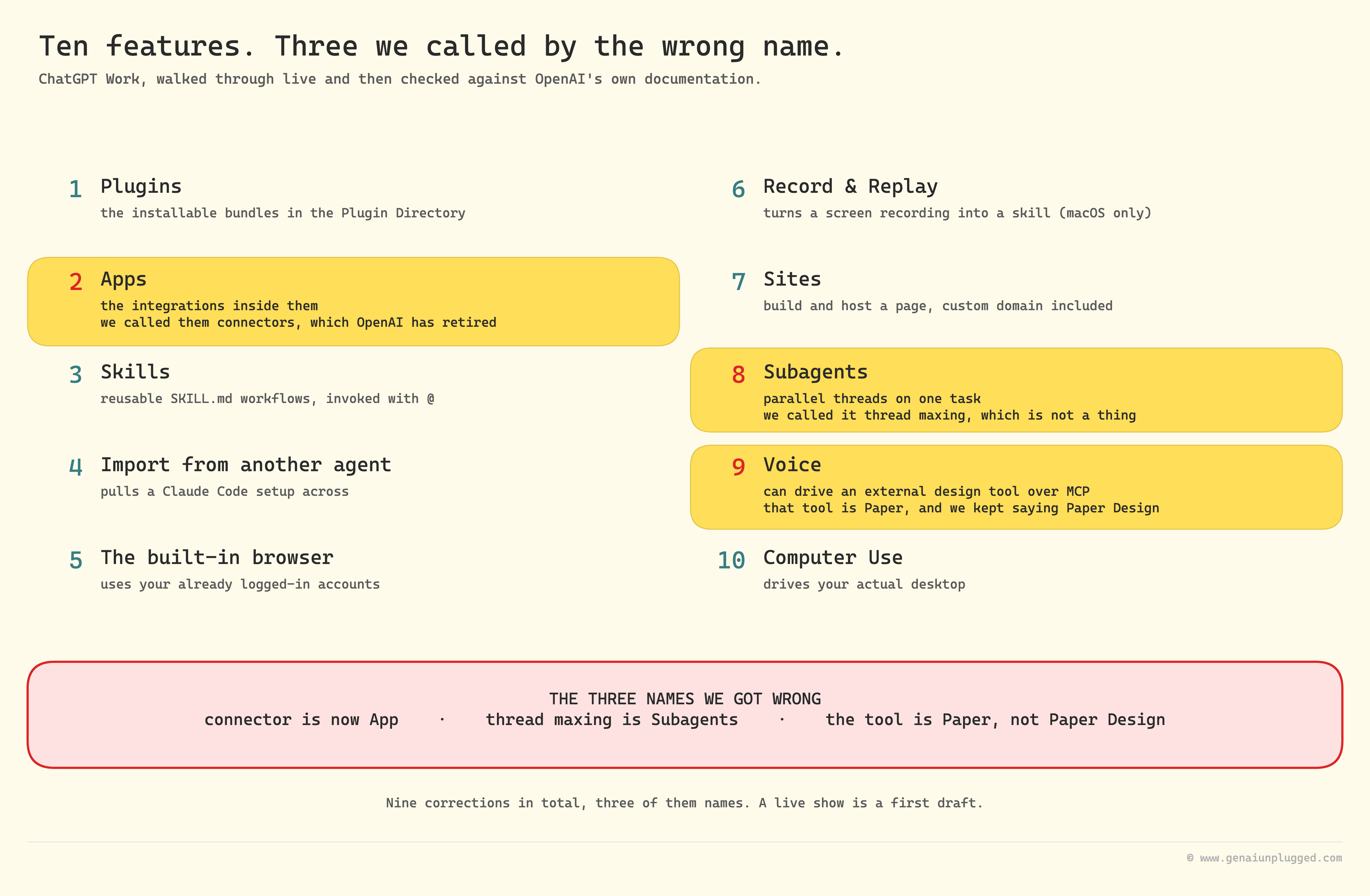
Here are the ten, so you can count them yourself:
Plugins, the installable bundles in the Plugin Directory
Apps, the integrations inside them, which used to be called connectors
Skills, reusable
SKILL.mdworkflows, invoked with@Import from another agent, which pulls a Claude Code setup across
The built-in browser, which uses your already logged-in accounts
Record & Replay, which turns a screen recording into a skill
Sites, for building and hosting a page, custom domain included
Subagents, for running parallel threads on one task
Voice, which can drive an external design tool over MCP
Computer Use, for driving your actual desktop
Numbers 2 and 8 are names we got wrong live. The third is Paper, the design tool in number 9, which we kept calling Paper Design.
What ChatGPT Work Is, and Why Atlas Died For It
ChatGPT ships as three experiences inside one desktop app: Chat for fast conversational work, Codex for software development, and Work, which OpenAI describes as "an agent designed for longer, multi-step work and finished deliverables". Atlas died so Work could own the browser.
That last part is the interesting bit (OpenAI Help Center). Browsing was never a weak idea. It was a feature wearing an application's clothes, and once the agent could drive a browser directly, a separate browser had nothing left to do.
The stakes here are less about any single feature and more about where your monthly subscription goes. Wyndo currently pays for both, roughly $20 a month each side, and he told me flatly that ratio is moving.
If OpenAI keeps closing the harness gap while Anthropic's usage limits stay tight, more of a builder's working hours end up inside ChatGPT by default, not by any dramatic switching decision.
Plugins, Skills, and Apps: What Each Term Actually Means
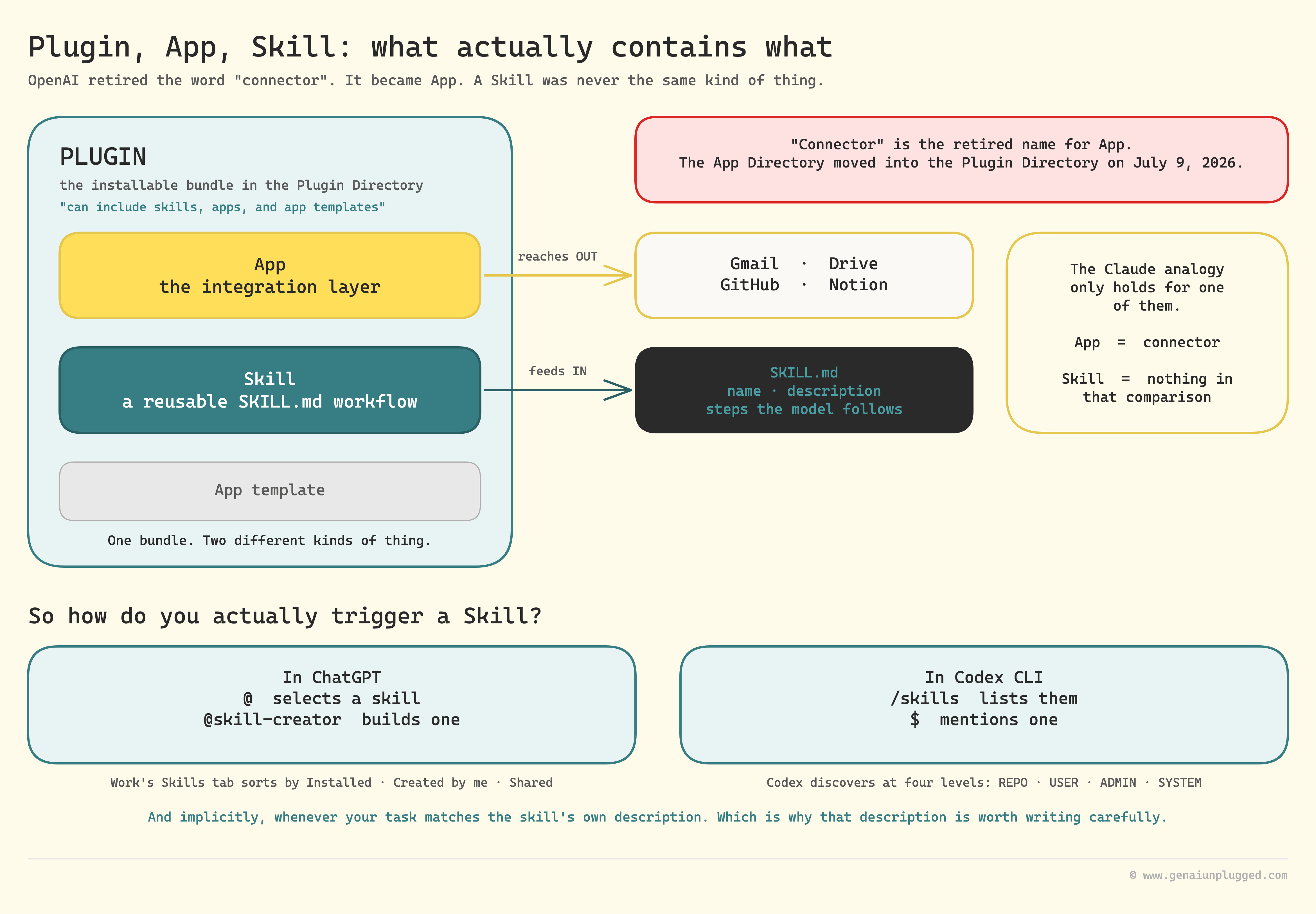
A plugin is the installable bundle, an app is the integration inside it that reaches Gmail or GitHub, and a skill is a separate reusable workflow file. This is the section I got most wrong live, and the confusion is worth clearing up because it decides how you trigger everything.
On the show, Wyndo mapped OpenAI's model onto Anthropic's like this: a plugin is a bundle, and the MCP-server-looking things inside it are the equivalent of Claude's connectors. I pushed back on air because the skills part did not sit right. Having checked OpenAI's own documentation since, the structure is:
Plugin is the umbrella. It is the installable, top-level wrapper in the Plugin Directory, and it "can include skills, apps, and app templates".
App is the integration layer, the thing that connects ChatGPT to Gmail, Google Drive, GitHub, or Notion. "Connector" is the retired name for exactly this. As of July 9, 2026 OpenAI migrated the App Directory into the Plugin Directory (OpenAI Help Center).
Skill is a separate thing entirely: a reusable workflow written as a
SKILL.mdfile. It is not an integration, and it does not belong in the connector analogy at all.
So the correction is narrow but real. Plugin as bundle holds. "Connector" should be "App", and it is a name OpenAI has already retired.
Skills are a third, independent concept, which is why folding them into the comparison felt wrong in the moment.
Practically, this decides how you invoke things, and here I have to correct myself twice over. In ChatGPT you type @ to select a skill, and the built-in creator is @skill-creator. Codex CLI works differently again: run /skills to list them, or type $ to mention one (ChatGPT Learn).
Skills also fire implicitly when your task matches the skill's own description, which is why that description is worth writing carefully.
One more correction. I said skills live at three levels. That describes Codex's local filesystem discovery, and it is four, not three: REPO, USER, ADMIN, and SYSTEM (ChatGPT Learn).
ChatGPT Work's own cloud Skills tab is not a filesystem hierarchy at all. It organises by Installed, Created by me, Shared with me, and Shared by workspace.
"Just make sure whenever you connect apps, you only connect the ones you actually use on a daily basis. If you connect everything, it will eat your token consumption." - Wyndo
That single line is the most practical advice in the whole conversation. Every connected app ChatGPT can see adds to what it has to reason about on every turn, whether you use that app in a given task or not.
Can You Import Your Claude Code Setup Into ChatGPT Work?
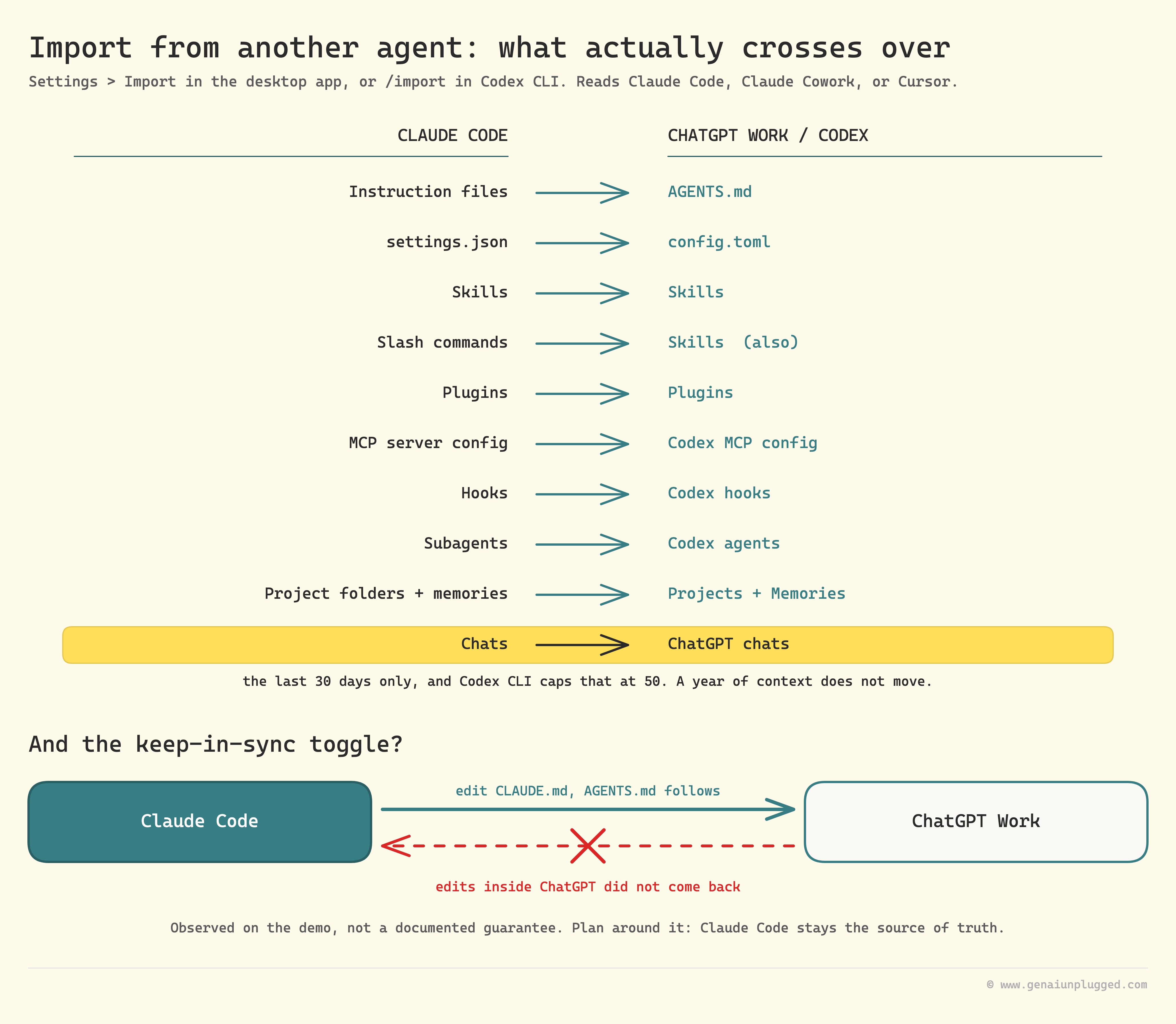
Yes, and it is broader than I expected. The feature is called Import from another agent, reached through Settings then Import in the desktop app or /import in Codex CLI, and it reads an existing setup out of Claude Code, Claude Cowork, or Cursor (ChatGPT Learn).
What carries across, per OpenAI's own mapping:
Instruction files become
AGENTS.mdsettings.jsonbecomesconfig.tomlSkills stay Skills, and slash commands also become Skills
Plugins stay Plugins
MCP server configuration becomes Codex MCP configuration
Hooks become Codex hooks
Subagents become Codex agents
Existing project folders become Projects using the same folders
Project memories from Claude Code become Memories
Chats from the last 30 days become ChatGPT chats
That last line is a correction to what we said live. We described it as importing your chat history, full stop. It is chats from the last 30 days, and Codex CLI specifically caps at up to 50 of them.
If you were counting on a year of context moving across, it does not.
I pushed Wyndo on the keep-in-sync toggle because it sounded too good to be true, and on the demo it was. The sync flowed one direction, Claude Code into ChatGPT. Edit CLAUDE.md and the change propagates into AGENTS.md.
Edit anything inside ChatGPT and it did not come back.
Treat that as what we observed on the day rather than a documented guarantee, but plan around it: if you run a real system across both tools, Claude Code stays your source of truth, or you own two copies to maintain by hand.
Learn with me: Claude Code Builder cohort
I run the Claude Code Builder cohort on Maven: four weeks, six live sessions, building a real AI system with me. If you would rather build it alongside me than read about it, this is the room.
Each cohort is a small, hands-on group, so seats are limited.
Build it with me, live. See the syllabus →
How the Built-In Browser Automates Real Work
ChatGPT Work's built-in browser lets an agent use your real, already authenticated accounts and finish a multi-step task without you clicking anything. That is a genuinely different capability from a chat session that can only read what you paste in.
This is the Atlas inheritance, and it is the clearest argument for why the browser became a feature.
Wyndo proved it rather than describing it. He had the agent open his Substack profile, read his latest Notes performance numbers, and log those figures into a Google Sheet.
What made that credible is how he built it. He did not hand-write the automation. He recorded himself doing the task once, and Record & Replay turned the recording into a reusable skill (ChatGPT Learn).
Two prerequisites before you go looking for it, because neither came up on the show. Record & Replay is macOS only, and it rides on Computer Use, so you need that plugin installed and its permissions granted first. The enablement path is further down under Computer Use.
If you are on Windows, this particular feature is not yours yet.
His own estimate of that skill's accuracy was roughly 70 to 80 percent, which is his number from running it, not a benchmark. At that rate it still needs a human reading the output.
"It is similar to Claude in Chrome, which is also infamous for the heavy token usage that comes with it." - Wyndo
An audience member asked directly whether the browser burns tokens faster than a normal chat. It does. Every page read and every click across tabs adds up.
The part I found most useful is that you can schedule these once they work. Tell it to run at 9am and the stats pull happens without you opening the app.
That is the real argument for a browser agent over a chat: not that it can browse, but that it can browse on a timer while you are doing something else.
What You Can Build With ChatGPT Sites
Sites lets you generate, host, and live-edit a working website inside ChatGPT Work with no separate deploy step. Wyndo built a lead magnet landing page with a single prompt and wired it to his real Substack signup form rather than a placeholder button.
The editing model is the part that surprised me. Instead of describing a change in text and hoping the model reads you correctly, you click an element, annotate it, and the model applies that one edit.
It is close in spirit to Claude Artifacts, except the output is a hosted, shareable URL rather than a preview pane living inside your chat.
Here is the correction that matters most in this article. On air we said Sites has no custom domain support and that you are stuck on OpenAI's domain unless you export the build. That is wrong.
Sites supports custom domains: open the Site's settings, select Add domain, enter your apex domain or subdomain, and add the DNS records it gives you. You have to already own the domain, and custom domains are not available in Enterprise workspaces at launch (OpenAI Help Center).
The audience also asked whether there is a cap on how many Sites you can host, and both of us said we did not know. Here is the real answer: there is no published numeric cap.
The public beta uses usage and storage based limits that vary by plan and are shown live in the app, and OpenAI says they "may change during the public beta".
Hit one and you may be blocked from creating a new Site or keeping a high-usage Site public, but existing Sites stay editable. Sites is available on Plus, Pro, and Business workspaces, not on Free or Go, and not in the EEA, Switzerland, or UK at launch.
Chart and data artifacts get the same live editing. Wyndo pulled up a lifetime value chart from an earlier analysis and switched its chart type and grouping axis in the panel without regenerating it from a new prompt.
Subagents: Running Parallel Threads on One Task
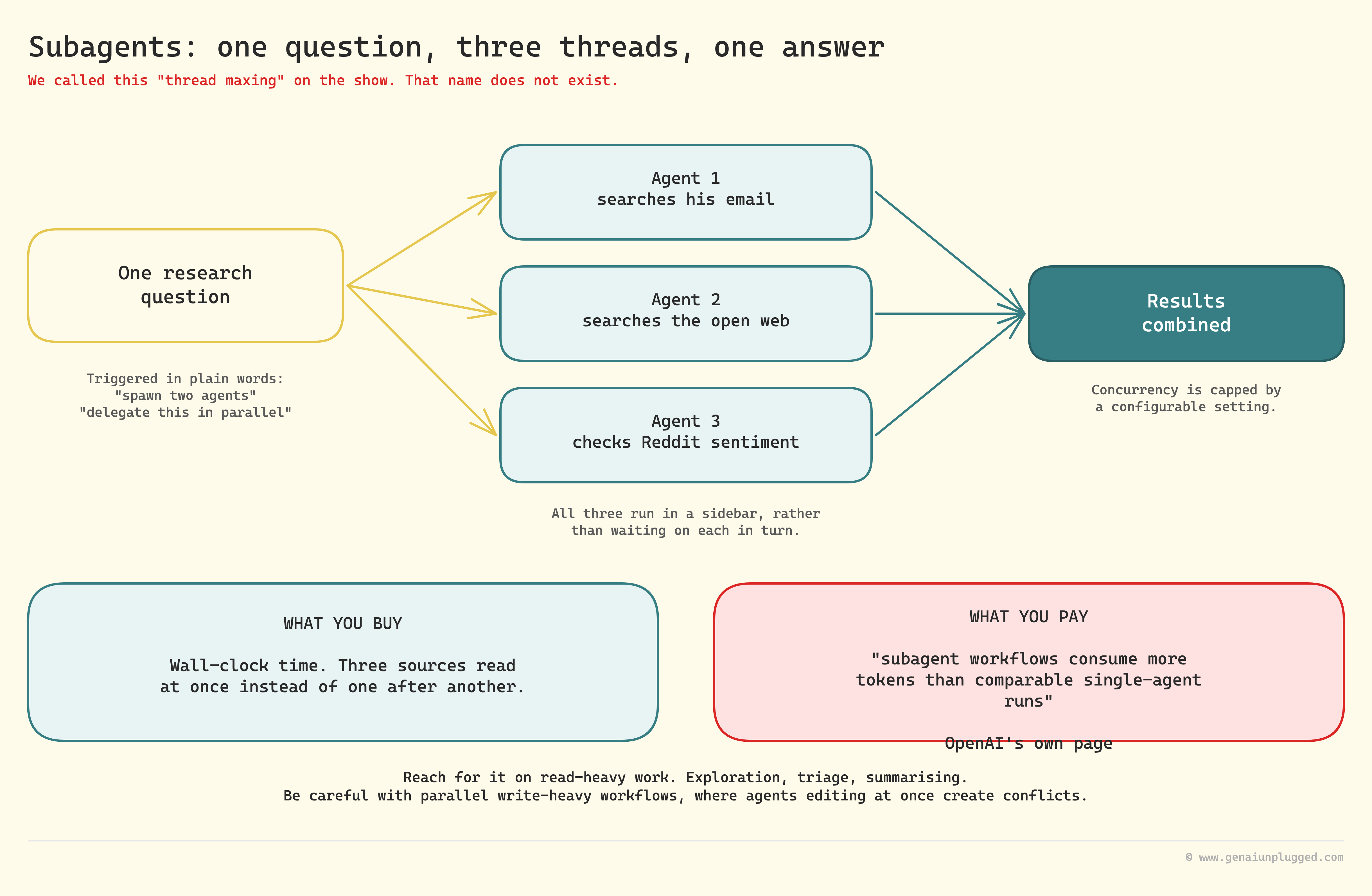
We called this "thread maxing" on the show. That term does not exist. OpenAI calls it Subagents, and a subagent workflow is one where the agent "runs parallel agents and combines their results", each working in its own agent thread (ChatGPT Learn).
You trigger it with plain instructions like "spawn two agents" or "delegate this in parallel", and concurrency is capped by a configurable setting.
Wyndo's example split one research question three ways: one thread searching his email, one the open web, one checking Reddit for community sentiment. He watched all three run from a sidebar rather than waiting on each in turn.
This is the feature I think gets underrated, because it does not demo as flashy as an agent logging into your accounts. For anyone doing real research before writing, it removes the sequential wait that makes multi-source research slow.
It also costs you for the privilege, and I should say so as plainly as I said it about the browser. OpenAI's own page states that "subagent workflows consume more tokens than comparable single-agent runs because each subagent does its own model and tool work". Parallel is not free.
It buys wall-clock time with tokens. Their guidance is to reach for it on read-heavy work such as exploration, triage, and summarising, and to be careful with parallel write-heavy workflows where agents editing at once create conflicts.
Two smaller behaviours round out how ChatGPT handles a growing conversation. You can pull a specific claim out of a response and open it as its own chat, so a deep dive does not clutter the main thread.
And you can reference a previous conversation inside a new one, where rather than dumping raw history into your window, the referenced chat gets compacted first. I am describing both as we saw them demonstrated, because neither maps to a product name in OpenAI's documentation that I could find.
On compaction, worth correcting a number I reached for live: I remembered a 200k context limit. That is stale.
The GPT-5.6 family carries a documented 1.05M token context window, and OpenAI's mechanism for overflow is called compaction. It produces compressed internal state, which OpenAI describes as "opaque and not intended to be human-interpretable" (OpenAI API docs). Treat it as machinery, not as notes you can audit.
Voice Mode and the Paper MCP Connection
ChatGPT Voice can drive real design output by talking through a task while the model calls an external tool over MCP. Wyndo demonstrated it by voice-prompting several landing page hero variations through Paper, an HTML-based design tool he compared to Figma.
The product is Paper, not "Paper Design" as we kept saying, and its MCP server is documented for Cursor, Claude Code, and Codex (Paper docs).
Voice "follows the same permissions as the tasks it directs in Chat, Work, and Codex" (ChatGPT Learn), which is what makes the design handoff work at all.
Why Paper suits this, in Wyndo's telling: its architecture is HTML rather than a proprietary canvas format. A model is naturally strong at reading and editing HTML, so the tool plays to what it is already good at instead of fighting a black box.
Computer Use, and Why I Am Not Comparing It to Claude Yet
Computer Use is the most literal feature of the ten. ChatGPT Work can operate your actual machine. The enablement path is specific: in the desktop app switch to Work or Codex, open Plugins then Computer Use, install the plugin, and turn on the server and skill toggles.
On macOS you then grant Screen Recording so it can see the app, and Accessibility so it can click, type, and navigate. On Windows it runs in the foreground and takes over active desktop input (ChatGPT Learn).
Wyndo's demo asked it to open Spotify and start a playlist, and it did. That is a deliberately small test, and he was the first to call his own use case thin.
On cost, the mechanism explains the reputation. Computer Use screenshots are sent at original detail rather than resized to a pixel budget, precisely so the model can read the screen accurately, and OpenAI's own guidance notes large screenshots use more input tokens. There is no separate price for it.
It draws from the same usage and credit pool as the rest of Work and Codex.
The comparison both of us reached for on air was Claude in Chrome, which has the same reputation for heavy usage. That is an impression from running both, not a measured comparison, and I am not going to dress it up as one.
If you want the honest version: neither of us has benchmarked these against each other, and the interesting question for a follow-up is which one finishes a given task in fewer tokens, not which one feels heavier.
One honest note before I move on. None of these ten features exist because someone at OpenAI copied a Claude Code feature list. They exist because both labs are converging on the same answer to the same problem, a builder tired of five separate tabs for five separate jobs.
If you are still stitching that workflow together by hand every day, the minutes lost per switch multiplied by every task you run is exactly the gap I built PluggedIn to close.
So Should You Switch From Claude Code to ChatGPT Work?
Feature parity is not the deciding factor. It comes down to two things: whether Claude's usage limits and Opus 5's token spend are frustrating you day to day, and whether ChatGPT's project analysis genuinely feels more accurate when pointed at your own codebase.
"I think it is whether Opus 5 is pissing you off or not. I think that is for sure like the first thing." - Wyndo
Wyndo's reasoning stacks two things: quota pressure on one side, and a subjective sense that ChatGPT reads his repo more accurately on the other. Neither of us is claiming that second point as settled. It is his lived impression running both daily, not a benchmark.
I will admit where I was wrong going in. I assumed the import would give me a true mirror, something I could edit in either app and trust to stay in sync. Finding out mid-demo that it flowed one direction changed how I think about using it.
Claude Code stays the single source of truth, and ChatGPT becomes a second surface rather than a second home.
Wyndo also raised Grok's coding model, which he described as available only through Cursor's Ultra plan at $200 a month.
That is the most expensive thing we got wrong. Grok 4.6 ships through GitHub Copilot in VS Code and Copilot CLI, through xAI's own API at $2 per million input tokens, through xAI's SuperGrok plans at $30 and $100 a month, and through Cursor.
Cursor's own pricing lists Grok usage under Pro at $20 a month as well as Pro+ and Ultra (Cursor, xAI pricing). Cursor Ultra at $200 is a real plan. Grok is simply not locked behind it, so the price was never the reason to pass.
Two more figures worth stating precisely, because we were loose with them on air. The $20 a month Wyndo and I were both describing is Claude Pro, not Max. Max starts at $100 a month (Claude pricing).
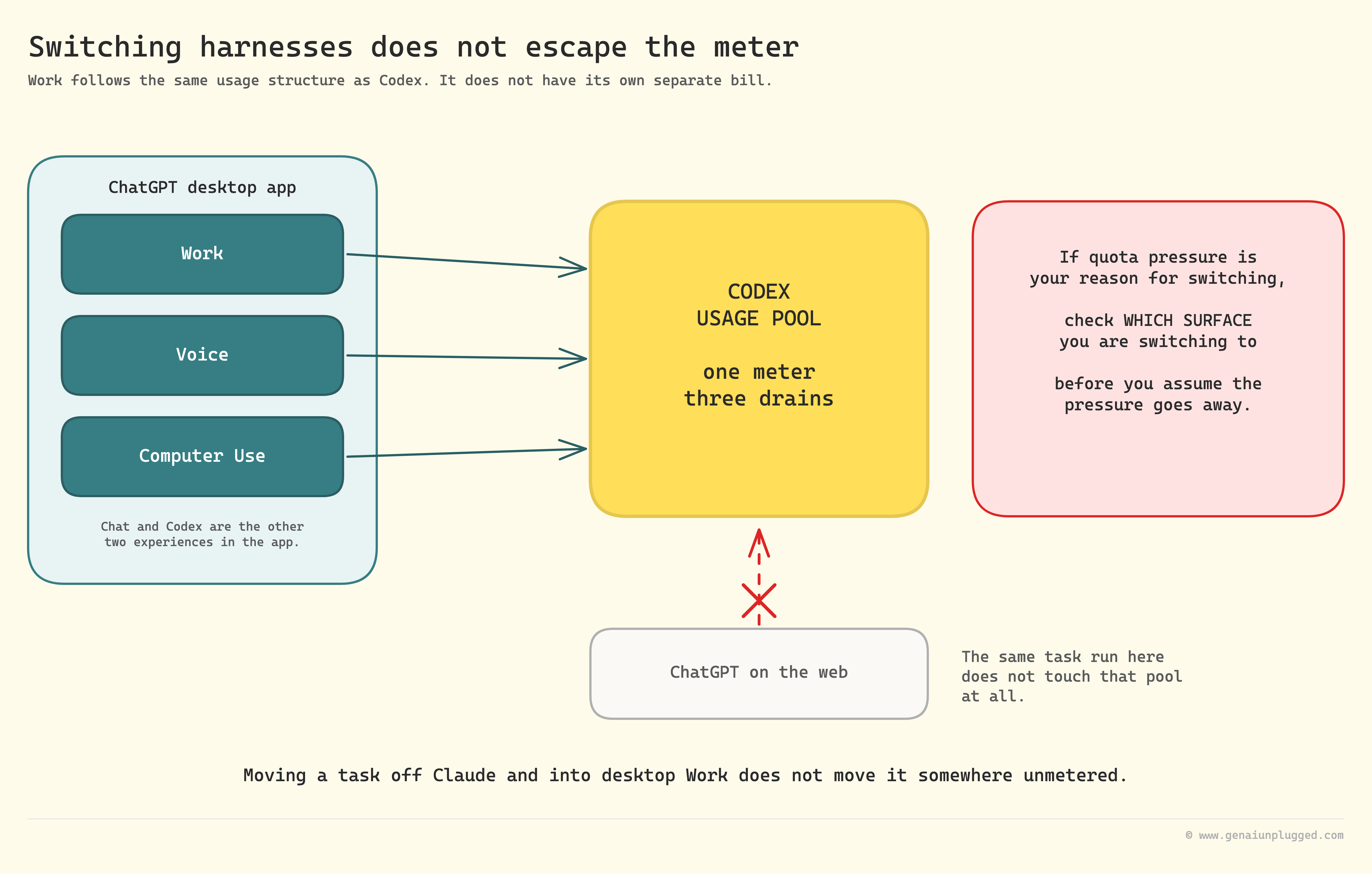
And Work follows the same usage structure as Codex rather than having its own separate bill.
That last point deserves more weight than I gave it live, because it undercuts the whole quota argument. Moving a task off Claude and into desktop Work does not move it somewhere unmetered. It moves it onto the Codex usage pool, which Work, Voice, and Computer Use all draw from.
The same task run in ChatGPT on the web does not touch that pool at all. So if quota pressure is your reason for switching, check which surface you are switching to before you assume the pressure goes away.
My own split has shifted for a different reason than Wyndo's. Claude's usage limits have mostly normalised for me since I changed how I batch sessions, which means Codex went from backup harness to something I barely open.
His usage is expanding in the opposite direction, and mine may follow the same curve as ChatGPT Work keeps closing the gap.
Where I Would Put Your Next Hour
Knowing what ten features do and having a system that uses any of them are separated by a gap nobody demos on a livestream. That gap is where the hours go: the setup, the thing that breaks on your machine, the prompt you rewrite six times before it holds.
🎁 PluggedIn subscribers get the build packs behind posts like this one: the setups I run in production, the prompts I paste rather than retype, and the teardowns of what broke before it worked.

Frequently Asked Questions
What is the difference between a plugin, an app, and a skill in ChatGPT?
A plugin is the top-level bundle in the Plugin Directory and can contain apps, skills, and app templates. An app is the integration that connects ChatGPT to an external tool, which is what OpenAI used to call a connector.
A skill is a separate reusable workflow written as a SKILL.md file.
Can you import your Claude Code project into ChatGPT Work?
Yes. The feature is Import from another agent, in Settings then Import, or /import in Codex CLI. It reads from Claude Code, Claude Cowork, or Cursor, and carries instruction files, settings, skills, slash commands, plugins, MCP configuration, hooks, subagents, project folders, memories, and chats from the last 30 days.
Does the Claude Code to ChatGPT sync work both ways?
On the demo we ran, no. It flowed one direction, from Claude Code into ChatGPT, and edits made inside ChatGPT did not appear back in the Claude Code project.
Can ChatGPT Sites use a custom domain?
Yes. Open the Site's settings, select Add domain, and add the DNS records Sites provides through your domain provider. You must already own the domain.
Custom domains are not available in Enterprise workspaces at launch.
Is there a limit on how many ChatGPT Sites you can host?
There is no published numeric cap. The public beta applies usage and storage based limits that vary by plan and are shown in the app, and they may change during the beta.
Is ChatGPT Work's browser access token heavy?
Yes. Reading full pages and clicking across tabs costs noticeably more than a normal chat. Computer Use adds to this because screenshots are sent at original detail rather than downsized.
Should I switch from Claude Code to ChatGPT Work?
It depends on whether Claude's usage limits or Opus 5's spend frustrate you, and whether ChatGPT's analysis feels more accurate on your codebase. Both of us currently run both rather than switching.
Key Takeaways
Get the terminology right first. Plugin is the bundle. App is the integration, formerly called a connector. Skill is a separate authoring format that does not belong in that comparison.
The import is real and broad, but time-boxed. Chats only come across from the last 30 days, and on our demo the sync ran one direction.
Sites does support custom domains. We said otherwise on air and we were wrong. The real constraint is usage-based beta limits, not a domain lock.
"Thread maxing" is not a thing. The feature is Subagents. It is the quiet winner for multi-source research, and OpenAI says it burns more tokens than a single-agent run.
"Connector" is retired, and the tool is Paper. Those are the other two names we called wrong, alongside Subagents.
Browser and computer agents cost real tokens. Schedule the repeatable ones instead of running them by hand.
Grok is not locked to a $200 plan. It ships through GitHub Copilot, xAI's own API and apps, and every Cursor tier including the $20 one.
The switch decision is about frustration, not features. Running both is the realistic default right now.
Resources Mentioned
ChatGPT Work (OpenAI): the agent experience for longer multi-step work, alongside Chat and Codex in one desktop app
Atlas sunset notice (OpenAI): the August 9, 2026 shutdown and the move of browser agent work into ChatGPT
Import from another agent (OpenAI): the full Claude Code to ChatGPT mapping table
Subagents (OpenAI): the real name for parallel agent threads
Record & Replay (OpenAI): turning a screen recording into a reusable skill
ChatGPT Sites (OpenAI): hosting, custom domains, and public beta limits
Computer Use (OpenAI): enablement path and macOS permissions
Paper: HTML-based design tool with a documented MCP server
Your 15-Minute Challenge
Open the ChatGPT desktop app and check Settings for Import. If it is there, point it at one Claude Code project and note exactly what lands on the other side against the mapping list above.
Then open your connected apps and disconnect one you have not used this month, following Wyndo's rule that every idle connection costs you on every turn. Success looks like a leaner setup and a straight answer to whether Import is even live on your plan.
Four corrections in one article is more than I expected to be filing, and every one of them came from checking a live conversation against the documentation afterwards rather than from anyone being careless on the day. Which makes me want to ask you something.
When a tool ships this fast, where do you actually go to find out what a feature is called? Vendor docs that are already a week behind the app, a changelog nobody reads, or somebody on a livestream who used it yesterday and might be calling it the wrong name?
Tell me in the comments how you keep up, because I do not think any of us have solved this. And if the Sites custom domain correction saved you an export you were about to do, restack this so the next person reads it before they build.


