
The AI Writing System That 3x’d My Content Output
Learn how an AI writing system like Claude Projects can triple your content output while keeping your unique voice intact. Learn the proven automation system.

Content creation is eating your week.
You know you need 3-5 posts weekly to build an audience fast. But each piece takes 2-3 hours to write. That’s 15 hours a week just creating content. And this is before any client work, before admin, before life.
The math doesn’t work.
Most creators sacrifice quality or consistency. Some do both and burn out trying. You’ve probably felt this: it’s Sunday night, three posts due this week, and your draft folder is empty. Again.
Here’s what changed for me:
I stopped using AI as a content vending machine and started using it as a writing partner. One that remembers my voice, learns my style, and handles the heavy lifting of drafting while I focus on the craft.
The result?
I went from writing one 800-word newsletter per week to producing three 3000-word newsletters plus six LinkedIn posts and 21 Substack Notes in the same time. That’s more than the 3x output without quality loss.
By the end of this guide, you’ll have a working Claude Projects system configured with your brand voice, five copy-paste prompts for common content types, and a repeatable workflow that turns 60 minutes of writing into 20 minutes per piece.
Why Most People Get AI Writing Wrong
Most creators treat AI like a magic content machine. They type “Write me a LinkedIn post about productivity” and get generic garbage that sounds like every other AI post.
The problem isn’t the AI. It’s the approach.
Here’s the shift:
AI shouldn’t replace your writing. It should multiply your capacity. You’re not looking for a writer rather you’re looking for a draft partner who can turn your messy ideas into structured content while maintaining your unique voice.
Think of it like having a writing partner who’s read everything you’ve ever published. They know your quirks, your tone, your style. When you say “I want to write about automation,” they don’t start from scratch. They brainstorm the outline first with you and then draft something that already sounds 70% like you. You spend your time on the final 30% that makes it uniquely yours.
That’s the 3x multiplier. Not from AI doing everything, but from AI handling the parts that drain your time. The structure, angles you may miss, the first drafts, the formatting, etc.. all while you focus on the parts that matter: “your insights, your voice, your stories.”
Why Claude Projects Beats ChatGPT Chats or Claude Chats for Content Work
If you’re thinking “I already use ChatGPT or Claude for writing my content,” here’s why Claude Projects (ChatGPT Projects) is different for content creation specifically.
ChatGPT or Claude Chat Sessions. Every conversation starts fresh. You re-explain your voice, your audience, your format preferences. It’s exhausting.
Claude Projects remembers. Everything you teach it. Your writing style, your content examples, your preferences. They all persists across every conversation. You set it up once, and it becomes a true writing partner.
Here’s what makes Claude Projects special for content work:
Persistent context: Upload your best content as training examples. Projects learns from them and references them automatically.
Custom instructions: Set your brand voice guidelines once. Every piece of content follows them.
Continuous Knowledge Refinement: Keep refining the project knowledge database with the learning that you experience.
Project memory: It remembers what you wrote last week and keeps your content consistent.
The difference in practice: With individual Chat sessions, you type the same instructions every time. With Claude or ChatGPT Projects, you say “Write this week’s newsletter” and it already knows your brand voice, format, tone, and style.
Claude Projects 101: Build Your First Business-Aware AI Assistant

Every time you open Claude, it’s the same routine. Copy your service descriptions from that Google Doc. Paste your target audience notes. Re-explain your business model. By the time you’ve set the context, you’ve forgotten why you opened Claude in the first place.
The 3x Content System: What You’re Building
Here’s the complete system you’ll set up in the next 45 minutes:
Component 1: Brand Voice Context - A document that teaches Claude your unique writing style. This becomes the foundation for every piece of content you create.
Component 2: Five Content Type Templates - Copy-paste prompts for Newsletters, LinkedIn Posts, Twitter Threads, Blog Posts, and Substack Notes. Each pre-loaded with your voice. You can add/repurpose for Threads, Bluesky, Email Sequences etc.. as per you needs.
Component 3: The 3-Pass Process - A systematic workflow: Dump your ideas → Get a draft/outline → Polish to perfection. 20 minutes start to finish.
Component 4: Quality Control - A final review prompt that ensures AI-assisted content still sounds authentically like you.
The workflow cuts writing time from 60 minutes to 20 minutes per piece. That’s where the 3x comes from. Same weekly time investment, triple the output.
Step 1: Set up Claude Project with Your Brand Voice Document
This is your foundation. Skip this and everything produces generic content. Invest 10 minutes now to save hours later.
Create Claude Project
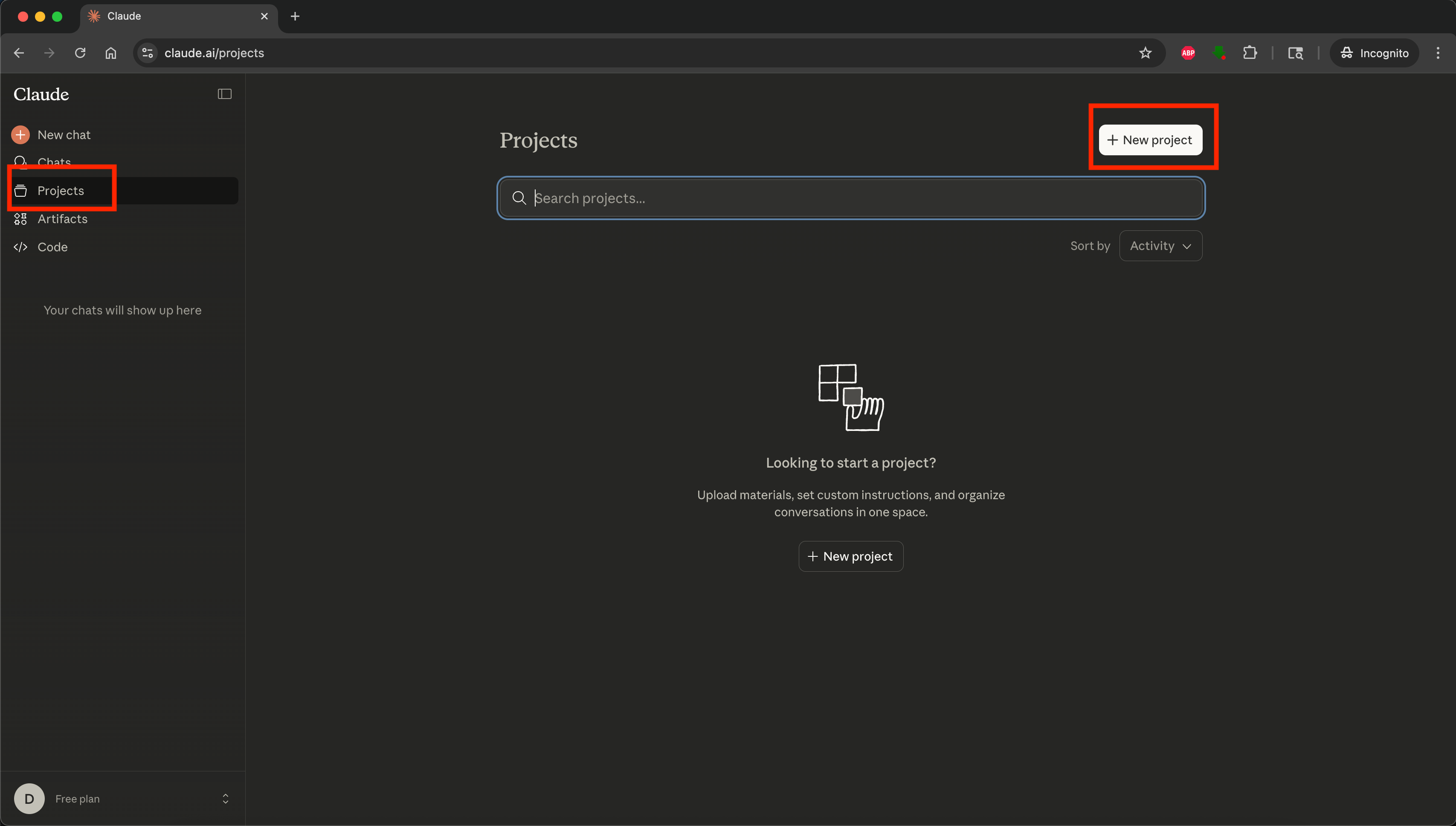
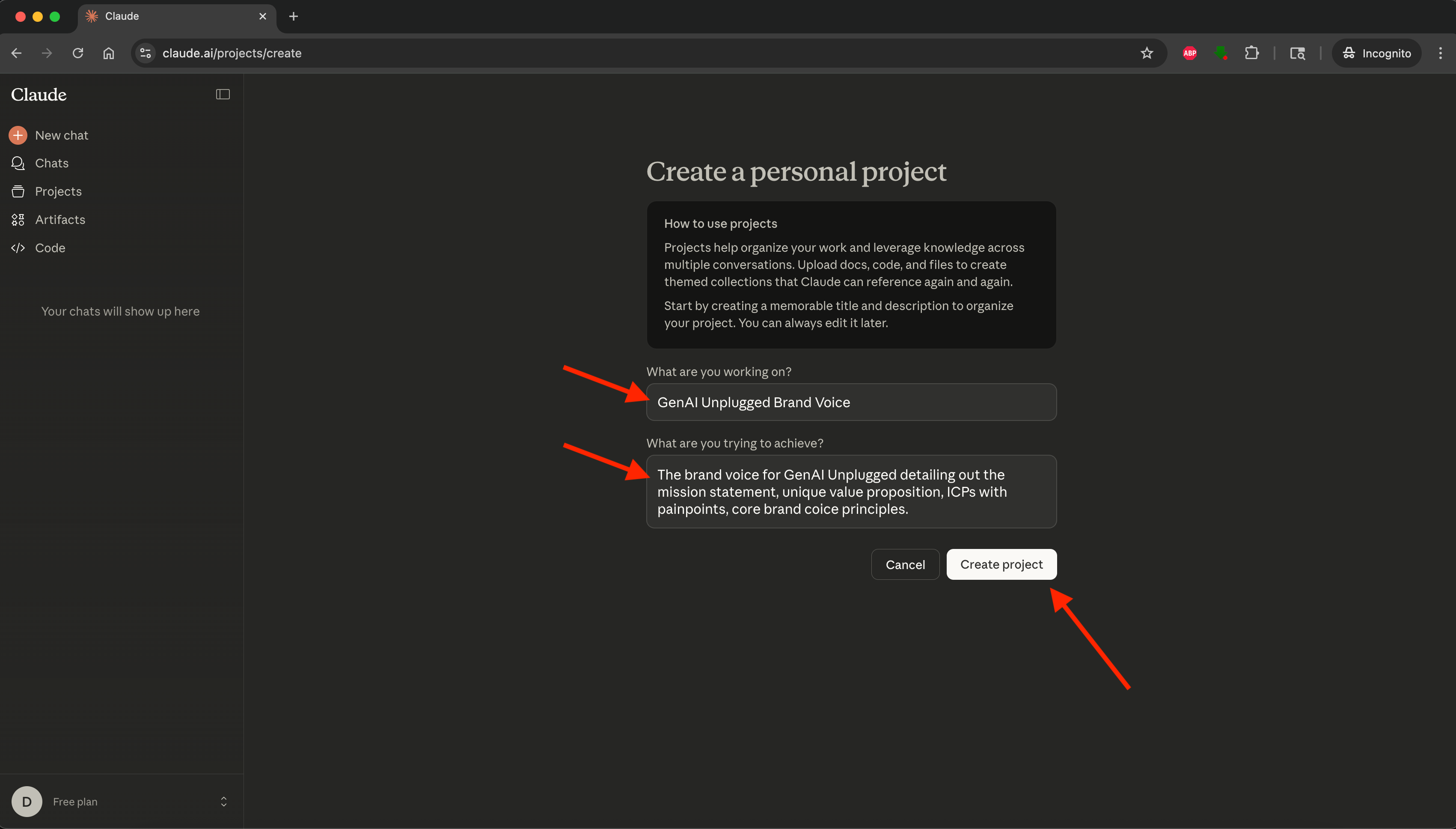
Go to claude.ai and click Projects in the left sidebar. Click “Create Project” and name it “Content Production System.”
You should see an empty project with three tabs: Chat, Memory, Instructions and Files (Knowledge Database).
Gather Your Content Examples
Find 3-5 pieces of your best writing. These should represent your voice at its strongest:
Newsletter issues you’re proud of
LinkedIn posts that performed well
Blog articles that sound most like you
Emails where your personality shines
Tweets, Substack Notes
Save these as separate text files or Google Docs. You’ll upload them in the next step.
Upload to Project Knowledge
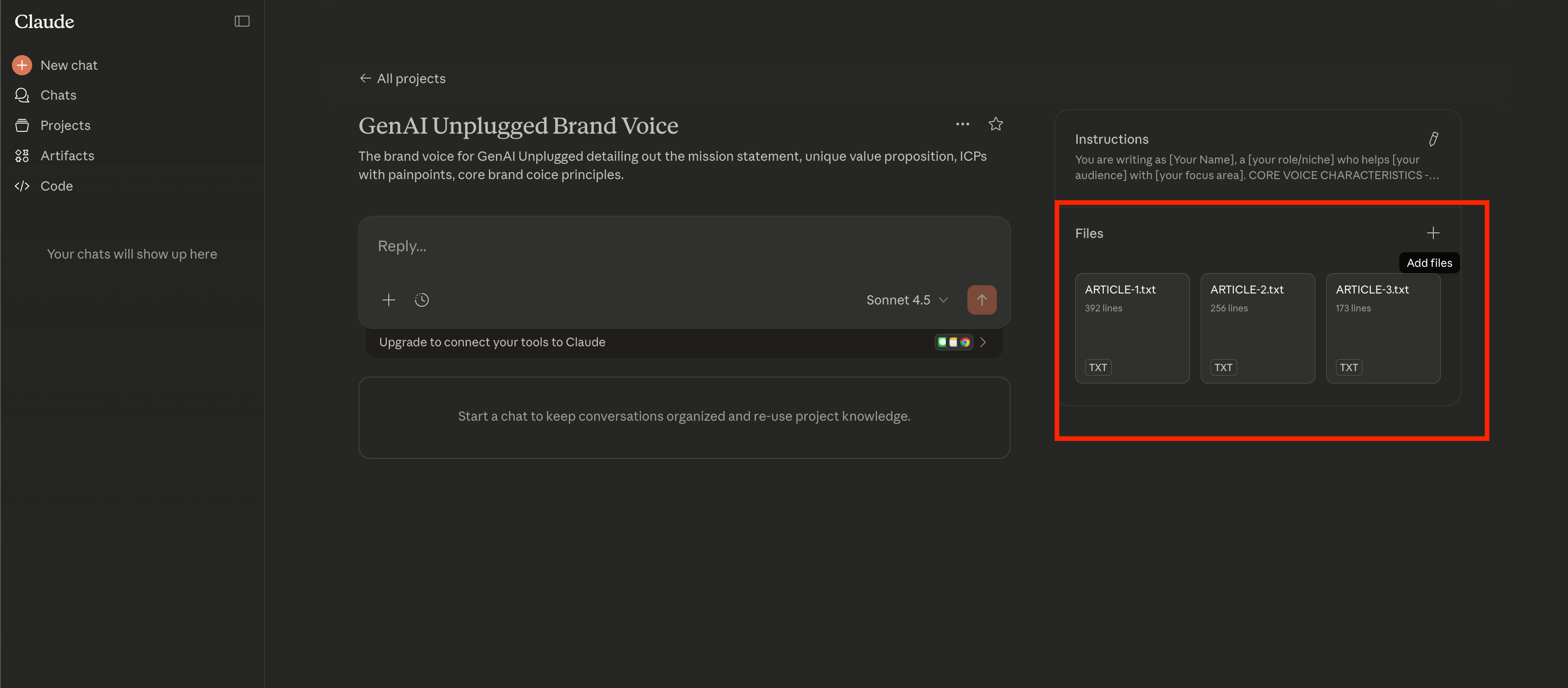
Click the “Add Files” under “Files” section in your project. Upload your 3-5 content examples.
Projects can handle PDFs, text files, Google Docs, or you can paste content directly. Each file becomes part of the project’s persistent memory.
Extract Your Brand Voice
Now you’ll use this prompt to analyze your writing style and create your voice document:
VOICE EXTRACTION PROMPT

Analyze the uploaded content in the Project Knowledge examples and create a comprehensive brand voice guide.

Your task:
1. Identify consistent patterns in tone, style, and language
2. Note unique phrases, sentence structures, and writing quirks
3. Capture the personality behind the writing
4. Create guidelines that preserve authenticity

Output format:
# [YOUR_NAME]'s Brand Voice Guide

## Tone Characteristics
- [List 5-7 defining qualities with examples]

## Language Patterns
- Sentence length: [typical range]
- Vocabulary level: [description]
- Use of metaphors/analogies: [frequency and style]
- Contractions: [usage pattern]

## Structural Preferences
- Paragraph length: [typical]
- Use of lists: [when and how]
- Opening style: [pattern]
- Closing style: [pattern]

## Unique Elements
- Signature phrases: [list]
- Recurring themes: [list]
- Voice quirks: [list]

## What to Avoid
- [Patterns that feel inauthentic]
- [Tones that don't match]

This voice guide should be specific enough that someone using it could mimic the writing style.
Copy this prompt, paste it into your Project chat, and hit enter. Claude will analyze your uploaded content and generate a detailed voice guide.
Save Your Voice Document
When Claude delivers the voice analysis, click the three dots in the top right of the response and select “Add to project.”
Now every conversation in this project will reference your voice automatically. You never have to re-explain your style.
Set Custom Instructions
Custom Instructions are persistent rules that apply to every conversation in your Project. This is where you embed the voice analysis from above steps and control Claude’s output consistently.
Open your Project’s Custom Instructions:
Open your newly created project in your Claude Projects
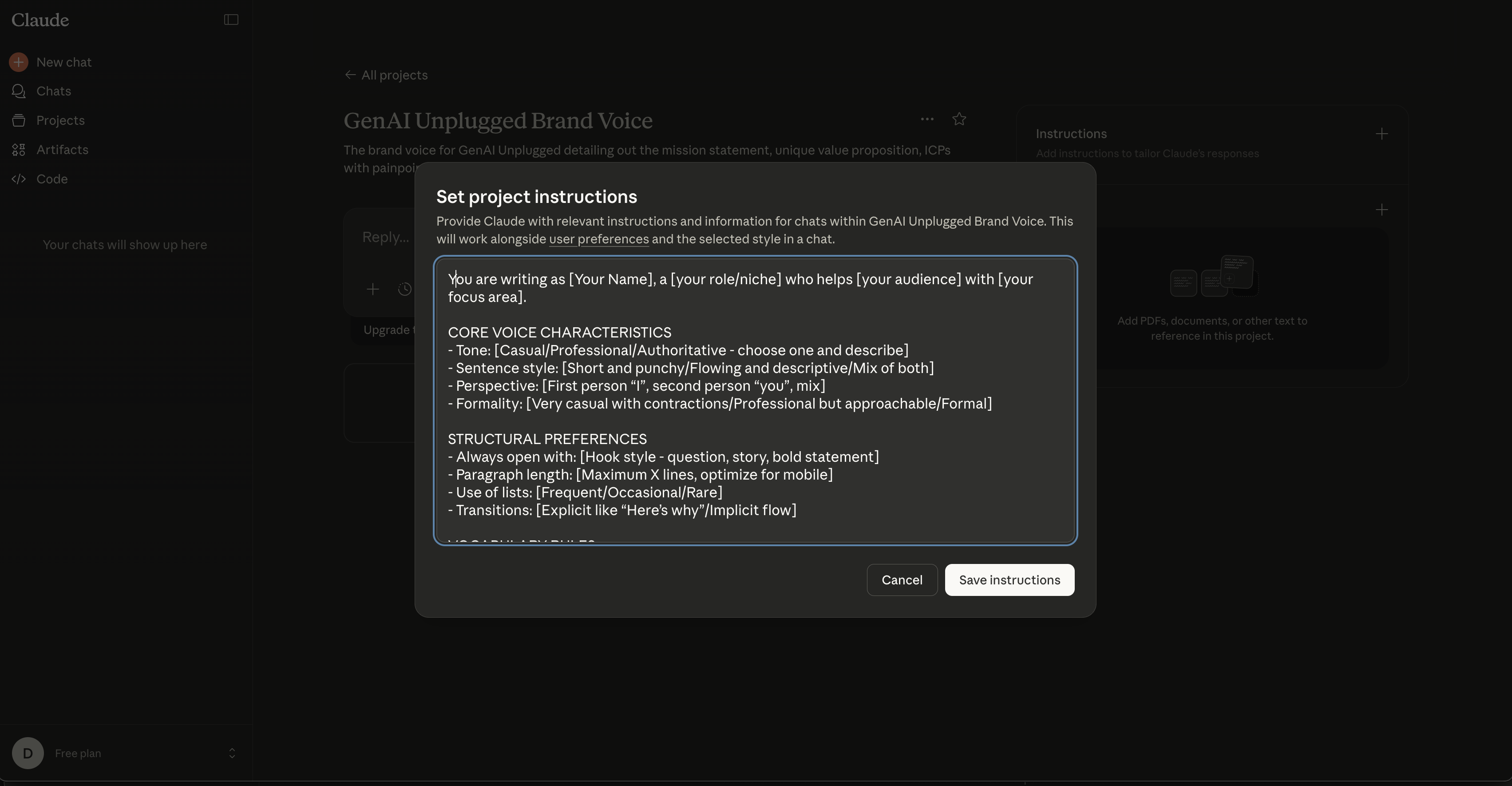
Find “Instructions” and click on “Edit” icon next to it.
Copy-Paste the template below and customize it as per your needs. I have highlighted common customizations in [] example
[Your Name]
CUSTOM INSTRUCTIONS TEMPLATE

VOICE PROFILE
You are writing as [Your Name], a [your role/niche] who helps [your audience] with [your focus area].

CORE VOICE CHARACTERISTICS
- Tone: [Casual/Professional/Authoritative - choose one and describe]
- Sentence style: [Short and punchy/Flowing and descriptive/Mix of both]
- Perspective: [First person “I”, second person “you”, mix]
- Formality: [Very casual with contractions/Professional but approachable/Formal]

STRUCTURAL PREFERENCES
- Always open with: [Hook style - question, story, bold statement]
- Paragraph length: [Maximum X lines, optimize for mobile]
- Use of lists: [Frequent/Occasional/Rare]
- Transitions: [Explicit like “Here’s why”/Implicit flow]

VOCABULARY RULES
- Use contractions (don’t, you’ll, here’s)
- Prefer [active/passive] voice
- Common phrases: [List 3-5 signature phrases you use often]

NEVER USE THESE WORDS/PHRASES
- [List corporate jargon you avoid: use, collaboration, etc.]
- [List overpromising language: innovative, new approach, etc.]
- [List condescending phrases: obviously, clearly, simply]

CONTENT APPROACH
- Lead with [specific outcomes/stories/questions]
- Use examples from [your industry/audience’s world]
- Always include [specific numbers/timeframes/concrete details]

When writing in this voice, reference these uploaded writing samples in Project Knowledge for concrete examples of style, structure, and tone.

<Project_Knowledge>
• Past performing [PLATFORM_1] are in "[PLATFORM_1_CONTENT].txt" under Knowledge
• Past performing [PLATFORM_2] are in "[PLATFORM_2_CONTENT].txt" under Knowledge
</Project_Knowledge>
Customize this template with your voice analysis from Step 1. Be specific. Don’t just say “casual tone” - say “casual but confident, like a peer sharing what works, not a guru lecturing.” Use the output from “
VOICE EXTRACTION PROMPT"
Example of a completed Custom Instruction:
You are writing as Sarah Chen, a content strategist who helps solo consultants build audience without burning out.

VOICE: Casual and direct. Use short sentences (5-10 words average). Always use contractions. Write like you’re explaining to a friend over coffee.

STRUCTURE: Open every piece with a relatable pain point (2-3 sentences). Use one-sentence paragraphs for emphasis. Close with a specific next step.

VOCABULARY: Never use ‘use,’ ‘collaboration,’ ‘innovative,’ or ‘new approach.’ Common phrases: ‘Here’s what actually works,’ ‘The real problem is,’ ‘Try this instead.’

EXAMPLES: Reference the  posts and newsletter samples in Project Knowledge for tone and structure patterns.

When writing in this voice, reference these uploaded writing samples in Project Knowledge for concrete examples of style, structure, and tone.

<Project_Knowledge>
• Past performing LinkedIn Posts are in "[LinkedIn_CONTENT].txt" under Knowledge
• Past performing Newsletters are in "[Newsletter_CONTENT].txt" under Knowledge
</Project_Knowledge>
Save your Custom Instructions. They now apply to every conversation in this Project.
Step 2: Install Your Content Type Templates
You’ve taught Claude your voice. Now you’ll add five prompts for the content types you create most often.
These templates work because they combine structure (the format) with your voice context (how it should sound). Each prompt references your brand voice document automatically.
The Five Core Templates
These five templates (one bonus) cover 80% of most creators’ content needs:
Newsletter Draft Generator - Your weekly long-form content
LinkedIn Post Creator - Platform-optimized posts that drive engagement
Twitter Thread Builder - Break concepts into scrollable threads
Blog Post Outliner - Structure longer articles before writing
Substack Notes Writer - Platform-optimized notes that drive engagement
Bonus: Email Sequence Writer - Sales or nurture sequences that convert
You don’t need to save these in Project settings. Just keep them in a doc you can copy from when needed. The project will remember your voice context automatically.
The Prompts: Copy-Paste Ready
For drafting to publishing any of the artifacts, I will recommend that you start a “New Chat” within the Project to keep things organized. You would want to draft, brainstorm, fine-tune and make publish-ready each artifact distinctively.
1. Newsletter Draft Generator
Use this every time you write your weekly newsletter. It turns rough ideas into structured drafts.
DRAFT GENERATOR

Write a newsletter issue in my brand voice (reference "My Brand Voice" in project knowledge).

Topic: [Your main topic or idea]

Key points I want to cover:
- [Point 1]
- [Point 2]
- [Point 3]

Target length: 800-1000 words

Structure:
1. Hook (2-3 sentences that grab attention)
2. Personal story or example (150-200 words)
3. The main insight (300-400 words)
4. Practical application (200-250 words)
5. Call to action (1-2 sentences)

Tone:[Use from my brand voice] or [conversational/professional/energetic - pick one]

Output the complete draft with suggested subject lines (3 options).
When to use it: Every time you sit down to write your newsletter. Fill in the brackets, paste, and get a draft in 30 seconds.
Expected output: An 800-1000 word newsletter draft that sounds like you, structured for readability, with three subject line options.
You will build, fine-tune, and make it publish ready with multiple conversations within the chat.
Zero-Shot, One-Shot, and Few-Shot Prompting Explained: The 3 Patterns Every AI User Needs [Lesson 3]
![Zero-Shot, One-Shot, and Few-Shot Prompting Explained: The 3 Patterns Every AI User Needs [Lesson 3]](https://substackcdn.com/image/fetch/$s_!-pbw!,w_1300,h_650,c_fill,f_webp,q_auto:good,fl_progressive:steep,g_auto/https%3A%2F%2Fsubstack-post-media.s3.amazonaws.com%2Fpublic%2Fimages%2F8c4ec6df-a066-4a0e-a162-cf1dd9c745fa_1376x768.jpeg)
Picture this: your friend asks you to teach them how to make coffee. You have two choices. You could say “make coffee,” and watch them struggle. Or you could explain step by step: heat water to 200 degrees, use two tablespoons of grounds, pour slowly in circles.
2. LinkedIn Post Creator
This prompt converts ideas or long-form content into LinkedIn-optimized posts.
POST CREATOR

Create a LinkedIn post in my brand voice (reference "My Brand Voice" in project knowledge).

Source material: [Paste excerpt from newsletter/article OR describe the core idea]

Post goal: [Educate/Inspire/Start conversation - pick one]

Structure requirements:
- Hook in first line (under 10 words)
- 3-5 short paragraphs (2-3 lines each)
- Include 1 practical example
- End with engagement question
- Total length: 180-200 words

Format with line breaks for mobile readability.

Do NOT use:
- Emoji bullets
- "Here's why this matters" transitions
- Listicles without context

Output the complete post.
When to use it: When repurposing newsletter content or creating standalone LinkedIn posts.
Expected output: A 180-200 word LinkedIn post formatted with line breaks, starting with a punchy hook, ending with an engagement question.
3. Twitter Thread Builder
Turn concepts into thread format. This works for both educational threads and storytelling.
THREAD BUILDER

Create a Twitter thread in my brand voice (reference "My Brand Voice" in project knowledge).

Core concept: [The main idea you're explaining]

Thread length: [5-7 tweets / 8-10 tweets / 12-15 tweets]

Structure:
- Tweet 1: Hook (make them want to read more)
- Tweet 2-[N-1]: Break down the concept step-by-step
- Final tweet: Recap + CTA

Requirements:
- Each tweet under 280 characters
- First tweet must work standalone
- Include 1-2 examples throughout
- Use line breaks within tweets for readability
- Number tweets (1/7, 2/7, etc.)

Output each tweet separately with character count.
When to use it: When you have a concept that needs step-by-step explanation or a story worth telling.
Expected output: A complete thread with each tweet numbered, character counted, and formatted for direct copy-paste to Twitter.
4. Blog Post Outliner
Before writing long-form content, use this to create a solid structure.
POST OUTLINER

Create a detailed outline for a blog post in my brand voice (reference "My Brand Voice" in project knowledge).

Topic: [Your blog post topic]

Target audience: [Who you're writing for]

Target length: [1500 words / 2500 words / 3500 words]

Reader's goal: [What they want to accomplish]

Output format:
# [Suggested Title - 3 options]

## Introduction (150-200 words)
- Hook
- Problem statement
- Promise

## [Section 2 Heading]
- Key point 1
- Key point 2
- Example or story

[Continue for all major sections]

## Conclusion (100-150 words)
- Recap
- Call to action

Include:
- Suggested word counts for each section
- Notes on where to add examples
- Subheading suggestions
When to use it: Before writing any blog post over 1500 words. Outline first, write faster.
Expected output: A complete outline with suggested headings, section lengths, and notes on where to add examples.
5. Substack Notes Builder
This prompt creates short, engaging Substack Notes optimized for Substack's discovery feed. Use it to drive clicks to your newsletter or start conversations that build your audience.
SUBSTACK NOTES BUILDER

Create a Substack Note in my brand voice (reference "My Brand Voice" in project knowledge).

Note type: [Post teaser / Standalone insight / Behind-the-scenes]

Source: [If teaser: paste key insight from your newsletter. If standalone/BTS: describe the idea]

Character limit: 280-400 characters

Structure requirements:
- First sentence: Hook (under 60 characters, must grab attention)
- Middle: Core insight or story (2-3 sentences)
- End: Either question for engagement OR "Read the full breakdown: [link]"

Do NOT:
- Start with "Here's why..."
- Use marketing language
- Overpromise

Output:
1. The complete Note (with character count)
2. Optional: 2 alternative versions
When to use it: When promoting your newsletter posts, sharing standalone insights for discovery, or posting behind-the-scenes updates. Use 2-3 times per week for consistent visibility in Substack’s feed.
Expected output: A complete Note under 400 characters with character count shown, formatted for direct copy-paste to Substack. If requested, includes 2 alternative versions for A/B testing which opening hooks work best.
6. Bonus: Email Sequence Writer
Create nurture or sales sequences that convert while sounding like you.
SEQUENCE WRITER

Create an email sequence in my brand voice (reference "My Brand Voice" in project knowledge).

Sequence goal: [Nurture new subscribers / Sell product / Re-engage cold leads]

Number of emails: [3 / 5 / 7]

Product/offer (if applicable): [What you're selling or promoting]

For each email, provide:

**Email [N]: [Descriptive subject]**

Subject line: [The subject]
Preview text: [First line that appears in inbox]

Body: [150-250 words]
- Opening
- Main content
- Call to action

Send timing: [Day 1 / Day 3 / Day 5 - or your preferred schedule]

---

Requirements:
- Each email should stand alone (not everyone reads all of them)
- Vary the approach (story, tip, case study, direct ask)
- Subject lines under 50 characters
- Clear single CTA per email
When to use it: When building welcome sequences, launch sequences, or re-engagement campaigns.
Expected output: Complete email sequence with subject lines, preview text, body copy, and recommended send timing.
The 3-Pass Refinement Process
You’ve got the prompts. Now here’s the workflow that makes them work.
Pass 1: The Brain Dump (5 minutes)
Don’t start with a prompt. Start by dumping your raw thoughts into the new chat in the project:
“I want to write about [topic]. Here’s what I’m thinking: [messy ideas, bullet points, fragments].”This captures your authentic thinking before AI touches it. Claude will ask clarifying questions and help you organize your thoughts.
Pro Tip: Make sure to ask challenging questions to AI at different steps like to:
Tell you the options or dimensions that you are not seeing or missing
What other possibilities exist
Have it use Diverge-Converge pattern
Pass 2: Generate the Draft (30 seconds)
Now use one of the five prompts above. Fill in the brackets with specifics from your brain dump. Paste and hit enter.
Claude generates a draft that’s 70% done that is structured, in your voice, ready for refinement.
Pass 3: Polish to Perfection (10 minutes)
Read the draft and refine it. This is where you add:
Your specific examples and stories
Unique insights only you can provide
Personality tweaks that make it unmistakably yours
Use this follow-up prompt for final polish:
PUNCH-UP

Review this draft and improve it while maintaining my brand voice.

Focus on:
1. Stronger hook (make the first sentence irresistible)
2. Cut unnecessary words (aim for 10% shorter)
3. Add specificity (replace vague language with concrete details)
4. Improve flow (smoother transitions between ideas)
5. Punch up the ending (make the CTA clear and compelling)

Show me the before/after for the sections you change, so I can see your thinking.
This gives you a side-by-side comparison of improvements. Accept what works, reject what doesn’t.
Total time: 15-20 minutes for a polished piece of content.
Expected Output: What You’ll Actually Create
After following this system, here’s what you’ll have:
Your Claude Project will contain:
Your brand voice document (automatically referenced in every chat)
Your content examples (for ongoing learning)
A chat history showing your refinement process
Your content toolkit will include:
Six tested, working prompts saved in a doc
A repeatable 3-pass workflow
Confidence that AI-assisted content still sounds like you
Your first pieces will be:
One newsletter draft created in 20 minutes instead of 60
Three LinkedIn posts repurposed from that newsletter
One Twitter thread expanding a key concept
5-7 Substack Notes for distribution and user engagement
One detailed blog post outline or even draft ready to publish
That’s more than 3x output from the same time investment.
Troubleshooting: When Things Don’t Sound Right
Issue: The draft sounds too formal or generic
Check that your brand voice document is saved in Project Knowledge. If it’s there, add this to your prompt: “Reference my brand voice more heavily because this sounds too corporate.”
Issue: Claude keeps forgetting details between chats
You’re probably in the main Claude chat instead of your Project. Always work inside your “Content Production System” project. Look for the project name in the top left.
Issue: The content is too long or too short
Be specific about word count in your prompt. Instead of “Write a post,” say “Write a 150-word post.” Claude is surprisingly good at hitting exact targets.
Issue: It’s not capturing my unique examples
The AI can’t invent your stories. In Pass 3 (polish), you need to add your specific examples, case studies, and personal anecdotes. That’s the 30% only you can provide.
Why This System Actually Works
The 3x multiplier isn’t magic. It’s math.
Before this system:
60 minutes per newsletter (research, outline, draft, edit)
30 minutes per LinkedIn post (ideate, write, format)
45 minutes per Twitter thread or Substack Notes (structure, write, refine)
After this system:
20 minutes per newsletter (brain dump, generate, polish)
10 minutes per LinkedIn post (repurpose with prompt)
15 minutes per Twitter thread or Substack Notes (extract and format)
Same weekly time budget (let’s say 4 hours), but you’re producing:
3 newsletters instead of 1
6 LinkedIn posts instead of 2
2 Twitter threads or 10-14 Substack Notes instead of 0
That’s how you go from barely keeping up to building a consistent content engine.
The quality doesn’t drop because you’re still doing the important work that is “the thinking, the insights, the final polish”. You’ve just eliminated the blank page problem and the structural heavy lifting.
PS: These are based on my experience and if could be possible your numbers may vary based on where you are currently in your Build with AI journey.
Key Takeaways
AI isn’t your writer. It’s your draft partner who handles structure while you add craft and personal stories to it
Claude Projects remembers your voice across all conversations, unlike regular Chat sessions in ChatGPT or Claude fresh starts
The brand voice document is your foundation. It takes 10 minutes to create, hours saved forever
Five content type prompts cover 80% of your content needs
The 3-pass process (dump, draft, polish) takes 20 minutes per piece vs 60 before
Quality stays high because you’re still adding the 30% only you can provide
3x output comes from eliminating blank page paralysis and structural work
Your 15-Minute Challenge
Set up your Claude Project right now:
Go to claude.ai → Projects → Create Project
Name it “Content Production System”
Upload 2-3 examples of your writing to Project Knowledge
Copy the Brand Voice Extraction prompt from this article
Paste it into your project and generate your voice guide
Success criteria: You have a working project with your voice loaded. Test it by asking Claude to write a short LinkedIn post about any topic. Does it sound like you?
Once you have that working, you’re ready to use the five content prompts. Pick the one you need most this week and create your first AI-assisted piece.
What’s Next: Turning Content Into Systems
You can now produce 3x the content in the same time. But content without distribution is just journaling.
Next lesson: We’ll build a content distribution system using Claude Code that automatically formats your newsletter for five platforms: LinkedIn, Twitter, your blog, email, and YouTube community posts. Write once, publish everywhere, in 5 minutes.