

What Is MCP? Model Context Protocol Explained Simply
MCP (Model Context Protocol) explained in plain English. What it is, why it matters, and how it changes what AI can do for you. Start here.

Every few months, a new AI application claims it can ‘connect to everything.’ But how do these AI models actually talk to other apps, databases, or websites?
The answer is something called MCP = Model Context Protocol. It’s not a product or an app. It’s a shared language that helps AI models and tools understand each other without confusion.
What is MCP? MCP (Model Context Protocol) is an open standard created by Anthropic that lets AI assistants connect to external tools and data sources through one universal interface - instead of custom code for each connection.
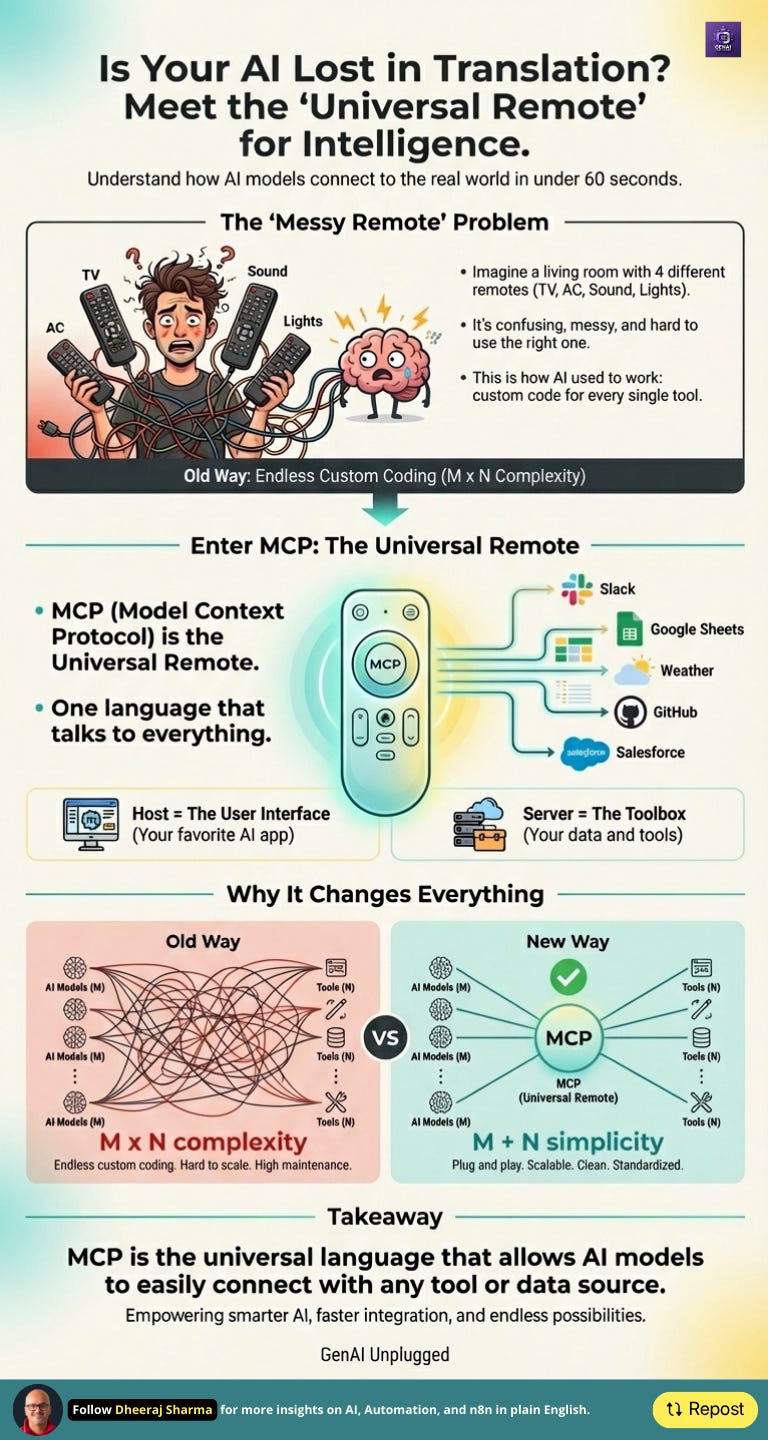
Let’s make it simple with an example from your living room.
MCP is like a universal remote for AI. One simple set of buttons that lets any smart model use any tool safely and smoothly.
👋 Julley, I’m Dheeraj and I’m an AI systems builder.
I build production-grade AI systems at work by day and ship my own products by night (9+). This newsletter is the bridge between those two worlds. Every system, every build, documented step by step.
Join 1,100+ builders getting the exact AI setups, prompts, and production configs that actually work in your business.
MCP Masterclass - Full Course
What Is MCP? Model Context Protocol Explained Simply ← You are here
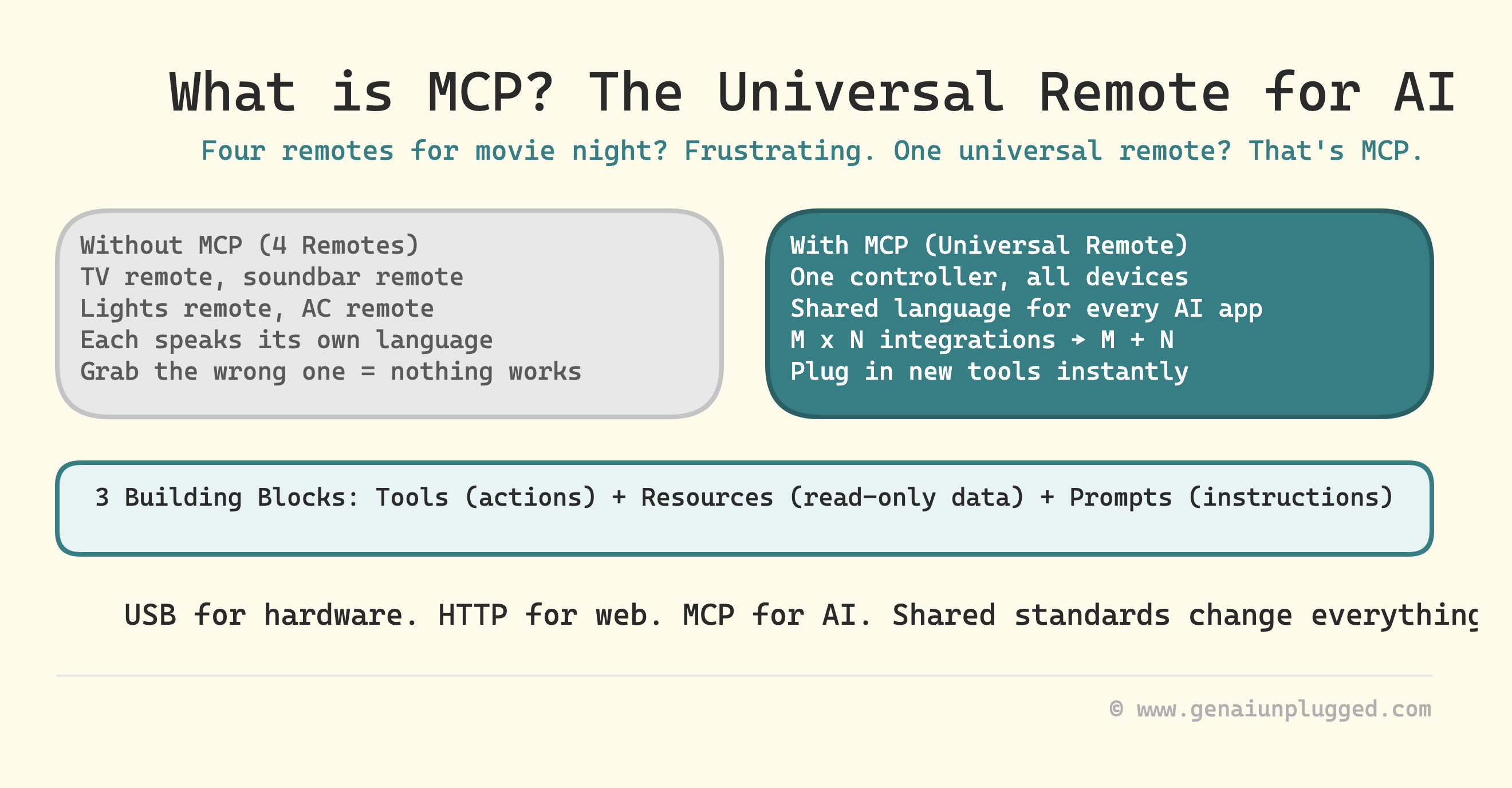
Picture your living room on movie night.
You have four remotes: one for the TV, one for the sound bar, one for the lights, and one for the AC.
You grab the wrong one, point it the wrong way, and nothing happens.
Frustrating. Right?
Then you buy a universal remote. Now one controller manages everything. You press a button, and it knows which device to talk to.
That’s what MCP does.
AI tools used to be like that messy pile of remotes. Each spoke its own language. MCP gives them one shared language so every AI application can work with any tool.
How MCP Actually Works with Example: Host, Client, and Server
When an AI application uses MCP, three main parts work together:
The Host is where you interact with the AI model. It could be a chat window, IDE like Cursor, or even a voice app. It’s the place where everything happens.
Inside the Host is the Client. Think of it as a translator.
When the AI model says ‘I need to check the weather,’ the Client translates that into MCP language and talks to the Server to get the answer.
The Server is like a toolbox that holds the real tools. One Server can have many tools inside it - like ‘get weather,’ ‘get forecast,’ and ‘get air quality.’ Each Server waits for any AI application that speaks MCP to ask for its tools.
When the AI model says “I need to check the weather,” the Client translates that into MCP language and talks to the Server to get the answer.
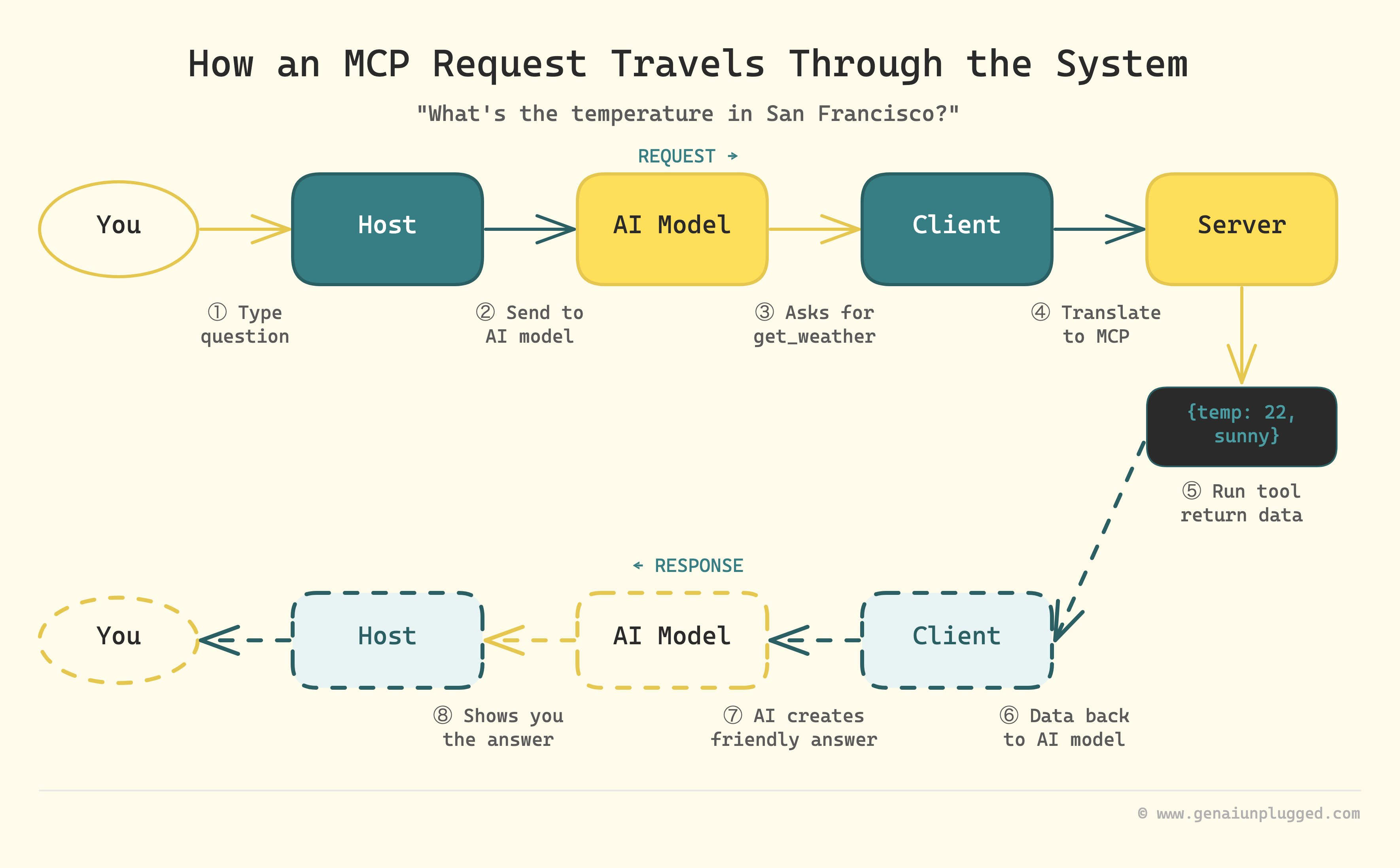
Now, imagine this flow:
You type: “What’s the temperature in San Francisco?“
The Host receives your question and sends it to the AI model.
The AI model thinks: “I need weather data” and asks for the get_weather tool.
The Client translates this request into MCP language and asks the Server.
The Server runs the tool and returns: {temperature: 22, conditions: “sunny”}.
The Client sends this data back to the AI model.
The AI model creates a friendly answer: “It’s 22°C and sunny in San Francisco.”
The Host shows you the answer.
You don’t see the wiring. However, everything works smoothly because they all speak, interpret and understand MCP language.
The Three Building Blocks of MCP
Tools
Actions that perform or change something.
Examples: download a file, run code, send an email, write a post, etc..
Resources
Data sources the AI model can look at but not modify.
Examples: company handbook, spreadsheet, documentation snippet, weather data, content swipefile, etc..
Prompts
Instruction sets or templates that help an AI application start a task.
Examples: a “Code Review Mode” prompt that reminds the model what to check.
These three make MCP more than a connector. It’s a structured system with safety rules and reusable parts.
Understanding MCP takes about 10 minutes. Getting your first MCP server actually running takes most people 3 to 5 hours of config errors, failed connections, and scattered GitHub issues before anything works.
PluggedIn members skip that friction. The MCP Mastery Bundle inside includes working source code, a quick reference card, and the exact configs that make setup a one-session job.
Why MCP Changes Everything: The M x N Problem
Let’s look at what came before it.
If you had 3 AI applications and 3 tools, each application had to build custom code for each tool separately. That’s 9 custom integrations to build and maintain. Add one more tool, and it jumps to 12. Each integration had its own bugs and headaches.
With MCP, it’s simpler. Each AI application learns to speak MCP once. Each tool learns to speak MCP once. Now it’s 3 + 3 = 6 implementations. Clean and scalable.
Add a new tool? Plug it in.
Add a new AI? It already speaks the language.
That’s why companies like Anthropic (Claude Desktop), Cursor, and OpenAI are using MCP. It standardizes communication between AI applications, AI models, and the tools.
Common Questions About MCP
Q: Can the AI model run dangerous commands through MCP?
A: Good MCP applications will always ask your permission first before running anything risky. You stay in control of what gets executed.
Q: Where do these tools live?
A: On MCP Servers. They can be on your machine or hosted online.
Q: Is MCP just for developers?
A: No. It’s for anyone who wants AI to connect with other services without rebuilding everything from scratch.
Try This: Your First MCP Thought Experiment
Grab a pen. Write down three tasks you do manually every day: check emails, update a spreadsheet, post to Slack.
Now imagine a small “tool” doing each one. If your AI assistant could trigger those safely through MCP, how much time would that save?
That’s the kind of automation MCP enables.
Frequently Asked Questions
What is MCP in AI?
MCP (Model Context Protocol) is an open standard that gives AI applications like Claude Desktop and Cursor a universal way to connect to external tools, files, and data sources. Think of it as a USB-C port for AI apps.
Is MCP the same as an API?
No. An API is a specific connection between two systems. MCP is a protocol (shared language) that lets any AI application connect to any tool through one standard. Instead of building separate API integrations, you build one MCP connection.
Who created Model Context Protocol?
Anthropic created MCP and released it as an open standard in November 2024. Since then, companies like Cursor, OpenAI, and others have adopted it. You can learn more at modelcontextprotocol.io.
Do I need to be a developer to use MCP?
No. Many AI applications (Claude Desktop, Cursor) already support MCP out of the box. You can use pre-built MCP servers without writing code. Building custom servers does require some coding - see our guide on building your first MCP server.
Key Takeaways
MCP is a universal remote that lets AI applications safely connect to external tools and data.
It connects applications (Hosts) to tool servers through a standard language.
It reduces integration work from M x N to M + N.
It defines how AI applications use tools, read data, and follow prompts.
It keeps you in control through permissions and safety checks.
Get PluggedIn
Most people read about MCP for weeks before they get a working server running once.

That 3 to 5 hour debugging session is not a rite of passage. It is just time you spend without the configs that are already inside PluggedIn.
Get PluggedIn to go from knowing what MCP is to having a working MCP server with tested configs and source code running in your own environment
What’s inside the MCP Mastery Bundle:
Complete 8-lesson ebook (PDF)
MCP quick reference card (PDF)
All source code on GitHub
What’s Next
Every major tech shift starts with a shared standard - like USB for hardware or HTTP for the web. For AI applications, that standard is shaping up to be MCP for now (but may be something else in the future).
In the next lesson, we’ll explore why MCP had to exist in the first place and how the old “connect everything manually“ approach created endless chaos for developers and AI application builders.
PS: If you learned something new, reply and tell me one task you wish your AI assistant could handle. Your idea might feature in the next demo.
Loved the content. I would gave this blog a title "Demystifying MCP" :)
The way in which the nuts and bolts of MCP along with explanation of each participant in MCP made it super clear.
The remote analogy shared here makes perfect sense. It is the first time someone giving a different (and 100% relatable) analogy for MCP. Otherwise, I would see everyone using the USB Type-C analogy :)
Keep sharing the awesome stuff.
Hey, great read as alwys, I'm so curious about the specific mechanisms behind MCP's shared language for diverse AI interactions.