


In the last lesson, we explored the three main players in MCP: Host - Client - Server.
Now let’s open the Server - the real action hub.
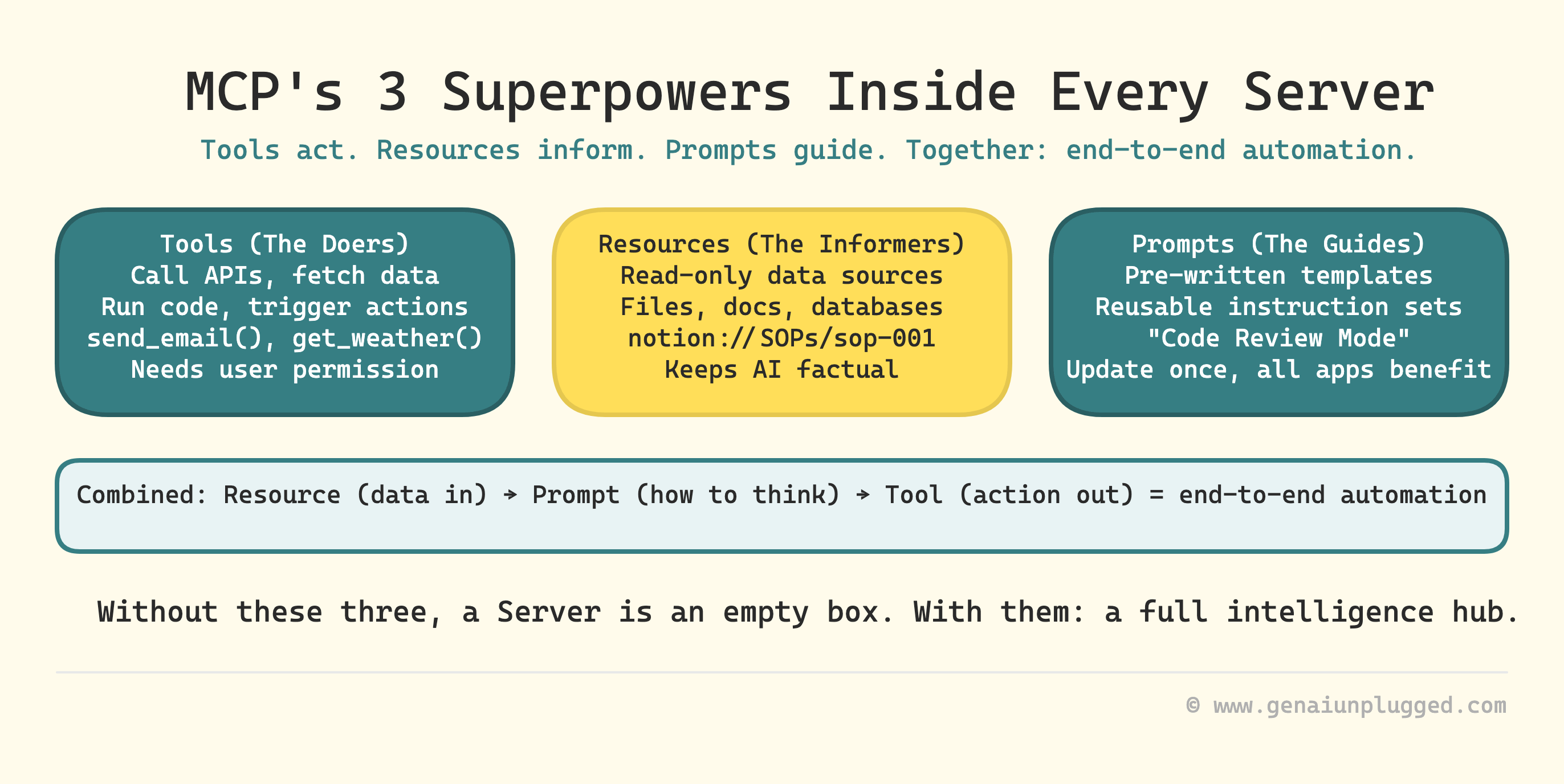
Inside, you’ll find three distinct capabilities that give MCP its strength. Understanding the difference between MCP tools, resources, and prompts is the key to knowing how to use them (and when to use which).
The short version:
Tools = Actions (the AI can do things)
Resources = Data (the AI can see things)
Prompts = Instructions (you can guide the AI’s behavior)
Together, they make AI models capable, informed, and consistent.
MCP servers offer three capabilities. Tools let the AI model take actions that can change data, and the host asks your permission first. Resources give the application read-only data for context, and prompts are reusable instruction templates you activate to keep AI behavior consistent.
👋 Julley , I'm Dheeraj, an AI systems builder.
I build production-grade AI systems at work by day and ship my own products by night, 12 and counting, including SubflowAI and the Content OS Agents Toolkit. This newsletter is the bridge between those two worlds. Every system, every build, documented step by step.
Join 3,000+ builders getting the exact AI setups, prompts, and workflows that actually work in your business.
MCP Masterclass - Full Course
MCP Tools, Resources, and Prompts: What Each One Does ← You are here
Prefer to watch? This lesson is now part of the MCP Masterclass, a free video course where you build one MCP server across 30 lessons. The whole course is one 2.5 hour video with a chapter per lesson, and the player below starts at the chapter that covers this one.
The Three MCP Primitives: What Each One Does
Before diving into each one, here’s the comparison that most articles skip - the model-controlled vs. application-controlled distinction that makes all the difference.
MCP Tools vs Resources vs Prompts - Quick Comparison:
Tools
Who controls it: The AI model decides when to invoke them
What they do: Execute actions with real-world side effects
Can they modify data: Yes
Examples:
send_email(),fetch_sales_data(),create_meeting()Permission required: Yes - host asks user before running
Resources
Who controls it: The application or user selects them
What they do: Provide read-only data and context
Can they modify data: No - strictly read-only by design
Examples: Policy documents, database query results, file contents
Permission required: Generally not - safe to access automatically
Prompts
Who controls it: The user activates them (by choosing a mode)
What they do: Provide reusable instruction templates
Can they modify data: No - they guide AI behavior only
Examples: “Code Review Mode”, “Summarization Template”, analysis frameworks
Permission required: No - they just shape how the AI responds
If MCP is the universal remote system, then the Server is your smart home.
Some devices perform tasks, some show data, and others follow pre-set routines.
That’s exactly how Tools, Resources, and Prompts work inside MCP.
Imagine you’ve set up a smart home where everything is connected.
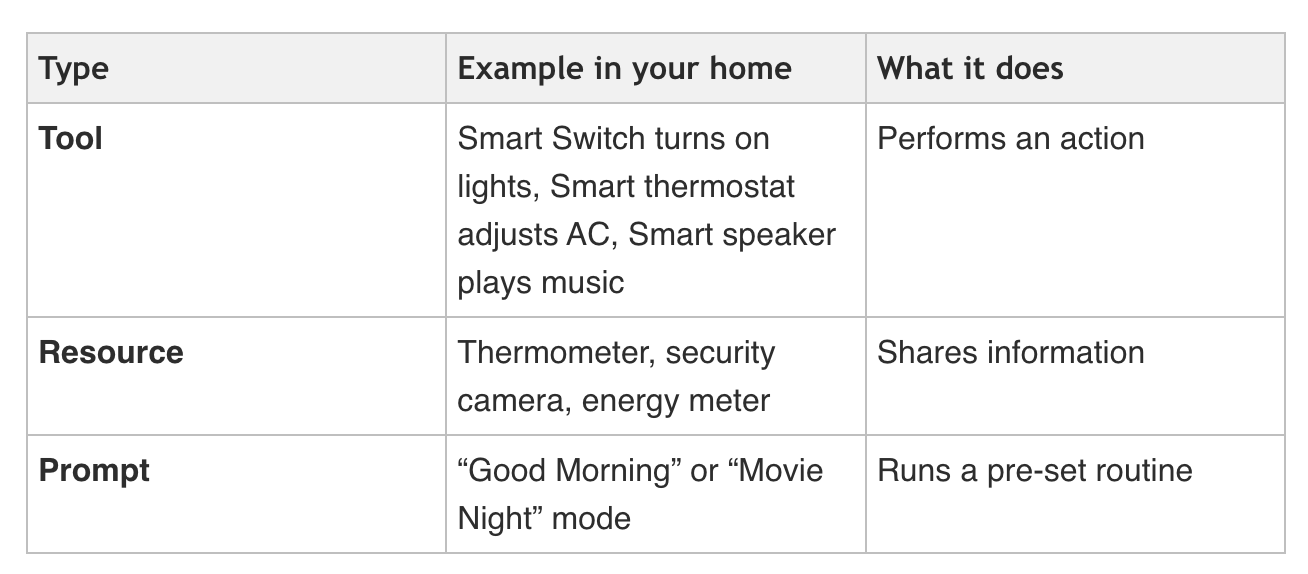
Now let’s see how these same roles appear inside MCP.
Learn with me: the Claude Code cohort
I run the Claude Code cohort on Maven for founders, creators and tech teams: six live sessions across six weeks, building a real AI system with me. If you would rather build it alongside me than read about it, this is the room.
Each cohort is a small, hands-on group, and a new one starts every month.

Use code GENAI20 for 20% off. Check the Syllabus →
MCP Tools: What the AI Can Do
Tools are the action buttons of the MCP Server. They make things happen by calling APIs, fetching data, running code, or changing something in the real world.
This is the “model-controlled” primitive - the AI model itself decides when to invoke a tool based on what you’ve asked for. You don’t push a button; the AI determines a tool is needed and requests it.
Example:
You say, “What’s the weather in San Francisco?“ to your AI application.
The Host asks the Client to find a tool called
get_weather.The Server runs it and returns:
{ "temperature": 22, "condition": "sunny" }
The AI model didn’t predict the weather from its training. Instead, it asked for the get_weather tool, and the Server ran it to get real-time data.
That’s the power of Tools: they let AI models reach beyond their training data and take action in the real world.
Other examples:
send_email()- triggers Gmail APIfetch_sales_data()- queries a databasecreate_meeting()- connects to a calendar service
All of these are MCP Tools.
How MCP Tools Are Defined
Each tool is defined with a JSON Schema that describes its inputs. The schema tells the AI model what parameters the tool accepts, which are required, and what types they expect. This is what lets the AI model know how to call the tool correctly without any custom training.
Tools Require Your Permission
Since Tools can change things - send emails, delete files, post to social media - the Host usually confirms before running them:
“The AI wants to use the ‘send_email’ tool. Allow it?”
This keeps you in control of what your AI application can do. Tools are powerful, and the permission gate is intentional.
MCP Resources: What the AI Can See
Resources don’t perform actions. They just provide knowledge. They’re read-only data sources that AI models can access for additional context.
This is the “application-controlled” primitive. Resources aren’t invoked by the AI autonomously - they’re made available by the application for the AI to reference when relevant.
In your smart home, think of:
A thermometer showing the current temperature
A camera feed
An energy meter emitting readings
You can see this type of data but you can’t change it.
In MCP, a Resource works the same way. It could be:
A local file with product information
A policy document
A database query result
A documentation page
Example:
You say, “Use my Notion database to answer this question.”
Host sends your request to AI model.
AI model says, “I need the Notion SOP resource
notion://SOPs/sop-001-intern-onboarding.”Client requests it from the Server.
Server returns the resource content.
Client sends it to the AI model.
AI model uses it to answer.
Host displays the answer.
Resources keep AI models informed and factual, like a librarian handing over the right book.
Can MCP Resources modify data? No. Resources are strictly read-only. They provide information to the AI model but cannot make changes. If you need to modify data, that requires a Tool.
Understanding tools vs. resources vs. prompts conceptually is one thing. Knowing exactly how to structure the JSON schema, which control model applies, and when to ask for user permission while you are actually writing a server is where most builders lose 2-3 hours per project.
PluggedIn members get the MCP quick reference card that collapses all three primitives, their control models, permission rules, and schema patterns into one page you can keep open while you build.
MCP Prompts: Reusable Interaction Templates
Prompts are pre-written templates that give the AI model clear instructions to follow.
This is the “user-controlled” primitive. You activate a prompt by selecting a mode or template in the application. The AI doesn’t choose to use a prompt on its own - you trigger it deliberately.
In your smart home, when you press “Movie Night,” the lights dim, curtains close, and the TV turns on automatically.
You didn’t control each device. The routine does the work - a clear set of instructions in a specific order.
Prompts play the same role in MCP.
They define reusable instruction sets that tell the AI model how to behave for a complete task.
Examples:
“You are a senior social media copywriter and growth marketer. Analyze the following article and generate platform-tailored promotional posts in one response for LinkedIn, Facebook, Twitter, and Instagram. Here is the article:”
“You are an expert extraction algorithm. Only extract relevant information from the text. Summarize the key insights, problems, and actionable points from the input text into 6-8 concise bullets. Here is the full text:”
Instead of rewriting this every time, the Host can fetch a stored prompt from the Server and add your input to it.
Prompts work differently from Tools and Resources. Usually:
You click a mode button in your application (like “Code Review Mode”).
The Host fetches that prompt template from the Server.
The Host adds your input (like your code) into the prompt.
The Host sends the complete instructions to the AI model.
The AI model follows those instructions to give you a structured response.
MCP prompts vs. system prompts: MCP prompts are templates stored on the server that can be fetched and used dynamically. System prompts are hardcoded into the application. The difference is that MCP prompts can be updated once on the server and every connected AI app benefits immediately - no app updates required.
Prompts are reusable blueprints. Update them once on the Server, and every connected AI application benefits.
When to Use MCP Tools vs Resources vs Prompts
This is the question that matters most when you’re designing a workflow. Here’s a simple decision guide:
Use a Tool when: The AI needs to take action or the task requires real-time data. Sending an email? Tool. Fetching live weather? Tool. Writing to a database? Tool. The test: if there’s a side effect (something changes in the world), it’s a Tool.
Use a Resource when: The AI needs context or background information to answer accurately. Company policy documents? Resource. Product catalog? Resource. Historical sales data? Resource. The test: if it’s read-only information that grounds the AI’s response, it’s a Resource.
Use a Prompt when: You want consistent AI behavior across sessions. “Always write in our brand voice.” “Always review code for these five specific issues.” “Always summarize in exactly 5 bullets.” The test: if you’re establishing a pattern you’ll repeat many times, make it a Prompt.
Most real workflows use all three together.
How All Three Work Together
These three capabilities usually combine in one smooth flow when you interact with AI applications.
Example:
You say, “Analyze this sales report and email me a summary.”
Resource: The AI model asks for the sales report. The Client fetches it from the Server (read-only).
Prompt: The Host uses a “Summarization Mode” prompt that tells the AI model how to analyze the data.
Tool: The AI model generates the summary and asks to use the
send_emailtool. The Client runs it to send you the result.
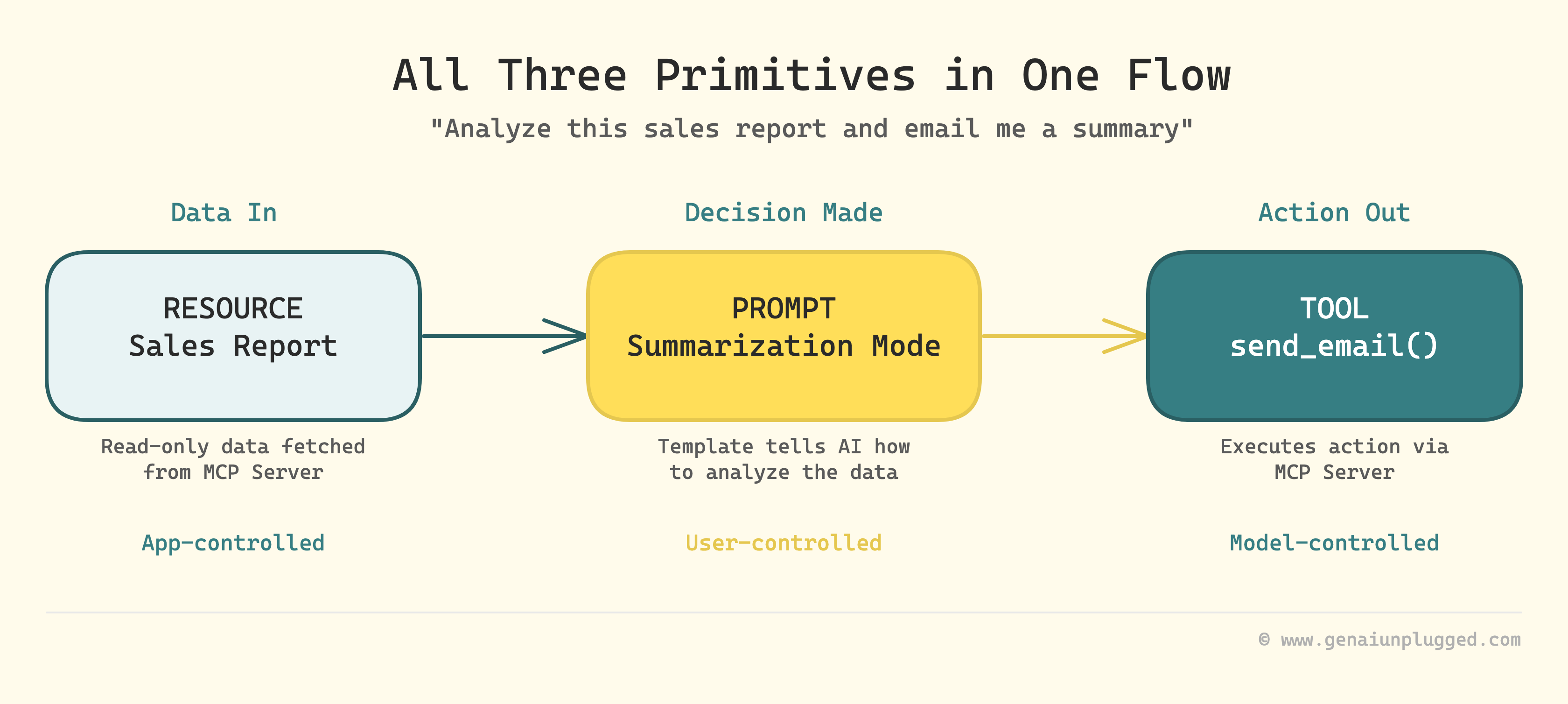
That’s how MCP creates end-to-end automation: Data in - Decision made - Action out.
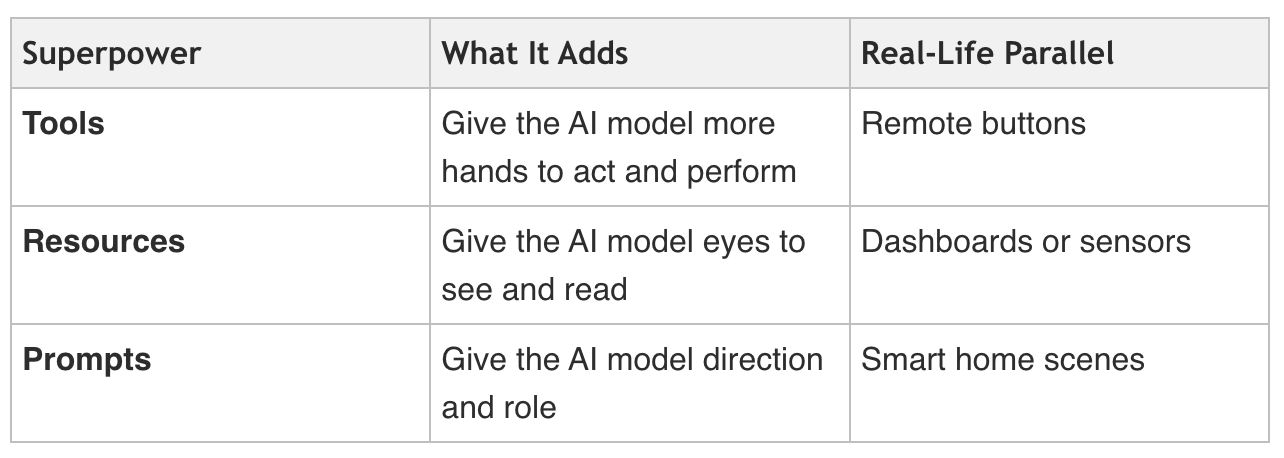
Without these three, a Server would be an empty box.
With them, it becomes a full intelligence hub that makes AI applications truly useful in real-world scenarios.
Think about a simple daily task like “draft and send a daily report.” Break it down the MCP way:
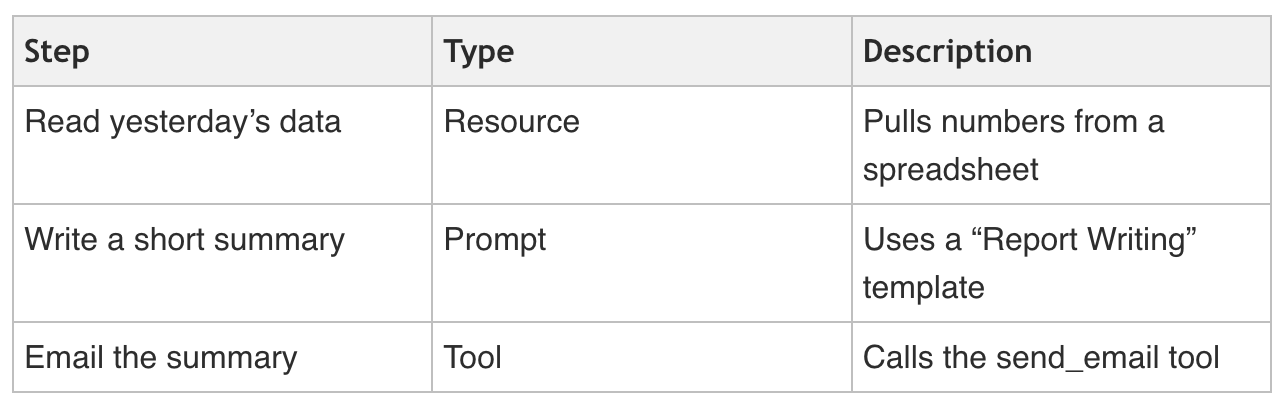
You just designed your first MCP workflow.
The official MCP specification at modelcontextprotocol.io covers the technical details of how each primitive is defined and how servers expose them - worth checking when you’re ready to build.
Key Takeaways
MCP Servers contain three primitives: Tools, Resources, and Prompts.
Tools act (model-controlled, can modify data, require permission).
Resources inform (application-controlled, read-only, safe to access automatically).
Prompts guide (user-controlled, reusable templates, shape AI behavior).
Every workflow you build will use a mix of these three.
Frequently Asked Questions
What is the difference between MCP tools and resources?
Tools perform actions that can change things (send emails, write files, call APIs). Resources provide read-only data for context (documents, database records, configuration files). The key distinction is control model: the AI model decides when to use tools; the application makes resources available. Tools need explicit user permission; resources are safe to access automatically.
Can MCP resources modify data?
No. Resources are strictly read-only by design. They provide information to the AI model but cannot make changes. If you need to modify data - write to a database, update a file, post to an API - that requires a Tool, not a Resource.
How do MCP prompts work?
MCP prompts are reusable instruction templates stored on the server. When you activate a mode (like “Code Review”), the host fetches that prompt template, adds your input, and sends the complete instructions to the AI model. Update the prompt once on the server, and every connected AI app benefits. This is different from system prompts, which are hardcoded into the application itself.
When should I use MCP tools vs resources vs prompts?
Use Tools when the AI needs to take action (send, create, modify, delete) or access real-time data. Use Resources when the AI needs context that grounds its answers (documents, records, reference data). Use Prompts when you want consistent AI behavior across sessions (review modes, writing styles, analysis frameworks).
How are MCP tools different from function calling?
MCP tools and function calling are similar in concept - both let AI models invoke external capabilities. The key difference is standardization. Function calling is model-specific (OpenAI’s format differs from Anthropic’s). MCP tools are provider-agnostic: any MCP-compatible AI can use any MCP tool without custom adaptation. MCP also adds the server layer, so tools can be shared across AI applications without redefining them each time.
What controls tool invocation in MCP?
The AI model controls when tools are invoked. When the AI determines that completing your request requires external data or action, it signals to the Client which tool to call and with what parameters. The Host then asks for your permission before the Client sends the request to the Server.
Get PluggedIn
You know the three MCP primitives. Now stop re-reading lessons every time you need to remember which one to reach for.

Without the reference card, that 2-3 hour orientation tax repeats on every new MCP server you start.
Get PluggedIn to go from re-reading conceptual lessons mid-build to having every primitive, schema pattern, and permission rule on one page before you write a single line of code
What’s inside the MCP Mastery Bundle:
Complete 8-lesson ebook (PDF)
MCP quick reference card (PDF)
All source code on GitHub
What’s Next
Now that you know what lives inside an MCP Server, it’s time to see it in action.
In the next lesson, we’ll build our first hands-on project - a local MCP Server using Python - and watch these Tools and Resources come alive on your own system.