


In the previous lessons, we learned what Model Context Protocol (MCP) is - a universal remote for AI - and why it was created to fix the M×N integration chaos.
Now let’s look under the hood.
MCP architecture in one sentence: The Host (like Claude Desktop) is where you interact, the Client inside it translates your requests into MCP language, and the Server runs the actual tools that do the work.
When you ask an AI application leveraging MCP, “Summarize this file,” what actually happens? Who takes your message, who does the work, and who shows the result?
Let’s follow that journey step by step.
MCP architecture has three parts. The host is the app you use, like Claude Desktop or Cursor, and it contains the client. The client translates the AI model's requests into MCP messages and passes them to the server, which runs the tools and returns the results.
👋 Julley , I'm Dheeraj, an AI systems builder.
I build production-grade AI systems at work by day and ship my own products by night, 12 and counting, including SubflowAI and the Content OS Agents Toolkit. This newsletter is the bridge between those two worlds. Every system, every build, documented step by step.
Join 3,000+ builders getting the exact AI setups, prompts, and workflows that actually work in your business.
MCP Masterclass - Full Course
MCP Architecture Explained: Hosts, Clients, and Servers ← You are here
Prefer to watch? This lesson is now part of the MCP Masterclass, a free video course where you build one MCP server across 30 lessons. The whole course is one 2.5 hour video with a chapter per lesson, and the player below starts at the chapter that covers this one.
The Restaurant Analogy: MCP Explained Simply
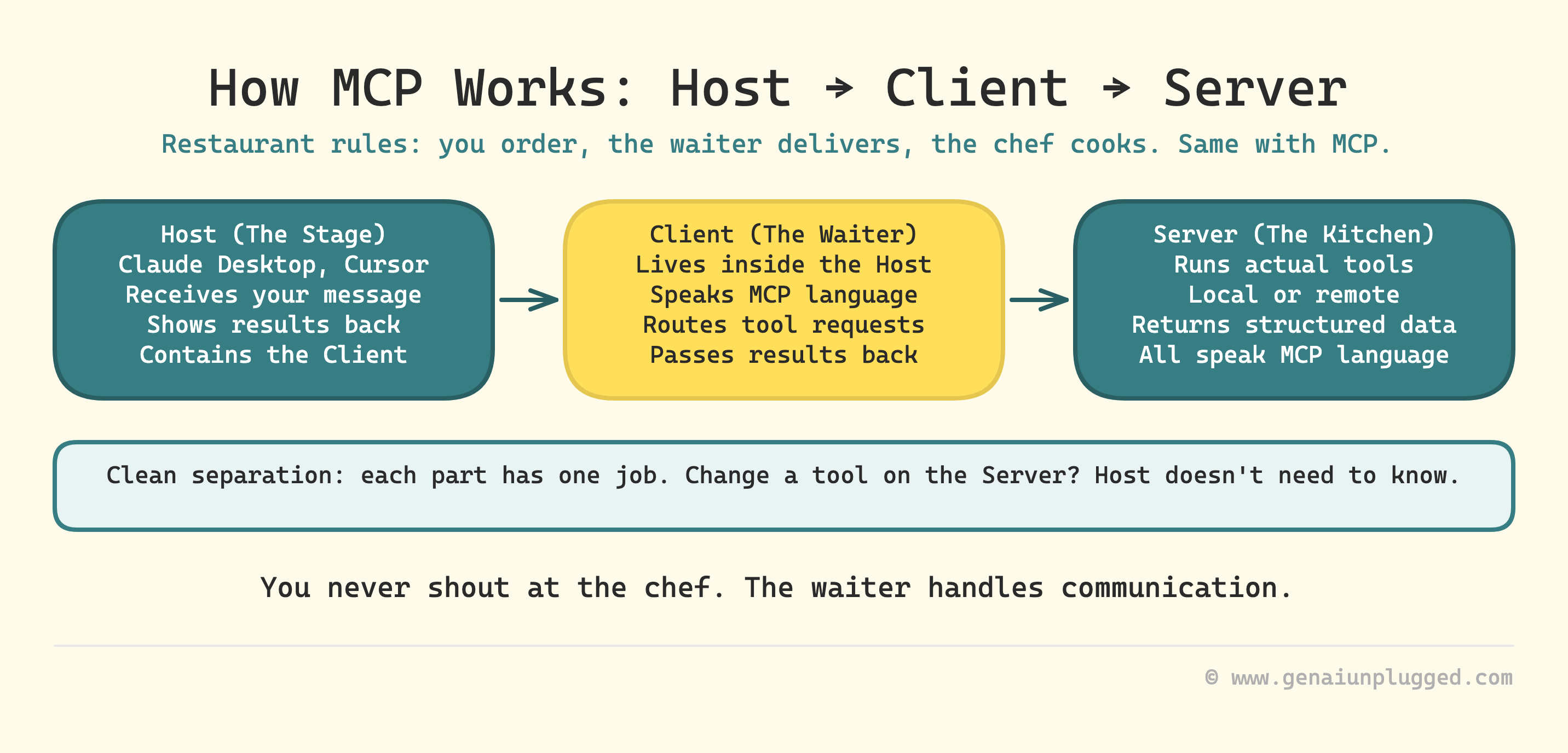
MCP works through a simple trio: Host - Client - Server
Each one has its own role. They all speak the same shared language so AI applications and tools can work together smoothly.
Think of a restaurant. You sit at a table and say, “I’d like a cheese pizza.”
The waiter writes it down and takes the order to the kitchen.
The chef cooks the pizza and gives it back.
The waiter brings it to your table.
Simple, right?
But wait. Who decided you wanted pizza in the first place? You did, based on what you know about the menu.
In MCP, there’s someone similar - the AI model. It reads your question and decides what tools are needed.
Now match that to MCP:
You = The person asking questions or making a request
The restaurant = The Host (the space where interaction happens)
Your friend who understands the menu = The AI model (figures out what you need)
The waiter = The Client (takes orders to the kitchen)
The kitchen = The Server (does the actual work)
You never shout at the chef. You never check the status of your pizza with the kitchen directly.
The waiter handles communication, the restaurant keeps things organized, and the kitchen delivers results.
That’s exactly how MCP works.
Now let’s break down the three components in detail.
Learn with me: the Claude Code cohort
I run the Claude Code cohort on Maven for founders, creators and tech teams: six live sessions across six weeks, building a real AI system with me. If you would rather build it alongside me than read about it, this is the room.
Each cohort is a small, hands-on group, and a new one starts every month.

Use code GENAI20 for 20% off. Check the Syllabus →
The Three Roles in MCP: Host, Client, Server
Let’s breakdown the three essentials roles in MCP - Model Context Protocol.
The MCP Host: The App You’re Using
The Host is where you and the AI model meet.
It could be:
A chat window like Claude Desktop or ChatGPT
An IDE such as Cursor
A voice interface on your phone
The Host:
Receives your message
Sends it to the AI model that lives inside
Keeps conversation history
Shows results back to you
Contains the Client that talks to MCP Servers
Think of the Host as the stage where the AI model works. It handles the interface, but the AI model decides what tools are needed.
An MCP host is the application you interact with directly. Claude Desktop is an MCP host. So is Cursor. The host manages your entire experience - it just happens to have an MCP client living inside it.
The MCP Client: The Protocol Handler
The Client lives inside the Host. Its only job is to communicate with the MCP Servers.
When the AI model decides a tool is needed, it tells the Client:
“Hey, ask the weather Server for today’s forecast.“
The Client:
Knows the MCP rules
Builds the right message
Sends it to the right Server
Waits for a reply
Passes it back neatly to the Host
It’s like the waiter writing down the order. You don’t need to know how that shorthand works.
The key distinction: the MCP client lives inside the host application and translates AI model requests into MCP protocol language. You never interact with the client directly - it works behind the scenes.
The MCP Server: Where Capabilities Live
The Server is where the real tools live. It’s like the kitchen where the chef does the work.
A Server can offer:
Tools like
get_weatherorsummarize_textordelete_emailResources like a company handbook or sales SOPs
Prompts that guide the AI, like a “Code Review Mode” setup
When a Client calls a tool, the Server runs it and returns the results in structured data (usually JSON).
MCP Servers can be local (on your computer) or remote (in the cloud).
No matter where they live, they all speak MCP, so any Client can connect.
This is lesson 3 of 8. Reading through all 8 separately, then hunting down source code and a quick reference card to actually build with MCP, costs most readers 3+ hours before a single server runs.
PluggedIn members skip that queue - the complete 8-lesson MCP ebook, quick reference card, and all source code are already in one download inside the bundle.
MCP Client-Server Communication Step by Step
Let’s replay a scene as an AI example to understand the full flow involved in this MCP conversation.
User: “Summarize this PDF into three bullet points.”
Host: Receives your message and sends it to the AI model.
AI model: Reads the request and decides, “I need the
summarize_filetool to do this.”Client: Gets the tool request from the AI model and translates it into MCP language, then sends it to the right Server.
Server: Runs the
summarize_filetool, reads the PDF, and returns the summary data.Client: Sends the data back to the AI model.
AI model: Uses that data to write a natural response: “Here’s a three-point summary...”
Host: Displays the AI model’s response to you.
Neither the Host nor the AI model needed to know how the tool worked. They only knew that the Server could handle it.
How MCP Messages Actually Travel: STDIO vs HTTP
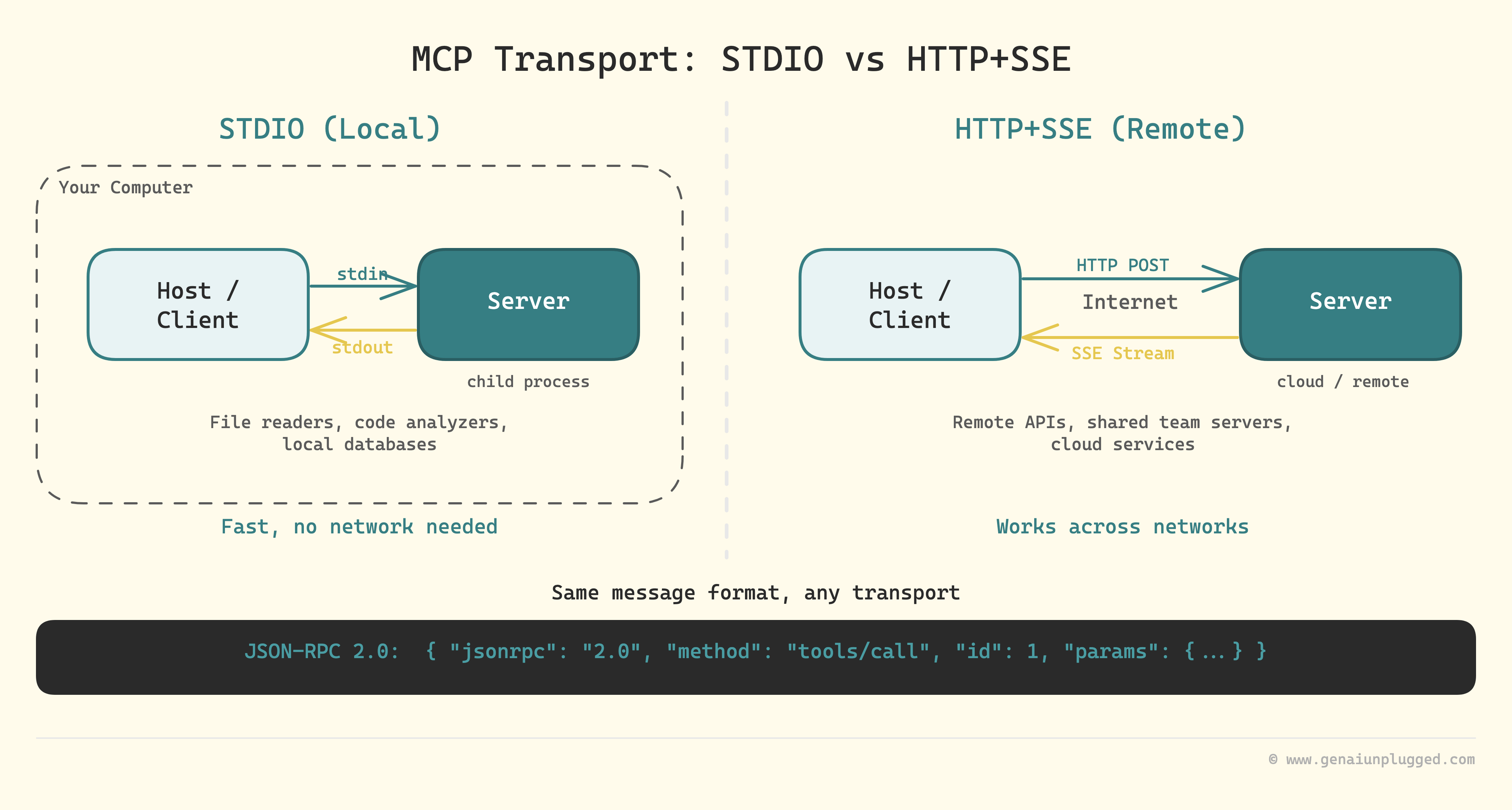
When the Client talks to a Server, the messages have to physically travel somehow. MCP supports two transport mechanisms:
STDIO (Standard Input/Output) - for local servers
The Host launches the MCP server as a child process on your computer
Messages pass through stdin/stdout - the most basic communication channel
Fast, simple, no network needed
Best for local tools: file readers, code analyzers, local databases
HTTP + SSE (Server-Sent Events) - for remote servers
The MCP server runs somewhere on the internet
The Client sends HTTP requests; the Server streams responses back via SSE
Works across networks; enables cloud-hosted capabilities
Best for remote APIs, shared team servers, cloud services
The protocol itself uses JSON-RPC 2.0 as the message format - think of it like a standardized envelope. Every request has a method name, parameters, and an ID. Every response carries either a result or an error. The envelope format is always the same regardless of which transport carries it.
This is how MCP differs from REST APIs. A REST API is a specific point-to-point connection. MCP is a protocol - a standardized way of communicating that works regardless of which tools or AI apps are involved. One MCP client can talk to hundreds of different servers using the exact same language.
Why This Architecture Design Works
Clean separation: Each part has one job. The Host handles the interface, the Client speaks MCP, and the Server runs tools.
Easy to update: Change a tool on the Server? The Host and Client don’t need to know.
Safe by design: The Host can ask your permission before any tool runs.
Works anywhere: Servers can be on your computer or in the cloud. The Client talks to both the same way.
Putting It Together: A Daily Task Example
Take one daily AI task - say, “Create a meeting summary.” Now map it like this:
Host: Chat window in Claude Desktop receives your request
AI model: Determines it needs to read your calendar notes (a Resource) and then create a formatted document (a Tool)
Client: Reaches out to the appropriate MCP Server for each capability
Server: Returns the calendar data, then executes the document creation
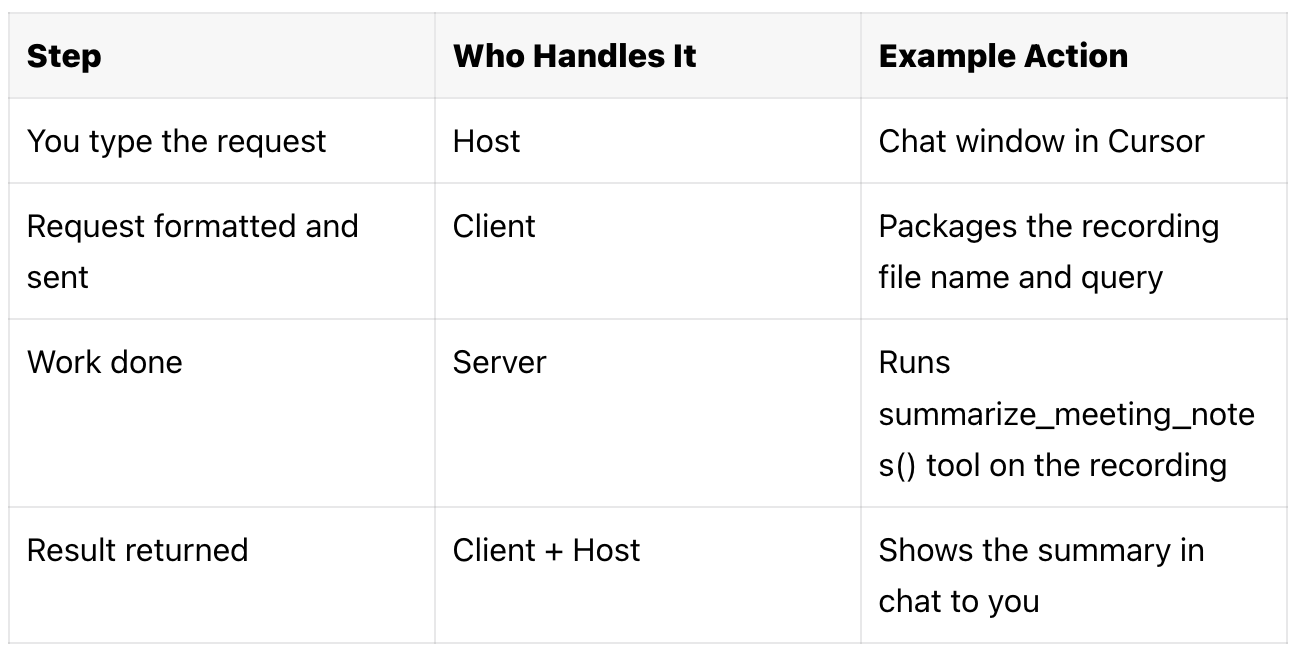
Once you see your tasks this way, you’ll understand how every MCP-based project runs behind the scenes.
This architecture also explains why MCP tools, resources, and prompts each exist as separate capabilities inside the Server - they represent three fundamentally different types of things a Server can provide, and the architecture makes it clean to separate them.
Key Takeaways
MCP works through a three-part loop: Host - Client - Server.
The Host is the stage (the app you use), the Client is the interpreter (protocol handler), and the Server is the toolbox (where capabilities live).
Transport happens via STDIO for local servers or HTTP+SSE for remote servers.
This setup keeps AI systems clean, modular, and safe.
Frequently Asked Questions
What is an MCP host?
An MCP host is the application you interact with directly - like Claude Desktop, Cursor, or a chat interface. It receives your messages, sends them to the AI model, and displays results. The host contains the MCP client that communicates with servers. You experience the host; everything else runs behind the scenes.
What is the difference between MCP client and server?
The MCP client lives inside the host application and translates AI model requests into MCP protocol language. The MCP server is a separate program that contains actual tools (file readers, API connectors, database queries). The client asks; the server does the work. You can think of client as the messenger and server as the specialist.
How do MCP clients and servers communicate?
They communicate via JSON-RPC 2.0 - a standardized message format. The physical transport is either STDIO (for local servers, where messages pass through stdin/stdout) or HTTP+SSE (for remote servers, where messages travel over the network). The format is always the same regardless of transport.
How is MCP different from REST APIs?
REST APIs are point-to-point connections between specific services. MCP is a universal protocol that standardizes how any AI application connects to any tool. One MCP client can talk to hundreds of different servers using the same language. REST APIs are also typically stateless; MCP connections maintain state during a session and include capability negotiation at startup.
What is JSON-RPC 2.0 in MCP?
JSON-RPC 2.0 is the message format MCP uses - think of it as the standardized envelope for every request and response. Each message has a method name (what to do), parameters (the inputs), and an ID (to match responses to requests). It’s the same format whether the message travels via STDIO or HTTP.
What are MCP transport mechanisms?
MCP supports two transports: STDIO (for local servers - fast, simple, no network required) and HTTP with Server-Sent Events (for remote servers - works across the internet). Most beginner setups use STDIO. Remote production servers typically use HTTP+SSE.
Get PluggedIn
You just learned how the pieces connect - now you need the complete reference to build, not 5 more articles.

At one article at a time, that's 5 more reads and 2+ hours before you have the full picture in one place.
Get PluggedIn to go from piecing together MCP across 8 separate lessons to having the full ebook, quick reference card, and source code ready to build with today
What’s inside the MCP Mastery Bundle:
Complete 8-lesson ebook (PDF)
MCP quick reference card (PDF)
All source code on GitHub
What’s Next
Now that you know who does what, in the next lesson we will explore what these Servers actually contain - the three key powers of MCP Servers: Tools, Resources, and Prompts - and how they make AI applications far more capable.
PS: Next time your AI application connects to your files, emails, or notes, remember this trio could be at work. That seamless experience is just Host - AI model - Client - Server running quietly in sync.
Now I can totally relate it with how I have been using MCP servers with Github Copilot on VS Code (which is the HOST).
I have been using GitHub, Atlassian and few local MCPs for day-to-day development and documentation. However, never dig this much deeper into the actual implementation. I was more of working with the abstractions till date. But this article has made it super clear how was the interaction actually happening and how different entities are interacting during the process.
What I take way from this is that the discovery of "tools" on the MCP server(s) is somewhat similar to how Postman leverages the Introspection to get the schema of the server. This way postman client gets the understanding of the supported request types (query, mutations etc.)