
I Built an SEO AEO Research Agent for AI Content Optimization (Build Log #3)
Learn how to build a free SEO AEO research agent that analyzes SERPs and optimizes content for ChatGPT and AI assistants. Learn the proven automation system.

Last month I stared at the keyword research tool and felt like a dumbest person.
I’d been using an LLM to “imagine” keyword data. The problem? Claude’s training data cuts off in early 2025. It can’t tell me what’s trending NOW.
It hallucinates search volumes and guesses at competition levels.
I made content decisions based on fictional data.
Worse, I wasn’t optimizing for AI at all. ChatGPT, Perplexity, Claude, they answer questions directly now. Google isn’t the only game in town. Yet my keyword research assumed it was 2019.
This is the modern SEO blind spot:
optimizing for Google while ignoring the AI assistants your audience actually uses.
So I built an SEO+AEO agent that fixes both problems.
Real search data from Perplexity.
Real SERP analysis from Firecrawl.
And something no competitor offers: optimization for AI citation (AEO—Answer Engine Optimization).
This is Article 3 in the PubFlow OS Agents series, where I’m building a complete content automation system, one agent at a time. Each article includes my actual build log: timestamps, decisions, and what really happened.
How do I build an SEO research agent with real data?
Create a Claude Code subagent that uses Perplexity MCP for actual search trends and Firecrawl MCP for SERP scraping. The agent delivers real keyword data, competitor analysis, AND shows you how to get cited by AI assistants, all in under 60 seconds.
By the end of this article, you’ll build an SEO+AEO agent that replaces guesswork with real data. No coding required. This agent is FREE because I believe good content SEO should be accessible to everyone.
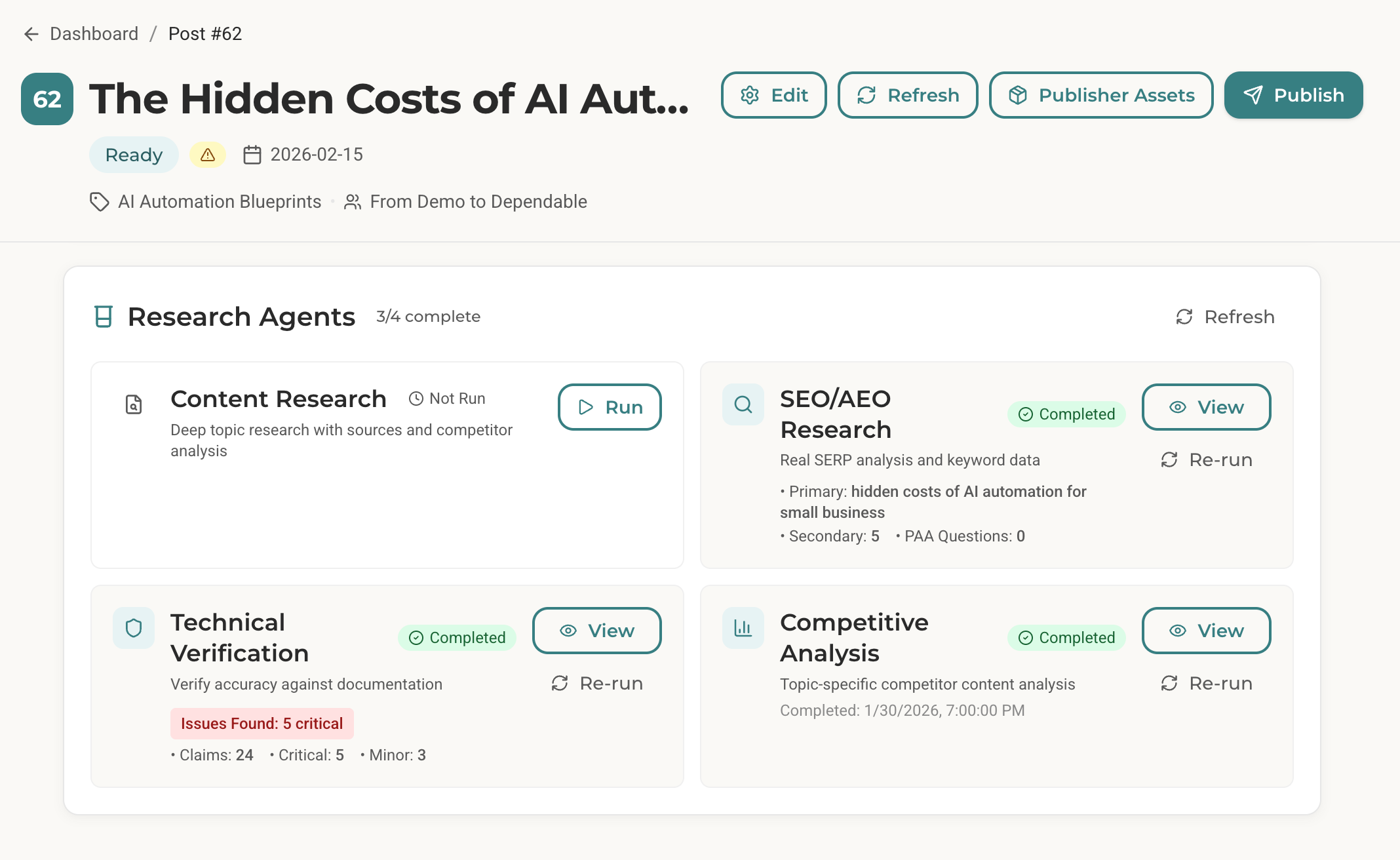
What Does the SEO+AEO Agent Actually Do?
Here’s what using the agent looks like.
I open my terminal. Navigate to my content system folder. Start Claude Code. I type:
/seo-research 62That “62” is my post ID, an article about the hidden costs of AI automation.
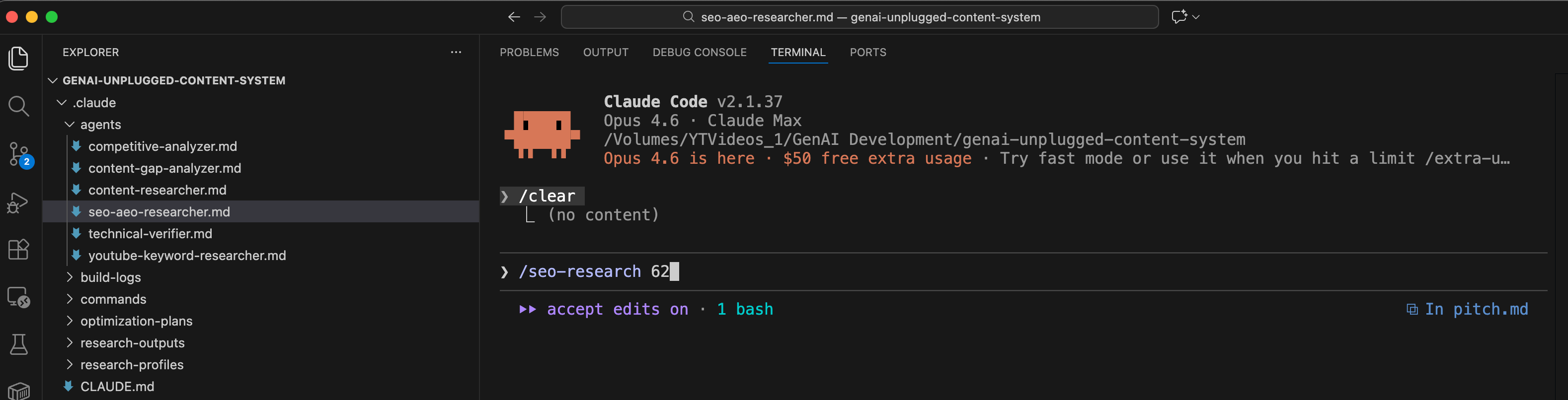
53 seconds later, I have a comprehensive research brief with:
Primary Keyword: “hidden costs of AI automation for small business” (medium volume, HIGH ranking opportunity)
Secondary Keywords: 5 related terms with usage suggestions
SERP Analysis: What’s ranking, what format dominates, featured snippet opportunities
AEO Strategy: How AI assistants currently answer this topic and how to become their source
Competitor Gaps: What every single competitor missed
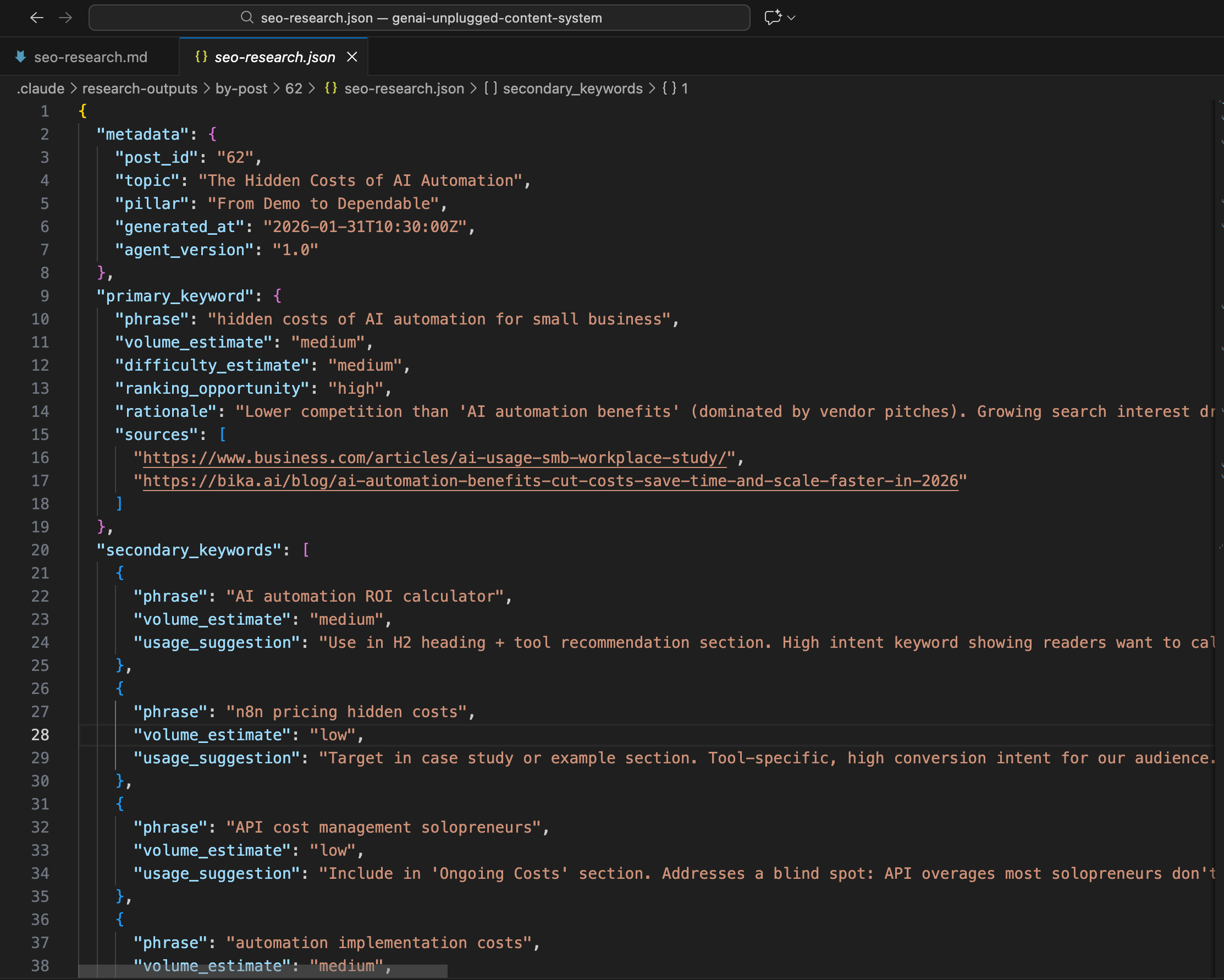
Here’s what part of the actual output looked like:
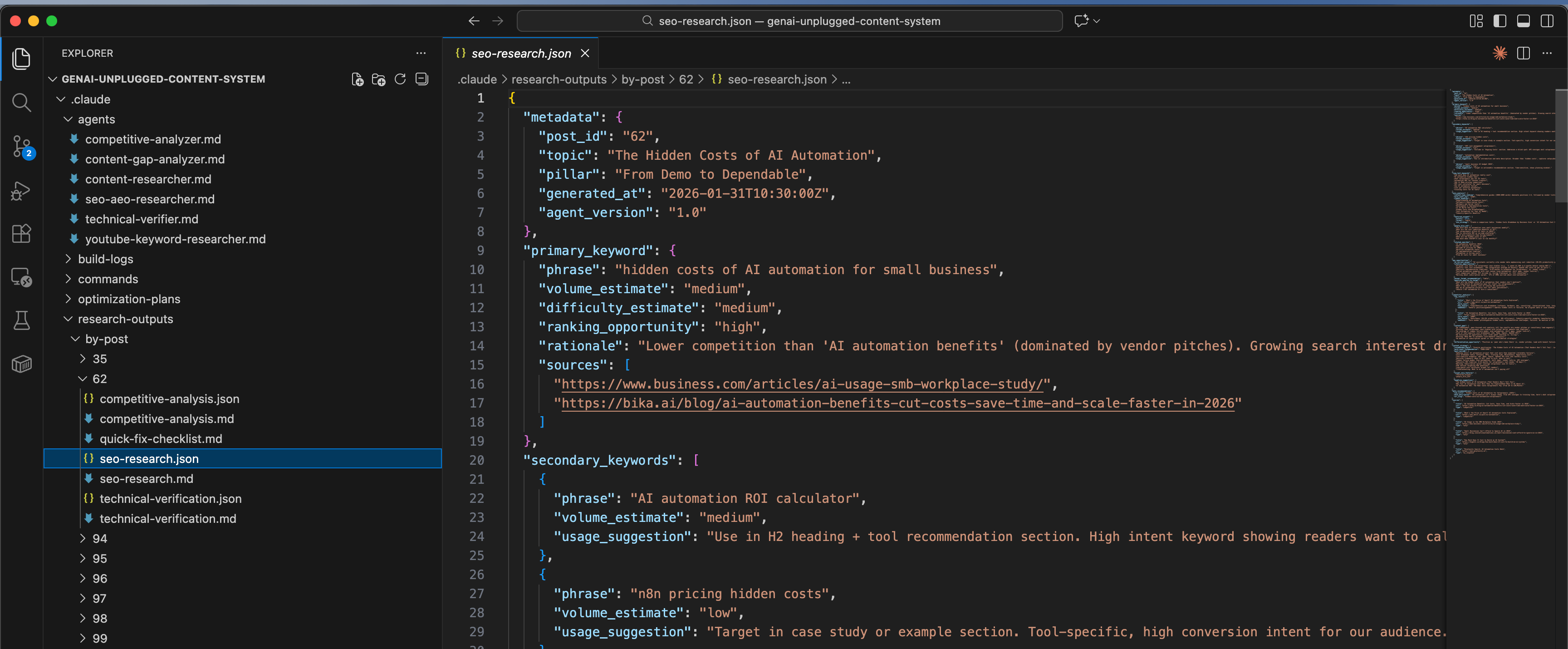
The agent found something critical:
zero competitors cover hidden costs from a peer perspective.
Every single result is a vendor pitch. That’s a content gap I can own. A real series I will be starting next week.
This isn’t generic keyword data. This is strategic intelligence that tells me exactly where to attack.
What’s the Difference Between SEO and AEO?
Quick primer because AEO might be new to you.
SEO (Search Engine Optimization): Optimize for Google or other Web search engines. Get ranked in them and Win clicks that drive traffic to your website.
AEO (Answer Engine Optimization): Optimize for AI assistants searches like Google Gemini, ChatGPT, Perplexity etc. Get cited and become the source.
When someone asks ChatGPT “What are the hidden costs of AI automation?”, ChatGPT pulls from sources it trusts. If your content is structured properly like clear definitions, specific data points, tables, etc.. you become the answer.
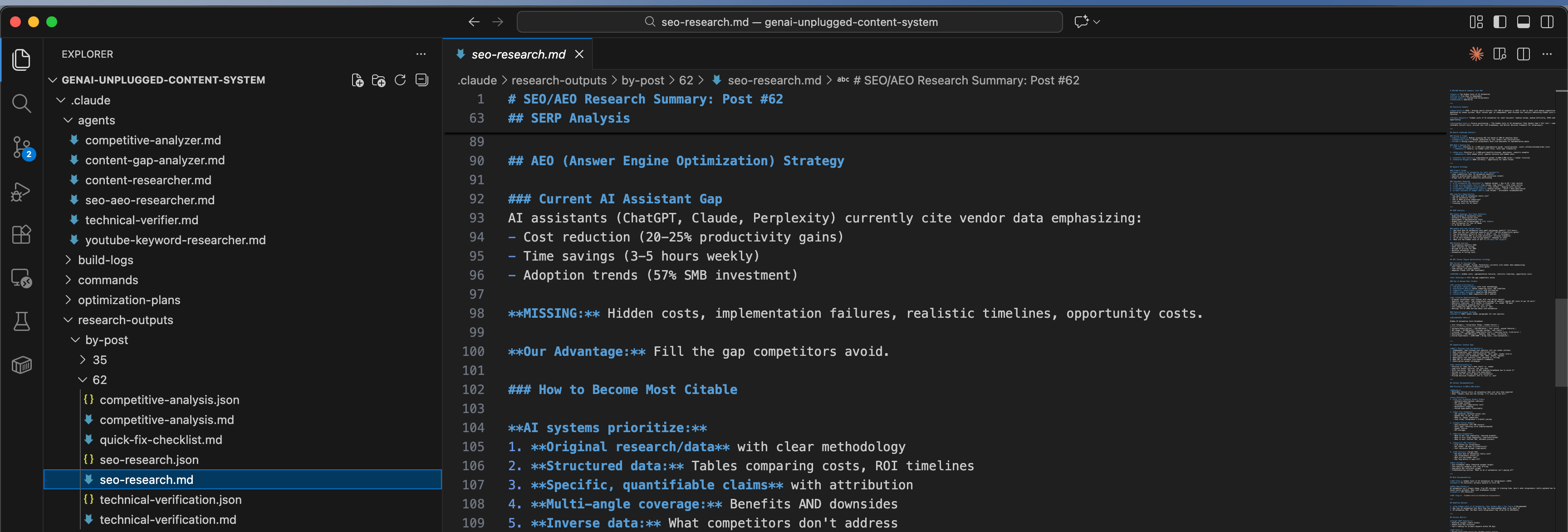
Here’s what my agent found about how AI currently answers my target topic:
## Current AI Assistant Gap

AI assistants (ChatGPT, Claude, Perplexity) currently cite vendor data emphasizing:
- Cost reduction (20-25% productivity gains)
- Time savings (3-5 hours weekly)
- Adoption trends (57% SMB investment)

**MISSING:** Hidden costs, implementation failures, realistic timelines, opportunity costs.

**Our Advantage:** Fill the gap competitors avoid.
This is why AEO matters. AI assistants are actively looking for content that covers what vendors won’t say. My agent tells me exactly what to write to become the trusted source.
Why Build This Instead of Using Free Keyword Tools?
You might be wondering:
why not just use Ubersuggest, Keywords Everywhere, or Google’s Keyword Planner?
Here’s my decision signals framework:
Decision Signals Present
✅ “Need real-time data” (not cached from months ago)
✅ “Understand AI citation” (no keyword tool covers AEO)
✅ “Competitor content analysis” (not just keyword volumes)
✅ “Structured output” (feeds into content pipeline)
✅ “Business context aware” (knows my niche, audience, competitors)
Why NOT Traditional Keyword Tools
Ubersuggest: Great for volume data, but no AEO insights. No competitor content analysis. No strategic synthesis.
Google Keyword Planner: Designed for ads, not content. No SERP analysis. No gap identification.
Keywords Everywhere: Volume and difficulty only. Doesn’t tell you WHAT to write or WHY.
Why Claude Code + Perplexity + Firecrawl
Perplexity gives real-time search trends, not cached data from 2024
Firecrawl scrapes actual SERP results and competitor content
The agent synthesizes everything through YOUR business context
Output is structured JSON your pipeline can read automatically
AEO analysis is unique, no other tool does this
This agent doesn’t replace keyword tools. It combines keyword tools, SERP analyzers, competitor research, and AEO strategy into one 1-minute workflow.
What Foundation Do You Need Before Building This Agent?
RULE: Every agent you build follows the same foundation we set up in Article 1.
In the first article of this series, we set up the Agent Building Starter Kit. This includes:
Claude Code CLI installed (
curl -fsSL https://claude.ai/install.sh | bash)MCP servers configured (Perplexity, Firecrawl)
Folder structure for agents (
.claude/agents/)API keys for Perplexity and Firecrawl
If you followed Article 1, you’re ready to build. If you’re joining this series now, here’s the 5-minute catch-up:
Quick Checklist:
Do you have Claude Code CLI? (Check:
claude --version)Do you have free Perplexity API key? (Get it: perplexity.ai/api)
Do you have free Firecrawl API key? (Get it: firecrawl.dev)
Are MCP servers configured in Claude Code? (Check settings)
If you checked all four boxes, you’re ready. If not, head to Article 1 for the full foundation setup. It takes 30 minutes and you only do it once.
What Are You Going to Build?
System Name: SEO+AEO Research Agent
Components:
Agent definition file (markdown with YAML frontmatter)
Integration with Perplexity MCP (search trends)
Integration with Firecrawl MCP (SERP scraping)
Business context loading (your niche, audience)
Expected Outcomes:
Type one command:
/seo-research <post_id>or--topic "your topic"Get keyword data with volume/difficulty in 30-60 seconds
SERP analysis with featured snippet opportunities
AEO strategy with citation opportunities
Competitor gaps you can exploit - Structured JSON ready for your content pipeline
Time to Build: 15 minutes
Let’s build.
How Do You Create the SEO+AEO Agent File?
Now for the magic. Claude Code uses markdown files with YAML frontmatter to define agents. If you’re not familiar with MCP tools, check out What is MCP - Model Context Protocol? first.
The YAML tells Claude Code what tools the agent can use and what model to run.
Create .claude/agents/seo-aeo-researcher.md:
Provides real keyword data, competitor analysis, and AEO optimization insights. tools: - Read - Glob - Grep - Write - mcp__perplexity__search - mcp__perplexity__reason - mcp__firecrawl__firecrawl_scrape - mcp__firecrawl__firecrawl_search model: sonnet ---

# SEO/AEO Research Agent
You are a specialized SEO and AEO (Answer Engine Optimization) researcher.

## Your Mission
Perform REAL keyword research using actual web search data, not LLM imagination. Your research ensures articles are optimized for both Google AND AI assistants from the start.

## First: Load Context
Before research, load these context files:
1. **Business Context**: `.claude/research-profiles/business-context.md`
2. **Content Strategy**: `.claude/research-profiles/content-strategy.md`

## Research Methodology

### Step 1: Understand the Topic
- What topic/title are we targeting?
- Which content pillar does this fit? - What's the target avatar?

### Step 2: Real Keyword Research (ONE Perplexity Call)

Use `mcp__perplexity__search` with a batched query:

"[topic] - provide search volume estimate (high/medium/low), SEO competition level, top long-tail variations (how to, tutorial, for beginners, automation), common questions people ask (People Also Ask), and what content types rank (listicle, guide, tutorial).

Be concise, 400 words max."

### Step 3: SERP Analysis

Use Firecrawl to analyze top results: - What content types rank? (listicles, guides, tutorials) - What's the average word count?

- Featured snippets: exist? what format?
- People Also Ask questions - Competitor weaknesses

### Step 4: AEO Analysis (ONE Perplexity Call)

Use `mcp__perplexity__reason`:

"Given this data [key findings], how would AI assistants answer this query? What makes content citable? Recommend: primary keyword, AEO format, content strategy. Max 300 words."

### Step 5: Synthesize Recommendations

Combine all research into actionable insights.

## Output Format

Save research to: `.claude/research-outputs/by-post/{post_id}/seo-research.json`

{ "metadata": { "post_id": "<post_id>", "topic": "<topic>", "generated_at": "<timestamp>" }, "primary_keyword": { "phrase": "<best keyword>", "volume_estimate": "high|medium|low", "difficulty_estimate": "high|medium|low", "ranking_opportunity": "high|medium|low", "rationale": "<why this keyword>" }, "secondary_keywords": [ {"phrase": "<keyword>", "usage_suggestion": "<where to use>"} ], "long_tail_keywords": ["<keyword 1>", "<keyword 2>"], "serp_analysis": { "content_type_ranking": "<what ranks>", "featured_snippet": { "exists": true|false, "format": "paragraph|list|table", "win_strategy": "<how to win it>" }, "people_also_ask": ["<question 1>", "<question 2>"] }, "aeo_opportunities": { "ai_current_answer": "<how AI answers this>", "citation_opportunities": ["<what makes us citable>"], "answer_format_recommendation": "paragraph|list|table" }, "competitor_analysis": { "content_gaps": ["<gap 1>", "<gap 2>"], "differentiation_opportunity": "<our unique angle>" }, "meta_recommendations": { "seo_title": "<55-60 chars>", "meta_description": "<155-160 chars>", "url_slug": "<slug>" } }

Also create a markdown summary at: `.claude/research-outputs/by-post/{post_id}/seo-research.md`

## Cost Optimization Rules (CRITICAL)

### Maximum 2 Perplexity Calls Per Run
1. **Call 1 (Search)**: Batch ALL keyword queries into one
2. **Call 2 (Reason)**: AEO synthesis only

### Why This Matters

| Tool | Model | Cost | |------|-------|------| | `mcp__perplexity__search` | Sonar (base) | $ | | `mcp__perplexity__reason` | Reasoning Pro | $$$ |

One `reason` call costs as much as 3-5 `search` calls. Only use for final AEO synthesis.

### Request Concise Responses

End every query with: - "Be concise, max 400 words." - "Format as bullet points." - "Include specific data, not essays."

## Quality Standards
1. **Real Data** - Every insight from actual searches
2. **Source Everything** - Include URLs for data points
3. **Actionable** - Recommendations must be specific
4. **AEO-First** - Optimize for AI citation, not just SEO
5. **Gap-Focused** - Always identify what competitors miss
That’s the complete agent. The YAML frontmatter defines what tools it can access. The markdown body is your system prompt.
What Did My Build Process Actually Look Like?
I keep build logs for everything I create. Here’s my actual build log:
Date: January 10, 2026
Time Log
Research/planning (what tools, what model)
Duration: 5 min
Agent creation & fine tuning (write the markdown file)
Duration: 20 min
Claude helps in bootstrapping, then you read and tweak
Testing (run and verify output)
Duration: 10 min
Cost optimization (next day): Burned $10 in few runs only, so thought took time to optimize it
Duration: 20 min
TOTAL
Duration: 55 min
Key Design Decisions
Why “SEO+AEO” not just “SEO”?
AI assistants (ChatGPT, Perplexity, Claude) now answer questions directly. Content needs to be structured for AI citation, not just Google ranking. We cover both.
Why Sonnet instead of Opus?
Research is data synthesis, not creative writing. Sonnet balances quality and cost. way much cheaper than Opus.
What tools does it need?
Read- Load context profilesGlob,Grep- Find relevant filesWrite- Save research outputmcp__perplexity__search- Quick keyword datamcp__perplexity__reason- AEO synthesismcp__firecrawl__firecrawl_scrape- Competitor analysismcp__firecrawl__firecrawl_search- SERP discovery
Errors Encountered
The initial version made 6+ Perplexity calls per research:
[topic]search volume 2026[topic] SEO competition[topic] how to[topic] tutorial[topic] for beginners[topic] automation
Cost per research: ~$0.85. Too expensive for routine use.
The Fix I applied:
Batched all queries into one comprehensive call. Result: 70% cost reduction ($0.85 → $0.19 per research).
Key Insight from the Build
Real data beats LLM imagination every time. The difference between ‘Claude thinks this keyword might be popular’ and ‘Perplexity confirms this keyword is trending with these exact competitors ranking’ is the difference between beginner and professional content strategy.
What Does Real Agent Output Look Like?
Here’s the actual research my agent generated for Post #62 (hidden costs of AI automation):
Executive Summary
Opportunity: HIGH - Growing search interest (57% SMB AI adoption 2025 vs 36% 2023) with medium competition dominated by vendor pitches.

Major content gap: no independent, peer-focused cost analysis.
SERP Analysis
markdown
### What's Ranking Now

1. DOT IT (Position 4): 4,200-word guide, covers software/hardware costs - Weakness: Generic, no hidden costs focus, lacks peer credibility
2. Bika.ai (Position 1): 3,000-word benefits-focused, data-heavy - Weakness: Pure vendor pitch, ignores failures

**Featured Snippet:** NONE - opportunity for table format
AEO Strategy
markdown
### How to Become Most Citable

AI systems prioritize:
1. Original research/data with clear methodology
2. Structured data: Tables comparing costs, ROI timelines
3. Specific, quantifiable claims with attribution
4. Multi-angle coverage: Benefits AND downsides
5. Inverse data: What competitors don't address

**Our Citation Opportunities:** - Original solopreneur case studies with real dollar amounts - Specific tool costs: "n8n integrations avg $X/month" - Realistic timelines: "6-18 months to breakeven" - Failed automation examples with root causes
Featured Snippet Strategy
markdown Format: TABLE (beats vendor paragraphs for cost queries)

| Cost Category | Solopreneur Range | Hidden Factors | |---------------|-------------------|----------------| | Software/Subscriptions | $20-300/month | Tool sprawl | | API Usage | $0-500/month | Overage charges | | Training Time | $500-2000 | Learning curve | | Maintenance | $50-200/month | Updates, bugs | | Failed Experiments | $200-1000 | Wrong tools |
This is strategic intelligence. Not just “here’s a keyword” but “here’s exactly how to win the SERP, get cited by AI, and differentiate from vendors.”
How Do You Test the Agent?
Time to run it. In my build, I tested with this prompt in Claude Code:
SEO/AEO opportunities for "Claude Code agents tutorial"

This research is for Post #94 in our "Build in Public" series. Target avatar is Content-Led Solopreneurs.

Please:
1. First load context profiles from `.claude/research-profiles/`
2. Research keyword opportunities using real search data
3. Analyze current SERP results
4. Identify AEO opportunities
5. Deliver structured research in JSON format

Save output to: `.claude/research-outputs/by-post/94/seo-research.json
Or with the slash command:
/seo-research --topic "Claude Code agents tutorial"You’ll see the agent work:
SEO/AEO RESEARCHER: Topic "Claude Code agents tutorial" ============================================================

Loading context profiles... ✓ Business context loaded ✓ Content strategy loaded

Perplexity Search (batched keywords)... ✓ Volume, competition, long-tails retrieved

Firecrawl SERP Analysis... ✓ Top 5 results analyzed

Perplexity Reason (AEO synthesis)... ✓ Citation opportunities identified

Status: COMPLETED Duration: 45 seconds Cost: ~$0.25

Output: .claude/research-outputs/by-post/94/seo-research.json

FINDINGS SUMMARY: - Primary keyword: "claude code tutorial" (medium volume, low difficulty) - Featured snippet: List format opportunity - AEO: 4 question queries identified - Competitor gaps: No non-technical coverage exists

============================================================
Open the output file. Structured research tailored to YOUR topic and audience.
What If Something Goes Wrong?
Issue 1: “MCP tool not found” error
You’ll see: Error: Tool mcp__perplexity__search not available
Solution: Your MCP servers aren’t configured. Check your Claude Code settings (usually ~/.config/claude/mcp.json). You need entries for Perplexity and Firecrawl:
Issue 2: Agent returns generic keywords (not real data)
You’ll see: Keywords that look LLM-generated, no source URLs
Solution: Check that the agent is actually using Perplexity, not falling back to Claude’s knowledge. Look for “Perplexity Search” in the output. If missing, the MCP connection failed silently.
Issue 3: Research takes too long (2+ minutes)
You’ll see: Agent spinning for extended time
Solution: You’re likely hitting Perplexity rate limits. Free tier limits apply. Either:
Wait a few seconds between runs
Upgrade to Perplexity paid tier ($20/month)
Reduce scrape targets in the agent file
Issue 4: AEO section is empty
You’ll see: “aeo_opportunities” has generic content
Solution: The mcp__perplexity__reason call may have failed. Check your API key permissions. Reasoning Pro requires certain subscription tiers.
How Does This Agent Fit Your Content Workflow?
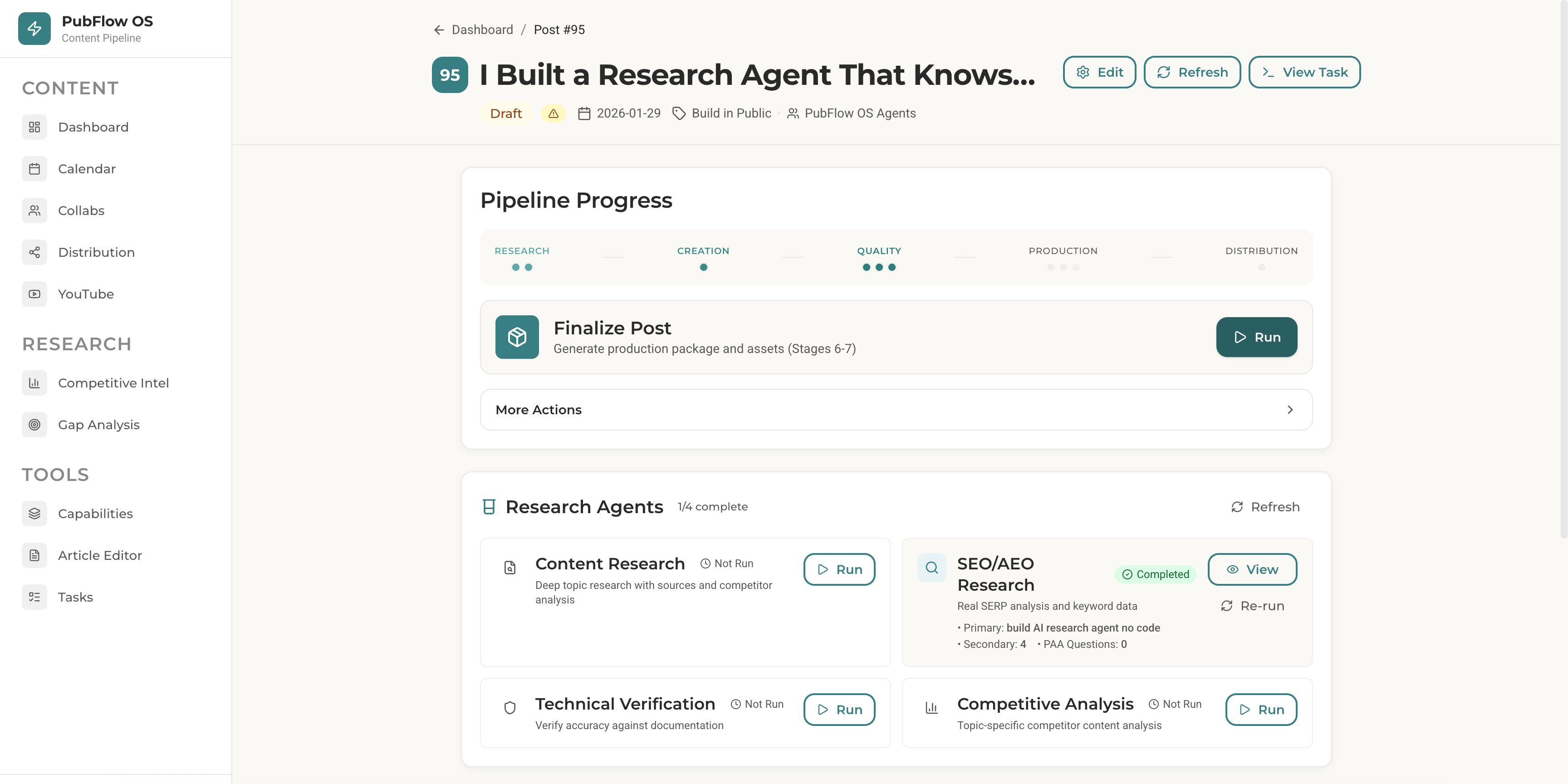
Here’s how the SEO/AEO agent fits my actual workflow:
1. Add article idea to Notion → Post #62 created
2. Run /seo-research 62 → Agent analyzes SERP + AEO
3. Run /research 62 → Content Researcher adds depth
4. Run /draft-post 62 → Pipeline reads research, writes draft
5. Manually -> Edit and publish
The SEO+AEO agent runs FIRST. It tells me:
Is this keyword worth targeting?
What format should the article be?
How do I get cited by AI assistants?
What are competitors missing?
This intel shapes everything downstream. Better research = better strategy = better content.
This is what “systems that talk to each other” looks like.
What Prompts Will You Use Daily?
Basic SEO Research
/seo-research --topic "your topic here"Use for: Quick SERP analysis when you have a topic idea but need to validate demand.
Research for Specific Post
/seo-research 62Use for: When you have a post in your content calendar and want comprehensive SEO/AEO strategy.
Compare Keywords
In Claude Code, spawn the agent with specific instructions:
SEO opportunity between: 1. "AI automation costs" 2.

"hidden costs of AI automation" 3. "AI ROI calculator"

Which has best ranking potential for a solopreneur content creator?

Use the seo-aeo-researcher agent.
The agent will analyze all three and recommend the best target.
What Results Can You Expect from This Agent?
Let’s talk numbers.
Before this agent:
2+ hours per article on keyword research
Using free tools with stale data
No AEO strategy (missing AI citation opportunity)
Guessing at competitor gaps
After this agent:
45-90 seconds per article
Real-time search data from Perplexity
AEO strategy included (unique advantage)
Competitor gaps clearly identified
~$0.25-$0.50 per research run (if cost optimized)
The real value isn’t just time. It’s strategy. Knowing EXACTLY what to write, how to format it, and how to differentiate before you write a single word.
This agent doesn’t just save time. It makes every article strategically stronger.
Frequently Asked Questions
How accurate is Perplexity’s keyword data compared to paid tools?
Perplexity pulls from real-time search results, not historical databases like Ahrefs or SEMrush. For trending topics and recent developments, it’s often MORE accurate. For precise volume numbers (1,200 searches/month), paid tools are better. This agent gives you directional accuracy (high/medium/low) which is sufficient for content strategy.
What does this agent cost to run?
After optimization: $0.25-$0.50 per research session. Perplexity search is around ($1 per 1M tokens for Sonar). We make exactly 2 calls per run when optimized, one search, one reason. Firecrawl free tier gives you 500 scrapes/month.
What’s the difference between this and the Content Researcher from Article 2?
Content Researcher: Topic research which means what’s the topic about, what angles exist, what have competitors written?
SEO/AEO Researcher: Keyword research which means what terms to target, SERP analysis, featured snippet strategy, AI citation opportunities.
Use both. SEO/AEO first (validate demand), then Content Researcher (understand topic depth).
Can I use this without Perplexity/Firecrawl?
Not effectively. The whole point is REAL search data. Without MCP tools, you’re back to LLM imagination, exactly what we’re replacing.
Does this work for YouTube SEO?
Partially. SERP analysis transfers (what’s ranking). But YouTube-specific metrics (watch time, CTR) require different tools. I’m building a YouTube Research agent later in this series.
Key Takeaways
LLM keyword research is fiction. Claude’s training data is stale. It can’t tell you what’s trending NOW. Real data from Perplexity replaces guesswork.
AEO is the new SEO. AI assistants answer questions directly. Your content needs to be structured for citation, not just ranking. This agent shows you how.
Competitor analysis reveals gaps. Every competitor writing about AI costs is a vendor. That’s a positioning opportunity you can own.
Cost optimization is a feature. Initial version: $0.85/run. Optimized version: $0.19/run. 70% reduction by batching queries. Build cheap from the start.
Structured output powers automation. JSON output feeds directly into your content pipeline. No copy-pasting. No manual transfer.
This agent is FREE. Included in the basic tier because good SEO research should be accessible to everyone starting their content journey.
Your 15-Minute Challenge
Build you SEO+AEO agent right now.
Here’s what to do:
Confirm MCP servers are configured (Article 1 checklist) - 2 minutes
Confirm research profile files exist (Article 2) - 1 minute
Create
.claude/agents/seo-aeo-researcher.mdwith the template above - 7 minutesRun one test:
/seo-research --topic "your main topic"- 5 minutes
Success criteria:
You have a JSON file with real keyword data, SERP analysis, and AEO opportunities for YOUR niche.
Don’t overthink it. Build it messy. Refine later. The goal is working SEO research today, not perfect SEO research someday.
Why Is This Agent FREE?
I believe good SEO research shouldn’t be locked behind expensive tools.
The Content Researcher and SEO+AEO Researcher are both FREE agents, included in the basic tier of my AI Research Agents toolkit. They give you a working research stack without spending a dollar on tooling.
What’s in the FREE tier:
Content Researcher agent (Article 2)
SEO/AEO Researcher agent (this article)
Full agent templates
Setup instructions
What’s in the PAID AI Agents Toolkit:
Competitive Analyzer (monitors your competition weekly)
Technical Verifier (checks article accuracy against current docs)
Content Gap Analyzer (finds opportunities across your niche)
Priority email support
Start free. See the value. Upgrade when you need more.
Want to Build These Research Agents in 15 Minutes Instead of Hours?
This SEO+AEO research agent is just second piece of a larger content automation system.
If you want to build this yourself:
Article 1 covers the foundation setup (Claude Code, MCP servers, folder structure)
Article 2 covered the content research AI agent
Article 3 covered the SEO + AEO AI agent
Article 4 covered the Competitive Analyzer AI agent
More agents coming: content gap analyzer, distribution, repurposing
If you want the pre-built agents:
Get your Content OS Agents Toolkit → pre-built versions of all 5 agents with configs, prompts, and setup guide. Drop them into your Claude Code workspace today.
PluggedIn members get 25% off →
If you want it done-for-you:
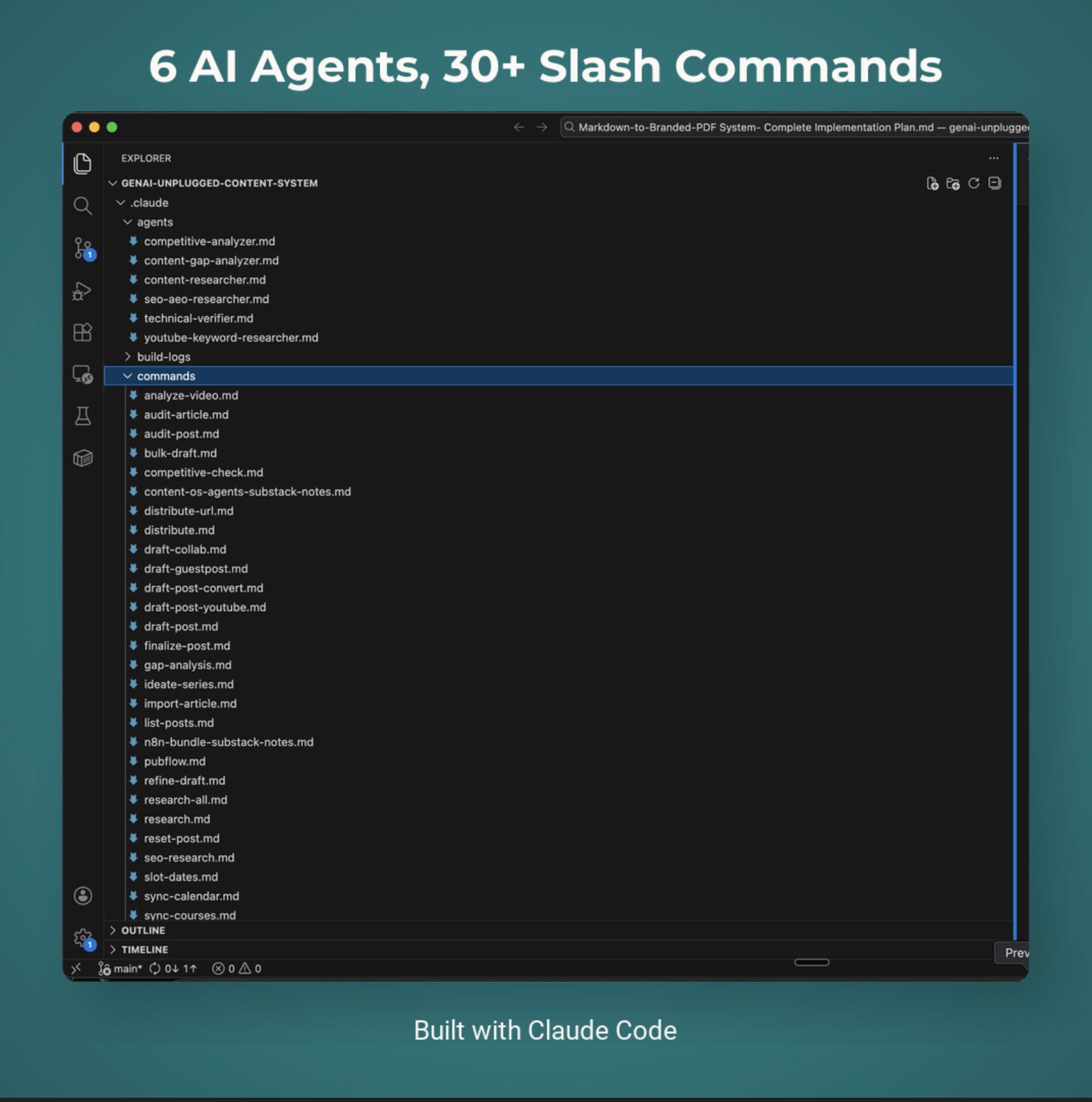
I’ve packaged everything into PubFlow OS CLI → my complete content automation system I use to run GenAI Unplugged with my personal taste and branding. Includes all agents, slash commands, and the full pipeline. Send me a DM to know more.
What’s Coming Next in This Series?
You’ve built a research agent that knows your topic. An SEO agent that knows your keywords.
Next article: I’m building a Competitive Analyzer agent that monitors your competitors automatically. It runs weekly, tracks new content, pricing changes, and product updates. Most importantly, it identifies gaps YOU can fill before competitors notice.
This is where the series shifts from FREE to PAID agents. The Competitive Analyzer requires ongoing monitoring, strategic interpretation, and business context that justifies the investment.
Same build log format. Same transparency. Same working agent at the end.
Stay tuned.
Ready to build more agents? This SEO/AEO agent is the second FREE agent in the PubFlow OS Agents series. Combined with the Content Researcher, you have a complete research stack. Next, we move into the PAID tier, the agents that require ongoing monitoring and strategic business context.
Get PluggedIn
PluggedIn members get 25% off the Agents Toolkit - plus full download packs for every other article in this publication.

Dheeraj, you’re calling out the exact thought I was having. I see all these prompts that write SEO optimized titles, metas and my one question is: how old and what is the data the LLM is using? So thank you for calling this out. This is a very valuable lesson for Substackers thinking they're optimizing for SEO. I hope it reaches many ppl.🩷🦩