

Why Your AI Automations Break Every Time You Change One Thing
Split monolithic AI automations into an orchestrator and reusable workers. Typed n8n sub-workflow contracts, Claude Code subagents, and the check most builds miss.

You've built five automations. Now you're scared to touch any of them.
Change one node in your content publishing workflow and your email sequence stops working. Update an API credential and three unrelated automations fail. You spend Tuesday morning fixing what you built last Tuesday.
That is spaghetti workflow syndrome, and the fix has a name that predates all of this tooling: split the thing that decides from the things that do.
Here is what changed while nobody was looking. In June 2026, n8n shipped Convert to sub-workflow: select nodes on the canvas, right-click, and the tangle becomes a callable module with its parameters wired up for you.
Anthropic shipped the same idea from the other direction, where a Claude Code subagent is a markdown file with its own context window and its own tool list. Two different worlds, six months apart, both arriving at one orchestrator and many workers.
So the split is solved. Both tools give it to you in about ten seconds.
How do I build reusable workflow modules that don't break when I make changes?
Split every workflow into an orchestrator that routes and workers that execute. Then write a contract for each worker: what goes in, what comes out, what happens when it fails. The split is the easy half.
The contract is the job.
By the end of this article you'll have a modular content distribution system: one orchestrator routing to three specialized workers.
You'll build it in n8n, then build the same worker as a Claude Code subagent, because the two tools enforce contracts in opposite ways and the difference decides how your system fails.
This is Part 7 of the "From Demo to Dependable" series: AI Production Field Notes.
👋 Julley, I'm Dheeraj, an AI systems builder.
I build production-grade AI systems at work by day and ship my own products by night, 9 and counting, including SubflowAI and the Content OS Agents Toolkit. This newsletter is the bridge between those two worlds. Every system, every build, documented step by step.
Join 2,000+ builders getting the exact AI setups, prompts, and workflows that actually work in your business.
The Split Is Now One Click. That Was Never the Hard Part.
Splitting a monolith used to mean rebuilding it. Now both major tools hand you the split for free, which means the difficulty has moved somewhere else entirely. It has moved into the boundary you just created, and boundaries are where systems lie to you.
In n8n, sub-workflow conversion has been available on all plans since version 1.97.0. You select a continuous group of nodes, right-click the canvas, and pick Convert to sub-workflow. Expressions that referenced other nodes get rewritten and added as parameters on the trigger.
The selection has rules (no trigger nodes, one entry, one exit), but for the middle of a linear pipeline it does the tedious part.
In Claude Code, a worker is a file. Drop code-reviewer.md into .claude/agents/, give it frontmatter and a system prompt, and you have a worker with its own context window, its own tool allowlist, and its own model. No wiring at all.
Both took me under a minute. Both produced something that ran. Neither told me whether the thing I had just carved out could be trusted by the thing that now calls it.
That gap is the entire subject of this article.
Blueprint Check: Before building the orchestrator, map the full system in your Workflow Blueprint. Draw the orchestrator box, each worker box, and the data flowing between them. If you can't draw the contract, you're not ready to build it. Remember: No map, no build.
Orchestrators Decide. Workers Do. Nothing Else.
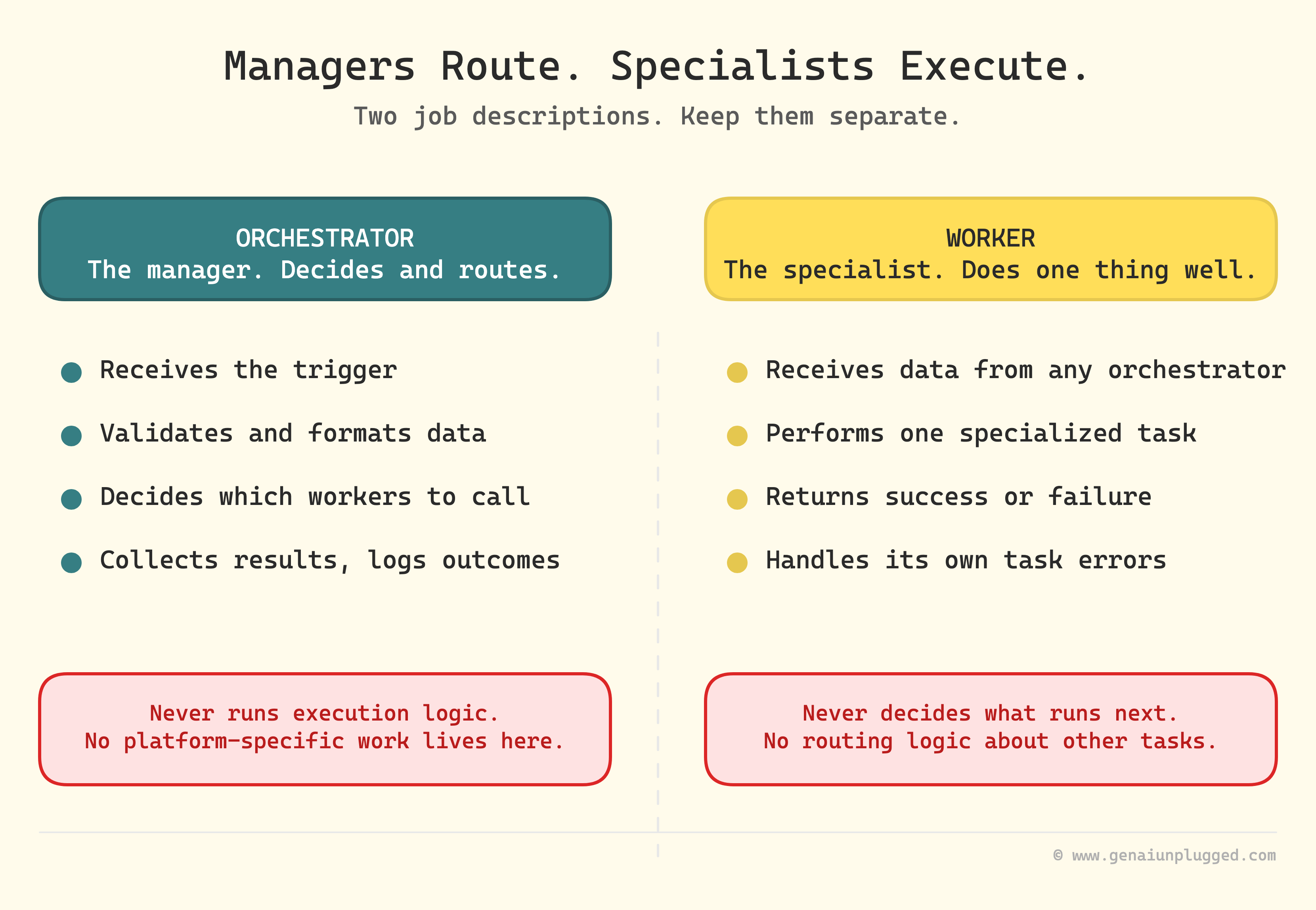
An orchestrator receives a trigger, works out what needs to happen, and delegates. It holds routing logic and no execution logic. A worker receives data from any orchestrator, performs one specialized task, returns a result, and knows nothing about what runs next.
Think managers and specialists. The moment a worker starts deciding what should run after it, you have two orchestrators and a coordination bug waiting for a bad Tuesday.
Orchestrator responsibilities
Receive the trigger (webhook, schedule, manual)
Validate and format incoming data
Decide which workers to call
Pass formatted data to each worker
Collect results and handle failures
Log what happened, per worker
Worker responsibilities
Receive data from any orchestrator
Perform one specialized task
Return success or failure in a predictable shape
Handle its own task-specific errors
Hold no routing logic about other tasks
Build a worker when the logic is platform-specific, when the same logic already exists in more than one workflow, when the task is complex enough to deserve its own tests, or when a second orchestrator might want it later.
Keep logic in the orchestrator when it's a simple routing decision, formatting that only this orchestrator needs, or error handling specific to this one flow.
The Contract Is the Whole Job
A contract is the promise a worker makes to every orchestrator that calls it: these fields go in, this shape comes out, and here is what a failure looks like. Part 3 of this series broke that into input contracts, output contracts, and error contracts.
A worker boundary is where all three get enforced at once.
Here is the part that surprised me when I went back through the docs. The two tools have moved in opposite directions on how that contract is enforced, and both directions are defensible.
n8n moved toward types.
The Execute Sub-workflow Trigger now carries an Input data mode with three settings, per the sub-workflow docs:
Define using fields below
What it does: You name each input and its data type. The calling node pulls those fields in automatically
Use it when: The default. This is your input contract, enforced by the tool
Define using JSON example
What it does: You paste an example object and n8n infers the shape
Use it when: You already have a real payload and want the schema derived from it
Accept all data
What it does: No contract. The worker must handle every inconsistency itself
Use it when: Migrating an old sub-workflow, or genuinely variable input
That first mode did not exist when this pattern was hard. The contract used to live in a comment, or in your head, or nowhere. Now the worker declares it and the orchestrator's node populates the fields from that declaration.
Claude Code moved toward prose.
A subagent's contract is its description field, written in plain English, and that description is what Claude reads to decide whether to delegate at all. There is no type checking. There is no schema.
The docs are direct about it: Claude uses each subagent's description to decide when to delegate, so write a clear one.
Same architecture. Opposite enforcement. And the failure modes are not the same shape:
Contract lives in
n8n sub-workflow: A typed field list on the trigger
Claude Code subagent: A prose
descriptionin frontmatter
Routing decided by
n8n sub-workflow: A Switch node you wrote
Claude Code subagent: The model, reading descriptions
Fails when
n8n sub-workflow: The shape doesn't match. Loudly, at the boundary
Claude Code subagent: Two descriptions overlap, and the wrong worker runs. Quietly
Blast radius limited by
n8n sub-workflow: The workflow boundary
Claude Code subagent: The subagent's own context window and
toolslist
Fix looks like
n8n sub-workflow: Correcting a field type
Claude Code subagent: Rewriting a sentence
Neither is better.
Typed contracts catch shape errors and cannot catch "this worker was the wrong choice." Prose contracts route flexibly and cannot catch anything at all. What matters is knowing which kind you're holding, because you debug them in completely different places.
If you're weighing the two toolchains more broadly, I scored them against each other in n8n vs Claude Code.
Learn with me: Claude Code Builder cohort
I run the Claude Code Builder cohort on Maven: four weeks, six live sessions, building a real AI system with me. If you would rather build it alongside me than read about it, this is the room.
Each cohort is a small, hands-on group, so seats are limited.
Build it with me, live. See the syllabus →
Why Your AI Workflows Became Spaghetti
Nobody plans a mess. Spaghetti workflows are the result of four reasonable shortcuts taken in sequence: copying a working workflow instead of extracting the shared part, adding features inline, letting each step read the previous step's output directly, and nesting one more conditional because extracting it was slower.
1. Copy-paste duplication.
You built a YouTube publishing workflow. It worked. Then you needed LinkedIn, so you copied it and changed a few nodes.
Now the same formatting logic lives in two places, and you update it twice. Sometimes you remember.
2. Feature creep.
Your email workflow started as "send a welcome email." Then a tag check. Then platform-specific content. Then A/B testing, then timezone handling.
Now it's 47 nodes doing five unrelated things and you can't tell where email logic ends.
3. Tight coupling.
Each step references the previous step's output directly. Change the image processing and caption generation breaks. Everything depends on everything.
4. The "just one more if/else" trap.
Inline conditionals are faster than extracting them. One becomes three, three becomes seven, and now you can't test one path without running the others.
Signs you've crossed the line: more than 30 nodes in one workflow, copy-pasted logic across workflows, fear of changing anything, multiple unrelated tasks in one place, or nested conditionals more than three levels deep.
What You're Building
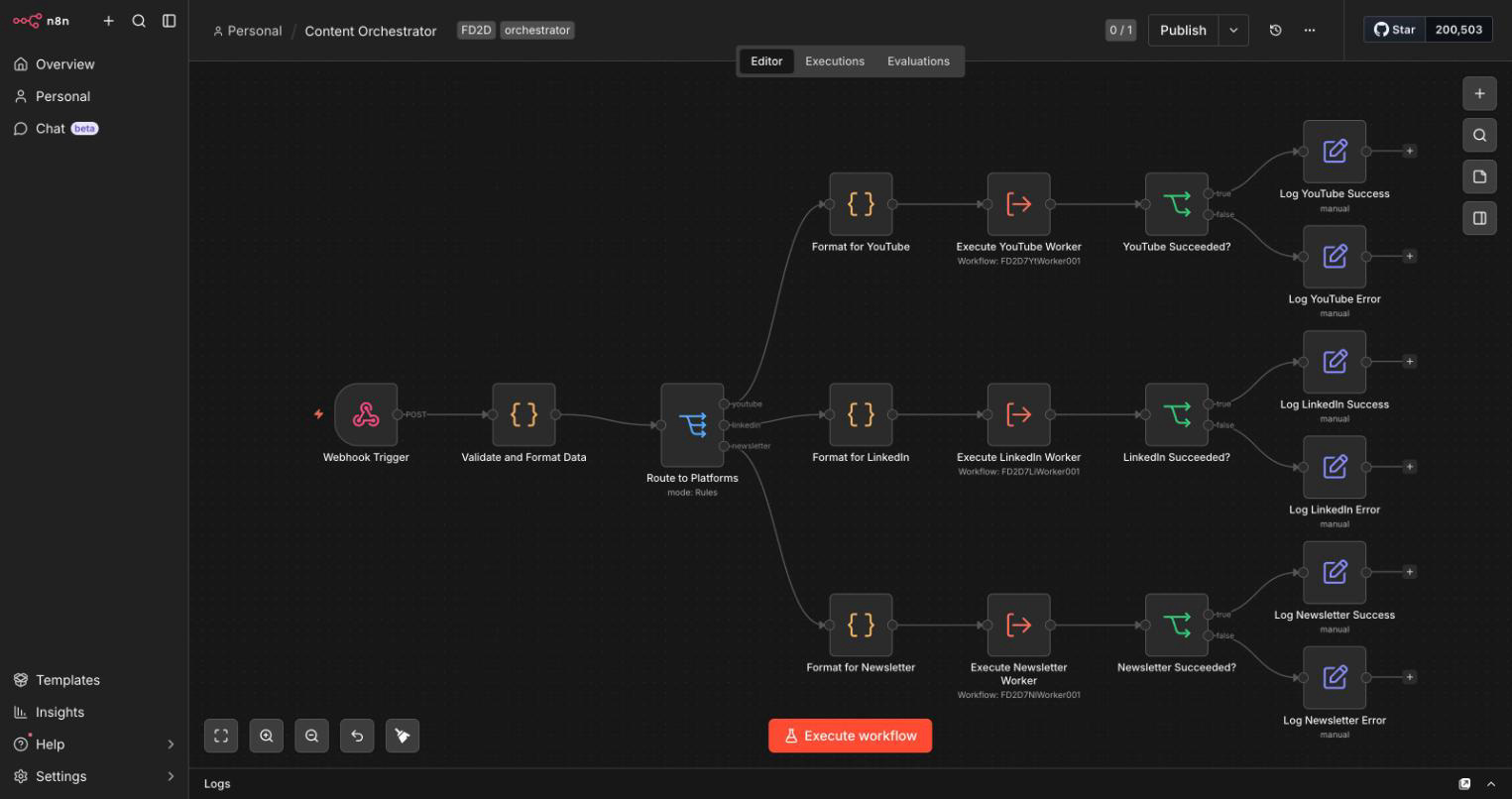
A modular content distribution system. You publish a blog post and it fans out: YouTube gets the title, description, tags and thumbnail for the episode, LinkedIn gets a text post, and your newsletter gets an email. Nothing here renders a video. Each worker prepares what its platform needs.
Monolithic version: one 50-node workflow that does all of it inline. Change the LinkedIn hashtag logic and you might break YouTube uploads. Test one platform without running the others?
You can't.
Modular version: a 10-node orchestrator plus three workers of 15 to 20 nodes each. More nodes in total, and that is not a typo. You are trading node count for blast radius, and that trade is the point.
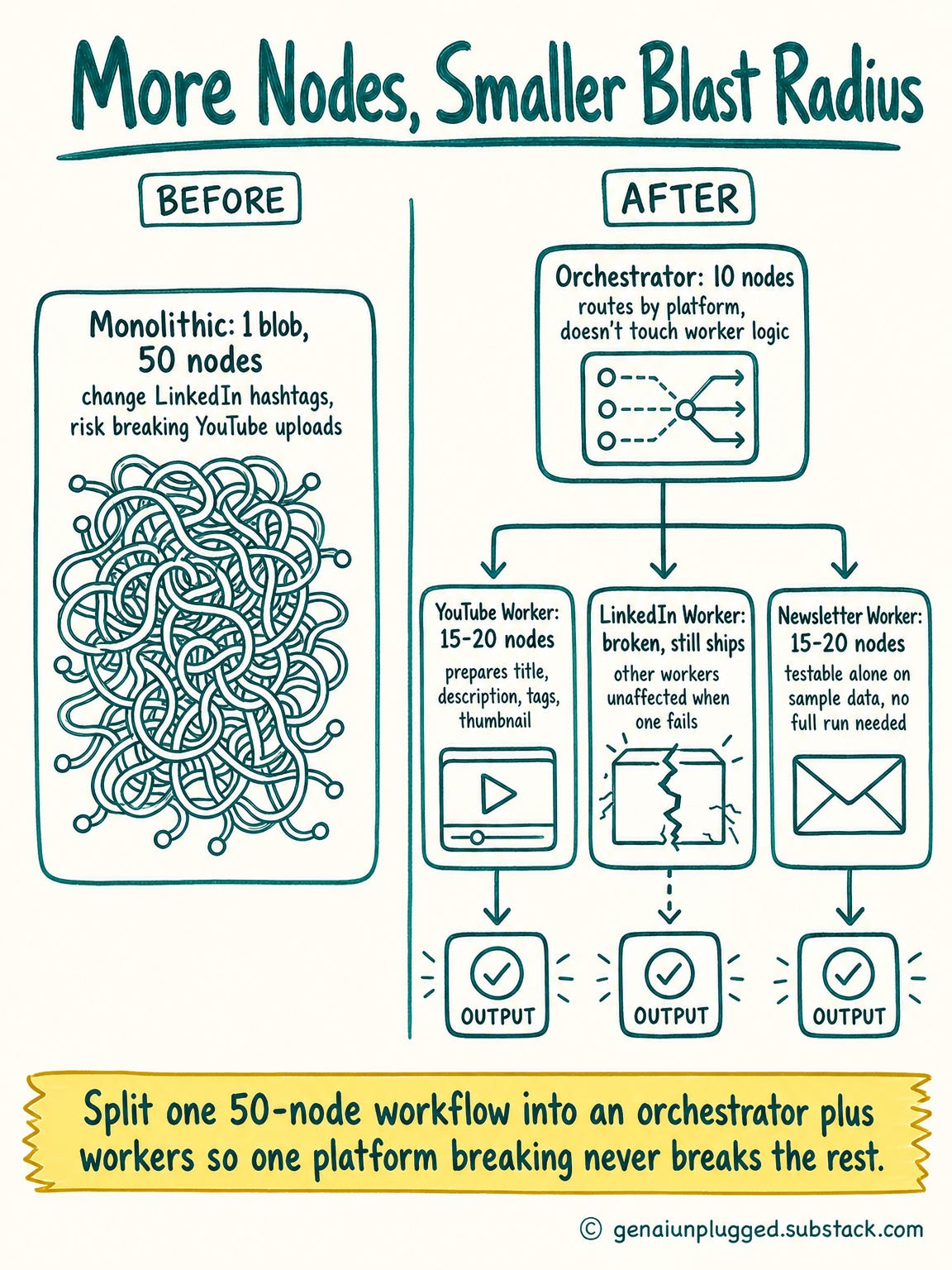
What you get for it:
Improve LinkedIn hashtag logic by editing one worker. The orchestrator doesn't change, and the other two workers aren't touched
Add Twitter by building one worker and adding one route
Reuse the LinkedIn worker from a different orchestrator, like a course launch flow
Test the Newsletter worker on sample data without running the pipeline
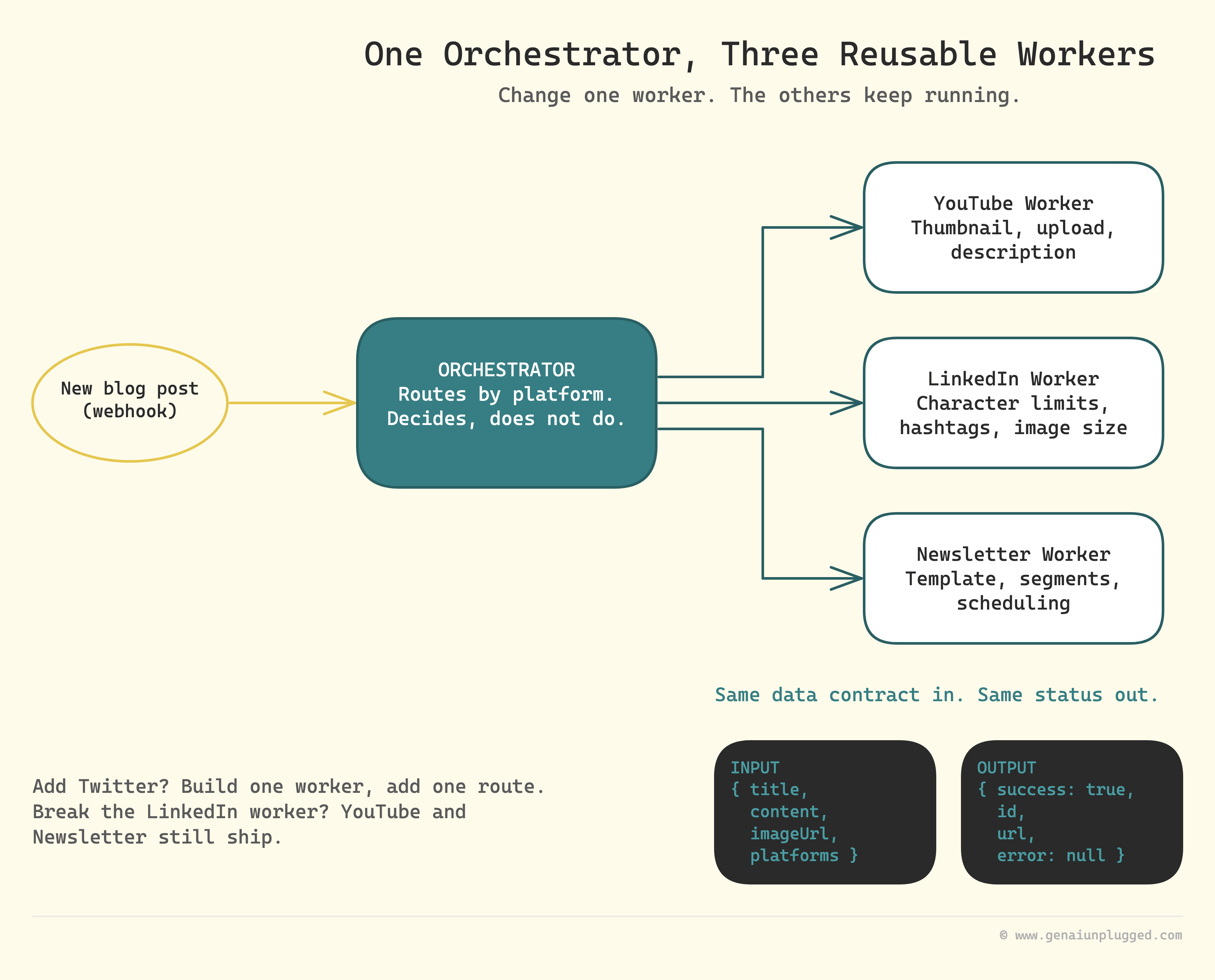
And here it is built, deployed and running on my own n8n:
Step 1: Build the Orchestrator
The orchestrator is three nodes before it delegates anything:
a trigger that receives the work,
a validation step that rejects bad input at the front door,
and a router that decides which workers to call.
Nothing platform-specific belongs in any of them.
Create a new workflow and name it "Content Orchestrator." Add a Webhook trigger: method POST, path content-publish, respond immediately.
Add a Code node after it named "Validate and Format Data." This is your input contract at the front door, before any worker sees anything:
const required = ['title', 'content', 'platforms'];
const body = $json.body ?? {};
const missing = required.filter(field => !body[field]);

if (missing.length > 0) {
  throw new Error(`Missing required fields: ${missing.join(', ')}`);
}

return {
  json: {
    title: body.title,
    content: body.content,
    imageUrl: body.imageUrl || '',
    publishDate: body.publishDate || new Date().toISOString(),
    platforms: body.platforms
  }
};
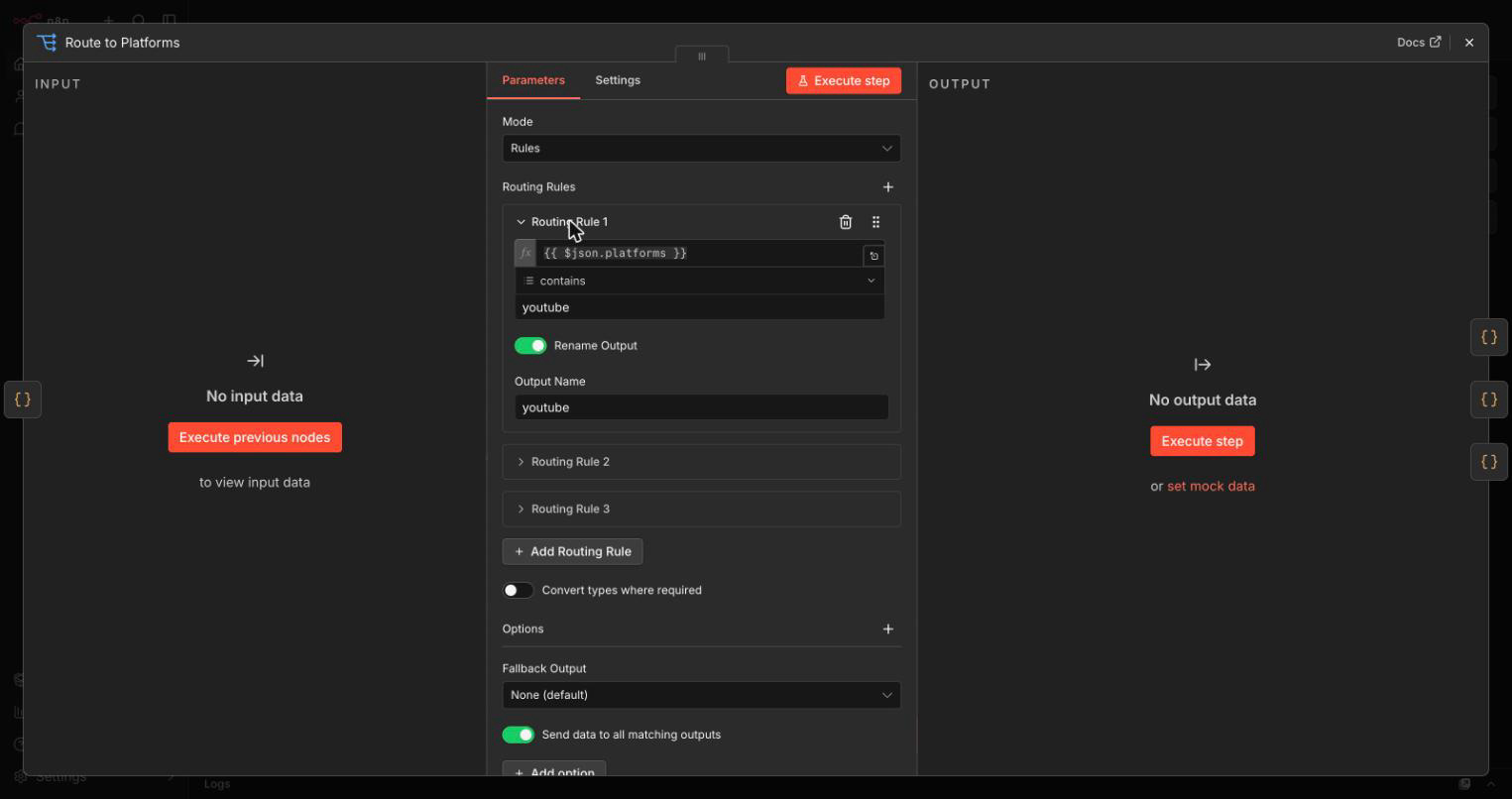
Then add a Switch node named "Route to Platforms," mode Rules, with one rule per platform checking whether platforms contains that value.
Open the node's Options and turn on "Send data to all matching outputs."
Miss this and only the first matching platform fires, silently.
The real control is in Options, and the Switch docs describe it as sending data to all outputs meeting conditions rather than only the first.
Step 2: Wire the Execute Sub-workflow Nodes
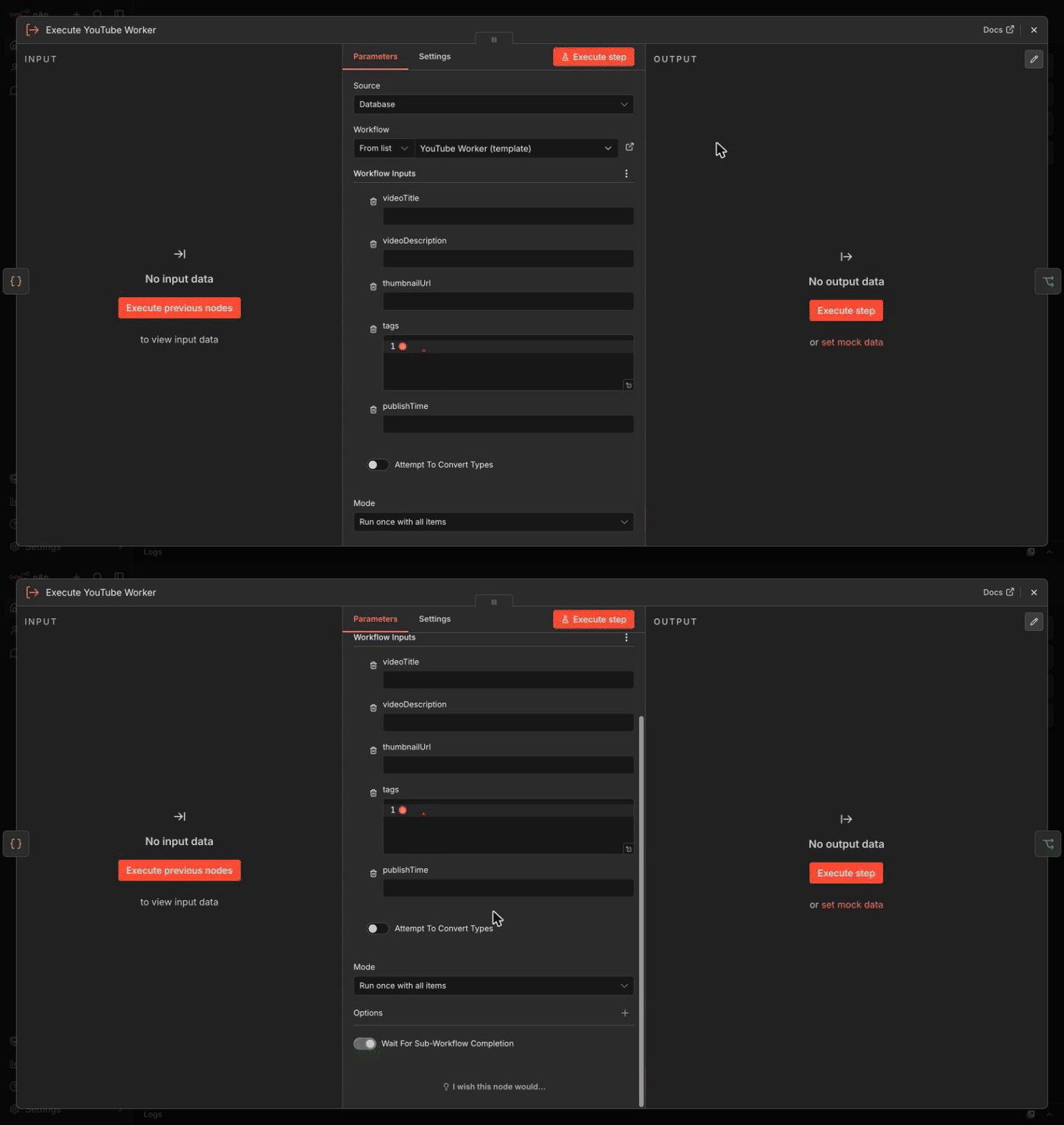
For each Switch output, add a Code node that shapes the data for that platform, then an Execute Sub-workflow node pointing at the matching worker.
Format first, then call, because a worker that has to guess at the shape of its input is a worker with no contract.
Each platform gets its own branch, its own limits, and its own error path.
YouTube:
// YouTube caps descriptions at 5000 BYTES, not characters.
// An emoji is 4 bytes, so slicing by .length quietly overshoots
// and the API rejects the upload.
const truncateBytes = (s, max) => {
  const bytes = new TextEncoder().encode(s);
  if (bytes.length <= max) return s;
  // Trailing partial character decodes to U+FFFD. Drop it.
  return new TextDecoder().decode(bytes.slice(0, max)).replace(/\uFFFD$/, '');
};

return {
  json: {
    videoTitle: $json.title,
    videoDescription: truncateBytes($json.content, 4800),
    thumbnailUrl: $json.imageUrl,
    tags: ['automation', 'AI', 'productivity'],
    publishTime: $json.publishDate
  }
};
LinkedIn. The UGC Post API caps post text at 3,000 characters, so that is the number:
return {
  json: {
    postText: `${$json.title}\n\n${$json.content}`.slice(0, 2900),
    imageUrl: $json.imageUrl,
    hashtags: ['#automation', '#AI', '#productivity'],
    publishTime: $json.publishDate
  }
};
Newsletter:
return {
  json: {
    subject: $json.title,
    htmlContent: $json.content,
    imageUrl: $json.imageUrl,
    sendTime: $json.publishDate,
    segmentTags: ['newsletter-subscribers']
  }
};
On each Execute Sub-workflow node, check Wait For Sub-Workflow Completion. Leave it off and the orchestrator moves on without the result, which means your success log is recording that you sent the work, not that it landed.
After each one, add an If node checking {{ $json.success }} equals true, with the true branch logging success and the false branch logging the error. Per platform, not once at the end.
The Step You Can Skip
Before you build the worker, delete a step. Every tutorial on this topic tells you to make the workflow callable first, including the first version of this one. On a stock n8n instance there is nothing there to change, because the default already allows it.
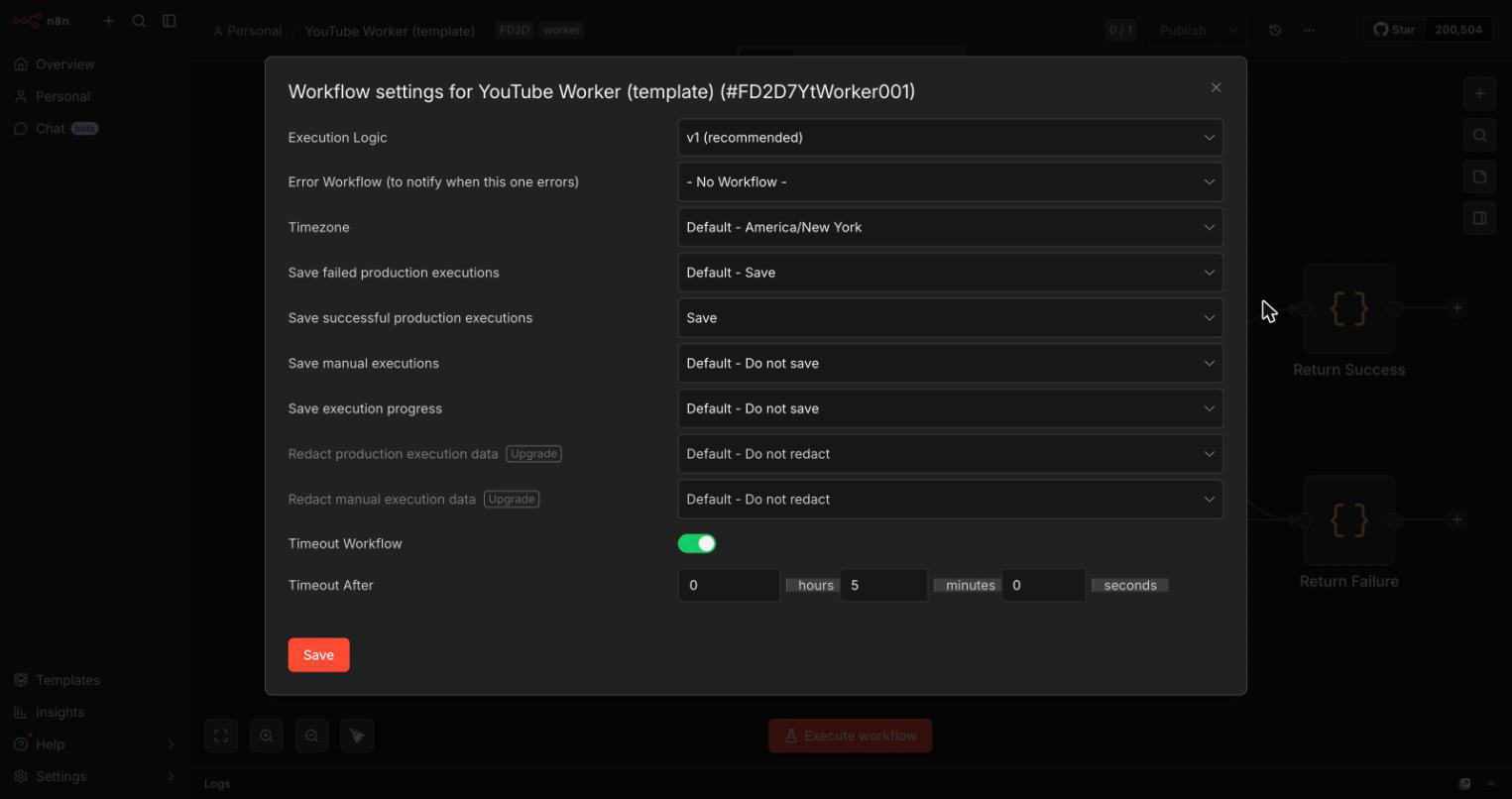
The old "Can be called by other workflows" checkbox is gone. What replaced it is a caller policy that defaults to `workflowsFromSameOwner`, so a workflow you own is already callable by your other workflows with no configuration at all.
The This workflow can be called by dropdown that the settings docs describe is real, but it requires Workflow sharing, which is a paid feature. Open Workflow settings on a stock instance and the row is simply not there.
The screenshot below is my own n8n running 2.18.5. Execution Logic, Error Workflow, Timezone, four execution-saving options, two greyed-out redaction rows, Timeout. No caller policy anywhere in it.
I only found this by deploying the workflow and opening the panel. The docs describe the dropdown without saying it is gated, and n8n's own sub-workflow walkthrough marks the step "Optional", which is easy to read past.
Step 3: Build the YouTube Worker
A worker is an ordinary n8n workflow with one difference that matters. You give it a trigger that declares the fields it expects and their types, and that declaration is the contract. Everything else about it is normal node work.
Create a new workflow and name it "YouTube Worker."
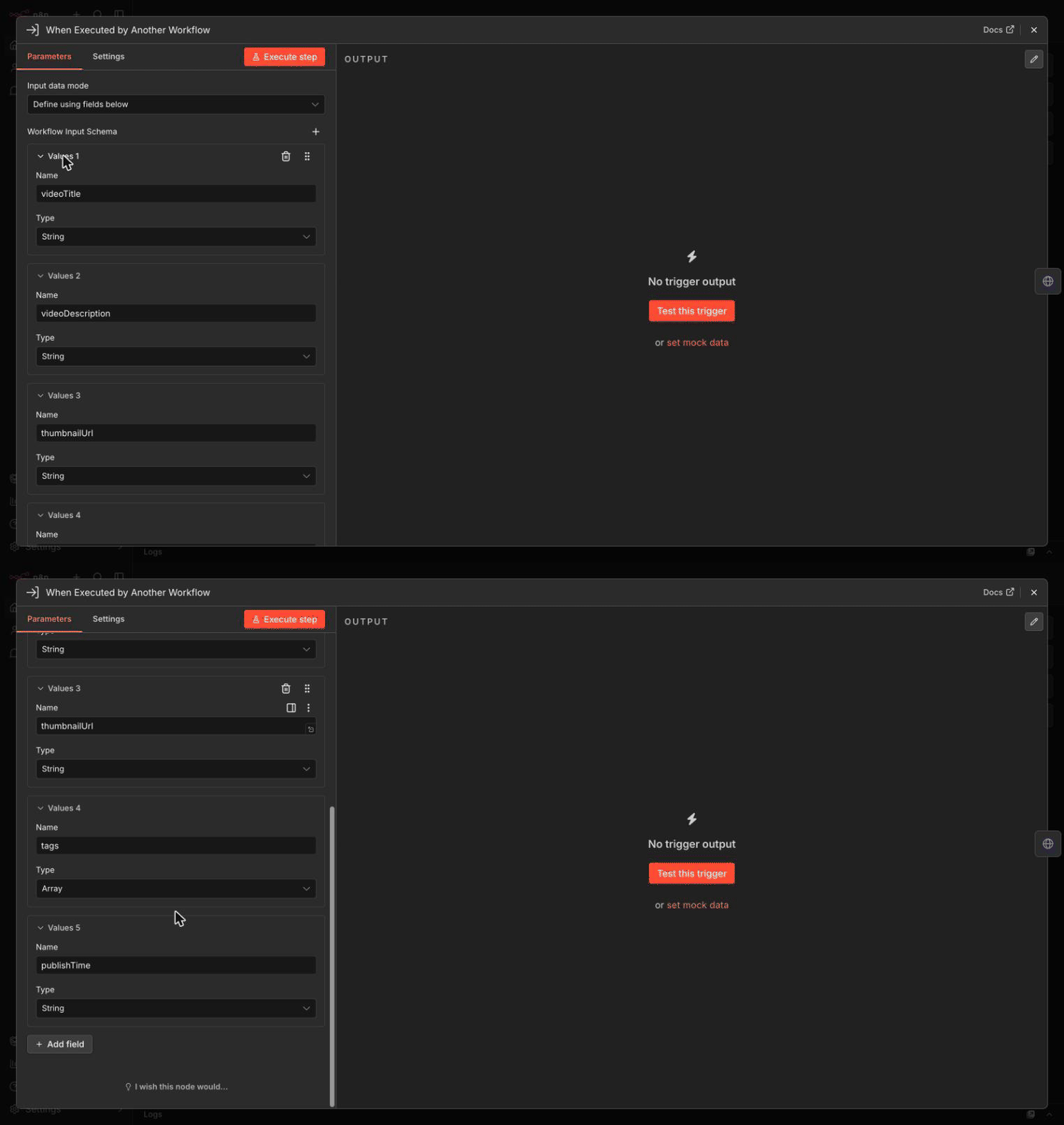
Add the Execute Sub-workflow Trigger node. If you're searching under triggers it's listed as When Executed by Another Workflow. Set Input data mode to Define using fields below and declare the contract:
`videoTitle`: String
`videoDescription`: String
`thumbnailUrl`: String
`tags`: Array
`publishTime`: String
Now the calling node pulls those fields in automatically. Change the contract here and the caller shows you the new fields. And notice what the contract does not carry: no video file and no video id. This worker sets publishing metadata for an episode you have already produced, it does not make one, and the five fields are what tell you that. Wanting it to upload media too means a sixth field and a different endpoint. A good contract answers "what can this worker actually do" before you read a single node. Reach for Accept all data only when you genuinely cannot know the shape, because it is the mode that hands every validation problem back to you.
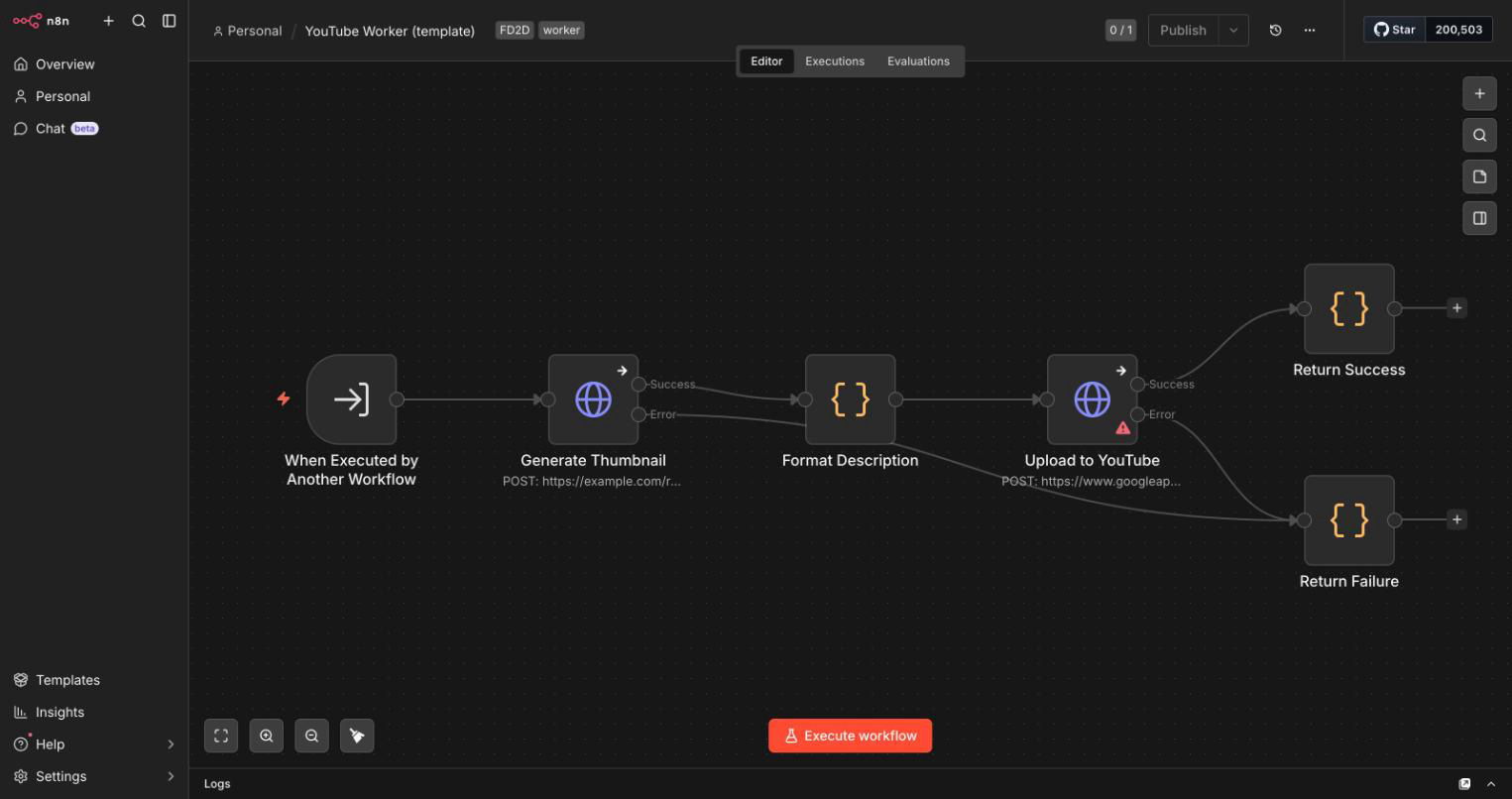
Then the work itself: an HTTP Request node to generate the thumbnail, a Code node to format the description, an HTTP Request node to https://www.googleapis.com/youtube/v3/videos with OAuth2, and a final Code node returning the output contract:
return {
  json: {
    success: true,
    videoId: $json.id,
    videoUrl: `https://youtube.com/watch?v=${$json.id}`,
    error: null
  }
};
Use a Code node here, not a Set node. A Set node maps fields and does not run JavaScript, and that mismatch is worth ten minutes of confusion.
For failures, set the HTTP nodes' On Error to continue using the error output, and route that branch into a Code node returning success: false with the message.
Separately, set an Error workflow in Workflow settings for anything that escapes: it must start with an Error Trigger node, and one error workflow can serve every workflow you own. You do not "wrap" nodes in an Error Trigger.
It is the entry point of a separate workflow that runs after a failure.
Repeat for LinkedIn (character limit, hashtags, image sizing) and Newsletter (template selection, segmentation, scheduling). Same trigger, same typed contract, same success shape.
Step 4: Build the Same Worker as a Claude Code Subagent
The same worker in Claude Code is one markdown file at .claude/agents/linkedin-worker.md. Its frontmatter is the contract and its body is the system prompt, so there is no canvas and no wiring. All of it is replaced by a description a model routes on.
---
name: linkedin-worker
description: Formats a blog post into a LinkedIn post. Use when the
  user has a finished article and wants LinkedIn copy. Do NOT use for
  YouTube descriptions or newsletter copy. Input is a title and body.
  Returns the post text and the hashtags used.
tools: Read, Write
model: haiku
---

You format articles into LinkedIn posts.

Return exactly this shape and nothing else:
{ "success": true, "postText": "...", "hashtags": [...], "error": null }

Cap postText at 2900 characters. Maximum 5 hashtags.
On failure return success: false with the reason in error.
Read that description again, because it is doing three jobs a Switch node does explicitly. It says what the worker does, when to call it, and (in the "Do NOT" line) when not to.
That last clause is your routing rule, written as a sentence to a model rather than a condition to a node.
Two things here are contracts even though they don't look like it. tools: Read, Write is a blast-radius contract, and a subagent gets only the tools listed in its own definition. It does not inherit yours.
model: haiku is a cost contract, routing a mechanical formatting job away from your expensive model.
The equivalent of "reuse this worker from another orchestrator" is file placement. Put it in .claude/agents/ and it belongs to this project. Put it in ~/.claude/agents/ and every project on your machine can call it.
One Worker, Two Callers
Here is where the two worlds stop being an analogy and start being the same system. n8n lets you call the exact same sub-workflow from an AI agent using the Call n8n Workflow Tool node. Nothing about the worker changes, and yet its contract changes character underneath you.
Called by an Execute Sub-workflow node, routing is a rule you wrote and inputs come from expressions you control. Called as an agent tool, routing is decided by a description the model reads, and the inputs can be filled by the model itself through $fromAI().
Same worker. Same typed input schema. Two completely different questions about whether the right thing got called with the right values.
That is the whole lesson in one node. Your typed contract protects the shape of the data. It has never had an opinion about whether calling this worker was the correct decision.
Deterministic routing gave you that for free, and the moment a model does the routing, you have to buy it back with the description and check it in the logs.
Most people who read a piece like this split one workflow this week and then stop.
The rest is the slow part: a typed schema per worker, one success and failure shape, an error workflow, and a coverage check. That is a lot of blank canvas before you learn whether the pattern suits your work.
In my PluggedIn tier, I package the orchestrators and workers I already run in this business, so you start from something that executes instead of a naming convention.
What I Got Wrong
On 4 August 2026 my article review system told me a post was ready to publish, with zero critical, zero major and zero minor issues. Every worker behind that verdict had failed. The orchestrator could not tell a clean sweep apart from no coverage at all.
That system is an orchestrator with four workers, run in three waves: a fact verifier, a community validator, a step executor, and a narrative auditor. It collects issues from each worker and computes a verdict.
Three of the four were in scope for that article, and all three failed. The CLI behind them had hit a monthly spend limit, and the fallback died on an unrelated decode error. Nothing ran, so nothing came back, so the orchestrator reported a clean sweep.
The bug was one line of reasoning: the verdict was computed from issue counts alone. Nothing distinguished "four workers checked and found nothing" from "nothing checked." Both are zero.
I had an output contract. Every worker returned a well-formed result. What I did not have was a coverage contract, which is the question of whether the worker ran at all, and it is not the same question as whether it succeeded.
The fix checks coverage before it looks at a single issue: all workers failed gives BLOCKED: NO COVERAGE, some failed with nothing found gives INCOMPLETE REVIEW, and only a full clean sweep gives a pass.
I had written the abstract version of this warning into an earlier draft of this very article, in the troubleshooting section, as "worker fails but orchestrator shows success." Knowing the failure mode did not stop me building it.
What would have stopped me is treating "did every worker actually run" as a field in the contract rather than a thing I would obviously notice.
Check your own orchestrator for this one before you check anything else. It is the failure that looks most like success.
Step 5: Test It
Workers first, always. Open the YouTube Worker and execute it with test data matching your declared input contract. If you set Save successful production executions to Save in that worker's settings, you can run the parent once and then pin real data in the trigger while you build the rest.
{
  "videoTitle": "Test Video",
  "videoDescription": "This is a test description",
  "thumbnailUrl": "https://example.com/thumb.jpg",
  "tags": ["test"],
  "publishTime": "2026-08-20T10:00:00Z"
}
Then the orchestrator:
curl -X POST https://your-n8n-instance.com/webhook/content-publish \
  -H "Content-Type: application/json" \
  -d '{
    "title": "How to Build Modular Workflows",
    "content": "Full blog post content here...",
    "imageUrl": "https://example.com/image.jpg",
    "platforms": ["youtube", "linkedin", "newsletter"],
    "publishDate": "2026-08-20T10:00:00Z"
  }'
All three branches should fire. Open the Execute Sub-workflow node and use View sub-execution to jump straight into the worker's run, then use the link in the worker's execution to come back. That navigation is the reason this pattern is debuggable at all.
Then test the failure. Send a payload missing title. Then break one worker's credentials on purpose and confirm the other two still ship. A modular system that has never been tested with a broken worker is a monolith you have not noticed yet.
Troubleshooting for Common Issues
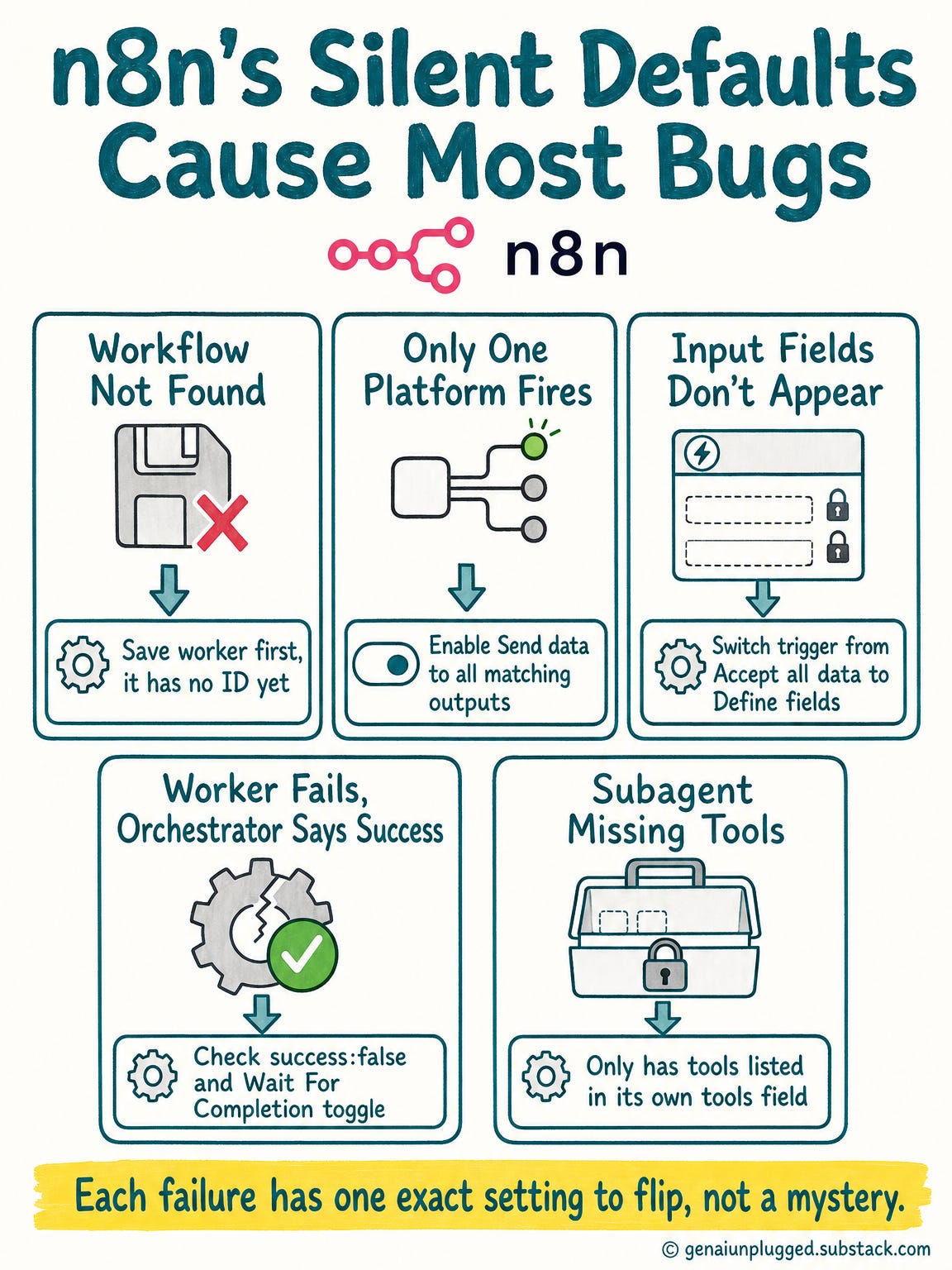
"Workflow not found" on the Execute Sub-workflow node.
Save the worker first, because it has no ID until you do. Then reopen the orchestrator and reselect it. If your instance has Workflow sharing, also check This workflow can be called by; without that feature the default already allows it.
Only one platform fires.
Switch node Options, turn on Send data to all matching outputs. This is the single most common cause.
Input fields don't appear on the calling node.
The worker's trigger is on Accept all data, which by design declares no fields. Switch it to Define using fields below. If you changed the schema and the caller still shows the old fields, reopen the node to pull them again.
Worker fails but the orchestrator logs success.
Two separate causes, and people usually only fix one. Either the worker isn't returning success: false on its error path, or Wait For Sub-Workflow Completion is off, so the orchestrator never saw a result to judge.
Fix both, then add the coverage check from the section above.
Claude Code delegates to the wrong subagent.
Two descriptions overlap. Add an explicit "Do NOT use for..." clause naming the neighbouring worker. This is the prose equivalent of a Switch rule that was matching too broadly.
A subagent can't do its job.
It only has the tools in its own tools field, and it does not inherit yours. Silent, and it looks like the model being unhelpful.
What This Looks Like Already Built
The rest of this pattern is assembly work: a typed input schema per worker, one success and failure shape every orchestrator can rely on, an error workflow behind all of it, and a coverage check so a silent skip cannot read as a pass.
🎁 Paid subscribers get the working version of everything above:
the importable orchestrator with routing and per-platform error branches already wired,
a worker template with the typed input contract and both return paths filled in,
and the setup checklist that walks the whole build in order so you're customizing rather than starting from a blank canvas.

Frequently Asked Questions
How do I make an n8n workflow callable by another workflow?
Usually you do nothing. Add the Execute Sub-workflow Trigger node, listed under triggers as "When Executed by Another Workflow," and save. The caller policy defaults to workflows from the same owner, so your own workflows can already call it.
The old "Can be called by other workflows" checkbox no longer exists, and the dropdown that replaced it requires the paid Workflow sharing feature.
How do I split an existing n8n workflow without rebuilding it?
Use sub-workflow conversion, available on all plans since n8n 1.97.0. Select a continuous group of nodes, right-click the canvas, and choose Convert to sub-workflow. Expressions referencing other nodes are rewritten as trigger parameters.
Input and output types stay unset, so add them yourself.
What is the difference between a monolithic and a modular workflow?
A monolithic workflow does everything in one place, so changing one part risks breaking others and you cannot test a single path. A modular workflow uses an orchestrator that routes to specialized workers. Each worker is independently testable and reusable across orchestrators.
Why does only one platform run when my Switch node matches several?
The Switch node sends items to the first matching output by default. Open the node's Options and turn on Send data to all matching outputs. There is no "All matches" mode setting, which is a detail plenty of tutorials still get wrong, including an earlier version of this one.
How does the orchestrator-worker pattern apply to Claude Code?
A subagent is the worker: a markdown file in .claude/agents/ with its own context window, tool allowlist, and model. Its description field is both its contract and its routing rule, because Claude reads that description to decide when to delegate. There is no type checking.
How many workers should each orchestrator have?
Build one worker per platform-specific or reusable unit of logic. Five social platforms with genuinely different logic means five workers. Three platforms sharing identical logic means one worker with a parameter.
Reuse across orchestrators matters more than count.
Should I use typed input schemas or Accept all data?
Use Define using fields below by default, because it makes the input contract explicit and the calling node populates fields from it automatically. Choose Accept all data only when input is genuinely variable, and accept that every validation problem then becomes the worker's job.
Key Takeaways
The split is free now, so the contract is the work. n8n converts a selection into a sub-workflow from the right-click menu; a Claude subagent is one markdown file. Neither tells you whether the boundary is trustworthy.
Orchestrators decide, workers do. The moment a worker starts choosing what runs next, you have two orchestrators and a coordination bug waiting.
n8n enforces contracts with types, Claude Code with prose. Set Input data mode to "Define using fields below" for a typed schema. A subagent's
descriptionis its contract, unchecked, and it is also its routing rule.
A contract has three parts, and most people ship two. Input shape, output shape, and what a failure looks like. Part 3 of this series covers all three.
Coverage is a fourth thing, and it is not success. My review orchestrator printed "ready to publish, 0 issues" when all its workers had failed to run. Check that workers ran before you read what they returned.
Turn on "Send data to all matching outputs" and "Wait For Sub-Workflow Completion." Both default to the quieter, wrong-er behaviour for this pattern.
Ignore every tutorial telling you to tick a callable checkbox. It is gone, and the dropdown that replaced it is a paid feature. Your own workflows can call each other by default.
Test workers alone, then test with one deliberately broken. A modular system never tested with a broken worker is an untested monolith.
Your 60-Minute Challenge
Pick the platform integration you're most afraid to touch (5 minutes)
In n8n, select those nodes and use Convert to sub-workflow. In Claude Code, write the
.claude/agents/file (10 minutes)Set the input contract: Define using fields below with real types, or a
descriptionnaming what it does, when to use it, and when not to (15 minutes)Define the return shape for both success and failure (10 minutes)
Call it from the orchestrator and test with valid data, then with a missing field (15 minutes)
Break it on purpose and confirm the orchestrator notices (5 minutes)
Success criteria: your orchestrator calls your worker, receives a response, and reports a failure correctly when you sabotage it. The last one is the only step that proves anything.
What's Next
You've built workflows that don't collapse when you change them. Next: making sure you're building the right ones before you quote.
Next in the series: Stop Asking Clients What They Want. Ask These 15 Instead. Most consultants ask "what do you want?", get a two-word answer, and eat the difference for six weeks. We'll build a discovery system that surfaces hidden complexity before a contract gets signed.
One thing I have not solved, and I'd genuinely like to know how you handle it.
Every contract in this article checks a boundary at one moment in time. A worker that satisfied its contract in March can drift by August, because an API changed shape under it or a model started answering differently, and nothing in the pattern notices. The typed schema still passes.
The success flag is still true. The output is quietly wrong.
So: how do you catch a worker that still passes its contract but has stopped being correct? Version the contract? Snapshot known-good outputs and diff them?
Or accept that this is what the maintenance tax buys you and just check on it?
Tell me in the comments what has worked in your own system, because I do not have a clean answer and I would rather steal yours than invent one.
And if the coverage bug landed, restack this so it reaches the next person whose orchestrator is reporting a clean sweep over workers that never ran.
Very interesting!
I build and execute my own workflows from Claude Cowork and ChatGPT Work using similar principles that you describe; my workflow execution md file is the orchestrator (with a bit more duties like global context loading) and each step in the workflow is typically a md file (sub-agent pattern).
The difference I guess is that I have the full session context (global) which doesn’t seem to be available through sub-agents.
I ran into validation logic issues too. It’s freaking hard in a non-deterministic system but also fun to figure out 😉
Agree that building is the easy part. I spend all my time testing and tweaking before pushing it to my students.