

How to Create a Claude Code Plugin (and Why Most Tutorials Get the Structure Wrong)
Create Claude Code plugins the right way: correct .claude-plugin/plugin.json structure, Claude Agent SDK, GitHub Actions v1, marketplace install.

Three things broke the first time I packaged my Claude Code setup as a plugin.
The manifest sat at the wrong path. The hook scripts pointed to my home directory. The reviewer agent ran a different prompt on my tester's machine than on mine. Three failures in fifteen minutes.
None of them were obvious from the third-party tutorials I followed, because most of those tutorials were written before Anthropic shipped the .claude-plugin/ convention, the marketplace system, and the Claude Agent SDK rename.
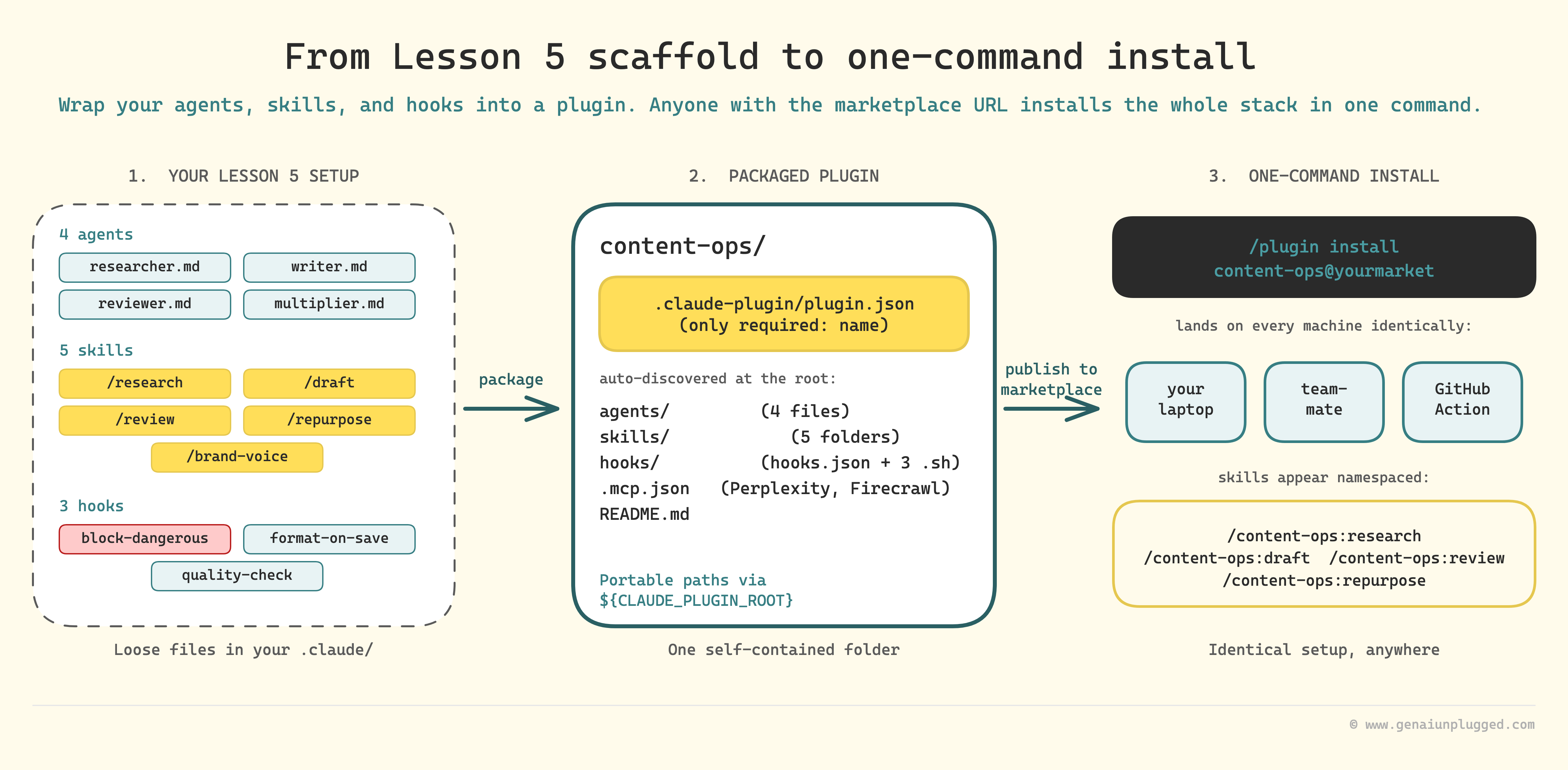
In Lesson 5 we built a complete content pipeline: 4 agents, 5 skills, 3 hooks, headless wrappers, the brand voice file.
Today we package that exact content-pipeline-scaffold/ into a Claude plugin anyone can install in one command, ship it through a marketplace, extend it with the Agent SDK, and run it from GitHub Actions on every pull request.
👋 Julley, I’m Dheeraj and I’m an AI systems builder.
I build production-grade AI systems at work by day and ship my own products by night (9+). This newsletter is the bridge between those two worlds. Every system, every build, documented step by step.
Join 1,300+ builders getting the exact AI setups, prompts, and production configs that actually work in your business.
By the end of this article you will have
a working Claude Code plugin built from your own scaffold,
the right
.claude-plugin/plugin.jsonstructure,the corrected install commands as of May 2026,
a CI workflow using the GA
anthropics/claude-code-action@v1, anda clear decision rule for when to reach for the Agent SDK instead.
This is Lesson 6 of the Claude Code Masterclass. The capstone. From user to builder.
What is a Claude Code plugin?
A Claude Code plugin is a distributable package that bundles agents, skills, hooks, MCP servers, and slash commands into a single installable unit.
The plugin manifest lives at .claude-plugin/plugin.json. After install, the plugin's skills appear namespaced inside Claude Code (for example, /content-ops:research), and its hooks register automatically.
That definition matters because the failure modes line up with each of those nouns:
Manifest in the wrong place = plugin won't load
Skill not namespaced = your
/researchcollides with someone else's/researchHook with an absolute path = works on your machine, breaks on every other one
The rest of this article is the right way to do all three, anchored on the scaffold from Lesson 5.
From recipe to restaurant
Think about the difference between a home cook with a great recipe and a restaurant that serves that recipe to hundreds of people.
The home cook knows the recipe by heart. They adjust on the fly. The pan size, the burner, the timing, all calibrated to their own kitchen. Sharing the recipe with someone else means writing it down precisely. Quantities can't be "a pinch." Timing can't be "until it feels right." Equipment can't be "whatever I have."
That's what a plugin does for your Claude Code setup. The scaffold from Lesson 5 worked because every path, every API key, every skill body assumed it lived in your project. The plugin version makes none of those assumptions. It uses portable variables, it declares what it needs, and it lands in someone else's .claude/ folder identical to how it sits in yours.
A Claude Code plugin is the smallest unit of distribution for a Claude Code setup. Take the agents, skills, hooks, and MCP wiring you already built in Lessons 2 through 5, drop them into one folder, add a 5-line manifest, and the entire system installs on a teammate’s machine with one slash command.
What goes inside a Claude Code plugin
Every component lives at the plugin root. Only the manifest goes inside the hidden .claude-plugin/ folder. This is the single most-missed detail in other tutorials.
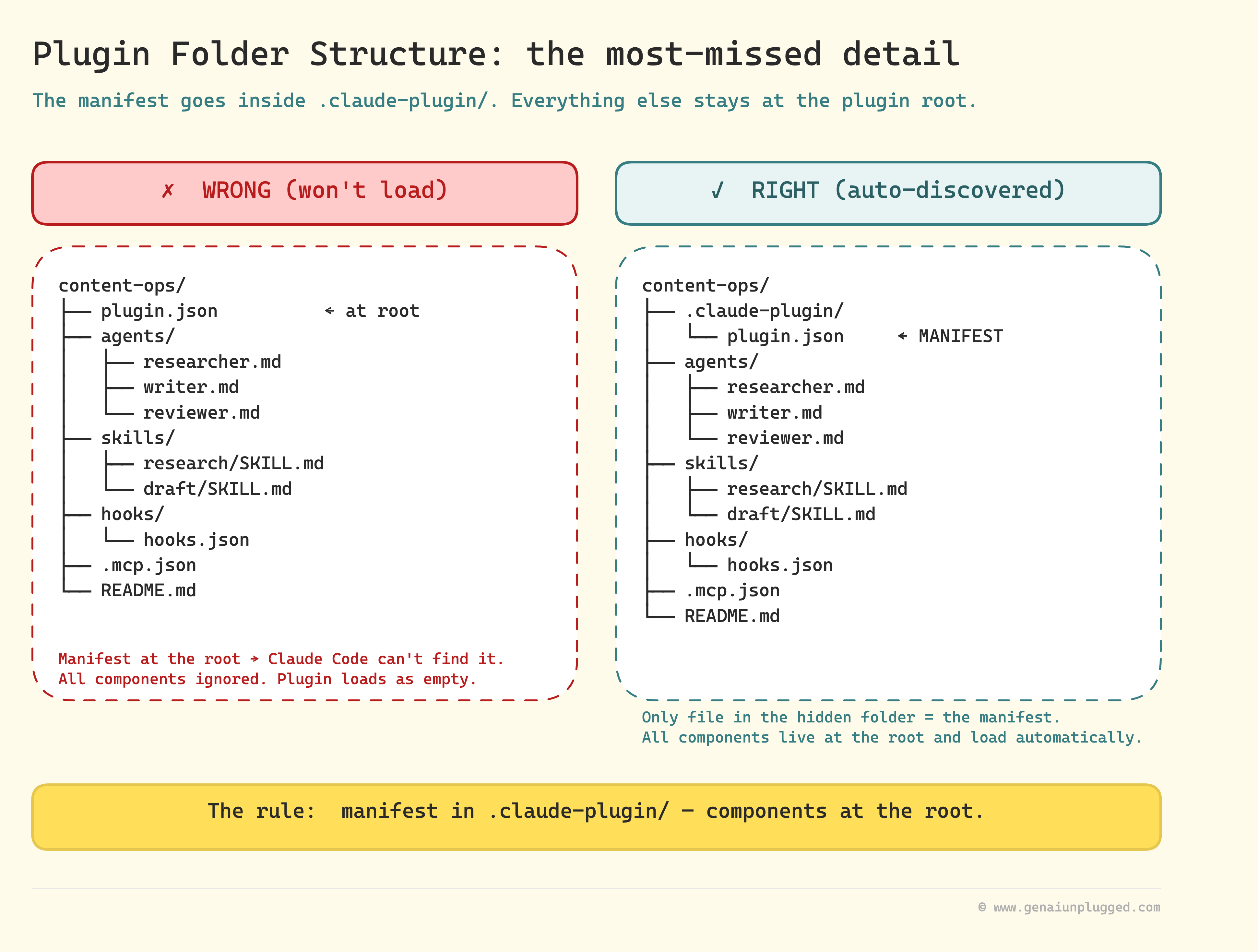
content-ops/
├── .claude-plugin/
│   └── plugin.json          # manifest (only this file is in the hidden folder)
├── agents/
│   ├── researcher.md        # from Lesson 4
│   ├── writer.md
│   ├── reviewer.md
│   └── multiplier.md
├── skills/
│   ├── research/SKILL.md    # from Lesson 5 (/research $TOPIC)
│   ├── draft/SKILL.md
│   ├── review/SKILL.md
│   ├── repurpose/SKILL.md
│   └── brand-voice-check/SKILL.md
├── hooks/
│   ├── hooks.json           # one config, three hook scripts below
│   ├── block-dangerous.sh
│   ├── format-on-save.sh
│   └── quality-check.sh
├── .mcp.json                # Perplexity + Firecrawl + Notion server stubs
├── templates/
│   └── brand-voice.md       # the only file users must edit
└── README.md
The agents/, skills/, hooks/, and .mcp.json paths are auto-discovered by Claude Code at the plugin root. You do not list them in plugin.json. You do not need to register them.
Drop them in the right folder and they load. (commands/ is also auto-discovered if you ship traditional slash commands instead of skills. The content-ops plugin uses skills, so the folder isn’t needed here.)
Plugins can ship more than just agents, skills, and hooks. Five additional component folders are auto-discovered if you include them:
.lsp.json(Language Server Protocol servers for code intelligence),monitors/monitors.json(background processes that watch logs or files and notify Claude as events arrive),bin/(executables added to the Bash tool’s PATH while the plugin is enabled),themes/(color themes that show up in/theme), andsettings.json(default settings applied when the plugin is enabled, currently limited to theagentandsubagentStatusLinekeys).
The content-ops plugin uses none of these because the four core component types cover the content pipeline. Worth knowing they exist when you ship your second plugin.
The .claude-plugin/plugin.json manifest
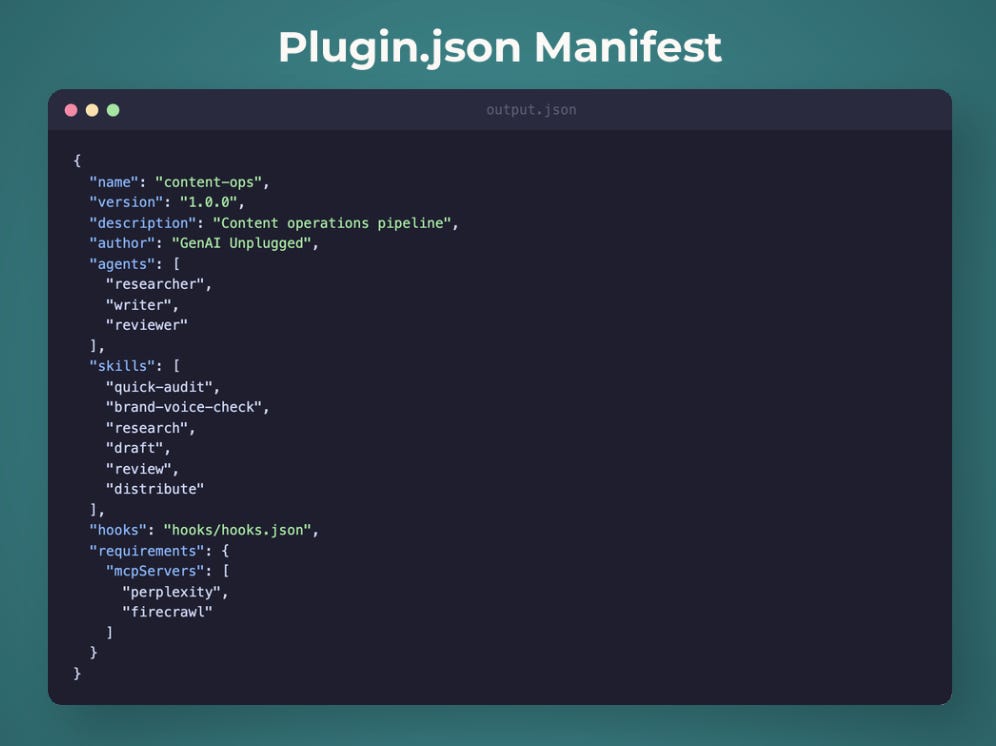
Manifest is technically optional (auto-discovery works without it), but you want one for versioning, attribution, and marketplace listings. The only required field is name.
{
  "name": "content-ops",
  "version": "1.0.0",
  "description": "Research, draft, review, repurpose pipeline for content creators",
  "author": { "name": "GenAI Unplugged", "url": "https://genaiunplugged.com" },
  "homepage": "https://github.com/genaiunplugged/content-ops",
  "license": "MIT",
  "keywords": ["content", "writing", "research", "newsletter"]
}
That’s the whole file. Notice what’s missing: no agents: [...], no skills: [...], no hooks: .... Older tutorials enumerated every component in the manifest. The current spec auto-discovers them from the folder structure. If you copy-paste a manifest from a 2025-era blog post, your plugin will still work, but the enumerated lists are dead weight.
One subtle gotcha on the version field
If you OMIT it and your plugin is distributed via git, Claude Code uses the commit SHA as the version, which means every commit counts as a new version and triggers an “update available” prompt for installed users.
If you’d rather control update cadence, set an explicit "version": "1.2.0" and bump it intentionally when you want users to see a new release.
Importance of userConfig field
The userConfig field lets you prompt the user for values at enable time and expose them as ${user_config.KEY} inside skill bodies and hook commands. Useful if your plugin needs an API key the user must provide before the first run.
Each entry needs type, title, and description (all required); add sensitive: true for API keys so the value gets masked in the prompt and stored in the system keychain instead of settings.json. Plugin subprocesses also see every value as a CLAUDE_PLUGIN_OPTION_<KEY> environment variable.
Building the plugin from Lesson 5's scaffold
Six steps. About 20 minutes if you already have the scaffold from Lesson 5 sitting in a project folder.
Step 1. Create the plugin folder structure.
mkdir -p content-ops/{.claude-plugin,agents,skills,hooks,templates}
mkdir -p content-ops/skills/{research,draft,review,repurpose,brand-voice-check}
Step 2. Copy the four agents from Lesson 4.
cp content-pipeline-scaffold/.claude/agents/*.md content-ops/agents/The frontmatter blocks (model: sonnet, permissionMode: plan on the reviewer, disallowedTools: Edit) work identically inside a plugin. No edits needed.
Step 3. Copy the skills from Lesson 5.
for s in research draft review repurpose brand-voice-check; do
  cp content-pipeline-scaffold/.claude/skills/$s/SKILL.md \
     content-ops/skills/$s/SKILL.md
done
Step 4. Move the hook scripts and write a portable hooks.json.
This is where most plugins break the first time.
cp content-pipeline-scaffold/.claude/hooks/*.sh content-ops/hooks/Then write content-ops/hooks/hooks.json. Note the outer "hooks" wrapper. Plugin hook configs need it. Plain .claude/settings.json hook configs do not. Forgetting it makes hooks silently fail to register.
{
  "hooks": {
    "PreToolUse": [
      {
        "matcher": "Bash",
        "hooks": [
          { "type": "command", "command": "${CLAUDE_PLUGIN_ROOT}/hooks/block-dangerous.sh" }
        ]
      }
    ],
    "PostToolUse": [
      {
        "matcher": "Edit|Write",
        "hooks": [
          { "type": "command", "command": "${CLAUDE_PLUGIN_ROOT}/hooks/format-on-save.sh" },
          { "type": "command", "command": "${CLAUDE_PLUGIN_ROOT}/hooks/quality-check.sh" }
        ]
      }
    ]
  }
}
The ${CLAUDE_PLUGIN_ROOT} variable resolves to wherever the plugin landed on the user’s machine. Never hard-code paths.
Each hook command also receives the full event payload as JSON on stdin - read it with jq inside your script (e.g. jq -r '.tool_input.file_path' for an Edit/Write event, jq -r '.tool_input.command' for a Bash event).
The old env-var pattern ($CLAUDE_TOOL_INPUT) is not how plugin hooks receive their input.
Step 5. Copy .mcp.json, the brand-voice template, write the manifest, and write a short README.
cp content-pipeline-scaffold/.mcp.json content-ops/.mcp.json
cp content-pipeline-scaffold/templates/brand-voice.md content-ops/templates/

# Drop the manifest at the right path (note the hidden folder)
cp plugin-json-template.json content-ops/.claude-plugin/plugin.json
The README only needs three things to keep the install loop short for testers:
A one-line description and the namespaced skill list (
/content-ops:research,/content-ops:draft,/content-ops:review,/content-ops:repurpose).The required env vars (
PERPLEXITY_API_KEY,FIRECRAWL_API_KEY, optionalNOTION_API_KEY).A "first run" snippet showing
/content-ops:research <topic>end to end.
Step 6. Test locally before you publish.
The local install flag is the fastest feedback loop.
claude --plugin-dir ./content-opsThat session loads your plugin in-place without going through any marketplace. Type / and your skills appear under the content-ops: namespace. If they don’t, the manifest is wrong or a path is broken.
While the session is open, edit any agent, skill, or hook file and run /reload-plugins to pick up the change without restarting Claude Code. That’s your inner dev loop. After every edit, /reload-plugins, then re-test the affected slash command.
Building the plugin from a clean folder means hand-writing the manifest, the hook config, the marketplace entry, and the README, then debugging two or three path issues before the first clean install on a second machine. Three to four hours, mostly spent on the parts the docs do not warn you about.
PluggedIn ships the entire content-ops/ plugin folder, the marketplace entry, the v1 GitHub Action workflow, and the SDK-wrapper script ready to drop into your repo. Everything tested on a clean machine before it gets to you.
${CLAUDE_PLUGIN_ROOT}: the variable that fixed the absolute-path bug
The first time I shipped the content-ops plugin, my tester ran /plugin install content-ops@genaiunplugged and got "Hook script not found" on the first save.
The cause: hooks.json had /Users/dheerajsharma/.claude/hooks/format-on-save.sh. My machine, my home directory, my path. Nobody else has that path.
The fix is a four-character swap.
# Before (works only on my laptop)
"command": "/Users/dheerajsharma/.claude/hooks/format-on-save.sh"

# After (works everywhere the plugin installs)
"command": "${CLAUDE_PLUGIN_ROOT}/hooks/format-on-save.sh"
Two related variables you'll want to know:
${CLAUDE_PLUGIN_ROOT}resolves to the plugin's install directory. It changes when the plugin updates, so anything you write here will be wiped on the next version bump.${CLAUDE_PLUGIN_DATA}resolves to a persistent directory under~/.claude/plugins/data/{plugin-id}/that survives updates. Use this for cached state, user data, anything you want to keep across versions.
Both substitute inline inside skill bodies, hook commands, MCP server configs, and LSP configs, and they're exported as environment variables to any subprocess you spawn from a hook.
The Claude Skill namespacing gotcha
Inside Lesson 5, you typed /research and the research skill ran. Inside a plugin, the same skill installs as /content-ops:research.
/research                  ← ambiguous: which plugin's research skill?
/content-ops:research      ← unambiguous, what plugins actually expose
Three implications:
Every reference to
/researchin your plugin's README needs the namespace prefix.If you cross-reference skills inside skill bodies (a
/repurposebody that calls/draft), use the namespaced form.Documentation written for the un-namespaced version (Lesson 5 in this course) will surprise readers who try to follow it inside a plugin context. Write the namespaced form once, cite the gotcha, move on.
This is the bug nobody tells you about because the official docs handle it correctly and most tutorials were written for un-installed .claude/ setups.
One related setting worth knowing: add disable-model-invocation: true to a skill’s frontmatter and Claude will only run that skill when the user types it explicitly, never auto-invoke it.
Useful for skills that should never fire mid-conversation without consent (think /content-ops:repurpose writing files to disk).
Installing a Claude Code plugin
Three install paths. Pick the one that fits how the plugin is published.
1. From the official Anthropic marketplace
/plugin install <name>@claude-plugins-officialBrowse the catalog at claude.com/plugins or via the Discover tab inside the /plugin slash command.
2. From any GitHub repository (or self-hosted git)
/plugin marketplace add owner/repo-name
/plugin install <plugin-name>@<marketplace-name>
The first command registers the marketplace. The second installs a specific plugin from it. You can pin a tag with /plugin marketplace add owner/repo@v1.2.0.
3. From a local directory (development mode)
claude --plugin-dir ./content-opsThe CLI form mirrors the slash commands.
claude plugin marketplace add owner/repo-name
claude plugin install <plugin-name>@<marketplace-name>
claude plugin list
claude plugin disable <plugin-name>
claude plugin uninstall <plugin-name>
Note the verb is plugin install, singular. Older tutorials wrote claude plugins add github:user/repo as one command. That form does not exist. Marketplace registration and install are two separate steps.
Get PluggedIn
PluggedIn ships the entire `content-ops/` plugin folder ready to install: manifest, portable hooks, marketplace JSON, GitHub Action, and SDK wrappers. Tested on a clean machine so the install commands above land on the first run.

Marketplaces: discovery, not just distribution
A marketplace is a folder with a marketplace.json file at .claude-plugin/marketplace.json listing one or more plugins.
{
  "name": "genaiunplugged14",
  "owner": { "name": "GenAI Unplugged" },
  "plugins": [
    { "name": "content-ops",   "source": "./content-ops" },
    { "name": "research-team", "source": "./research-team" }
  ]
}
The "./content-ops" shorthand works because the plugin lives in the same repo as the marketplace. Anyone who runs /plugin marketplace add genaiunplugged14/claude-plugins then sees both plugins in their Discover tab.
Three reasons to bother with the marketplace step:
Versioning. A marketplace can pin specific tags or commits. Direct
--plugin-dirinstalls do not.Bundling. One repo can ship multiple plugins (research, content, distribution) under one umbrella.
Submission. The official Anthropic catalog at claude.com/plugins accepts marketplace submissions through
claude.ai/settings/plugins/submit. That's how you get to "discoverable to every Claude Code user without them knowing your repo URL."
How to submit your Claude Code plugin to the official directory
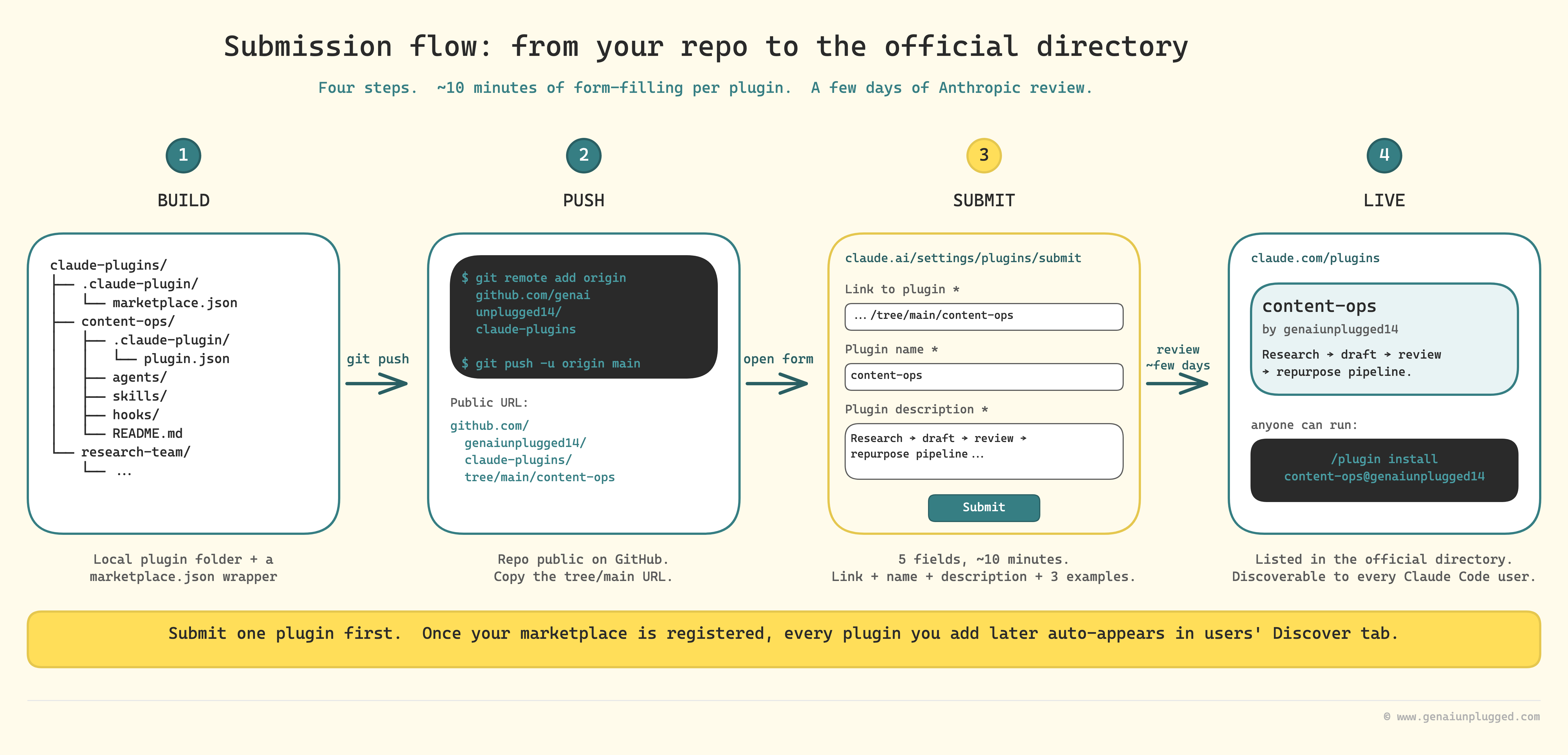
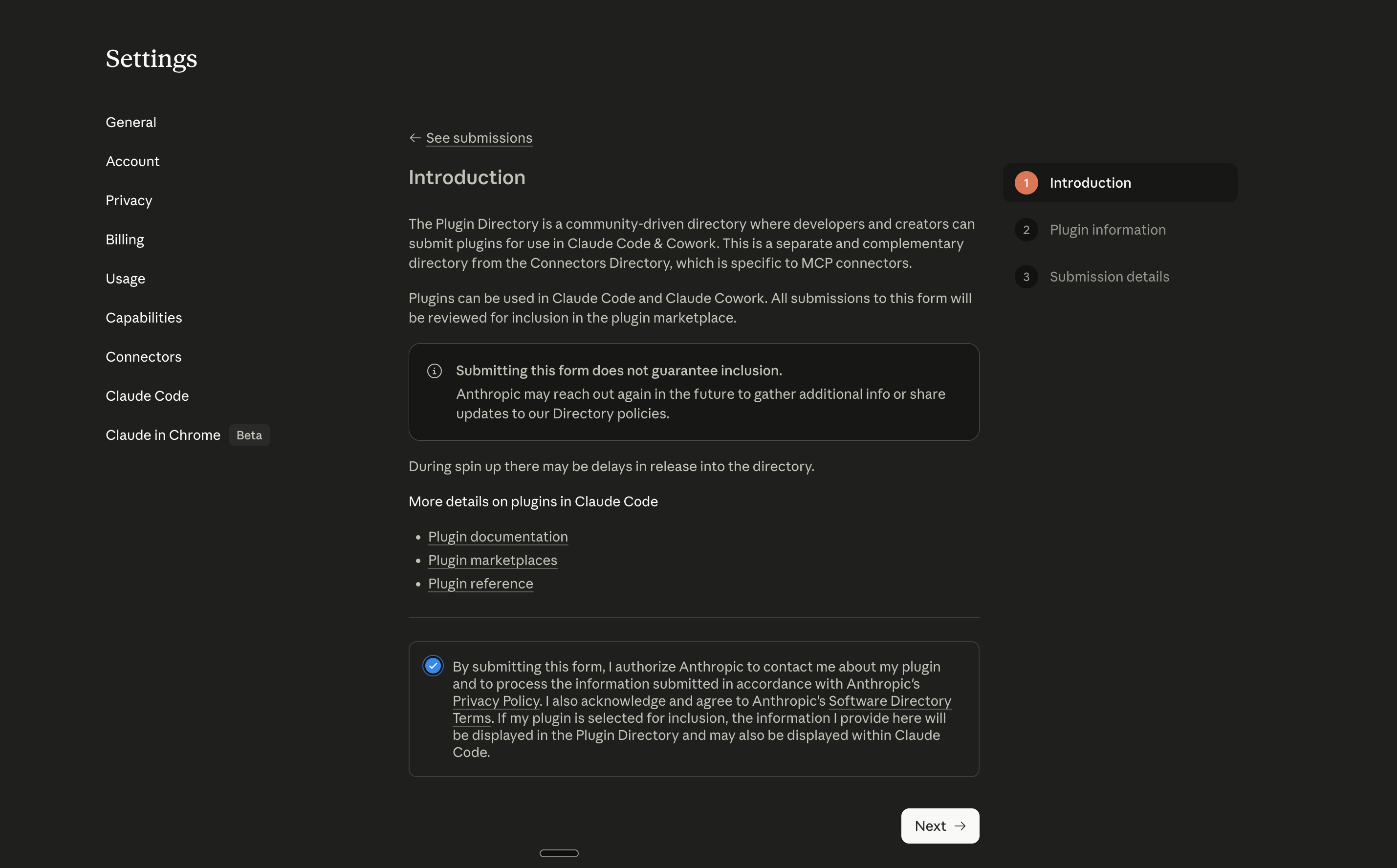
Once your marketplace repo is on GitHub, the official directory at claude.com/plugins will list your plugins in front of every Claude Code user, for free. The submission form is three pages and takes about ten minutes per plugin if your manifest is in order.
Open claude.ai/settings/plugins/submit (or platform.claude.com/plugins/submit on the API console) and walk through it.
Page 1: Choose plugin type
Pick the option that matches what your plugin actually ships. For the content-ops plugin from this article (agents + skills + hooks + MCP servers), the right choice is the general-purpose plugin type, not the more restricted variants.
Page 2: Plugin information
This is where most of the work happens. Five fields, two are optional.
Link to plugin (required). The URL to the specific plugin’s subdirectory inside your marketplace repo. GitHub URL convention requires /tree/<branch>/ between the repo and the path:
https://github.com/genaiunplugged14/claude-plugins/tree/main/content-opsIf you submitted the marketplace root URL by mistake, the validator will reject it. Always link to the subdirectory.
Plugin homepage (optional). A page that explains what the plugin does and shows screenshots or a demo. Either your docs site or the article that introduces the plugin works. For this lesson the right URL is:
https://www.genaiunplugged.com/courses/claude-code/lesson-6If you don’t have a docs site yet, use the GitHub README anchor: https://github.com/genaiunplugged14/claude-plugins/tree/main/content-ops#readme.
Plugin name (required). Kebab-case, lowercase, no brand names you do not own. This becomes the <name> in /plugin install <name>@<marketplace>, and the namespace prefix on every skill the plugin ships.
content-opsCheck claude.com/plugins first to confirm the name isn’t taken. If it is, vendor-prefix it: content-ops-genaiunplugged.
Plugin description (required). Lead with the job. List the components in one breath. End with one piece of evidence (cost, time, results). Anthropic’s directory cards show the first ~150 characters, so the hook has to land in the first sentence.
Research → draft → review → repurpose pipeline for content creators. Bundles 4 agents (researcher, writer, reviewer, multiplier), 5 namespaced skills (/content-ops:research, /content-ops:draft, /content-ops:review, /content-ops:repurpose, /content-ops:brand-voice-check), 3 production hooks, and Perplexity + Firecrawl MCP wiring. ~$1.50/article, ~45 min/article end-to-end.Example use cases (required). Three concrete scenarios that span interactive use, scheduled use, and automated use. Each line names the actual slash command, the input, and the output. Vague examples (“write articles faster”) get rejected.
Example 1: Long-form newsletter. Run /content-ops:research <topic> then /content-ops:draft then /content-ops:review then /content-ops:repurpose. Output: 2,500-word draft + scored review + three platform-specific copies (LinkedIn, X, Substack notes).

Example 2: Weekly competitive intel. Schedule /content-ops:research "what did <competitor> ship this week" via cron + claude -p. Drops a dated brief into drafts/weekly-intel-YYYY-MM-DD.md every Monday morning.

Example 3: PR quality gate. Wire /content-ops:review into a GitHub Action using anthropics/claude-code-action@v1. Every push to drafts/*.md gets an automated review comment with score, fixes, and any blockers.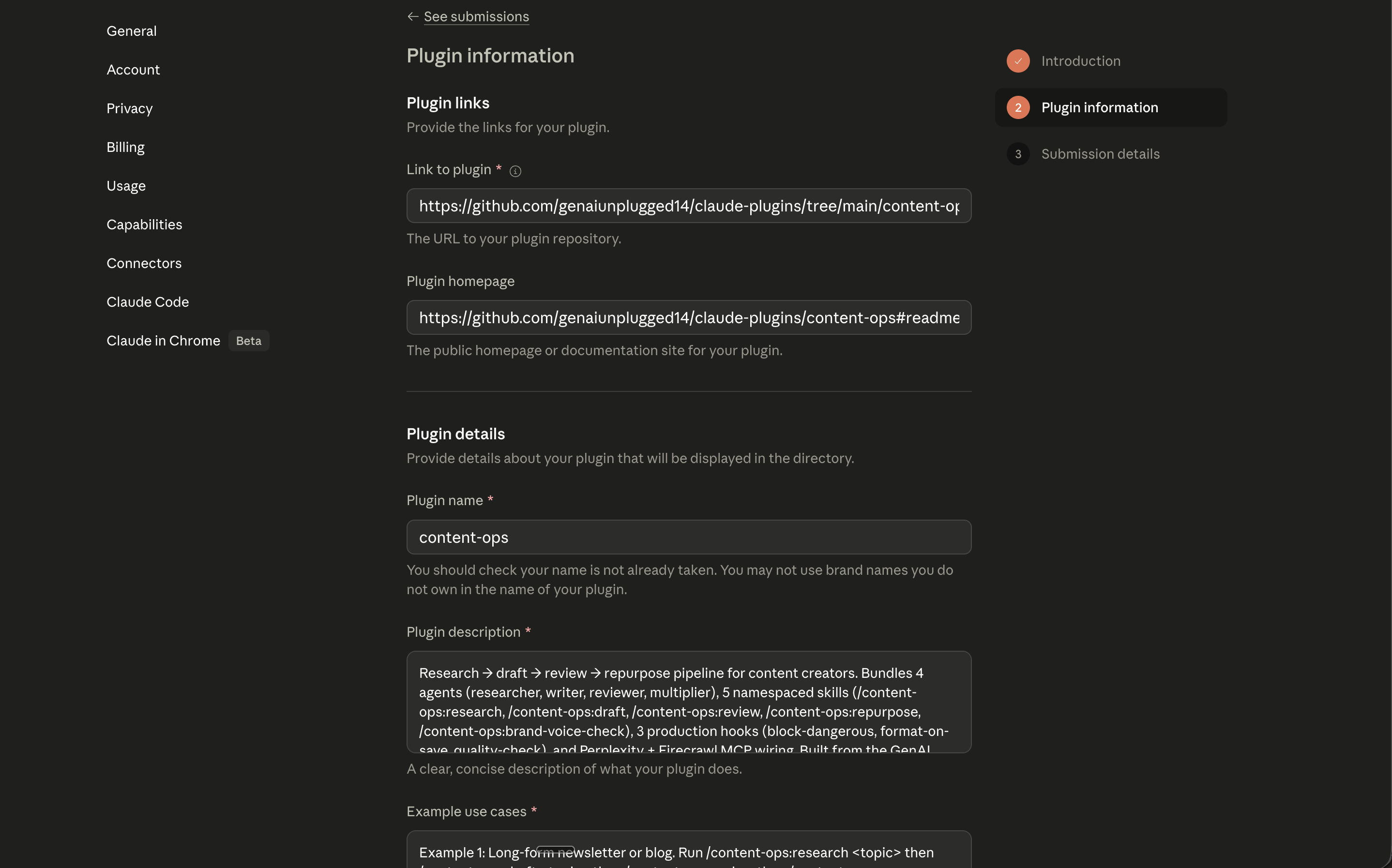
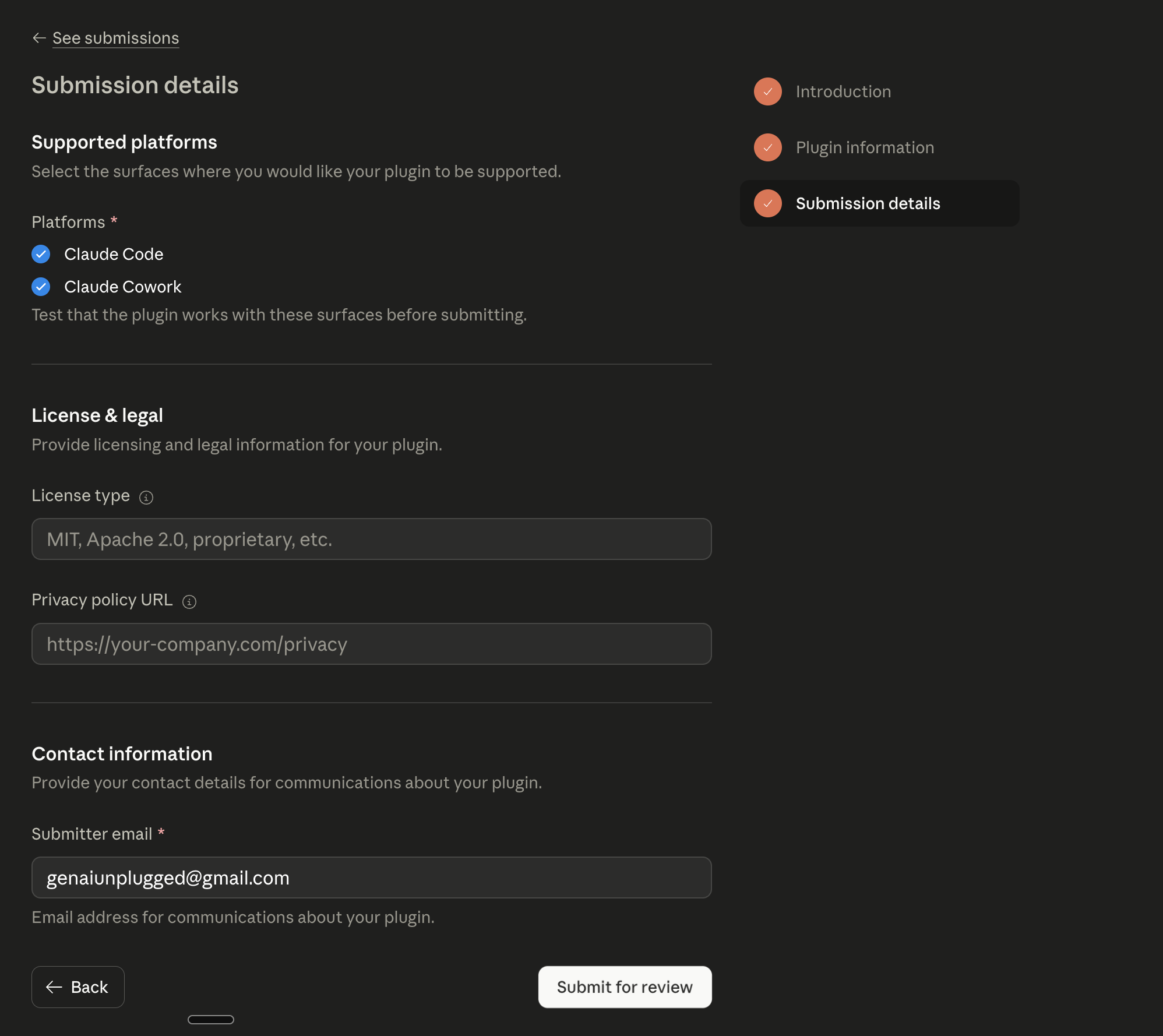
Page 3: Submission details
The last page asks for contact info, license (match what’s in your plugin.json, usually MIT), 2-3 category tags (for content-ops: content, writing, research), and a maintenance commitment. Pick the categories carefully because they drive Discover-tab filtering.
What happens after you submit
You get an email confirmation. Anthropic reviews submissions in batches (turnaround tends to be a few days, not minutes), and they’ll either approve, reject with a reason, or ask for one revision.
If approved, the plugin shows up in /plugin Discover and at claude.com/plugins within a few hours of approval.
Once your first plugin is live, subsequent submissions for the same marketplace are faster: same URL pattern, same contact info, just swap the plugin name and the tree/main/<folder> path.
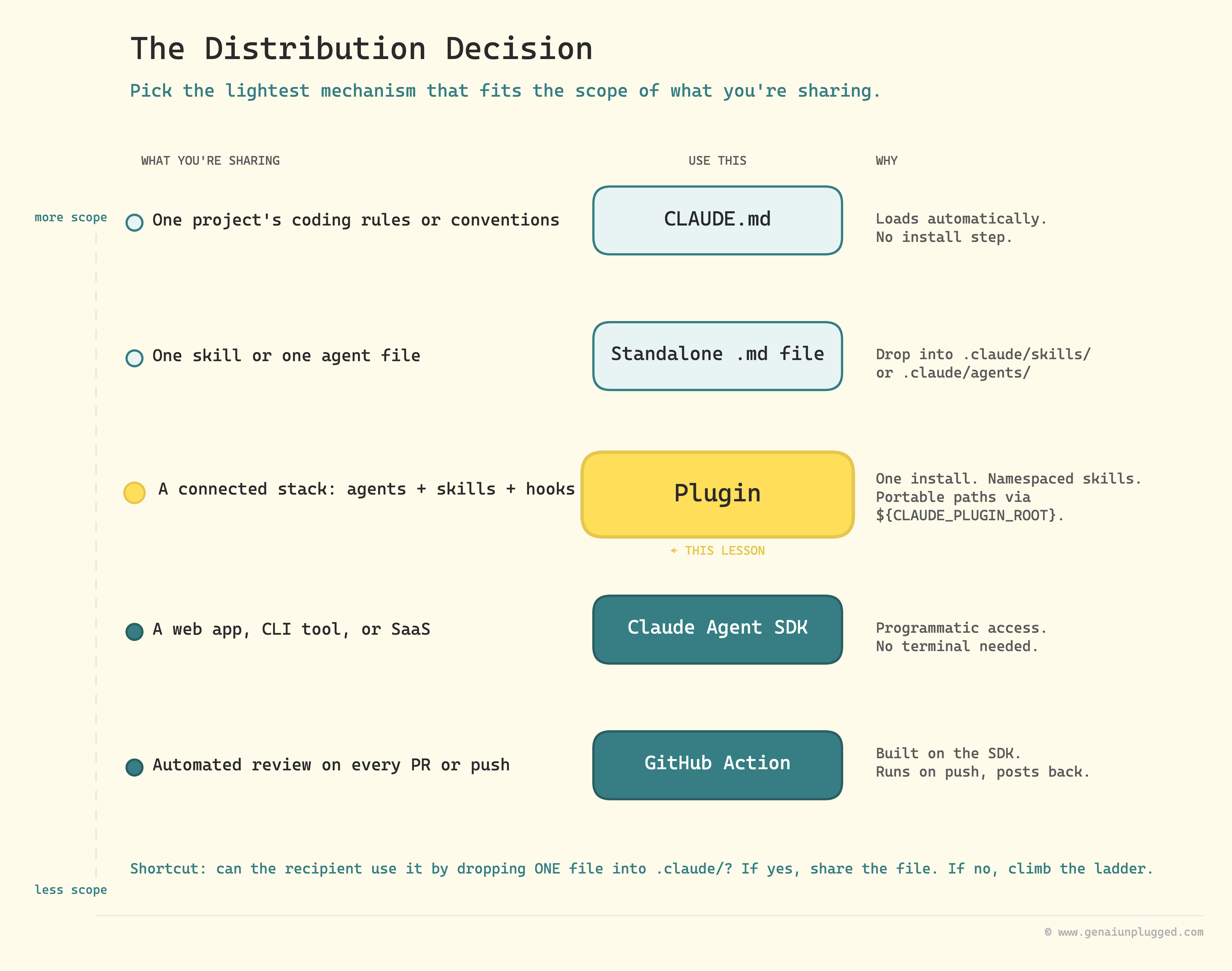
The Distribution Decision: when to use what
Five ways to share a Claude Code setup. This is the table I keep open when somebody asks "should I package this?"
One project’s coding rules
Use this:
CLAUDE.mdin the repoWhy: Loads automatically, no install
One skill or one agent file
Use this: Standalone
.mdfileWhy: Drop it in
.claude/skills/or.claude/agents/
A connected stack of agents + skills + hooks
Use this: Plugin
Why: One install, namespaced skills, portable paths
A web app, CLI tool, or SaaS that uses Claude Code
Use this: Agent SDK
Why: Programmatic access, no terminal needed
Automated review on every PR or push
Use this: GitHub Action (built on the SDK)
Why: Runs on push events, posts results back
Quick check questions
If the recipient can use what you're sharing by dropping a single file into their
.claude/folder then share the file.If they need agents, skills, hooks, and configuration working together, build a plugin.
If they need a custom application that calls Claude Code from inside their own code, use the SDK.
For most non-technical content creators, plugins are the right answer. The SDK is for when you're building software products, not just sharing configurations.
The Claude Agent SDK (formerly the Claude Code SDK)
Anthropic renamed the Claude Code SDK to the Claude Agent SDK in September 2025. The package names and the API surface both changed. Tutorials from before the rename will not work.
# Install (current)
npm install @anthropic-ai/claude-agent-sdk     # TypeScript
pip install claude-agent-sdk                   # Python
The main entry point is query(), which returns an async iterable. You consume it with async for (Python) or for await (TypeScript).
Async iteration just means you process each message as Claude generates it, instead of waiting for the full response. The pattern looks the same in both languages.
TypeScript:
import { query } from "@anthropic-ai/claude-agent-sdk";

for await (const message of query({
  prompt: "Use the content-ops:reviewer agent to audit drafts/latest.md",
  options: { allowedTools: ["Read", "Edit", "Bash"] }
})) {
  console.log(message);
}
Python:
import asyncio
from claude_agent_sdk import query, ClaudeAgentOptions

async def main():
    async for message in query(
        prompt="Use the content-ops:reviewer agent to audit drafts/latest.md",
        options=ClaudeAgentOptions(allowed_tools=["Read", "Edit", "Bash"]),
    ):
        print(message)

asyncio.run(main())
For a content creator, the realistic SDK use case is wrapping the pipeline inside a small script your team or your customers run. A Notion button that triggers /content-ops:research against a topic, a Slack slash command that returns a draft, a tiny web UI where freelance writers paste a brief and get a /repurpose output ten minutes later. Same agents, same skills, called from outside the terminal.
If everything you want runs fine inside Claude Code interactively, you do not need the SDK. The SDK is for when you want to put your pipeline behind an interface other people use without ever opening Claude Code themselves.
Claude Code in CI/CD: the v1 GitHub Action
The official GitHub Action is anthropics/claude-code-action@v1. It's GA since August 2025. The @beta version is deprecated and has breaking changes from v1, so anything you find from before the v1 cut needs updating: direct_prompt was renamed to prompt, the mode field was removed (auto-detected now), and CLI options moved into a multiline claude_args: block.
Bootstrap the GitHub App + secret + workflow file once by running /install-github-app from inside Claude Code. The slash command writes the ANTHROPIC_API_KEY secret to your repo and drops a starter workflow file. After that, the YAML below works as-is.
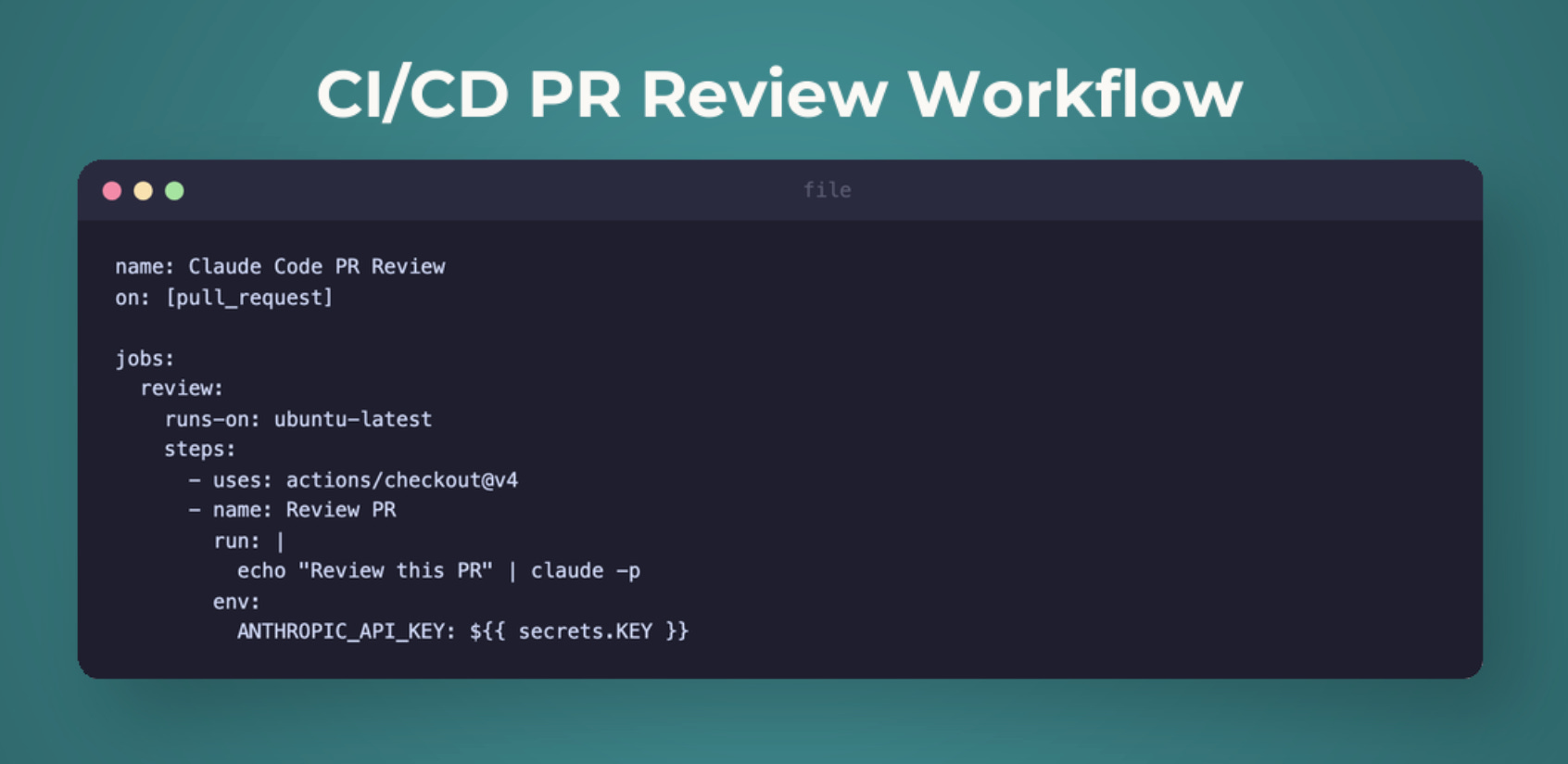
Automated content quality gate
# .github/workflows/content-check.yml
name: Content Quality Gate
on:
  push:
    paths: ['drafts/**/*.md']

jobs:
  quality:
    runs-on: ubuntu-latest
    steps:
      - uses: actions/checkout@v4
      - uses: anthropics/claude-code-action@v1
        with:
          anthropic_api_key: ${{ secrets.ANTHROPIC_API_KEY }}
          prompt: |
            For each modified file under drafts/*.md, run /content-ops:review
            and post the results as a PR comment.
          claude_args: |
            --max-turns 8
            --model claude-sonnet-4-6
            --bare
        env:
          GITHUB_TOKEN: ${{ secrets.GITHUB_TOKEN }}
Two flags worth highlighting:
--bareskips auto-discovery of hooks, skills, plugins, MCP servers, andCLAUDE.mdfor the duration of the run. Use this in CI for reproducible behavior. Without it, your action picks up the runner's defaults and your reviews drift.--max-turnscaps the agent's loop length. Without a cap, a confused run can burn through your token budget on retries.
To bootstrap the action and the GitHub App, run /install-github-app once from inside Claude Code on your machine. It walks you through the auth and writes the workflow file.
Security and permissions: the responsibility section
Permissions inside Claude Code work as a hierarchy. Hooks enforce policy regardless of mode.
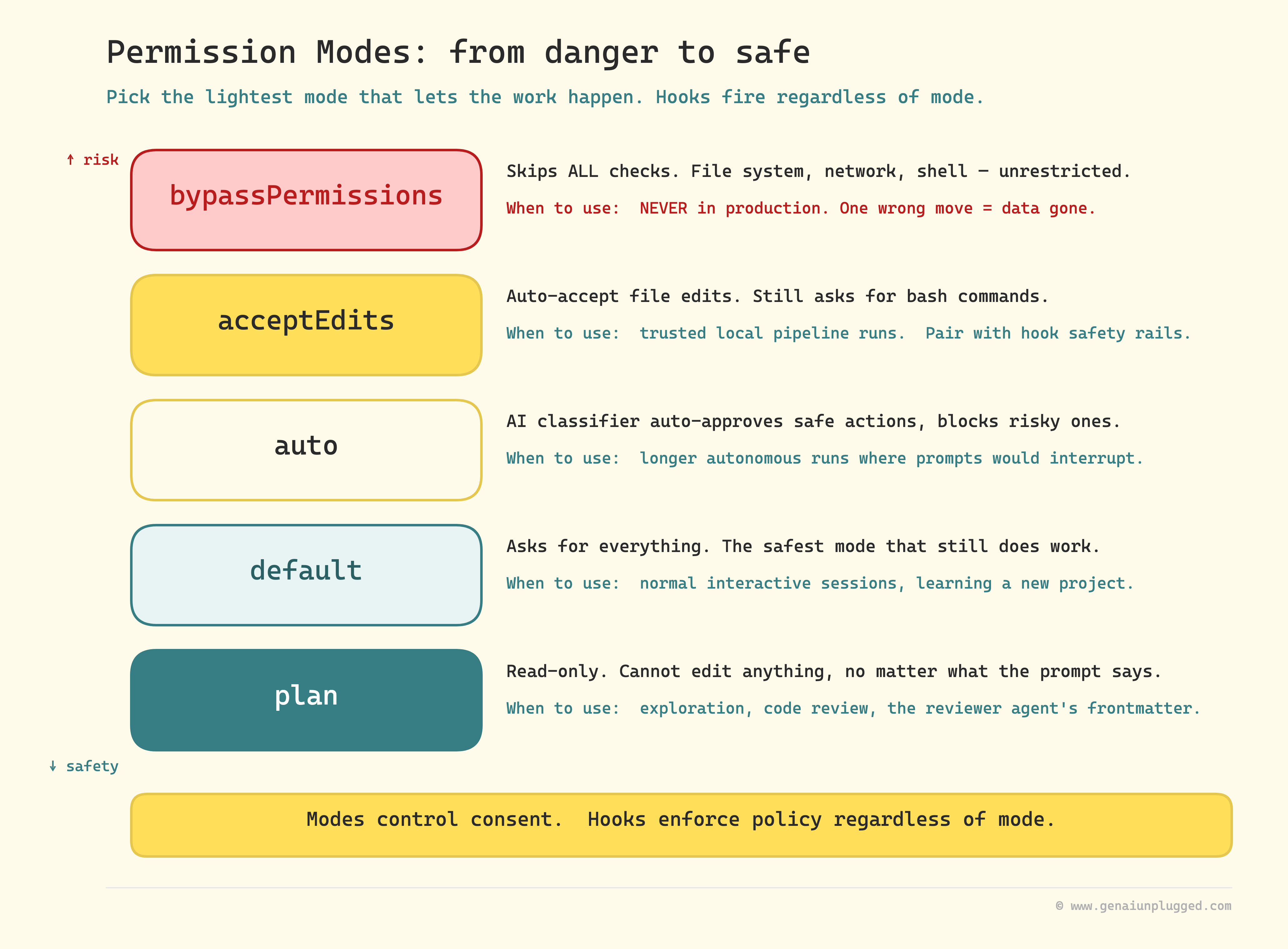
bypassPermissions  → Skip ALL checks. Never use in production.
acceptEdits        → Auto-accept file edits, still asks for bash.
auto               → AI classifier auto-approves safe actions, blocks risky ones.
default            → Ask for everything. Safest.
plan               → Read-only. No edits possible. Use for exploration and reviewers.
For automated systems (CI, headless, the Agent SDK), the right combination is acceptEdits plus hook-based safety rails.
The hooks from Lesson 3 (block-dangerous, format-on-save, quality-check) become your safety net inside the plugin context, because a hook fires regardless of which permission mode the runner happens to be in.
Two rules that will save you a bad weekend:
Never `bypassPermissions` outside of localhost testing. It gives Claude Code unrestricted file system, network, and shell access. One wrong move and a database is gone.
Never put API keys in `plugin.json` or any committed file. Use environment variables. In CI, use the platform's secrets manager. The
userConfigfield in the manifest is for non-secret user input, notcredentials.
The complete masterclass, in one diagram
Six lessons. One system that compounds.
Lesson 1: Content Multiplier
  └── 1 article becomes 10+ platform pieces

Lesson 2: Extension Stack
  ├── CLAUDE.md (3 levels of memory)
  ├── Skills (user-invocable + auto-invocable)
  ├── Hooks (deterministic guardrails)
  └── Agents (the conceptual foundation)

Lesson 3: Connected Intelligence
  ├── MCP Servers (Perplexity, Firecrawl, Notion)
  └── Hooks deep dive (3 production hooks)

Lesson 4: Agent Team
  ├── Researcher (Sonnet + web tools)
  ├── Writer (Sonnet + brand voice)
  └── Reviewer (Sonnet + read-only)

Lesson 5: Integrated Pipeline
  ├── 5 skills wiring 4 agents into one pipeline
  ├── Permission modes for safety
  ├── Headless mode for automation
  └── Real cost: $1.50/article, 8 articles/month

Lesson 6: Distribution
  ├── Plugin packaging (.claude-plugin/plugin.json)
  ├── ${CLAUDE_PLUGIN_ROOT} for portable paths
  ├── Marketplaces (official + custom)
  ├── Claude Agent SDK (renamed, query() API)
  ├── claude-code-action@v1 (GA)
  └── Permission hierarchy

Lesson 7: Channels
  ├── Claude Code out of the terminal
  ├── Telegram + Discord bridges
  ├── Two-way custom channels
  └── tmux for persistent sessions
Across the seven lessons: 3 to 4 hours of build setup, plus ~30 minutes per channel you wire up, ~$1.50 per article afterwards, 10+ hours saved per month. The compounding part is the shareability, which is what this lesson unlocked.
Why this matters
This course started with "how do I use Claude Code?" It ends with "how do I build things others use with Claude Code."
The progression from consumer to creator is the real value. Not any single tool. The ability to design, package, and distribute AI-powered systems.
The plugin you just built is a simplified version of how the Agents Toolkit is distributed. A plugin package with research, writing, SEO, and quality agents tested across 100+ articles, plus the hooks and skills that make them work together.
If you've followed the masterclass through all seven lessons, you've built the architecture; the Toolkit is the version with the rough edges already sanded down. (If you want to see the production agents in detail, I documented building each one in a separate series.)
Get PluggedIn
You are one plugin away from turning your Claude Code setup into something your whole team installs in one command.
Without the templates, expect 2 to 3 hours of config debugging before your plugin installs cleanly anywhere but your own machine.
Get PluggedIn to go from understanding the plugin structure conceptually to having a tested, distributable plugin folder, the GitHub Action workflow, and the SDK wrapper script ready to drop into your repo.
Key takeaways
`.claude-plugin/plugin.json` is the only file in the hidden folder. Skills, agents, hooks, and
.mcp.jsonlive at the plugin root. Manifest is optional but recommended.Only `name` is required in the manifest. Components are auto-discovered from the folder structure. Don't enumerate them.
`${CLAUDE_PLUGIN_ROOT}` is non-negotiable. Any absolute path in your hooks or skills will break on every machine but yours.
Skills install namespaced.
/researchbecomes/content-ops:research. Document accordingly.Marketplace registration and plugin install are two separate commands.
/plugin marketplace add owner/repothen/plugin install name@marketplace.The Claude Code SDK is now the Claude Agent SDK. Package:
@anthropic-ai/claude-agent-sdk(TS),claude-agent-sdk(Python). API surface usesquery()and async iteration.GitHub Action `claude-code-action@v1` is GA.
@betais deprecated.direct_promptis nowprompt. CLI options moved intoclaude_args:.Use `--bare` in CI. Skips auto-discovery of plugins, hooks, MCP servers, and CLAUDE.md for reproducible runs.
Never `bypassPermissions` in production.
acceptEditsplus hooks is the right combination for automated workflows.
Mini exercise (45 minutes)
This exercise tests that the plugin actually installs cleanly on a machine that is not yours. The packaging part is easy; the test part is where bugs hide.
Part 1: Package (15 minutes)
Create the folder:
mkdir -p content-ops/{.claude-plugin,agents,skills,hooks,templates}Copy your four agents from
content-pipeline-scaffold/.claude/agents/intocontent-ops/agents/Copy each of the all skills (research, draft, review, repurpose, brand-voice-check) into
content-ops/skills/<name>/SKILL.mdCopy the three hook scripts and write
content-ops/hooks/hooks.jsonusing${CLAUDE_PLUGIN_ROOT}for every pathWrite
content-ops/.claude-plugin/plugin.jsonwith the manifest template from this lessonWrite a README explaining the namespaced skills and which API keys the plugin needs
Part 2: Test locally (15 minutes)
From a different project directory:
claude --plugin-dir /absolute/path/to/content-opsType
/and verify your skills appear under thecontent-ops:namespaceRun
/content-ops:research <any topic>end to endTry a
rm -rfcommand to confirm the dangerous-command hook still firesIf anything fails, check the error. It is almost always a path issue or a missing
${CLAUDE_PLUGIN_ROOT}
Part 3: Distribute (15 minutes)
Push the plugin folder to a GitHub repo
From a fresh terminal session in any project:
/plugin marketplace add <your-username>/<repo-name>then/plugin install content-ops@<marketplace-name>Repeat the smoke tests from Part 2
If they pass on a second machine, the plugin is distributable
The test steps matter more than the packaging. A plugin that only works on your machine is not a plugin. It is a backup.
What's next
This caps the build arc of the Claude Code Masterclass. Over six lessons you’ve gone from first install to a distributable plugin, with a working SDK example and a CI workflow on top.
Lesson 7 takes the same plugin and breaks Claude Code out of the terminal entirely (Telegram, Discord, custom channels) so you can drive your pipeline from your phone.
The Claude Code ecosystem is moving fast. New marketplaces, new SDK capabilities, new hook events ship every few weeks. The foundation you've built (extension taxonomy, hook system, agent architecture, plugin packaging) gives you the framework to evaluate and adopt new features as they appear without re-learning the whole platform.
Build something. Ship it through a marketplace. DM me on Substack with what you made and where it's installable. The next masterclass season picks the best community plugins as case studies.
Lesson 7: Claude Code Channels (out of the terminal) →
Your PluggedIn assets for this post
Production-ready plugin:
content-ops-plugin.tar.gz- The complete content-ops plugin folder, snapshot from the live github.com/genaiunplugged14/claude-plugins marketplace. 4 agents + 5 skills + 3 hooks + MCP wiring, ready to drop in or forkINSTALL.pdf- Two install paths: marketplace (5 seconds) or fork-and-rebrand (15 minutes)
Plugin authoring templates:
plugin-json-template.json- The.claude-plugin/plugin.jsonmanifest withuserConfigfor API keys and the correctedsensitiveflagplugin-folder-structure.pdf- Annotated folder map showing where every file goes (and the hidden.claude-plugin/gotcha)marketplace-json-template.json- Multi-pluginmarketplace.jsonwith the simplified"./content-ops"source shorthandhooks-json-template.json- Production-readyhooks.jsonwith the outer"hooks"wrapper and${CLAUDE_PLUGIN_ROOT}syntax
CI / SDK examples:
ci-cd-review.yml- GitHub Actions workflow onclaude-code-action@v1(GA) for PR reviewci-cd-content-check.yml- GitHub Actions workflow for the content quality gate using the namespaced reviewersdk-wrapper.ts- Minimal Claude Agent SDK example (TypeScript) calling the plugin’s reviewersdk-wrapper.py- Same wrapper in Python (claude-agent-sdkpackage)
Verification:
plugin-test-checklist.pdf- 12-step clean-machine install verification
