


You delivered on time. The client was happy. You sent the credentials with a cheerful "let me know if you have questions."
They had questions.
"How do I reset the password?"
"Where was that documentation again?"
"Can you show me one more time how to..."
Each one is two minutes to answer and twenty minutes to recover your focus from, and they arrive for months.
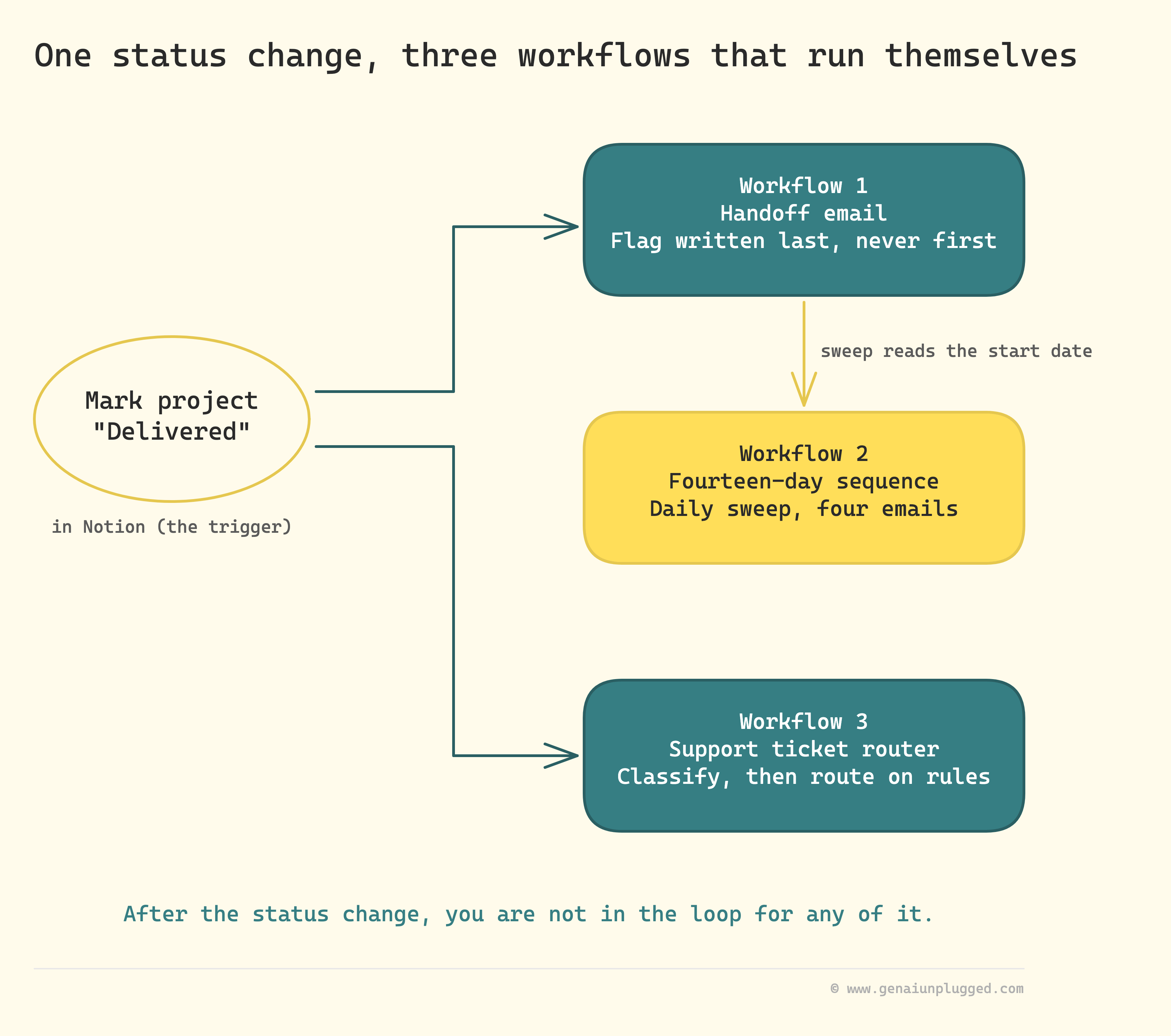
Automate the client handoff with three n8n workflows: a delivery trigger that sends the handoff email, a fourteen-day training sequence, and a router that classifies incoming requests. The training sequence is what reduces the questions. Use plain automation for the predictable steps and a model only for classification.
How do I stop a delivered project turning into permanent tech support?
Automate the client handoff itself. A trigger on delivery that sends the handoff, a scheduled sequence that teaches the client over two weeks, and a router that classifies incoming requests. The training sequence is what actually reduces the questions.
By the end of this article you'll have three workflows that run without you. You'll build them in n8n, and you'll see exactly where an AI agent belongs in this system and where it does not, because two of these three jobs should never be given to a model.
This is Part 9 of the "From Demo to Dependable" series: AI Production Field Notes.
👋 Julley, I'm Dheeraj, an AI systems builder.
I build production-grade AI systems at work by day and ship my own products by night, 12 and counting, including SubflowAI and the Content OS Agents Toolkit. This newsletter is the bridge between those two worlds. Every system, every build, documented step by step.
Join 3,000+ builders getting the exact AI setups, prompts, and workflows that actually work in your business.
What’s inside
Why Manual Client Handoffs Keep Failing
You have promised yourself a proper handoff checklist after every chaotic delivery, and then the next deadline arrives and you send credentials in a two-line email again. The failure is structural rather than a discipline problem, and it repeats for four specific reasons.
Memory is the checklist. Sometimes you send the documentation link. Sometimes you set support expectations. Sometimes you skip the training entirely because the client seemed technical. Every client gets a different handoff and you cannot tell which version they got.
Inconsistency reads as carelessness. One client gets a walkthrough, another gets two lines. The work was excellent in both cases and only one of them can tell.
No training means the questions never stop. You assume the client will explore the system and read the docs. They will try once, get stuck, and email you. Every "how do I" is a training gap you could have filled before they hit it.
No tiers means no boundaries. Every request gets the same response time regardless of what the engagement was worth, so the smallest project consumes the same attention as the largest and you have no principled way to say no.
The last two are the ones automation actually fixes. A checklist fixes the first two, and you can write that today without building anything.
Blueprint Check: Map your current handoff in your Workflow Blueprint before automating it. Write down what you actually send today, then decide what should be automatic. Remember: No map, no build.
Define Done Before You Automate It
Automating a client handoff you have not defined just makes an inconsistent process run faster. The definition comes first, and it is the same artifact that ends scope creep at the other end of the project: a written statement of what "done" means, agreed before the build starts.
Five sections carry the whole thing:
Functional requirements. What must work, specifically. "Welcome sequence sends within five minutes of signup" is testable. "Email stuff that works" is not.
Performance benchmarks. How fast, how reliably. "Processes 100 records in under two minutes" gives you something to demonstrate at handoff.
Deliverables checklist. Every credential, document, video, source file and key you will hand over. This list becomes the body of your handoff email, which is why the email can be generated rather than written.
Training expectations. What you will teach, in what format, over what period. This becomes the email sequence.
Support scope. What is included, for how long, and what is billable. This becomes the routing logic.
Notice what just happened: the three automated workflows are not something you design separately. They are three sections of this document, executed. Part 3 of this series called this a contract, and a handoff is a contract with a client instead of between two workflows.
Learn with me: Claude Code Builder cohort
I run the Claude Code Builder cohort on Maven: four weeks, six live sessions, building a real AI system with me. If you would rather build it alongside me than read about it, this is the room.
Learn with me: the Claude Code cohort
I run the Claude Code cohort on Maven for founders, creators and tech teams: six live sessions across six weeks, building a real AI system with me. If you would rather build it alongside me than read about it, this is the room.
Each cohort is a small, hands-on group, and a new one starts every month.

Use code GENAI20 for 20% off. Check the Syllabus →
Build it with me, live. See the syllabus →
Determinism Beats Intelligence, Except Once
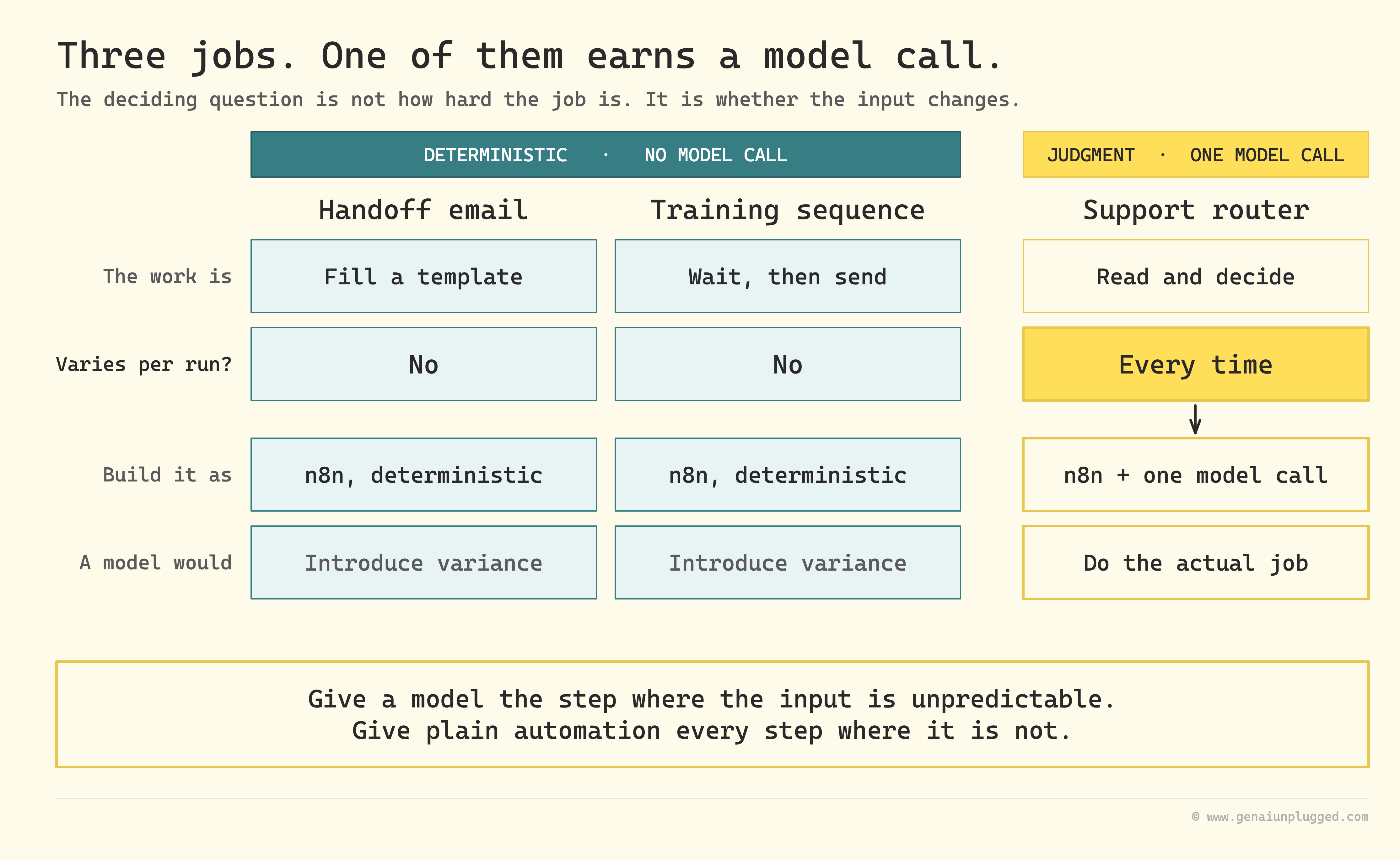
Here is the design decision that matters most in this build, and the reason this article is not simply "point an AI agent at your inbox". Two of these three workflows should never be given to a model, and the third should. The split is not about capability.
An earlier version of this article argued that automation platforms win because an AI agent needs a human to run it.
That is no longer true and it is worth correcting.
Claude runs on a schedule now: Managed Agents support scheduled deployments that fire on a cron expression with no human in the loop. "It cannot run unattended" stopped being the differentiator.
The real differentiator is what each job actually needs.
Workflows 1 and 2 need determinism.
A day-8 training email must fire on day 8, with the same content, for every client, for the next two years. There is no judgment in it.
A model asked to do this will occasionally reword the subject line, occasionally decide day 8 is a strange time to send, and occasionally do something you cannot reproduce. Every one of those is a defect, and the variability that makes a model useful elsewhere is pure downside here.
Workflow 3 needs judgment.
"The thing you built stopped working this morning" and "how do I add a user" arrive in the same inbox and need completely different responses. Classifying them is exactly the work a keyword rule does badly and a model does well.
A rule that routes on the word "urgent" will miss the genuinely urgent message from a polite client and escalate the one from a client who types in capitals.
The rule generalizes past this article: give a model the step where the input is unpredictable, and give plain automation every step where it is not.
Most systems get this backwards, either automating nothing because the whole thing "needs intelligence" or routing everything through a model and paying for variance they did not want.
What This Looks Like Already Built
The rest is assembly: an idempotent delivery trigger, a sequence that keeps its state in the database instead of a suspended execution, a classifier with an enforced schema, and the routing floor that keeps an auto-reply away from an outage.
🎁 Paid subscribers get the working version:
all three importable workflows with the idempotency flags and the daily sweep already wired,
the classifier prompt with its output schema,
and the acceptance criteria template that feeds all three.

Workflow 1: Delivery Trigger and Handoff Email
This one watches your project database and sends the handoff the moment a status changes to delivered.
It is the simplest of the three and the easiest to get subtly wrong, because a polling trigger with no memory of what it already sent will happily send it again every fifteen minutes.