


Scope creep starts before you quote.
A client says they want "simple email automation." Six weeks later you're building a CRM integration nobody mentioned, they're asking why it's taking so long, and you're delivering three times the work for the original price.
The failure did not happen in week six. It happened in the twenty minutes before you sent the number.
How do I stop scope creep in automation projects?
Ask fifteen specific client discovery questions before quoting, in three fixed groups: business context, technical environment, and success criteria. Each group is a gate on the next one. If a client cannot answer the first five clearly, the later ten do not matter yet.
By the end of this article you'll have the fifteen questions, a scoring rubric that turns answers into a go or no-go, and a discovery system that runs them for you.
You'll build it in n8n, then build the same thing as a Claude Code agent, because a form and an agent fail at discovery in exactly opposite ways.
This is Part 8 of the "From Demo to Dependable" series: AI Production Field Notes.
👋 Julley, I'm Dheeraj, an AI systems builder.
I build production-grade AI systems at work by day and ship my own products by night, 12 and counting, including SubflowAI and the Content OS Agents Toolkit. This newsletter is the bridge between those two worlds. Every system, every build, documented step by step.
Join 3,000+ builders getting the exact AI setups, prompts, and workflows that actually work in your business.
What's inside
Why Discovery Calls Fail in AI Automation Projects
Most discovery starts with the wrong question, and the wrong question is "what do you want?" The client answers with a solution they already picked, you nod, and you quote against their guess instead of their problem.
Everything downstream inherits that error.
They answer with a solution, not a problem. "I want AI automation" tells you nothing you can scope. "We spend Monday mornings copying form entries into the CRM by hand" tells you almost everything.
Nobody asks about the technical environment. You quote for connecting two modern SaaS tools. Three weeks in you learn the system of record is a 2008 desktop app with no API, and now you're writing a scraper you never priced.
Nobody asks who owns access. The client says "sure, I can give you access." In week two you discover IT approves every integration and the queue is a fortnight long.
Nobody checks whether the client is ready. They want AI Agents and AI Automation but cannot describe their current process. Readiness is its own axis, separate from budget and enthusiasm, and a client who scores low on it turns you into their unpaid technical educator while a deadline runs.
Signs you're quoting blind: you haven't seen the current workflow written down, you don't know who controls access, you can't name who signs off on "done", you don't know what they tried before, and you haven't heard them describe the finished state in their own words.
Two or more of those and the number you're about to send is a guess.
Blueprint Check: Before building this system, map it in your Workflow Blueprint. Remember: No map, no build.
The 5-5-5 Method
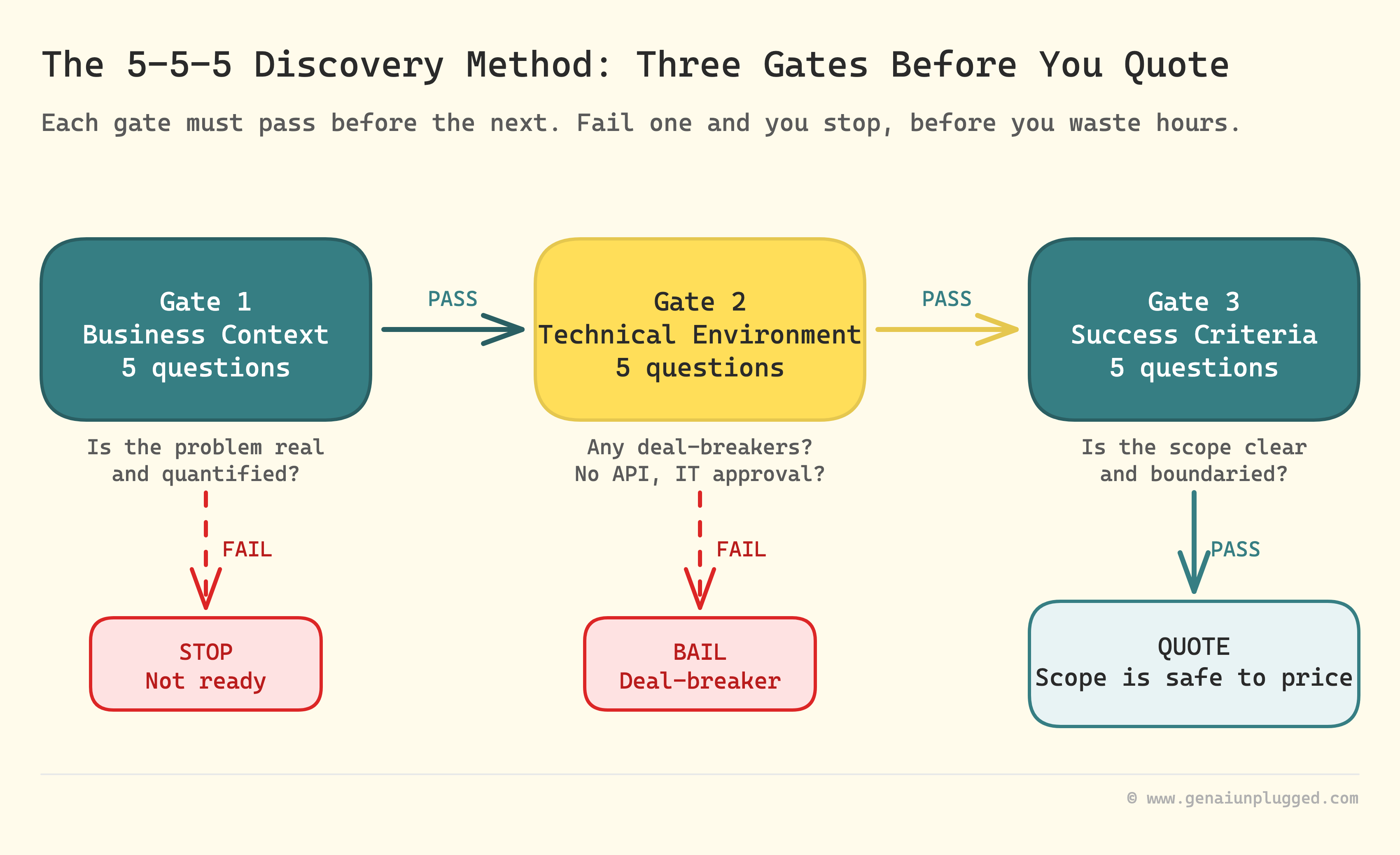
The fifteen client discovery questions run in three groups of five, and the order is the whole point. Each group is a gate rather than a section, so you only open the next one if the previous group cleared. Skipping ahead is how a quote becomes a guess.
Business context, questions 1 to 5.
What problem, what does it cost, who feels it, what have they tried. These separate a real project from a browsing exercise. If a client cannot answer these, stop.
Not "note the risk", stop. There is nothing to scope yet.
Technical environment, questions 6 to 10.
What tools, what access, where the data lives, what compliance applies. These surface the complexity you cannot see from the outside, and they are where quotes go wrong most often.
Success criteria, questions 11 to 15.
What done looks like, timeline, budget, who approves, what happens after launch. These draw the boundary that stops scope creep once you have started.
Fifteen is the number because it catches the failures above without turning discovery into an interrogation that gets ghosted.
Business Context: Questions 1 to 5
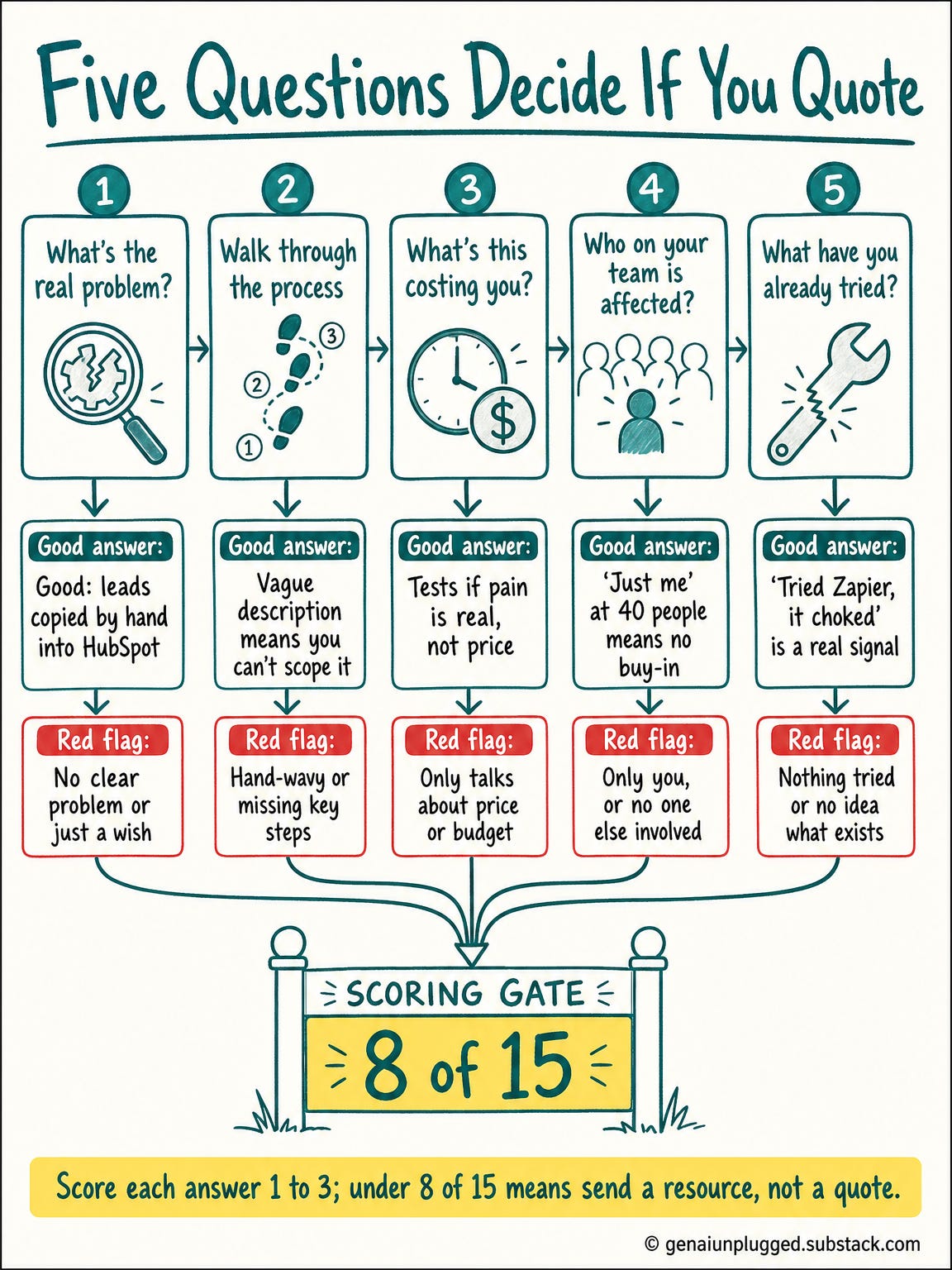
These five decide whether there is a project at all. You are listening for a problem the client can describe concretely and has already tried to solve, because a problem nobody has tried to fix is usually a problem nobody is funding.
1. What specific problem are you trying to solve?
Not what they want. What hurts.
Good: "Sales copies lead data from our website form into HubSpot by hand, so follow-up is slow and we lose deals that went cold." Red flag: "We just want to automate some stuff."
2. Walk me through the current process, step by step.
Make them describe every click.
Good: "Every morning I export the CSV, open it in Excel, copy the email column into Gmail, then paste name and company into the CRM." Red flag: "It's complicated" with no detail, or "I'm not sure exactly how it works."
If they cannot describe it, you cannot automate it. A detailed description becomes your scope. A vague one becomes scope creep.
3. What is this costing you?
Time, money, or missed opportunities. You are not fishing for a number to anchor your price.
You are testing whether the pain is real enough to fund a fix.
Red flag: "I'm not sure" or "it's just annoying."
4. Who on your team is affected?
This reveals stakeholders and blockers. "Everyone, kind of" is not an answer.
"Just me" at a company of forty usually means one person is championing something their team has not agreed to.
5. What have you already tried?
Past attempts tell you what they expect and where it broke.
Good: "We tried Zapier but it choked on our custom fields." Red flag: "Nothing yet, we just thought of this."
Scoring group one. Rate each answer 1 to 3: 1 for vague, 2 for clear but unquantified, 3 for specific with evidence. Under 8 out of 15 and the honest move is to send them a resource and revisit in a quarter, not to quote.
Learn with me: Claude Code Builder cohort
I run the Claude Code Builder cohort on Maven: four weeks, six live sessions, building a real AI system with me. If you would rather build it alongside me than read about it, this is the room.
Learn with me: the Claude Code cohort
I run the Claude Code cohort on Maven for founders, creators and tech teams: six live sessions across six weeks, building a real AI system with me. If you would rather build it alongside me than read about it, this is the room.
Each cohort is a small, hands-on group, and a new one starts every month.

Use code GENAI20 for 20% off. Check the Syllabus →
Build it with me, live. See the syllabus →
Technical Environment: Questions 6 to 10
This is the group that saves quotes, and the one most people skip because it feels technical for a sales conversation. Everything in it is invisible from the outside and expensive to discover afterwards. Ask all five before you put a number on anything.
6. What tools and platforms are involved?
Every one, not the two they thought of. Modern SaaS is straightforward.
"We built it ourselves" is a different project.
7. Do you have API access?
Most clients do not know what you are asking.
Explain it plainly: "API access means these tools can talk to each other directly. Without it we work through exports and email, which limits what we can automate."
Then ask what plan tier they are on, because that is the answer that actually determines it.
8. Who controls access to these systems?
"I'm the admin" and "IT approves everything" are different projects with different timelines. Ask before you promise a date.
9. Where does the data live?
Consolidated and exportable is a smooth setup. "Everywhere, some of it on paper" is a data archaeology project that belongs in a separate line item.
10. Any security, compliance, or legal requirements?
HIPAA, GDPR, SOC 2. "I think so but I'm not sure" is the worst answer, because it means nobody has checked and you will be the one who finds out.
Capture it in a fixed shape so two projects can be compared:
Tool:                  [name]
Plan level:            [free / paid / enterprise]
API access:            [yes / no / unknown]
Who controls it:       [name and role]
Approximate data size: [records]
Compliance:            [none / HIPAA / GDPR / other]
Anything marked unknown is not a detail to chase later. It is an open question that has to close before the quote does.
Success Criteria: Questions 11 to 15
These five prevent scope creep after you have started, because they turn "done" from an opinion into a written line both sides agreed to. Without them every later request sounds reasonable in isolation. With them you have something specific to point at.
11. What does done look like?
Make them describe the finished state as a specific sequence.
Good: "A lead fills in the form, they land in HubSpot with the right tags, and sales gets a Slack ping within two minutes." Red flag: "When everything's automated", or a list that keeps growing while they talk.
12. What's your timeline, and what's driving it?
The second half matters more. A date tied to a trade show is real.
"As soon as possible" usually means nobody has planned anything.
13. What range have you budgeted?
Not to anchor. To find out whether you are having the same conversation.
"Just send me a quote" often means they are collecting numbers to build it themselves.
14. Who signs off on the final deliverable?
The person on the call is not always the decision maker. A clear approver means a clear end.
A committee means revisions with no natural stop.
15. What happens after launch?
Set this before you start, not when the first "quick question" arrives six weeks in.
Part 6 of this series put a number on why: maintenance is where the real cost lives, and unscoped support is the most expensive thing you can agree to by accident.
Scoring group three. Rate each 1 to 3 again. A high score here is what lets you write a scope with edges. A low score means you write the scope narrower and say so out loud.
A Form Cannot Follow Up. An AI Agent Cannot Guarantee Coverage.
Here is the trade at the centre of automating any of this, and it is the same one Part 3's workflow contracts run into wearing different clothes. Deciding it is what picks your build. Getting it wrong produces a system that looks thorough and is not.
A form asks the fifteen questions and cannot ask a sixteenth. When a client answers question 2 with "it's complicated", the form accepts it and moves on. You get a complete response with a hole in the middle of it.
An AI agent reads "it's complicated" and asks the obvious follow-up: "walk me through what you did yesterday morning." That is the whole job of discovery, and a form structurally cannot do it.
But the agent has the opposite failure. Nothing guarantees it asked all fifteen. It follows an interesting thread about their CRM and never gets to compliance, and you do not notice until the quote is already out.
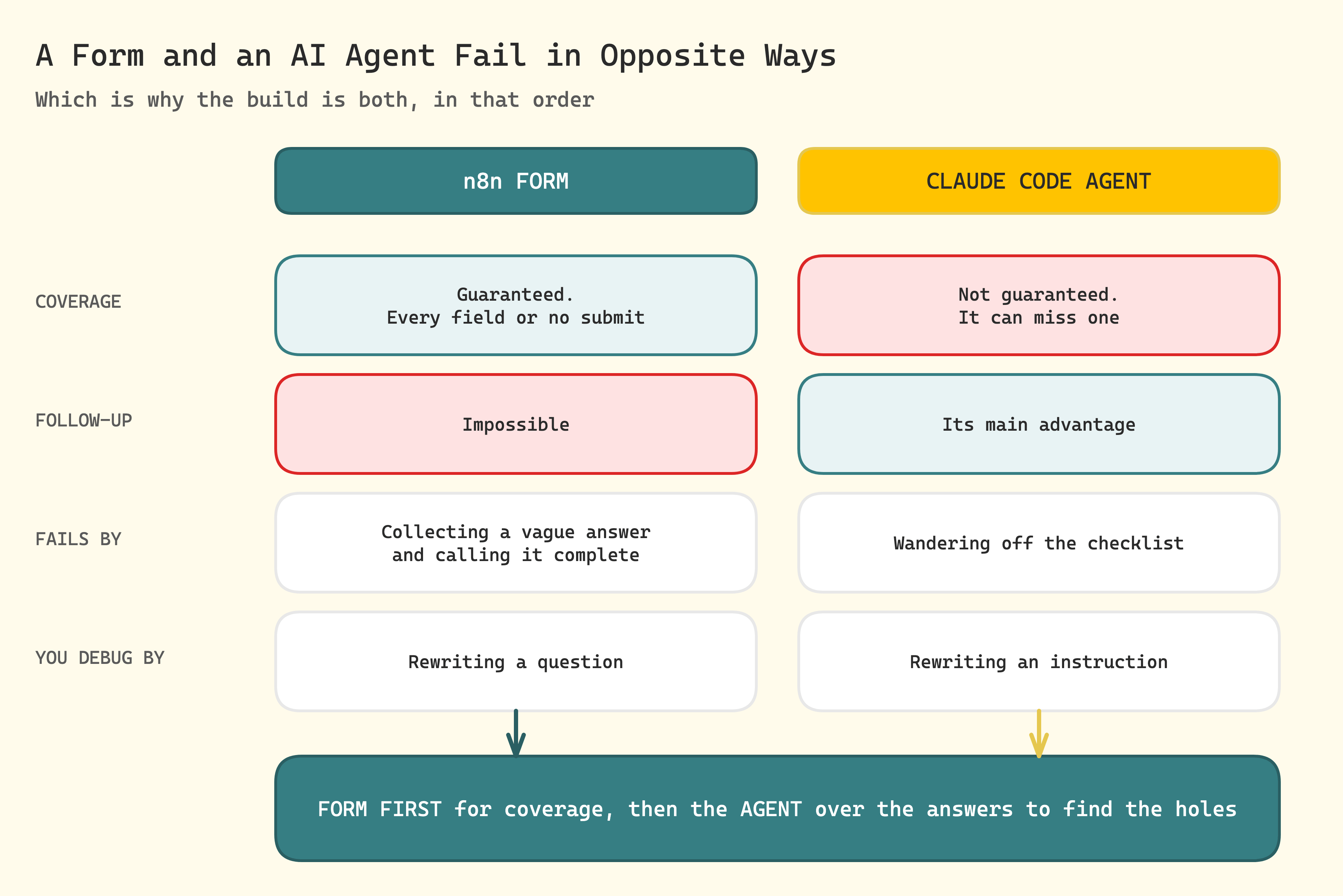
Neither is better. The form guarantees coverage and cannot probe. The agent probes and cannot guarantee coverage.
So the useful build is not one or the other. It is a form for coverage, then an agent over the answers to find the holes and go back for them.
Most people who read a piece like this ask better questions on their next call and stop there.
The gap is not knowing the questions. It is having something that asks them the same way every time, scores what comes back, and tells you which answers are too thin to quote against.
In my PluggedIn tier, I package the discovery workflow and the agent I actually run, so you start from something that executes instead of a blank form builder.
Frequently Asked Questions
How many discovery questions should I ask before quoting?
Fifteen, in three groups of five: business context, technical environment, success criteria. Fewer misses the complexity that breaks quotes. Many more gets abandoned halfway.
The grouping matters as much as the count, because each group gates the next.
What does it cost to automate client discovery?
n8n self-hosted is free, and the model call is the only per-lead cost. One analysis is a few thousand tokens in and under a thousand out, so at current Claude pricing it lands in cents rather than dollars. Check the live rate rather than trusting a figure in any article.
Should I use a form or an AI agent for discovery?
Use both, in that order. A form guarantees coverage because required fields cannot be skipped, but it cannot follow up on a vague answer. An agent follows up well but can wander off the checklist.
Form for coverage, agent over the answers to find the thin ones.
Why does my automated discovery still miss technical requirements?
The questions are too easy to answer vaguely. "What tools do you use" gets a shrug. "List every tool involved in this workflow and name who administers each" gets an inventory.
Specific questions get specific answers, and the fix is almost always in the question rather than the model.
How do I know if a client is not ready rather than just difficult?
Score the first five answers. A client who cannot describe the problem, the current process, or what it costs is not ready to buy, however keen they sound. Send a useful resource and revisit in a quarter.
That is a better outcome than a project that dies in implementation.
Can I run these fifteen questions on a live call instead?
Yes, and the framework is the same. The form version exists because calendars do not scale and memory is unreliable about which questions got thin answers. Run them live if you prefer; use the scoring rubric either way.
What the Output Looks Like
This is what the automated discovery process sends, before we build it. The analysis step returns two things that matter: a complexity score, and a list of the fifteen questions answered too vaguely to scope against. That second list is the point.
A complete response produces a scoping document and an email within a few minutes of submission. That is the easy case, and it is not the one worth building for. The interesting output is what happens when the answers are good but incomplete.
The case worth building for is qualified but incomplete: the complexity score clears your bar, but two questions came back too thin to quote against. The client gets a short reply naming exactly those two, rather than a scoping document built on a guess:
Thanks for the detail on the lead handoff, that was clear enough to scope.

Two things I still need before I can put a number on it:

1. Which plan tier are you on for HubSpot? That decides whether we can
   use the API or have to work through exports.
2. Who approves the final deliverable? You, or does it go wider?

Reply to these and I'll have a scoping document over the same day.
That email is the output of the pipeline that manual discovery loses, because a human running discovery from memory does not notice which of fifteen questions got a thin answer. A system that counts does.
What This Looks Like Already Built
The rest of this is assembly: the fifteen fields wired into a multi-step form, the scoring gate between pages, an analysis step that returns a schema rather than prose, and the three-way routing that treats incomplete-but-qualified as its own path.
🎁 Paid subscribers get it built: the workflow you import and run today, the agent that reads the answers back and names what a client left too vague, and a printable worksheet for the calls where there is no time for a form.

Let's build it.
Build an Automated Discovery System in n8n
n8n has a native multi-step form, so the whole n8n form workflow needs one tool rather than two. The n8n Form Trigger starts the workflow and the n8n Form node adds each later page. Your own nodes run in between, which is what makes the gate possible.